
Introduction
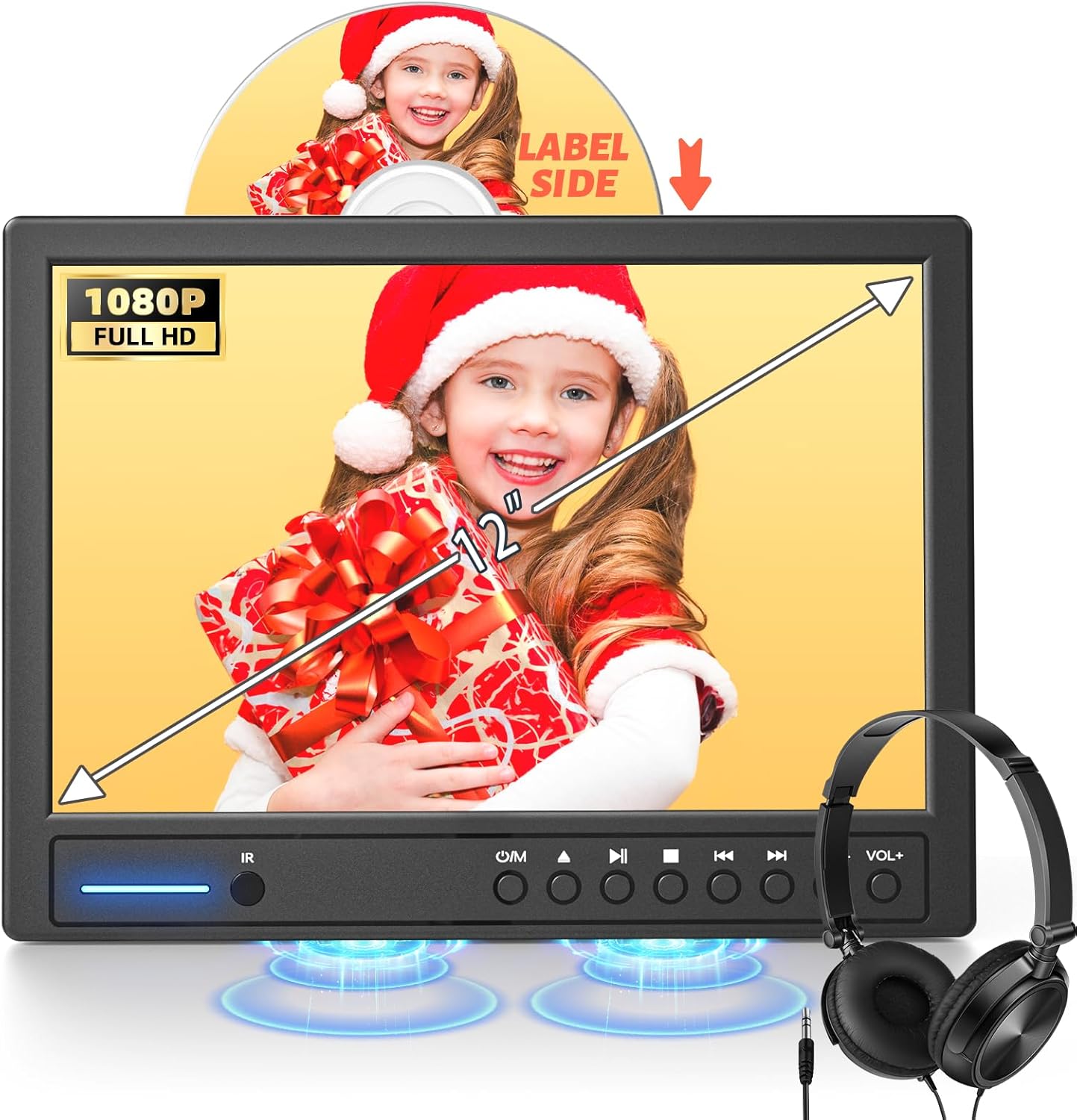
This manual provides detailed instructions for the operation and maintenance of your Arafuna 12" Portable DVD Player. Please read this manual thoroughly before using the product to ensure proper functionality and to extend the lifespan of your device. This portable DVD player is designed for in-car entertainment, featuring a suction-type disc loading mechanism, HDMI input, and support for various media formats.
Package Contents
Upon unpacking, please verify that all the following items are included in your package:
- 1 x Arafuna 12" Portable DVD Player
- 1 x Car Charger
- 1 x Remote Control
- 1 x Earphone
- 1 x AV Cable
- 1 x Mounting Bracket
- 1 x RCA Cable
- 1 x User Manual

Product Overview
Key Features
- 12.5" Full HD Display: 1920*1080p resolution for clear visuals.
- Suction-Type Disc Loading: Automatic disc insertion for ease of use.
- Last Memory Function: Resumes playback from where it was last stopped.
- HDMI Input: Connect external devices like phones, computers, game consoles (supports 1080P video).
- AV In/Out & RCA Sync: Connect to another portable DVD player or a TV for synchronized viewing.
- Region Free & Multi-format Support: Compatible with various DVD regions and media formats.
- Adjustable Viewing Angle: Mounting bracket allows for flexible screen positioning.
- Built-in Dual Speakers: Provides integrated audio output for an enhanced experience.
- USB/SD Card Reader: Supports media playback from USB drives and SD cards (up to 128GB FAT32, 1920*1080 pixel video).


Setup
Mounting in a Vehicle
- Install the Base: Attach the mounting bracket base to the headrest posts of your car seat. Ensure it is securely fastened.
- Press and Push Up: Align the DVD player with the bracket and press the release button, then push the player upwards to slide it into the bracket's slot.
- Insert: Ensure the player is fully inserted and locked into place.
- Adjust Angle: Press the button on the side of the bracket to adjust the viewing angle of the screen. The player supports up to 135 degrees of adjustment.


Powering On
Connect the provided car charger to the player's power input and to your vehicle's 12V power outlet. The player will automatically power on or can be turned on using the power button on the device or remote control.
Operating Instructions
Disc Playback
The Arafuna DVD player features a suction-type disc loading mechanism. Gently insert a standard 12 CM diameter disc into the disc slot with the label side facing up. The player will automatically draw the disc in and begin playback. This player is compatible with DVD, SVCD, VCD, CD, CD±R, DVD±R, and DVD±RW formats.

USB/SD Card Playback
Insert a USB flash drive or an SD card (up to 128GB, FAT32 format) into the respective port. The player supports various video, audio, and image formats. Navigate through the media files using the remote control or on-device buttons.
Supported Media Formats
This player is region-free and supports a wide range of media formats:
- Video formats: MPEG, MPG, TRP, VOB, FLV, MP4, RMVB, AVI, MOV, MKV, ASF, WM
- DVD formats: DVD, SVCD, VCD, CD, CD±R, DVD±R, DVD±RW
- Image formats: JPG, JPEG
- Audio formats: MP3, WMA

HDMI Input (Screen Mirroring)
The player includes an HDMI input port. Use an HDMI cable (not included) to connect external devices such as mobile phones, computers, Raspberry Pi, Xbox, or Kindle Fire to mirror their screen content. Ensure your connected device supports HDMI output functionality. The HDMI input supports up to 1080P video.

AV In/Out and RCA Sync Function
Utilize the AV cable to connect two Arafuna portable DVD players for synchronized playback, allowing both screens to display the same movie. Alternatively, use the included RCA cable to connect the player to a television for a larger viewing experience with lossless image transfer.

Last Memory Function
The player is equipped with a last memory function. If the device is powered off during playback, it will automatically resume from the exact point where it was stopped when powered on again.

Maintenance
- Cleaning: Use a soft, dry cloth to clean the screen and exterior of the player. Do not use liquid cleaners or abrasive materials.
- Disc Handling: Always handle discs by their edges. Keep discs clean and free from scratches to ensure optimal playback.
- Storage: When not in use, store the DVD player in a cool, dry place away from direct sunlight and extreme temperatures.
- Battery Care: The device contains a Lithium Polymer battery. Avoid exposing it to high temperatures or physical damage.
Troubleshooting
| Problem | Possible Cause | Solution |
|---|---|---|
| No power | Car charger not connected or faulty. | Ensure the car charger is securely connected to both the player and the car's power outlet. Check the car's power outlet for functionality. |
| Disc not playing | Disc is dirty, scratched, or incompatible format. | Clean the disc with a soft cloth. Try a different disc. Ensure the disc is a standard 12 CM diameter and a supported format (DVD, CD, etc.). |
| No sound | Volume too low, headphones not connected properly, or audio settings. | Increase the volume. Ensure headphones are fully plugged in. Check audio settings in the player's menu. |
| HDMI input not working | HDMI cable faulty, or connected device does not support HDMI output. | Try a different HDMI cable. Verify that your external device has HDMI output functionality. |
| Remote control not responding | Batteries are dead or remote is not aimed correctly. | Replace the remote control batteries. Ensure there is a clear line of sight between the remote and the player's IR receiver. |
Specifications
- Brand: Arafuna
- Model Number: 12" -Un Seul écran avec HDMI
- Screen Size: 12.5 inches (Visible screen diagonal: 12" / 31 cm)
- Display Type: LCD
- Resolution: 1920*1080p
- Item Weight: 3.3 pounds
- Product Dimensions: 12.5 x 12.5 x 12.5 inches
- Color: Black
- Media Type: DVD
- Supported DVD Formats: DVD, SVCD, VCD, CD, CD±R, DVD±R, DVD±RW
- Supported Video Formats: MPEG, MPG, TRP, VOB, FLV, MP4, RMVB, AVI, MOV, MKV, ASF, WM
- Supported Audio Formats: MP3, WMA
- Supported Image Formats: JPG, JPEG
- USB/SD Card Support: Max 128GB (FAT32), 1920*1080 pixel video
- Battery: 1 Lithium Polymer battery (included)
- Connectivity: HDMI Input, AV In/Out, RCA Output, USB, SD Card Slot, Headphone Jack
Warranty and Support
Arafuna offers a 12-month product warranty from the date of purchase. Additionally, an unconditional money-back guarantee is provided within 30 days of purchase. For any questions, technical assistance, or warranty claims, please contact Arafuna customer service. Our team aims to provide a solution within 24 hours.
For further assistance, please refer to the contact information provided on the official Arafuna website or your purchase documentation.
