
1. Product Overview
The ELIKIDSTO Y20 is a motorcycle helmet headset designed to provide audio communication and entertainment while riding. It features HiFi stereo sound, noise reduction technology, RGB lighting, and IPX6 waterproofing.

Image: The ELIKIDSTO Y20 Motorcycle Helmet Headset, showcasing its main unit with RGB lights.
Package Contents:
- Y20 Host Unit
- Speaker Microphone
- Clip-on Base
- Velcro Installation Package
- Type-C Charging Cable
- User Manual

Image: Diagram illustrating the components included in the package and basic installation steps.
2. Setup and Installation
2.1 Helmet Compatibility
The Y20 headset is designed for various helmet types, including full-face, off-road, half, unmask, and retro helmets. Before purchasing, verify if your helmet has reserved space for speakers. If not, minor modifications to the helmet lining may be required for optimal speaker placement.

Image: Visual guide showing the Y20 headset compatible with various helmet styles.
2.2 Installation Steps
- Attach the Main Unit: Secure the Y20 host unit to the side of your helmet using the provided clip-on base. Ensure it is firmly attached.
- Position Speakers: If your helmet has reserved speaker space, attach the helmet speakers using the Velcro. Run the speaker wires behind the helmet padding for a neat installation.
- Connect Microphone: Choose between the boom microphone or wired microphone based on your helmet style and preference. Connect it to the main unit.
- Connect Headphone Port: Press the Type-C headphone port firmly into the host unit until you hear a 'PA' sound, indicating a secure connection. An incomplete connection may result in no sound or low volume.

Image: Illustration demonstrating the correct and incorrect way to plug in the Type-C headphone port.
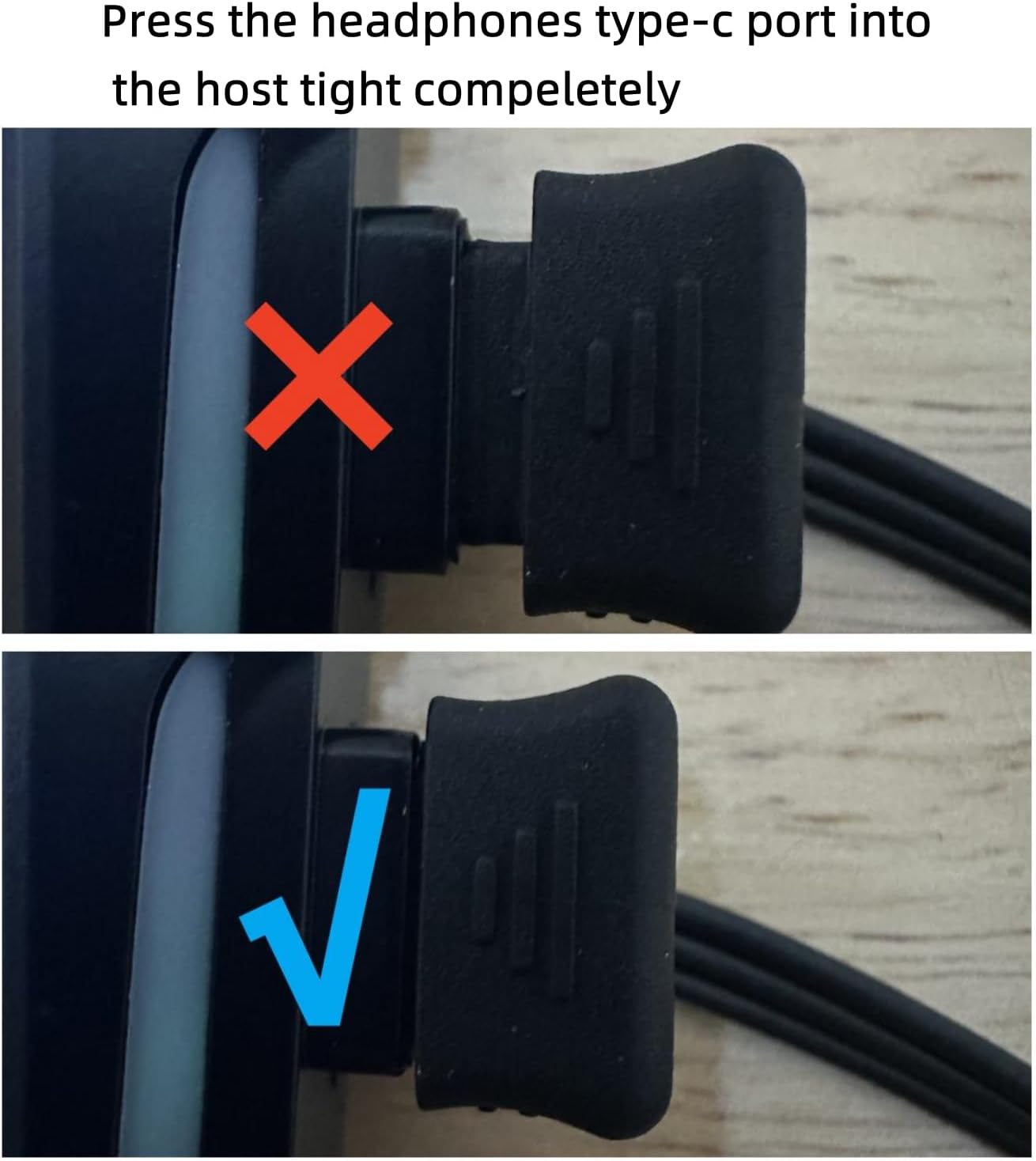
Image: The Y20 headset main unit detached from its mounting clip, illustrating its split installation design.
3. Operating Instructions
3.1 Power On/Off and Pairing
- Power On: Press and hold the power button until the indicator lights activate.
- Pairing Mode: Long press the function key to enter pairing mode. The red and blue lights on the unit will flash alternately.
- Connect to Device: On your mobile phone or Bluetooth-enabled device, search for and select the 'Y20' headset model to establish a connection. The headset can connect to two phones simultaneously.
3.2 Audio and Calls
- HiFi Stereo Sound: The headset features a professional sound decoding chip and 40mm diameter, 0.3-watt speakers for high-quality audio.
- Noise Reduction: CVC and DSP noise reduction technologies, along with the microphone, work to minimize surrounding noise for clearer calls.
- Automatic Call Answering: Incoming calls will automatically broadcast the number and be answered, enhancing safety by eliminating manual phone interaction while riding.

Image: A rider wearing a helmet with the Y20 headset, illustrating the automatic call answering function.
3.3 Voice Assistant
Press the designated button on the headset to activate your smartphone's voice assistant (e.g., Siri, Google Assistant). This allows for hands-free control and safer riding.

Image: A helmet with the Y20 headset, showing the button to activate voice assistants like Siri and Xiaoai.
3.4 Volume Adjustment
- Press and hold the volume '+' button on the headset to increase the volume.
- Adjust the volume directly from your mobile phone before or during your ride.
- Ensure speakers are positioned close to your ears within the helmet and not obstructed by the helmet lining for optimal sound.
3.5 RGB Lighting
The Y20 headset features cool and colorful RGB lights. You can switch between 16 different light effect modes by pressing the designated button.

Image: The Y20 headset displaying its RGB lighting and highlighting its 1000mAh battery capacity.
4. Maintenance
The ELIKIDSTO Y20 headset is IPX6 waterproof, meaning it is protected against high-pressure water jets from any direction. This allows for use in various weather conditions without fear of rain or splashes.

Image: The Y20 headset being splashed with water, demonstrating its IPX6 waterproof rating.
To maintain optimal performance and longevity:
- Wipe the unit with a soft, damp cloth to clean. Avoid harsh chemicals.
- Ensure the Type-C port cover is securely closed when not charging to maintain water resistance.
- Store the headset in a dry place when not in use.
5. Troubleshooting
- No Sound or Low Volume:
- Ensure the Type-C headphone port is fully and securely plugged into the host unit. A loose connection can cause audio issues.
- Check the volume levels on both the headset and your connected mobile device.
- Verify that the speakers are correctly positioned close to your ears and are not obstructed by helmet padding.
- Cannot Pair with Device:
- Ensure the headset is in pairing mode (red and blue lights flashing).
- Turn off and restart both the headset and your mobile device.
- Clear previous Bluetooth connections on your device and try pairing again.
- Poor Call Quality:
- Ensure the microphone is positioned correctly near your mouth.
- Check for excessive wind noise; while the headset has noise reduction, extreme conditions can affect clarity.
6. Specifications
| Feature | Detail |
|---|---|
| Model Name | Y20 |
| Brand | ELIKIDSTO |
| Connectivity Technology | Wireless |
| Noise Control | Active Noise Cancellation (CVC, DSP) |
| Audio Driver Size | 40 Millimeters |
| Battery Life | Up to 25 Hours |
| Charging Time | 1 Hour |
| Water Resistance Level | IPX6 (Water Resistant) |
| Control Type | Button, Voice Assistant (Google Assistant, Siri) |
| Frequency Range | 20 Hz - 20,000 Hz |
| Product Dimensions | 3.43 x 0.91 x 1.65 inches |
| Item Weight | 5.3 ounces |
| UPC | 768571079862 |
7. Warranty and Support
For warranty information or technical support, please contact ELIKIDSTO directly through their official channels or the retailer from whom the product was purchased. Please refer to your purchase documentation for specific warranty terms and conditions.