
1. Introduction
Thank you for choosing the ELIKIDSTO Motorcycle Helmet Headset, Model Y10. This headset is designed to enhance your riding experience by providing high-fidelity audio, clear communication, and convenient features while on the road. Please read this manual thoroughly before use to ensure proper installation, operation, and maintenance.
2. Product Overview
The ELIKIDSTO Y10 Helmet Headset features advanced audio technology and user-friendly controls, making it an ideal companion for motorcycle enthusiasts. It includes a main unit, speakers, and microphones designed for various helmet types.
2.1. What's in the Box

The package includes:
- Y10 Host (Main Unit)
- Speaker Microphone (with integrated speakers)
- Clip-on Base
- Velcro Installation Package (adhesive pads)
- Type-C Charging Cable
- User Manual (this document)
2.2. Key Features
- Excellent HiFi Sound Quality: Equipped with a professional sound decoding chip and 40MM diameter, 0.3-watt speaker units for loud and clear audio.
- Advanced Noise Cancellation: Features dual CVC and DSP noise cancellation technology for clearer calls.
- Long-Lasting Battery: Professional 1000mAh battery provides over 25 hours of music/talk time with a 1-hour quick charge.
- Automatic Call Answering: Automatically answers incoming calls in 10 seconds for safer riding.
- Voice Assistant Support: Easily activate voice assistants like Siri or Google Assistant with a dedicated button.
- Dual Device Connection: Connects to two mobile phones simultaneously, allowing seamless switching between music, navigation, and calls.
- IPX6 Waterproof: Designed to withstand all weather conditions, including wind and rain.
- Glove-Friendly Buttons: Large, clear buttons for easy operation even with riding gloves.
- RGB Light: Customizable lighting to personalize your helmet style.
3. Setup & Installation
Proper installation is crucial for optimal performance and sound quality. The headset is designed for easy installation across various helmet types.
3.1. Choosing Your Microphone
The headset comes with a speaker microphone unit suitable for different helmet designs:
- Boom Microphone: Ideal for open-face or flip-face (convertible) helmets.
- Button Microphone: Specifically designed for full-face helmets.
3.2. Installation Steps
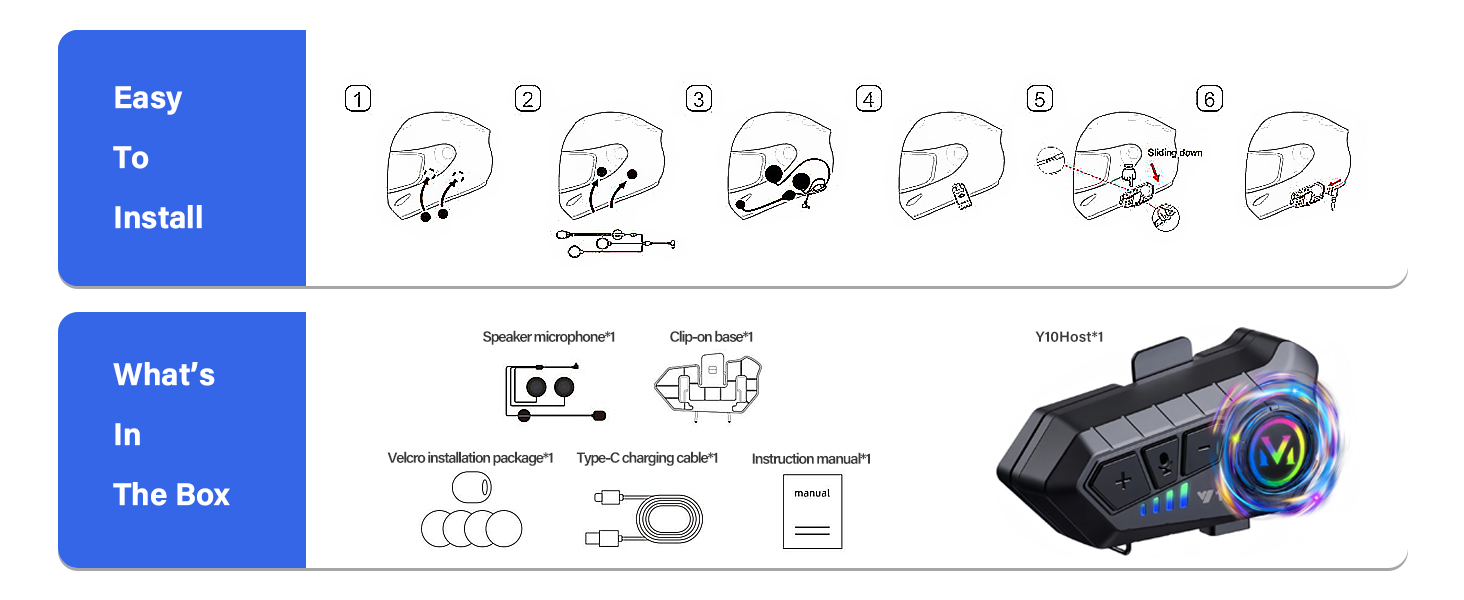
Follow these steps for installation:
- Attach the Main Unit: Use the clip-on base or adhesive stickers to securely attach the main headset unit to the side of your helmet. Ensure it's in a position that allows easy access to buttons.
- Route Speaker Wires: Carefully route the speaker wires inside the helmet lining to the ear pockets.
- Position Speakers: Place the speakers directly over your ears within the helmet's ear pockets. Ensure they are close to your ears and not obstructed by the helmet lining for optimal sound.
- Secure Microphone: Position the microphone close to your mouth. For boom microphones, ensure it's adjustable. For button microphones, secure it discreetly within the helmet's chin bar area.
- Connect Speaker/Mic Unit: Press the Type-C port of the speaker/microphone unit firmly into the host unit until you hear a "PA" sound, indicating a complete and secure connection. Important: If the Type-C headphone port is not fully plugged into the host port, there may be no sound or low volume.
- Final Adjustments: Adjust the position of the main unit, speakers, and microphone for comfort and clear audio.

This image illustrates the correct way to plug in the Type-C connector for the speaker/microphone unit. Ensure it is fully inserted to avoid sound issues.
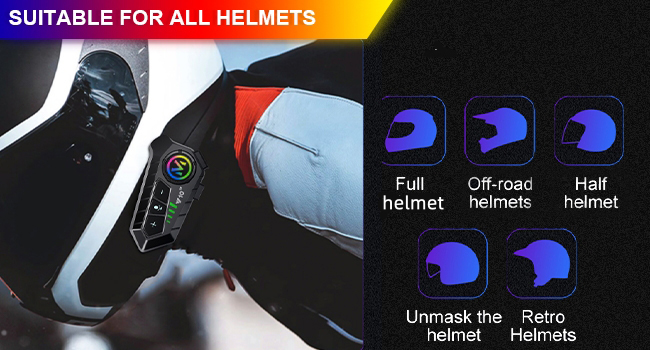
The ELIKIDSTO Y10 headset is designed to be compatible with a wide range of helmet types, including full-face, off-road, half-helmets, unmask helmets, and retro helmets.
4. Operation
The Y10 headset features intuitive controls designed for ease of use, even with gloves on.
4.1. Power On/Off & Pairing
- Power On: Press and hold the main function button until the indicator light turns on.
- Pairing Mode: To enter pairing mode, long press the main function key until the red and blue lights flash alternately.
- Connect to Device: On your mobile phone or other Bluetooth device, search for "Y10" in the Bluetooth settings and select it to pair. The headset will automatically reconnect to previously paired devices.
- Power Off: Press and hold the main function button until the indicator light turns off.
4.2. Music Playback

The Y10 headset delivers excellent HiFi stereo music thanks to its professional sound decoding chip and 40MM diameter, 0.3-watt speaker units.
- Play/Pause: Short press the main function button.
- Next Track: Short press the "+" button.
- Previous Track: Short press the "-" button.
- Volume Up: Press and hold the "+" button.
- Volume Down: Press and hold the "-" button.
Note on Volume: For optimal listening, ensure the speakers are positioned close to your ears within the helmet and adjust the volume using both the headset controls and your mobile phone's volume settings prior to riding.
4.3. Phone Calls

The headset supports automatic call answering and clear communication with noise cancellation.
- Answer Call: The headset will automatically answer incoming calls after 10 seconds.
- End Call: Short press the main function button.
- Reject Call: Long press the main function button.
- Redial Last Number: Double-press the main function button.
4.4. Voice Assistant

Activate your smartphone's voice assistant (Siri, Google Assistant) with a single press.
- Activate Voice Assistant: Short press the microphone button.
4.5. Dual Device Connection

The Y10 can connect to two mobile phones simultaneously, allowing you to manage calls and media from both devices.
Pair both devices as described in section 4.1. The headset will intelligently manage connections for calls and audio playback.
5. Maintenance
To ensure the longevity and optimal performance of your ELIKIDSTO Y10 headset, follow these maintenance guidelines:

The headset is IPX6 waterproof, meaning it can handle splashes and rain, but should not be submerged.
- Cleaning: Wipe the main unit and speakers with a soft, damp cloth. Do not use harsh chemicals or abrasive cleaners.
- Charging: Charge the headset fully before first use and regularly to maintain battery health. Use the provided Type-C charging cable.
- Storage: When not in use for extended periods, store the headset in a cool, dry place away from direct sunlight and extreme temperatures.
- Water Exposure: While IPX6 waterproof, avoid prolonged exposure to heavy rain or submersion. Ensure the charging port cover is securely closed when not charging.
6. Troubleshooting
If you encounter issues with your ELIKIDSTO Y10 headset, please refer to the following common solutions:
| Problem | Possible Cause | Solution |
|---|---|---|
| No sound or low volume from speakers. |
|
|
| Cannot pair with device. |
|
|
| Poor call quality / Noise during calls. |
|
|
| Headset not turning on. |
|
|
7. Specifications
| Feature | Detail |
|---|---|
| Model Name | Y10 |
| Brand | ELIKIDSTO |
| Connectivity Technology | Wireless (Bluetooth 5.2) |
| Bluetooth Range | 30 Meters |
| Noise Control | Active Noise Cancellation |
| Battery Life | 25 Hours (Music/Talk Time) |
| Charging Time | 1 Hour |
| Water Resistance Level | IPX6 Waterproof |
| Audio Driver Size | 40 Millimeters |
| Frequency Range | 20 Hz - 20,000 Hz |
| Impedance | 32 Ohm |
| Control Type | Push Button (Google Assistant, Siri) |
| Product Dimensions | 3.43 x 0.91 x 1.65 inches |
| Item Weight | 4.2 ounces |
| Included Components | User Manual, Charging cable, Boom microphones, motorcycle helmet headset, Base and mounting stickers |
8. Warranty & Support
For warranty information, technical support, or any questions regarding your ELIKIDSTO Y10 Motorcycle Helmet Headset, please contact the manufacturer or seller directly through your purchase platform. Please retain your proof of purchase for warranty claims.
Manufacturer: ELIKIDSTO
For further assistance, you may visit the ELIKIDSTO Store on Amazon.