
HILEO hi77
HILEO Hi77 Open Ear Headphones User Manual
Model: Hi77 | Brand: HILEO
1. Introduction
Thank you for choosing the HILEO Hi77 Open Ear Headphones. These true air conduction wireless Bluetooth earbuds are designed for secured, long-wearing comfort, making them ideal for sports and daily use. Featuring dual microphones for clear calls and IPX5 water resistance, the Hi77 provides an immersive sound experience while keeping you aware of your surroundings.
2. Product Overview
The HILEO Hi77 headphones feature an innovative open-ear design that rests comfortably on your ear, allowing you to enjoy audio while maintaining awareness of your environment. They are equipped with advanced technology for superior sound and call quality.

Figure 2.1: HILEO Hi77 Open Ear Headphones (Ink Rock Black).
Key Features:
- Open Ear Design: Ensures comfort and situational awareness, ideal for outdoor activities.
- True Air Conduction: Delivers sound without blocking the ear canal.
- Bluetooth 5.4: Provides stable and efficient wireless connectivity.
- Dual Microphones with ENC: Enhances call clarity by reducing background noise.
- IPX5 Water Resistance: Protects against sweat and light rain, suitable for workouts.
- Dynamic Drivers: 15mm drivers for powerful bass and clear audio.
- Long Battery Life: Up to 6.5 hours of music time.
- Smart Touch Control: Intuitive controls for music playback and calls.

Figure 2.2: The open-ear design of the Hi77 headphones, emphasizing comfort and awareness.
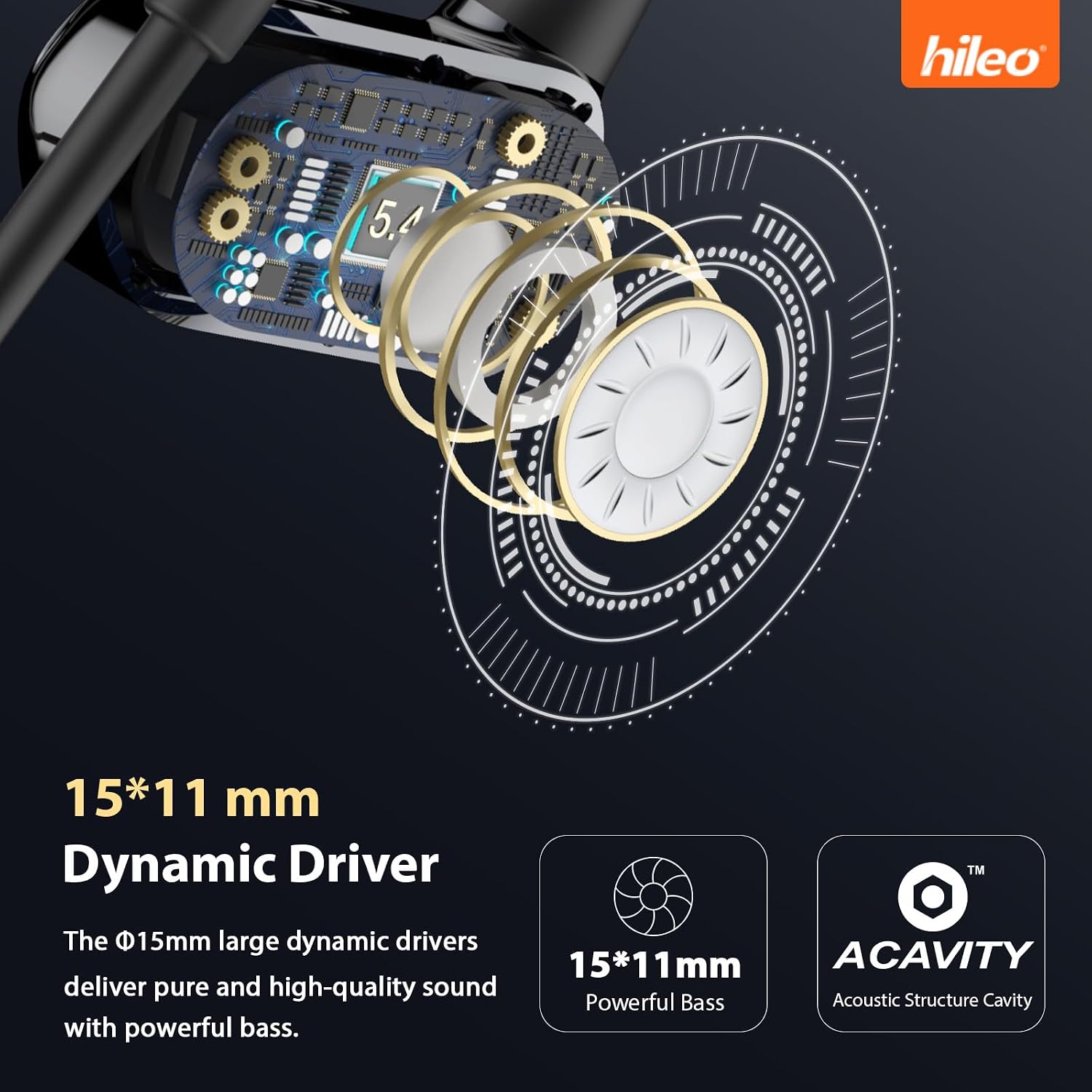
Figure 2.3: Illustration of the 15mm dynamic drivers for enhanced sound quality.

Figure 2.4: Explanation of ENC noise cancellation for clear HD calling.
3. What's in the Box
Verify that all items are present in your package:
- HILEO Hi77 Open Ear Headphones x 1
- Charging Cable x 1
- User Manual x 1
4. Setup
4.1 Charging the Headphones
Before first use, fully charge your HILEO Hi77 headphones. Connect the provided charging cable to the charging port on the headphones and a USB power source. The indicator light will show charging status and turn off when fully charged.
- Charging Time: Approximately 1.5 hours.
4.2 Powering On/Off
- Power On: Touch and hold the touch control area on either earbud for 2 seconds until you hear a power-on prompt.
- Power Off: Touch and hold the touch control area on either earbud for 5 seconds until you hear a power-off prompt.
4.3 Bluetooth Pairing
To pair your HILEO Hi77 headphones with your device:
- Ensure the headphones are powered off.
- Press and hold the touch control area for approximately 5 seconds until the indicator light flashes blue and red, indicating pairing mode.
- On your device (smartphone, tablet, computer), enable Bluetooth and search for "HILEO Hi77" in the list of available devices.
- Select "HILEO Hi77" to connect. Once connected, the indicator light will turn off, and you will hear a confirmation sound.
The headphones can connect to two devices simultaneously and switch between them freely.

Figure 4.1: The Hi77 headphones support simultaneous connection to two devices.
5. Operating Instructions
5.1 Touch Controls
The HILEO Hi77 headphones feature intuitive touch controls on the earbud surface:

Figure 5.1: Guide to smart touch controls on the HILEO Hi77 headphones.
| Action | Function |
|---|---|
| Double Touch | Answer / Hang Up Call, Play / Pause Music |
| Touch 2s (Incoming Call) | Reject Incoming Call |
| Triple Touch | Next Track |
| Touch 2s | Activate Voice Assistant |
| Four Touch | Game / Music Mode Switch |
5.2 Wearing the Headphones
The Hi77 headphones are designed for a secure and comfortable fit. Place the ear hooks over your ears with the speakers resting gently outside your ear canal. Adjust for optimal comfort and sound delivery.

Figure 5.2: The comfortable and secure fit of the Hi77 headphones, suitable for active use.

Figure 5.3: The lightweight design ensures comfort even during extended periods of wear, preventing shifting during movement.
5.3 Official Product Video
Video 5.1: An official video showcasing the HILEO Hi77 Open Ear Headphones, highlighting features like immersive bass and open-ear design.
6. Maintenance
- Cleaning: Wipe the headphones with a soft, dry cloth. Do not use abrasive cleaners or solvents.
- Storage: Store the headphones in a cool, dry place away from extreme temperatures and direct sunlight.
- Water Resistance: The headphones are IPX5 water resistant, meaning they can withstand sweat and light splashes. Do not submerge them in water or expose them to heavy rain. Ensure the charging port is dry before charging.

Figure 6.1: The multi-layer sealing technology provides effective resistance against sweat and rainwater.
7. Troubleshooting
| Problem | Possible Cause | Solution |
|---|---|---|
| Headphones won't turn on. | Low battery. | Charge the headphones fully. |
| Cannot pair with device. | Headphones not in pairing mode; Bluetooth off on device; device too far. | Ensure headphones are in pairing mode (flashing blue/red). Turn on Bluetooth on your device. Move device closer to headphones (within 10 meters). |
| No sound or low volume. | Volume too low on headphones or device; not connected properly. | Increase volume on both headphones and connected device. Re-pair the headphones. |
| Intermittent connection. | Interference; device too far; low battery. | Move away from sources of interference (Wi-Fi routers, other Bluetooth devices). Ensure device is within range. Charge headphones. |
| Touch controls unresponsive. | Incorrect touch gesture; temporary software glitch. | Refer to the "Touch Controls" section for correct gestures. Power off and on the headphones to reset. |
8. Specifications
| Feature | Detail |
|---|---|
| Model Name | hi77 |
| Ear Placement | Open Ear |
| Connectivity Technology | Wireless (Bluetooth) |
| Bluetooth Version | 5.4 |
| Bluetooth Range | 10 Meters |
| Audio Driver Type | Dynamic Driver |
| Audio Driver Size | 15 Millimeters |
| Frequency Range | 20 Hz - 20,000 Hz |
| Sensitivity | 127 dB |
| Impedance | 32 Ohm |
| Water Resistance Level | IPX5 (Waterproof) |
| Control Type | Media Control, Touch |
| Talk Time | 5.5 hours (approx.) |
| Music Time | 6.5 hours (approx.) |
| Charging Time | 1.5 hours (approx.) |
| Charging Port | Type-C |
| Item Weight | 0.09 Kilograms (3.2 ounces) |
| Material | Rubber |

Figure 8.1: Summary of HILEO Hi77 technical specifications.
9. Warranty and Support
HILEO products are designed for reliability and performance. For specific warranty information, please refer to the warranty card included with your product or visit the official HILEO website. If you encounter any issues or have questions regarding your HILEO Hi77 headphones, please contact HILEO customer support through their official channels or the retailer from whom you purchased the product.
For the latest support information and FAQs, please visit the HILEO Store on Amazon: HILEO Store.
Ask a question about this manual
Ask about setup, troubleshooting, compatibility, parts, safety, or missing instructions. Manuals+ will review the question and use this page’s manual context to help answer it.