
Pentax SF10
Pentax SF10 35MM SLR Film Camera Kit User Manual
Model: SF10
1. Introduction
This manual provides comprehensive instructions for the proper setup, operation, and maintenance of your Pentax SF10 35MM SLR Film Camera Kit. Please read this manual thoroughly before using your camera to ensure optimal performance and longevity. The Pentax SF10 is a 35mm SLR camera featuring a Pentax KA Mount lens system, built-in autofocusing, flash, and a power winder/rewinder.
2. Product Overview
The Pentax SF10 is designed for ease of use, offering automatic features for capturing high-quality 35mm film photographs. It comes equipped with a versatile Pentax KA Mount lens, providing flexibility for various photographic situations.

Figure 2.1: Front view of the Pentax SF10 camera with the lens cap attached. This image shows the camera body, the attached Pentax 28-80mm lens, and the neck strap.

Figure 2.2: Top view of the Pentax SF10 camera, highlighting the LCD display panel which shows current settings like 'AUTO' and 'PROG', and the mode dial on the left.
Key Features:
- 35mm Film Format: Utilizes standard 35mm film rolls.
- Pentax KA Mount Lens System: Compatible with a wide range of Pentax KA mount lenses.
- Built-in Autofocusing: Provides quick and accurate focus for sharp images.
- Integrated Flash: For low-light conditions or fill-flash.
- Power Winder/Rewinder: Automatically advances and rewinds film.
- Battery Powered: Operates on a single 2CR5 battery.
3. Setup
3.1. Battery Installation
The Pentax SF10 requires one 2CR5 lithium battery for operation. Ensure the camera is powered off before installing or replacing batteries.
- Locate the battery compartment on the bottom of the camera body.
- Open the battery compartment cover by sliding the latch or turning the knob as indicated.
- Insert the 2CR5 battery, ensuring the positive (+) and negative (-) terminals align correctly with the markings inside the compartment.
- Close the battery compartment cover securely until it clicks into place.

Figure 3.1: Bottom view of the Pentax SF10 camera, illustrating the location of the battery compartment door and the tripod mount.
3.2. Lens Attachment
To attach a Pentax KA mount lens:
- Remove the body cap from the camera and the rear lens cap from the lens.
- Align the red dot on the lens barrel with the red dot on the camera's lens mount.
- Gently insert the lens into the camera mount.
- Rotate the lens clockwise until it clicks into place, indicating it is securely locked.
3.3. Film Loading
The Pentax SF10 features automatic film loading. Use standard 35mm film cartridges.
- Open the camera back by sliding the film door release latch (usually on the side or top of the camera).
- Place the film cartridge into the film chamber on the left side, ensuring the film leader points towards the take-up spool on the right.
- Pull the film leader across to the red mark on the take-up spool.
- Close the camera back firmly until it latches. The camera will automatically advance the film to the first frame. The frame counter will display '1'.
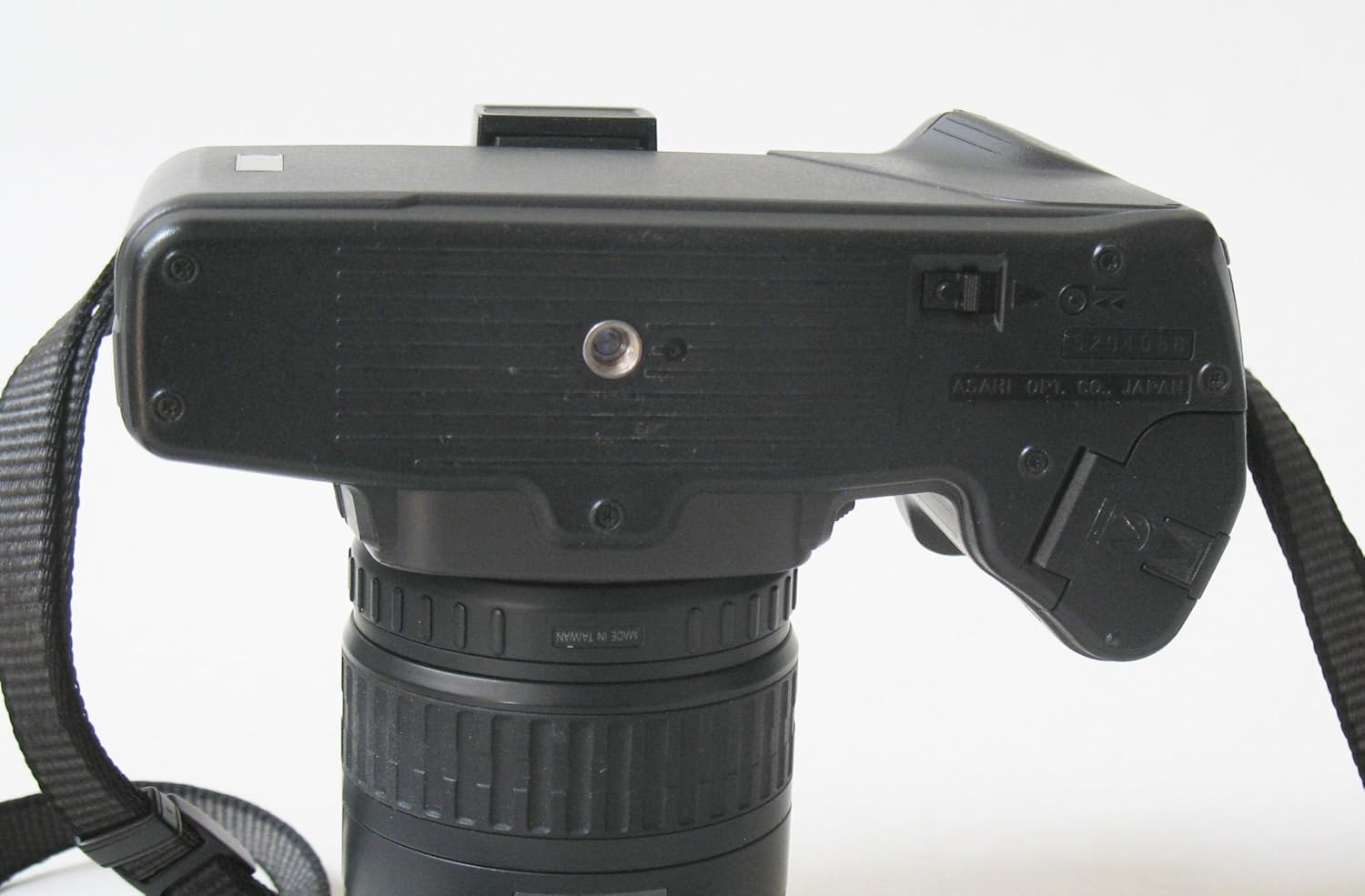
Figure 3.2: Rear view of the Pentax SF10 camera with the film door open, showing the film chamber on the left and the take-up spool area on the right.
4. Operating the Camera
4.1. Power On/Off
To power on the camera, locate the power switch (often integrated with the shutter release button or a separate switch near it) and move it to the 'ON' position. To power off, move it to 'OFF'.
4.2. Focusing
The Pentax SF10 features built-in autofocus. To focus:
- Look through the viewfinder.
- Press the shutter release button halfway down. The camera will automatically focus on the subject in the center of the viewfinder.
- A focus confirmation light or sound will indicate when focus is achieved.
4.3. Exposure Modes
The SF10 offers various exposure modes, typically including Program (P), Shutter-Priority (Tv), Aperture-Priority (Av), and Manual (M). Select your desired mode using the mode dial, usually located on the top left of the camera body.
4.4. Using the Built-in Flash
The camera has an integrated flash for additional illumination. To activate the flash:
- In low-light conditions or when fill-flash is desired, the camera may automatically pop up the flash in certain automatic modes.
- Alternatively, you may manually raise the flash unit using a dedicated button or switch.

Figure 4.1: Front view of the Pentax SF10 camera with the built-in flash unit raised, ready for use.
4.5. Taking a Picture
- Frame your subject through the viewfinder.
- Press the shutter release button halfway to activate autofocus and exposure metering.
- Press the shutter release button fully to take the picture. The camera's power winder will automatically advance the film to the next frame.
4.6. Film Rewinding
Once all frames on the film roll have been exposed, the camera will typically initiate automatic film rewinding. If manual rewinding is required, locate the film rewind button or switch (often on the bottom or side of the camera) and activate it. The frame counter will count down as the film rewinds into the cartridge.
5. Maintenance
5.1. Cleaning the Camera
- Camera Body: Use a soft, dry cloth to wipe the camera body. For stubborn dirt, a slightly damp cloth can be used, followed by a dry one. Avoid harsh chemicals.
- Lens: Use a lens brush or blower to remove dust. For smudges, use a specialized lens cleaning solution and a microfiber lens cloth. Never touch the lens surface with your fingers.
- Viewfinder/LCD: Use a soft, dry cloth. Avoid excessive pressure.
5.2. Battery Care
- Remove the battery if the camera will not be used for an extended period to prevent leakage.
- Store batteries in a cool, dry place.
5.3. Storage
When not in use, store the camera in a dry, dust-free environment, preferably in a camera bag or case. Avoid extreme temperatures and high humidity.
6. Troubleshooting
| Problem | Possible Cause | Solution |
|---|---|---|
| Camera does not power on. | Dead or incorrectly installed battery. | Check battery orientation. Replace with a fresh 2CR5 battery. |
| Film does not advance. | Film not loaded correctly; end of roll. | Re-load film, ensuring leader is properly engaged. If at end of roll, rewind and replace film. |
| Autofocus not working. | Insufficient light; subject too close/far; lens not attached correctly. | Ensure adequate lighting. Check lens attachment. Try focusing on a subject with more contrast. |
| Flash does not fire. | Flash not raised; flash mode disabled; battery low. | Manually raise the flash. Check camera mode settings. Replace battery if low. |
| Images are blurry. | Camera shake; incorrect focus; dirty lens. | Hold camera steady or use a tripod. Ensure focus confirmation. Clean the lens. |
7. Specifications
- Brand: Pentax
- Model: SF10
- Film Format Type: 35mm
- Lens Mount: Pentax KA Mount
- Focusing: Built-in Autofocus
- Flash: Built-in
- Film Transport: Power Winder/Rewinder
- Power Source: 1x 2CR5 Battery
- Item Weight: 2.3 pounds (approximately 1.04 kg)
- Package Dimensions: 6.8 x 6.1 x 4.6 inches (approximately 17.3 x 15.5 x 11.7 cm)
- Compatible Devices: Camera (specifically Pentax KA mount lenses)
- ASIN: B0CWB1BYZF
- UPC: 786513718365
8. Warranty and Support
This Pentax SF10 camera is a renewed product. Renewed products typically come with a specific return policy and limited warranty from the seller or platform.
8.1. Return Policy
This product is eligible for a 90-day refund or replacement policy from the date of purchase. Please refer to the specific terms and conditions provided by the seller, ElectronicsRenewed, or the Amazon Renewed program for full details.
8.2. Additional Protection
Optional protection plans may be available for purchase to extend coverage beyond the standard return policy. Details regarding these plans can be found on the product's purchase page.
8.3. Customer Support
For further assistance or inquiries regarding your renewed Pentax SF10 camera, please contact the seller directly or visit the Amazon Renewed Store for general information on renewed products.
Related documentsSF10


Ask a question about this manual
Ask about setup, troubleshooting, compatibility, parts, safety, or missing instructions. Manuals+ will review the question and use this page’s manual context to help answer it.