
1. Introduction
Thank you for choosing addlon 48FT Solar String Lights. This manual provides essential information for the safe and efficient use of your new solar string lights. Please read these instructions carefully before installation and operation, and retain them for future reference.
2. Package Contents
- 1 x addlon 48FT Solar String Lights (with bulbs)
- 1 x Solar Panel with Ground Stake
- 1 x Remote Control
- 1 x USB Charging Cable (Type-C)
- Mounting Hardware (screws, wall anchors)
- 1 x Spare Bulb
3. Specifications
| Feature | Detail |
|---|---|
| Model Number | A09010281 |
| Length | 48 FT |
| Power Source | Solar Powered, USB Charging |
| Charging Time (Solar) | Approx. 8 hours (full sunlight) |
| Charging Time (USB) | Approx. 4 hours |
| Operating Time | Up to 20+ hours (fully charged) |
| Waterproof Rating | IP65 |
| Special Features | Dimmable, Remote Controlled, Timer, Shatterproof Bulbs |
| Bulb Type | S14 LED (E12 base, 3V) |
4. Setup & Installation
- Unpack and Inspect: Carefully remove all components from the packaging. Inspect the string lights, solar panel, and accessories for any damage.
- Initial Charging: For optimal performance, it is recommended to fully charge the solar panel via the USB port (Type-C) for approximately 4 hours before first use. This ensures sufficient power for initial operation, especially during periods of low sunlight.
- Solar Panel Placement: Choose a location for the solar panel that receives at least 8 hours of direct sunlight daily. Avoid shaded areas from trees, buildings, or other obstructions. The solar panel can be installed using the provided ground stake or mounted to a wall/surface with screws.
- Connect String Lights: Connect the string lights to the solar panel's output port. Ensure the connection is secure and the waterproof cap is properly sealed.
- Arrange Lights: Hang the string lights in your desired outdoor area. The lights are designed for flexible installation and can be draped, strung, or hung to create your preferred ambiance.

5. Charging
Your addlon Solar String Lights offer dual charging options:
- Solar Charging: The integrated solar panel charges the internal battery during the day when exposed to direct sunlight. A full charge typically takes 8 hours of bright sunlight.
- USB Charging: For faster charging or during prolonged cloudy/rainy weather, use the provided USB Type-C cable to charge the solar panel. A full USB charge takes approximately 4 hours.


6. Operating Instructions
The addlon Solar String Lights feature automatic operation and can be controlled via the included multi-function remote.
6.1 Automatic Operation
The lights will automatically turn on at dusk and turn off at dawn, provided the solar panel has received sufficient charge during the day.
6.2 Remote Control Functions
The remote control allows you to customize your lighting experience:
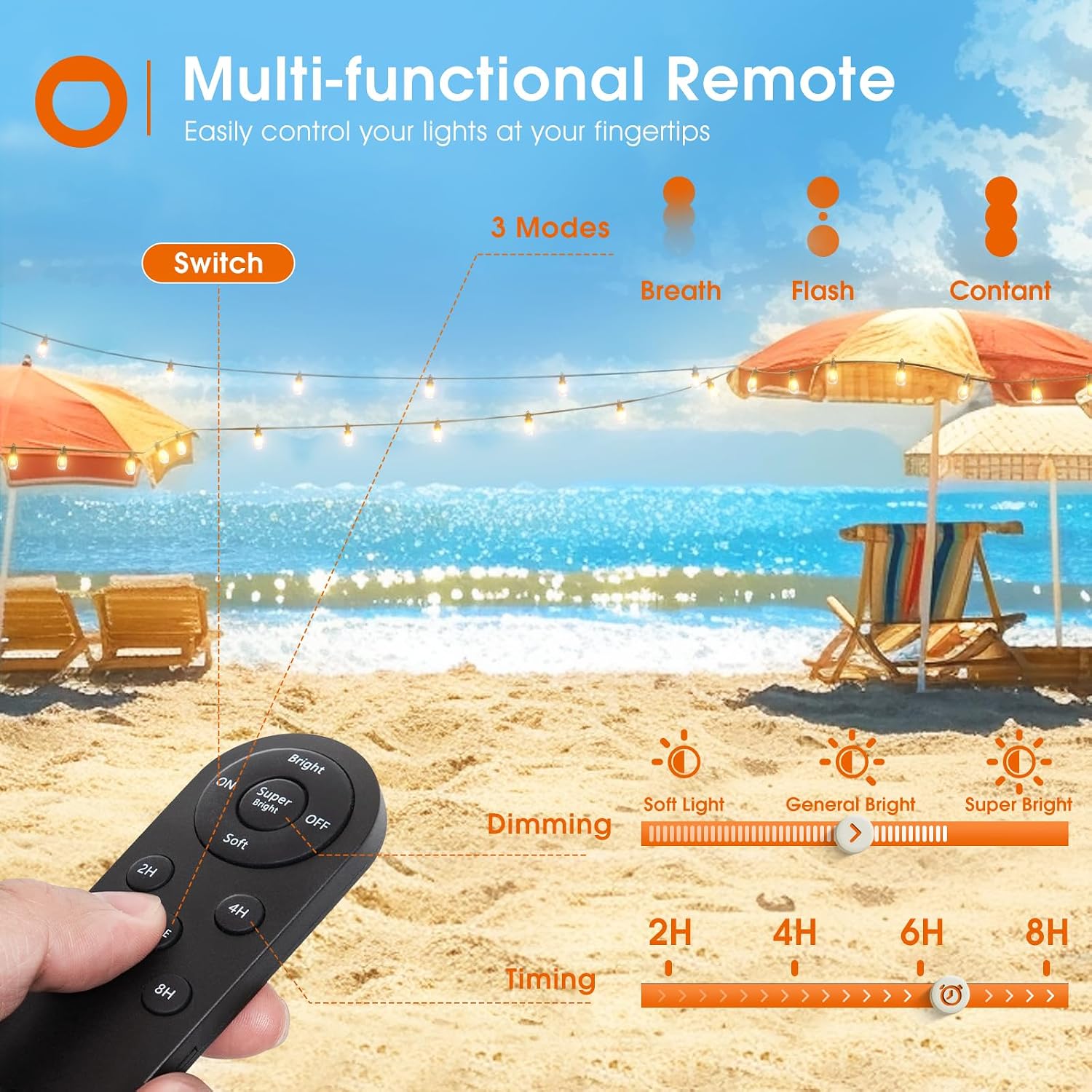
- ON/OFF: Press the 'ON' button to turn the lights on, and 'OFF' to turn them off.
- Brightness Modes: Select from 'Soft', 'Bright', or 'Super Bright' to adjust the light intensity.
- Light Modes: Cycle through 'Breathing', 'Flashing', or 'Constant' light effects using the 'MODE' button.
- Timing Control: Set the lights to automatically turn off after 2, 4, 6, or 8 hours using the respective timer buttons (2H, 4H, 6H, 8H).

7. Maintenance
- Cleaning the Solar Panel: Regularly wipe the solar panel with a soft, damp cloth to remove dust, dirt, or debris. A clean panel ensures maximum sunlight absorption and efficient charging.
- Bulb Replacement: The string lights use S14 LED bulbs with an E12 base and 3V rating. If a bulb needs replacement, ensure the power is off, carefully unscrew the old bulb, and screw in the new one. A spare bulb is included in the package.
- Waterproof Design: The lights and solar panel are IP65 waterproof, designed to withstand various weather conditions. However, ensure all connections are secure and waterproof caps are properly sealed to maintain water resistance.

8. Troubleshooting
- Lights do not turn on automatically at night:
- Ensure the solar panel is placed in a location receiving ample direct sunlight.
- Check if the solar panel is fully charged (use USB charging if necessary).
- Verify that the string lights are securely connected to the solar panel.
- Confirm the remote control has not turned the lights off or set a timer that has expired.
- Lights stay on for a short duration:
- The solar panel may not be receiving enough sunlight for a full charge. Relocate the panel or use USB charging.
- The selected brightness mode (e.g., 'Super Bright') consumes more power, reducing operating time. Try a 'Soft' or 'Bright' setting for longer illumination.
- Ensure the solar panel surface is clean.
- Remote control not working:
- Check the remote control battery and replace if needed.
- Ensure there are no obstructions between the remote and the solar panel receiver.
9. Warranty & Support
addlon stands behind its products with a commitment to quality and customer satisfaction.
- 3-Year Product Support: We offer 3 years of quality support for this product.
- 1-Year Free Bulb Replacement: Enjoy free bulb replacements for one year from the date of purchase.
- 30-Day Free Return & Exchange: If you are not satisfied, you may return or exchange the product within 30 days.
For any inquiries or support needs, please contact addlon customer service through your purchase platform.
