
1. Introduction
This manual provides instructions for the proper use and maintenance of your Air Choice remote control. This remote is designed for use with Air Choice portable air conditioner models NPLN11A-05C/X1E(8K) (8,000 BTU) and NPLN11A-06C/X1E(10K) (10,000 BTU).
Please read this manual thoroughly before operating the remote control to ensure correct usage and to prevent damage.
2. Product Overview
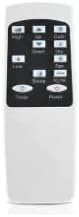
Figure 2.1: Front view of the Air Choice remote control. It features a digital display at the top, showing temperature and mode settings. Below the display are various control buttons for power, mode, fan speed, temperature adjustment, and timer functions.

Figure 2.2: A side profile of the Air Choice remote control, illustrating its compact and ergonomic shape designed for comfortable handling.

Figure 2.3: This image shows the rear section of the Air Choice remote control, likely indicating the battery compartment or a general back view.
3. Setup
3.1 Battery Installation
- Locate the battery compartment cover on the back of the remote control.
- Slide the cover downwards or press the latch to open it.
- Insert two AAA batteries (not included), ensuring the positive (+) and negative (-) terminals match the diagrams inside the compartment.
- Replace the battery compartment cover, ensuring it clicks securely into place.
Note: Always use new batteries and replace both batteries at the same time. Do not mix old and new batteries or different types of batteries.
4. Operating Instructions
Point the remote control directly at the air conditioner's receiver window. Ensure there are no obstructions between the remote and the unit.
4.1 Button Functions
- Power Button: Turns the air conditioner ON or OFF.
- Mode Button: Cycles through available operating modes (e.g., Cool, Fan, Dry, Heat - if applicable to your AC model).
- Fan Speed Button: Adjusts the fan speed (e.g., Low, Medium, High, Auto).
- Temperature Up/Down Buttons (▲/▼): Increases or decreases the desired temperature setting.
- Timer Button: Sets the auto-on or auto-off timer function. Press repeatedly to cycle through timer settings or to cancel.
- Sleep Button: Activates or deactivates the sleep mode, which adjusts temperature and fan speed for comfortable sleep.
- Swing Button: Controls the louver swing function (if available on your AC model).
4.2 Display Indicators
The remote control's LCD screen displays current settings such as:
- Current temperature setting.
- Operating mode icon.
- Fan speed indicator.
- Timer status.
- Battery level indicator (if available).
5. Maintenance
5.1 Cleaning the Remote Control
- Wipe the surface of the remote control with a soft, dry cloth.
- Do not use liquid cleaners, abrasive cleaners, or chemical sprays, as these may damage the remote.
5.2 Battery Replacement
Replace batteries when the remote control's range decreases or if the display becomes dim. Refer to Section 3.1 for battery installation instructions.
- Remove old batteries promptly to prevent leakage.
- Dispose of used batteries according to local regulations.
6. Troubleshooting
| Problem | Possible Cause | Solution |
|---|---|---|
| Remote control not working. | Dead or incorrectly installed batteries. | Replace batteries, ensuring correct polarity. |
| Limited remote control range. | Weak batteries or obstruction. | Replace batteries. Remove any objects blocking the signal path to the AC unit. |
| Air conditioner not responding. | Remote not pointed at AC unit, or AC unit is off. | Ensure remote is aimed directly at the AC unit. Check if the AC unit is powered on. |
7. Specifications
- Product Dimensions: 4.9 x 0.98 x 1.57 inches
- Item Weight: 1.13 ounces
- Model Number: 06937590205826
- Power Source: 2 x AAA Batteries (not included)
- Compatible Devices: Air Choice Portable Air Conditioners NPLN11A-05C/X1E(8K) and NPLN11A-06C/X1E(10K)
- Special Feature: Ergonomic design
8. Support and Warranty
Air Choice is committed to providing reliable products and customer support.
- Customer Service: Quick replies within 24 hours for inquiries.
- Replacement Policy: 12-month replacement available from the date of purchase.
- Technical Support: Lifetime after-sales service and technical assistance.
For further assistance, please contact Air Choice customer support through the retailer's platform or the official Air Choice website.


