
CYCPLUS AL2
CYCPLUS AL2 Portable Tire Inflator User Manual
Model: AL2 | Brand: CYCPLUS
Product Overview
The CYCPLUS AL2 is a high-performance, portable tire inflator designed for quick and efficient inflation. Its compact size, powerful motor, and dual power supply options make it an ideal tool for maintaining optimal tire pressure for various vehicles and inflatable items. The device features an intuitive dual LED display, preset inflation modes, and an automatic shut-off function for precise and safe operation.
Key Features:
- Fast Inflation: Equipped with a powerful motor providing 36L/Min airflow, capable of inflating a small car tire (28-36 PSI) in approximately 60 seconds.
- Dual-Use Power Supply: Operates on a built-in 3*2600mAh battery (7800mAh total capacity) or via a 12V car power cord, ensuring usability even when the battery is low.
- Dual LED Display: Clear digital display shows both real-time and preset pressure values with an accuracy of ±1 PSI.
- Automated Operation: Features 4 preset modes (bicycle, motorcycle, car, ball) and allows custom pressure settings up to 150 PSI. Automatically stops when the target pressure is reached.
- Emergency LED Light: Integrated LED light for illumination during night-time use or emergencies.

Image: The CYCPLUS AL2 Portable Tire Inflator with its digital display.

Image: Close-up of the inflator's dual LED display showing real-time and preset pressure values.
Setup and Charging
Package Contents:
Before first use, please verify all components are present:
- Inflator Unit (AL2)
- EVA Storage Case
- Type-C Charging Cable
- 12V Car Power Cable
- Air Tube (short)
- Air Tube (long)
- Ball Needle
- Presta Valve Adaptor
- User Manual

Image: Diagram showing all items included in the CYCPLUS AL2 package.
Initial Charging:
For optimal performance, fully charge the inflator before its first use. Charging takes approximately 3 hours using the provided Type-C cable and a compatible power adapter (not included). The battery indicator on the display will show charging progress.
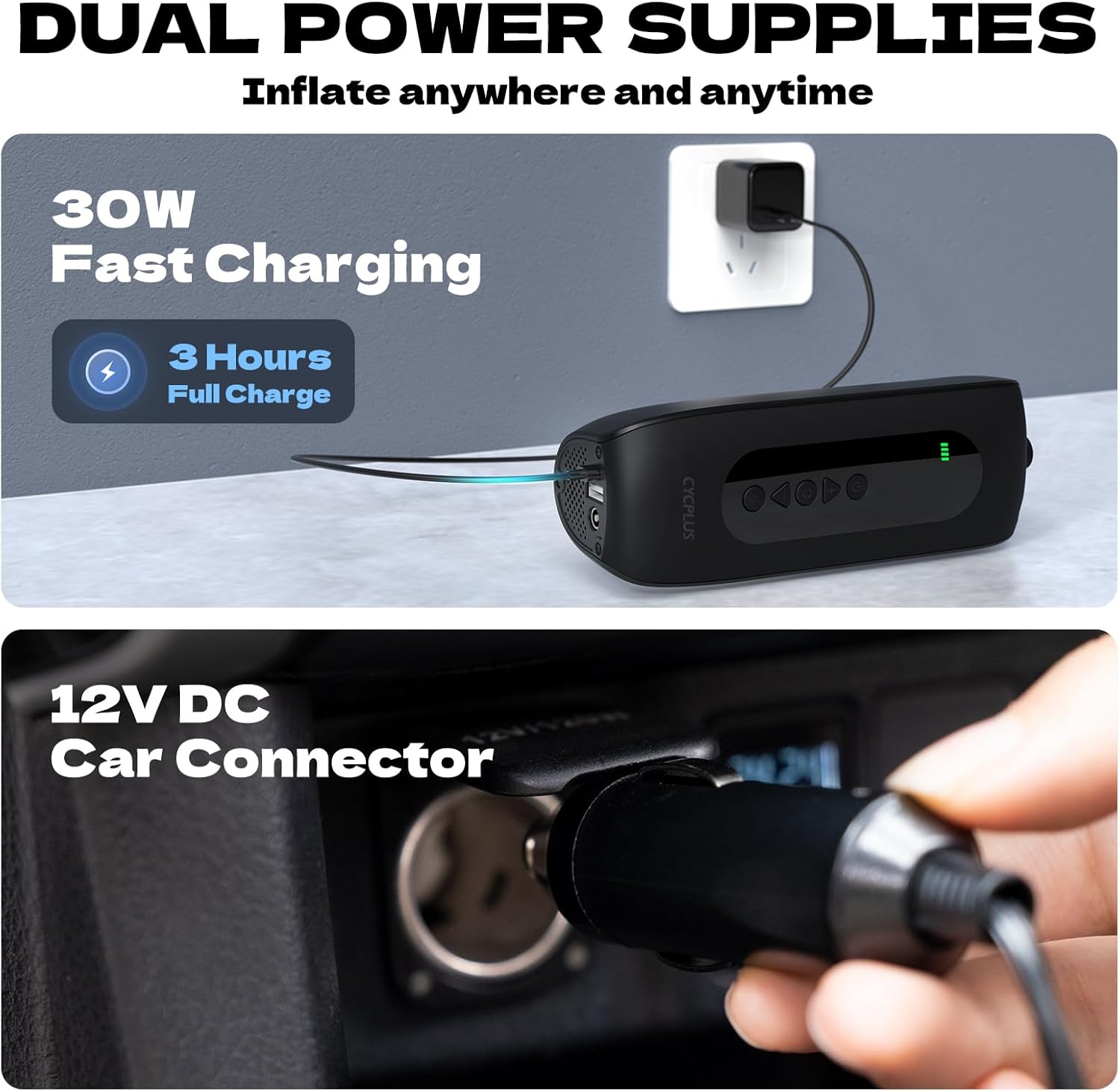
Image: The inflator being charged via USB-C and connected to a 12V car power outlet.
Operating Instructions
Connecting the Air Tube:
- Select the appropriate air tube (short or long) for your application.
- Screw one end of the air tube firmly into the inflation port on the top of the inflator.
- Attach the other end of the air tube to the valve stem of the item you wish to inflate. Ensure a secure connection to prevent air leakage.

Image: The CYCPLUS AL2 inflator connected to a car tire valve.
Inflation Process:
- Power On: Press the power button to turn on the inflator. The dual LED display will illuminate.
- Select Mode: Use the mode button to cycle through the 4 preset inflation modes: Bicycle, Motorcycle, Car, and Ball. Each mode has a default pressure setting.
- Adjust Pressure (Optional): If the preset pressure is not suitable, use the '+' and '-' buttons to adjust the target pressure value. The inflator supports pressures up to 150 PSI.
- Start Inflation: Press the inflation button to begin inflating. The real-time pressure will be displayed and increase as the item inflates.
- Auto Shut-off: The inflator will automatically stop once the preset target pressure is reached.
- Disconnect: Carefully disconnect the air tube from the valve stem and then from the inflator.

Image: Visual representation of the inflator's application modes for cars, motorcycles, bikes, and balls.
Using the LED Light:
Press the light button to turn on the integrated LED light. This feature is useful for illuminating the work area in low-light conditions or as an emergency light.

Image: The CYCPLUS AL2 inflator with its LED light activated, illuminating a car tire at night.
Product Introduction Video:
Video: Official product introduction for the CYCPLUS AL2 Tire Inflator, demonstrating its features and ease of use.
Maintenance
- Cleaning: Wipe the exterior of the inflator with a soft, dry cloth. Do not use harsh chemicals or abrasive cleaners.
- Storage: Store the inflator and its accessories in the provided EVA case in a cool, dry place, away from direct sunlight and extreme temperatures.
- Battery Care: To prolong battery life, charge the device at least once every three months if not in regular use. Avoid fully depleting the battery for extended periods.
Troubleshooting
Common Issues and Solutions:
- Inflator does not turn on: Ensure the battery is charged. If using the 12V car cord, ensure it is securely connected and the car's power outlet is functional.
- Inflation is slow or not working: Check that the air tube is securely connected to both the inflator and the valve stem. Ensure the valve stem is not damaged. Verify the target pressure is set correctly and is within the device's operating range (up to 150 PSI).
- Inaccurate pressure reading: Ensure the air tube is fully screwed onto the valve stem. If the issue persists, compare the reading with a known accurate pressure gauge.
- Battery drains quickly: Ensure the device is fully charged before use. Extreme temperatures can affect battery performance. If battery life significantly degrades, contact customer support.
- Device overheats: The inflator may become warm during prolonged use. Allow it to cool down before continuing operation. If it overheats excessively or emits smoke/unusual odors, immediately power off and disconnect, then contact customer support.
Specifications
| Feature | Specification |
|---|---|
| Model Name | AL2 |
| Brand | CYCPLUS |
| Max Pressure | 150 PSI |
| Air Flow Capacity | 36 LPM |
| Power Source | Battery Powered; Corded Electric (12V) |
| Battery Type | Lithium Polymer (3*2600mAh) |
| Charging Time | Approx. 3 hours |
| Noise Level | 78 dB |
| Item Weight | 670 Grams (1.48 pounds) |
| Material | Aluminum |
| Included Components | Air tube, Ball needle, Presta Valve adaptor, Type-C charge cable |
Warranty and Support
Warranty Information:
The CYCPLUS AL2 Portable Tire Inflator comes with a 1-Year Warranty from the date of purchase. This warranty covers manufacturing defects and workmanship under normal use. It does not cover damage caused by misuse, accidents, unauthorized modifications, or normal wear and tear.
Customer Support:
For any questions, technical assistance, or warranty claims, please contact CYCPLUS official after-sales support. Refer to the contact information provided on the product packaging or the official CYCPLUS website.
Please retain your proof of purchase for warranty validation.
Ask a question about this manual
Ask about setup, troubleshooting, compatibility, parts, safety, or missing instructions. Manuals+ will review the question and use this page’s manual context to help answer it.