
Product Overview
The Imagitarium Powered Sponge Filter provides essential water movement and filtration for your aquarium. It utilizes dense sponges to cultivate beneficial bacteria and capture debris, contributing to a clean and healthy aquatic environment. This filter is particularly suitable for low-flow or shrimp aquariums, offering protection against strong filter suction.
Key features include:
- Provides necessary water movement for aquariums.
- System can be discreetly placed in the background of your tank.
- Allows beneficial bacteria to grow while effectively trapping debris.
- Ideal for low-flow or shrimp aquariums to protect delicate inhabitants.
- Offers optional aeration for enhanced oxygenation.
- Features adjustable water flow for customized performance.
- Includes an adjustable height water return and pivoting sponge inlets for versatile setup.
- Recommended for aquariums up to 8 gallons.
Package Contents
Before beginning installation, ensure all components are present and undamaged. The package typically includes:
- Powered Filter Unit with power cord
- Sponge Filters (typically two)
- Water Return Pipe with adjustable height
- Aeration Tube and Air Stone (if applicable)
- Flow Control Valve
- Suction Cups for mounting
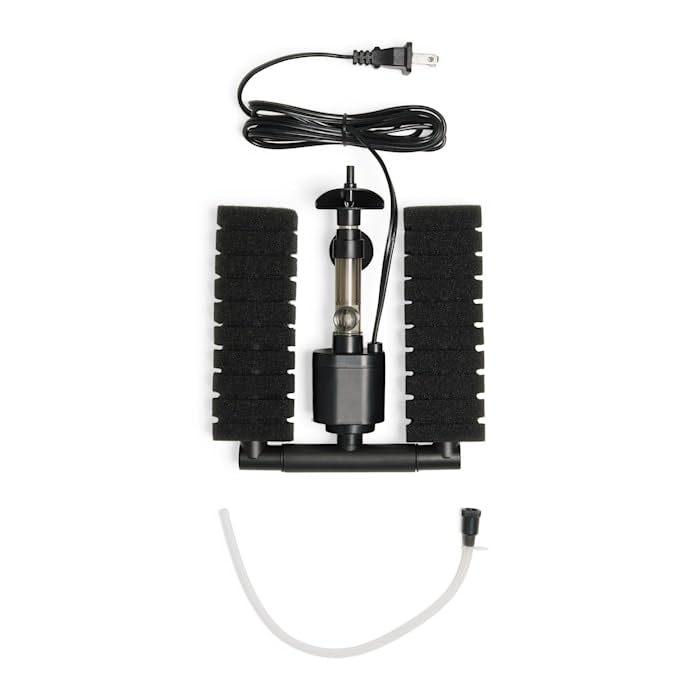
Image: All components of the Imagitarium Powered Sponge Filter, including the main pump, two sponge filters, power cord, and various connectors and tubes.
Setup Instructions
- Preparation: Rinse and wipe down all filter parts with a clean, soft towel prior to first use. Do not use soap or detergents.
- Assembly: Carefully assemble the filter components according to the diagram. Ensure all connections are secure. Attach the sponge filters to the inlets. Connect the water return pipe and aeration tube (if using).
- Placement: Position the assembled filter inside your aquarium. Use the provided suction cups to secure it firmly to the aquarium wall. Ensure the filter is fully submerged.
- Adjustments: Adjust the height of the water return pipe and the angle of the pivoting sponge inlets to achieve desired water flow and circulation within the tank.
- Power Connection: Once the filter is correctly positioned and fully submerged, plug the power cord into a suitable electrical outlet. Ensure a drip loop is formed to prevent water from traveling along the cord to the outlet.
Always check for any broken parts before assembly and operation.
Operating the Filter
The Imagitarium Powered Sponge Filter is designed for continuous operation to maintain water quality. Once plugged in, the pump will begin to draw water through the sponges and return filtered water to the aquarium.
- Water Flow Adjustment: Use the adjustable water flow valve to control the intensity of the water output. Turn the valve to increase or decrease flow as needed for your specific aquarium inhabitants and setup.
- Aeration: If your model includes an aeration feature, ensure the aeration tube is properly connected. This will introduce air bubbles into the water, increasing oxygen levels.
- Monitoring: Regularly observe the filter's performance. Ensure water is flowing freely and the sponges are not excessively clogged.
Maintenance
Regular maintenance is crucial for the optimal functionality and longevity of your Imagitarium Powered Sponge Filter. Neglecting maintenance can lead to reduced filtration efficiency and poor water quality.
- Unplug Before Maintenance: Always unplug the filter from the electrical outlet before performing any cleaning or maintenance.
- Frequent Inspection: Inspect the filter and its components frequently for any signs of wear, damage, or excessive debris buildup.
- Sponge Cleaning: Remove the sponge filters and gently rinse them in old aquarium water (from a water change) to preserve beneficial bacteria. Avoid rinsing under tap water, as chlorine can kill these bacteria. Squeeze out excess water.
- Component Cleaning: Disassemble other parts of the filter, such as the pump impeller and housing, and clean them thoroughly to remove any accumulated sludge or algae. A small brush can be helpful.
- Media Replacement: Replace applicable filter media (e.g., sponges if they are deteriorating) as suggested in the instruction manual or no more than every 4 weeks, depending on aquarium conditions and bioload.
- Reassembly: Reassemble all parts securely and place the filter back into the aquarium. Ensure it is fully submerged before plugging it back in.
Troubleshooting
If you encounter issues with your Imagitarium Powered Sponge Filter, refer to the following common troubleshooting steps:
- Filter Not Running:
- Check if the power cord is securely plugged into a working electrical outlet.
- Ensure there is power to the outlet by testing with another appliance.
- Inspect the impeller for any obstructions or damage. Clean the impeller and its housing.
- Reduced Water Flow:
- Check if the sponge filters are clogged. Clean or replace them as necessary.
- Inspect the water return pipe and aeration tube for blockages.
- Ensure the flow control valve is fully open or adjusted to the desired setting.
- Clean the pump impeller and housing for any debris.
- Excessive Noise:
- Ensure the filter is fully submerged in water.
- Check for any loose parts or vibrations against the aquarium glass.
- Clean the impeller and its shaft, as debris can cause rattling.
If problems persist after attempting these steps, please contact Imagitarium customer support.
Specifications
| Feature | Detail |
|---|---|
| Brand | Imagitarium |
| Model | Powered Sponge Filter |
| ASIN | B0CW7CLR87 |
| Item Weight | 9.12 ounces |
| Recommended Aquarium Size | Up to 8 gallons |
| Size (Overall) | 6.65 IN (This likely refers to a dimension, e.g., height or length) |
| Number of Items | 1 (referring to the filter unit) |
| Manufacturer | Imagitarium |
| Date First Available | February 22, 2024 |
Warranty and Support
For information regarding product warranty, please refer to the documentation included with your purchase or visit the official Imagitarium website. If you require technical assistance, have questions about your product, or need to report a defect, please contact Imagitarium customer support directly.
Contact information can typically be found on the product packaging or the manufacturer's official website.