
Introduction
Thank you for purchasing the ADIUM Mini Lint Remover. This manual provides important information regarding the safe operation, maintenance, and troubleshooting of your new device. Please read this manual thoroughly before using the product and retain it for future reference.
Safety Instructions
- Keep the device out of reach of children and pets.
- Do not use the device on wet fabrics or in wet environments.
- Avoid direct contact with the rotating blades. Always ensure the protective mesh cover is securely in place before operation.
- Do not disassemble or attempt to repair the device yourself. Contact qualified personnel for service.
- Turn off and unplug (if applicable) the device before cleaning or when not in use.
- Use only as intended for removing lint and fuzz from fabrics.
Product Overview
Familiarize yourself with the components of your Mini Lint Remover:
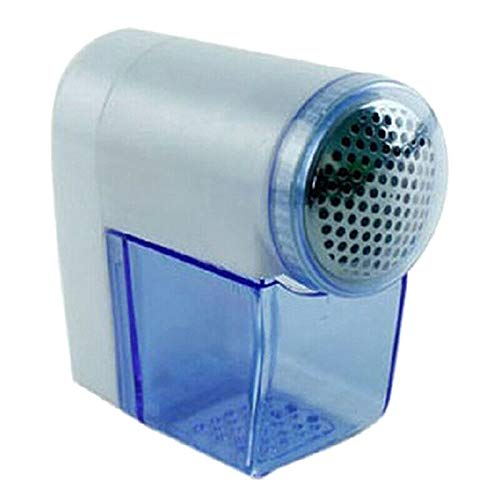
Figure 1: Front view of the Mini Lint Remover, showing the lint collection bin and the protective metal mesh.
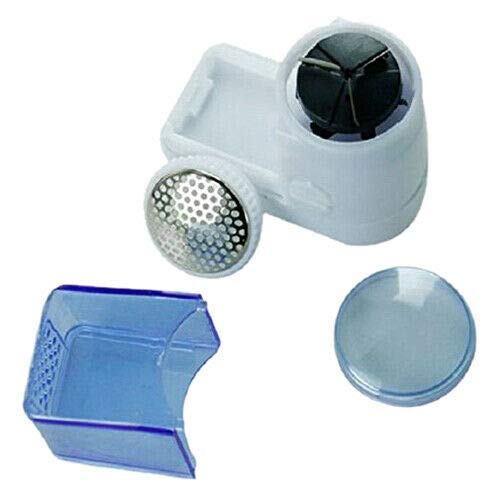
Figure 2: Disassembled view of the Mini Lint Remover, showing the main unit with blades, the removable lint collection bin, and the protective cap.
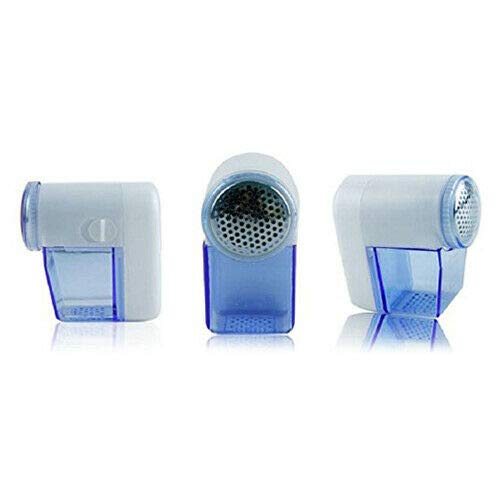
Figure 3: Three different angles of the Mini Lint Remover, illustrating its compact size and design.
The device typically consists of a main body housing the motor and blades, a protective metal mesh cover, and a transparent lint collection bin.
Setup
- Unpacking: Carefully remove the lint remover and any accessories from its packaging. Ensure all components are present, including the device and the lint collection bin.
- Power Source: If your model requires batteries, open the battery compartment (usually located at the back or bottom) and insert the required batteries, ensuring correct polarity (+/-). If it is rechargeable, ensure it is fully charged before first use according to manufacturer guidelines (charging cable not specified, so assume standard USB or similar).
- Inspection: Before first use, inspect the device for any visible damage. Ensure the protective metal mesh is securely attached and the lint collection bin is properly seated.
Operating Instructions
- Prepare the Fabric: Lay the fabric flat on a hard, smooth surface. Stretch the fabric taut to ensure the best contact with the shaver head and prevent damage.
- Turn On: Locate the power switch (usually a slide switch or button) and turn the device ON. The blades will begin to rotate.
- Lint Removal: Gently press the metal mesh head against the fabric and move the device in small, circular motions or short, straight strokes. Do not apply excessive pressure, as this can damage the fabric or the device.
- Monitor Lint Bin: Periodically check the transparent lint collection bin. Empty it when it becomes full to maintain optimal performance.
- Turn Off: Once you have finished removing lint, turn the device OFF and replace any protective caps if provided.
Tips for Best Results:
- For delicate fabrics, test on an inconspicuous area first.
- Move the shaver slowly and evenly over the fabric.
- Ensure the fabric is clean and dry before use.
Maintenance and Cleaning
Regular cleaning ensures the longevity and efficiency of your lint remover.
- Turn Off and Disconnect: Always ensure the device is turned OFF and any power source (batteries or charging cable) is disconnected before cleaning.
- Empty Lint Bin: Detach the lint collection bin and empty all accumulated lint and fuzz into a waste bin.
- Clean Blades and Mesh: Use a small brush (often included with the device) to carefully brush away any lint or debris from the metal mesh cover and the rotating blades. Be extremely cautious around the blades to avoid injury.
- Wipe Exterior: Wipe the exterior of the device with a soft, dry cloth. Do not use water or harsh cleaning agents.
- Reassemble: Once clean, reattach the lint collection bin and ensure the protective mesh cover is securely in place.
Troubleshooting
| Problem | Possible Cause | Solution |
|---|---|---|
| Device does not turn on. |
|
|
| Lint not being removed effectively. |
|
|
| Device makes unusual noise or vibrates excessively. |
|
|
Specifications
- Model Number: EP-23410
- Brand: ADIUM
- Dimensions (LxWxH): 15 x 5 x 10 cm
- Included Components: Lint Remover, Case
- Manufacturer: ADIUM
Warranty and Support
This product comes with a standard manufacturer's warranty. Please refer to the product packaging or your purchase receipt for specific warranty terms and conditions. For technical support, troubleshooting assistance beyond this manual, or warranty claims, please contact ADIUM customer service through the retailer where the product was purchased or via the contact information provided on the product packaging.