
1. Introduction
Thank you for choosing the Abolee Pedestal Air Circulator Fan FXH009R. This fan is designed to provide efficient and quiet air circulation for your home or office. Please read this manual thoroughly before operating the fan to ensure safe use, optimal performance, and proper maintenance. Keep this manual for future reference.

The Abolee Pedestal Air Circulator Fan FXH009R, a sleek black standing fan with a circular head and a stable base.
2. Important Safety Instructions
To reduce the risk of fire, electric shock, or injury, always follow these basic safety precautions:
- Read all instructions before using this fan.
- Place the fan on a stable, level surface to prevent it from tipping over.
- Do not use the fan near water or in damp environments.
- Always unplug the fan from the power outlet before cleaning, moving, or performing any maintenance.
- Keep fingers, hair, and other objects away from the fan blades and openings during operation.
- Do not operate the fan with a damaged cord or plug. If the cord or plug is damaged, contact customer support.
- Ensure children are supervised when the fan is in use. This appliance is not intended for use by persons (including children) with reduced physical, sensory or mental capabilities, or lack of experience and knowledge, unless they have been given supervision or instruction concerning use of the appliance by a person responsible for their safety.
- Do not block air openings or operate the fan on a soft surface, such as a bed or rug, where openings may become blocked.
- Do not insert or allow foreign objects to enter any ventilation or exhaust opening as this may cause an electric shock or fire, or damage the fan.
3. Package Contents
Verify that all components are present in the package:
- Fan Head
- Adjustable Stand Pole
- Base
- Remote Control
- User Manual
4. Setup Instructions
Follow these steps to assemble your Abolee Pedestal Air Circulator Fan:
- Attach the Stand Pole to the Base: Carefully insert the bottom end of the adjustable stand pole into the designated slot on the fan base. Twist or secure with provided fasteners until it is firm and stable.
- Secure the Fan Head: Place the fan head onto the top of the adjustable stand pole. Ensure it clicks into place or is securely fastened according to the design.
- Verify Connections: Double-check that all connections are firm and the fan is stable before proceeding.
- Power Connection: Plug the power cord into a standard 120V AC electrical outlet.

The Abolee Pedestal Fan in a living room setting, highlighting its 36-inch adjustable height and modern design.
5. Operating Instructions
Your Abolee Pedestal Fan offers various settings for customized comfort. Operate the fan using either the touch control panel on the fan body or the included remote control.
Power On/Off
Press the Power button ( ) on the control panel or remote control to turn the fan on or off.
Wind Modes
Press the Mode button () to cycle through the available wind modes:
- Normal Mode: Provides a constant, steady airflow at your selected speed.
- Natural Mode: Simulates a natural breeze by varying the fan speed intermittently.
- Sleep Mode: Operates at a low, quiet speed to minimize disturbance during sleep.
- AI Mode: Automatically adjusts the fan speed based on the ambient room temperature, providing optimal comfort without manual adjustments.
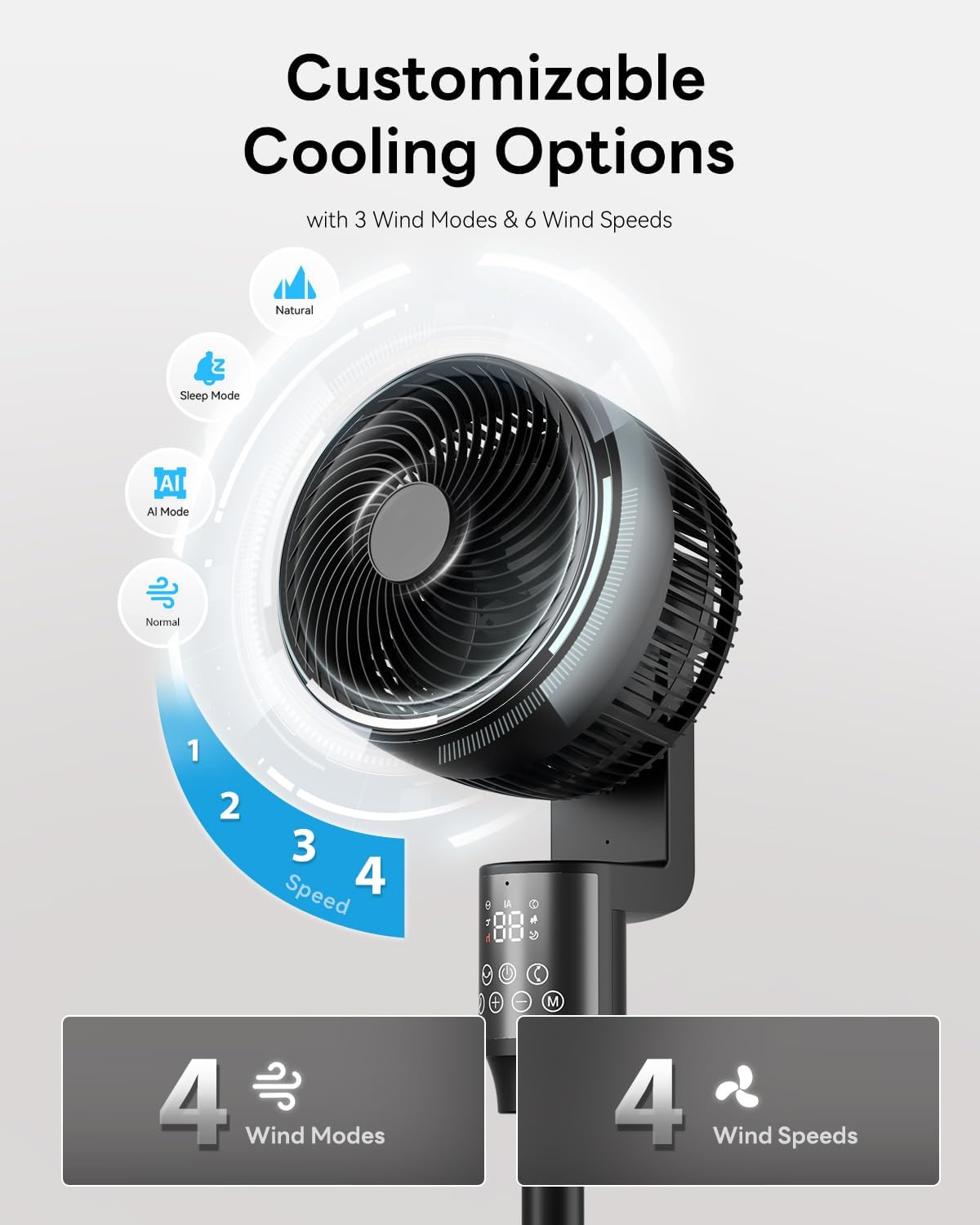
Close-up of the Abolee Pedestal Fan's control panel and head, illustrating the four available wind modes and four speed settings.
Fan Speeds
Use the + and - buttons on the control panel or remote to adjust the fan speed from 1 (lowest) to 4 (highest).
Oscillation and Tilt
- Horizontal Oscillation: Press the Oscillation button () to activate the 70° automatic horizontal swing, distributing air across a wider area. Press again to stop.
- Vertical Tilt: The fan head can be manually adjusted up to 90° vertically to direct airflow precisely where needed.

The Abolee Pedestal Fan showcasing its omni-directional oscillation, with arrows indicating 70 degrees of horizontal swing and 90 degrees of manual vertical tilt.
Timer Function
Press the Timer button () to set the fan to automatically turn off after a specified period, from 0 to 24 hours. Each press increases the timer by one hour.
Child Lock
Activate the Child Lock feature () to prevent unintended changes to settings by children or pets. Press and hold the button for a few seconds to activate/deactivate.
Remote Control
The included remote control allows for convenient operation from a distance. Ensure the remote has working batteries and is pointed towards the fan's receiver. For optimal performance, store the remote on the fan base when not in use.

A family using the remote control for the Abolee Pedestal Fan, highlighting the convenience of remote operation and the clear LED display on the fan's body.
This video provides a visual overview of the Abolee Pedestal Fan, including its assembly, operation, and the functionality of its remote control.
6. Maintenance and Cleaning
Regular cleaning helps maintain the fan's performance and extends its lifespan.
- Before Cleaning: Always unplug the fan from the power outlet.
- Cleaning the Blades: The front grille can be easily removed to access and wipe the fan blades clean. Use a soft, damp cloth. Do not use abrasive cleaners or solvents.
- Exterior Cleaning: Wipe the exterior surfaces of the fan with a soft, dry cloth.
- Storage: When not in use for extended periods, store the fan in a cool, dry place, preferably in its original packaging.
7. Troubleshooting
If you encounter any issues with your fan, refer to the following common problems and solutions:
| Problem | Possible Cause | Solution |
|---|---|---|
| Fan does not turn on. | No power supply. | Check if the power cord is securely plugged into a functional outlet. |
| Remote control is not working. | Dead batteries or obstruction. | Replace remote control batteries. Ensure there is a clear line of sight between the remote and the fan's receiver. |
| Weak or no airflow. | Low speed setting or obstructed intake/output. | Increase the fan speed. Check for any obstructions around the fan's air intake or output. |
| Unusual noise during operation. | Loose parts or debris. | Unplug the fan and inspect for any loose components or debris caught in the fan blades. Clean as per maintenance instructions. |
| Oscillation not working. | Oscillation function not activated. | Press the oscillation button on the control panel or remote. |
8. Specifications
| Brand | Abolee |
| Model Name | FXH009R |
| Product Dimensions | 14"D x 14"W x 36"H |
| Electric Fan Design | Pedestal Fan / Floor Fan |
| Power Source | AC |
| Special Features | Oscillating, Remote Controlled, Timer, Child Lock, AI Mode |
| Recommended Uses | Air Circulation, Cooling, Drying |
| Mounting Type | Floor Mount |
| Controller Type | Remote Control, Touch Panel |
| Number of Speeds | 4 |
| Noise Level | 23 Decibels (in Sleep Mode) |
| Wattage | 60 watts |
| Air Flow Capacity | 915 Cubic Feet Per Minute (CFM) |
| Air Throw Distance | 100 feet |
| Speed | 21 feet per second (Max) |
| Voltage | 120 Volts |
| Indoor Outdoor Usage | Indoor |
| Motor Type | Brushless DC Motor |
| Material | Plastic |
| Blade Material | Plastic |
| Oscillation | 70° Horizontal, 90° Manual Vertical Tilt |
| Timer | 0-24 Hours |
| UPC | 717225932862 |
| Certifications | FCC, RoHS, UL |
9. Warranty and Support
Warranty Information
This Abolee product is covered by a product and labor warranty for 5 years from the date of its original purchase. Please retain your proof of purchase for warranty claims.
Customer Support
For technical assistance, troubleshooting not covered in this manual, or any other customer service inquiries, please refer to the contact information provided in your product packaging or visit the official Abolee website for support resources.