
1. Introduction
The Energeeks EG-AWG003 WiFi + GSM Alarm System is an advanced security solution designed to protect your home or business. This system provides dual security through both WiFi and GSM connectivity, ensuring continuous protection even if one connection type is unavailable. Installation is straightforward, guided by a touchscreen display that simplifies the programming of security scenarios and automations. The system is expandable, supporting up to 200 additional accessories, including motion sensors, door/window sensors, remote controls, and sirens up to 120dB. It is compatible with Energeeks WiFi or 4G cameras for comprehensive security coverage.
2. Package Contents
Upon opening your Energeeks EG-AWG003 alarm system package, verify that all the following components are included:
- 1 x Energeeks Smart WiFi + GSM Control Panel with Touchscreen
- 1 x Motion Sensor (PIR)
- 1 x Door/Window Opening Sensor
- 1 x Remote Control
- Power Adapter
- Mounting Hardware
- User Manual (this document)
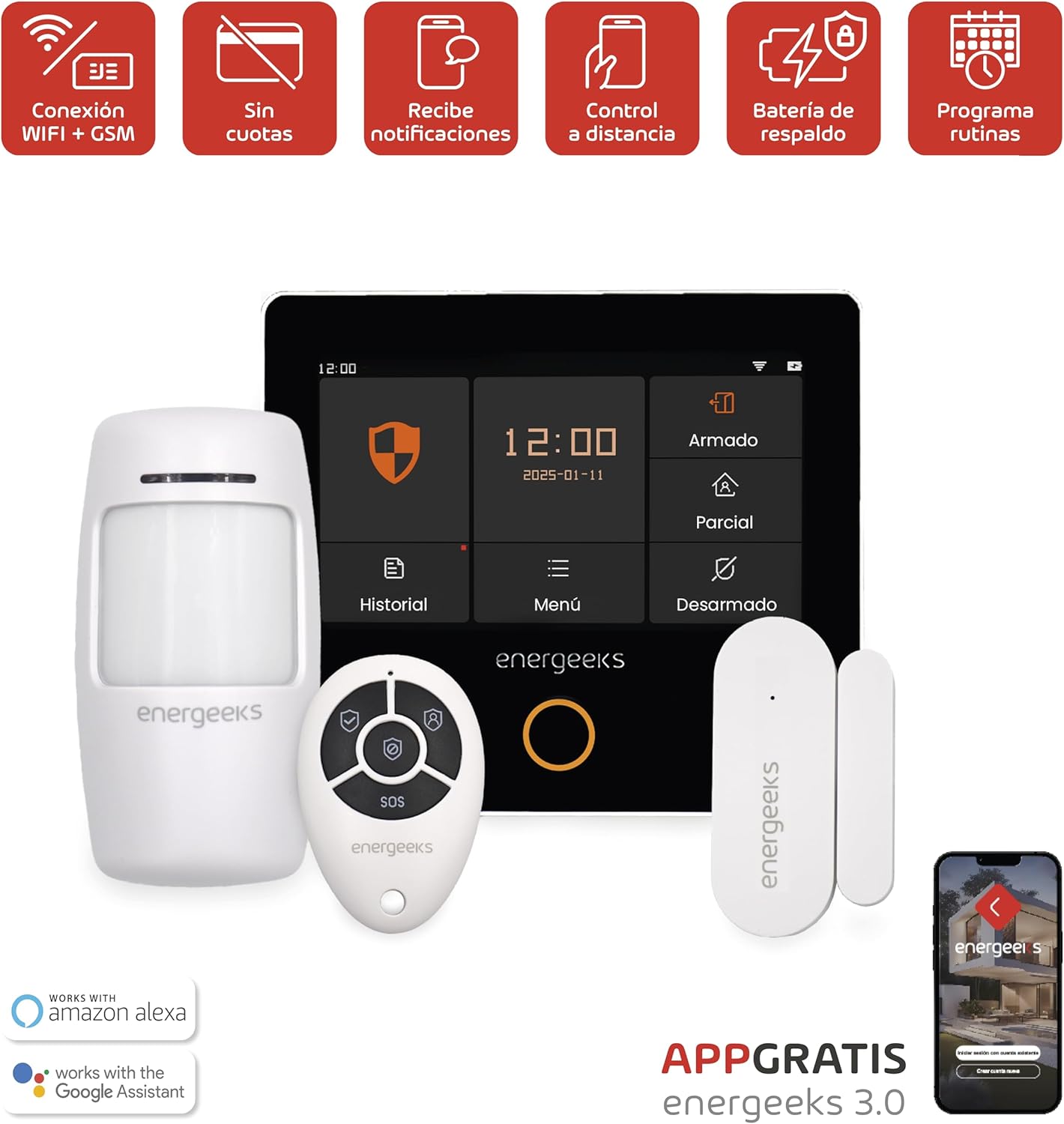
This image displays the complete Energeeks EG-AWG003 alarm system kit, featuring the central touchscreen control panel, a passive infrared motion sensor, a magnetic door/window opening sensor, and a compact remote control. The image also highlights compatibility with Amazon Alexa and Google Assistant, and the Energeeks 3.0 mobile application.
3. Setup
The installation process for the Energeeks EG-AWG003 system is designed to be quick and user-friendly, typically taking around 15 minutes with the assistance of the virtual assistant integrated into the control panel.
3.1 Initial Control Panel Setup
- Unpack: Carefully remove all components from the packaging.
- Power On: Connect the control panel to a power outlet using the provided adapter. The panel will power on automatically.
- SIM Card Installation (Optional for GSM): If you intend to use the GSM functionality, insert a compatible 2G/4G SIM card into the designated slot on the control panel. Ensure the SIM card is active and has credit for calls/SMS.
- Follow Virtual Assistant: The touchscreen will display a virtual assistant to guide you through the initial setup steps, including language selection, date/time settings, and network configuration.
- WiFi Connection: Select your WiFi network from the list on the touchscreen and enter the password. Ensure a stable 2.4GHz WiFi connection for optimal performance.

A hand is shown interacting with the touchscreen display of the Energeeks alarm system control panel, demonstrating the ease of use for arming, disarming, and accessing system menus. Icons for GSM connection, expandable system, wireless installation, and touchscreen are also visible.
3.2 Pairing Sensors and Remote Control
After the control panel is set up, you need to pair the included sensors and remote control:
- Enter Pairing Mode: On the control panel, navigate to the 'Menu' and select the 'Add Device' or 'Pairing' option.
- Activate Motion Sensor: Follow the instructions on the control panel to activate the motion sensor (e.g., press a button or trigger it). The panel will confirm successful pairing.
- Activate Door/Window Sensor: Separate the two parts of the door/window sensor to trigger it, or press its pairing button if available. The panel will confirm pairing.
- Pair Remote Control: Press any button on the remote control while the panel is in pairing mode. The panel will confirm pairing.
- Placement: Install the motion sensor in an area covering entry points or valuable zones. Mount the door/window sensor on doors or windows, ensuring the two parts are aligned and close when closed.

This image showcases the individual components included in the Energeeks alarm system: a motion sensor on the left, a door/window opening sensor at the top right, and a remote control at the bottom right, all in white with the Energeeks branding.
4. Operating Instructions
The Energeeks EG-AWG003 alarm system offers various modes to suit your security needs, controllable via the touchscreen panel, remote control, or the mobile application.
4.1 Arming and Disarming
- Arm (Full Arm): Activates all sensors. Use this mode when leaving the premises.
- Partial Arm (Home Arm): Activates perimeter sensors (e.g., door/window sensors) while allowing movement within the property. Use this mode when you are home.
- Disarm: Deactivates all sensors, allowing free movement without triggering the alarm.
To change modes, simply tap the corresponding icon on the touchscreen or press the respective button on your remote control.

A detailed view of the Energeeks alarm system's touchscreen interface, showing the current time, date, and options for 'Armado' (Armed), 'Parcial' (Partial Arm), 'Desarmado' (Disarmed), 'Historial' (History), and 'Menú' (Menu). The Energeeks logo is prominently displayed below the screen.
4.2 Emergency (SOS) Function
The remote control includes an SOS button. Pressing this button will immediately trigger the alarm and send emergency notifications to pre-configured contacts, regardless of the system's arming status.
5. Advanced Features
5.1 Scenarios and Programming
The Energeeks EG-AWG003 allows you to customize your home security by creating various scenarios and specific schedules. You can configure the system to activate alarms, turn on lights (with compatible smart devices), or send notifications in response to predefined events. This flexibility enables automation of your home security, ensuring an immediate and effective response to potential risks.
5.2 Mobile App Connectivity
Control your alarm system from any location using the free Energeeks 3.0 app, available for both iOS and Android devices. The app provides real-time status updates, allows remote arming/disarming, and manages system settings. You will receive instant notifications directly to your smartphone, ensuring you always maintain full control of your home security.
5.3 Voice Control Integration
The system is compatible with Google Home and Amazon Alexa, simplifying the management of your home security through voice commands. Link your Energeeks account with your preferred voice assistant to arm, disarm, or check the status of your alarm system hands-free.
6. Maintenance
Regular maintenance ensures the optimal performance and longevity of your Energeeks alarm system.
- Battery Backup: The control panel includes an emergency battery that provides up to 4 hours of operation during power outages. Ensure the control panel remains connected to power to keep this backup battery charged.
- Sensor Batteries: Wireless sensors (motion, door/window) are powered by batteries. Monitor the battery status through the control panel or mobile app. Replace batteries promptly when indicated to ensure continuous protection. Refer to individual sensor manuals for specific battery types (e.g., CR2032 for some sensors).
- Cleaning: Periodically clean the control panel screen and sensor surfaces with a soft, dry cloth. Avoid abrasive cleaners or liquids that could damage the components.
- Firmware Updates: Check the Energeeks app regularly for any available firmware updates for your control panel. Updates can improve performance, add features, and enhance security.
7. Troubleshooting
If you encounter issues with your Energeeks EG-AWG003 alarm system, refer to the following common troubleshooting steps:
| Problem | Possible Cause | Solution |
|---|---|---|
| Control panel not powering on | Power adapter disconnected or faulty; no power at outlet. | Check power connection and outlet. Try a different power source. |
| Sensors not triggering alarm | Sensor battery low/dead; sensor not paired; system disarmed. | Check sensor battery and replace if necessary. Re-pair sensor. Ensure system is armed. |
| No WiFi connection | Incorrect WiFi password; router issue; panel too far from router. | Verify WiFi password. Restart router. Move panel closer to router or use a WiFi extender. Ensure 2.4GHz network. |
| GSM not working | SIM card not inserted correctly; SIM card inactive or no credit; poor signal. | Reinsert SIM card. Check SIM card status with carrier. Ensure good cellular signal. |
| False alarms | Improper sensor placement; environmental factors (pets, drafts). | Adjust sensor sensitivity or reposition. Ensure motion sensors are not facing heat sources or direct sunlight. |
For further assistance, consult the Energeeks app's help section or visit the official Energeeks support website.
8. Specifications
| Feature | Detail |
|---|---|
| Brand | Energeeks |
| Model Number | EG-AWG003 |
| Connectivity Technology | Wireless (WiFi, GSM) |
| Compatible Devices | Smartphone (iOS, Android), Amazon Alexa, Google Home |
| Power Source | Battery (backup), Mains Power (5 Volts) |
| Average Battery Duration (Backup) | 4 Hours |
| Installation Type | Wireless DIY |
| Alert Type | Motion, Opening |
| Sensor Technology | Motion and Opening Sensor Technology |
| Control Method | Application, Touchscreen |
| Expandability | Up to 200 additional sensors/accessories |
| Product Dimensions (L x W x H) | 6.7 x 12.7 x 14.2 centimeters |
| Country of Origin | China |
9. Warranty and Support
Energeeks products are designed for reliability and performance. This alarm system comes with a standard manufacturer's warranty. Please refer to the warranty information provided with your purchase documentation for specific terms and conditions.
For technical support, troubleshooting assistance, or inquiries regarding your Energeeks EG-AWG003 alarm system, please visit the official Energeeks website or contact their customer service department. You can often find FAQs and detailed guides within the Energeeks mobile application.
This system operates without requiring monthly fees or long-term commitments, providing a cost-effective security solution.


