
TBS TBS5930 lite
TBS5930 lite DVB-S2 DVB-S Universal TV Tuner USB Card User Manual
Model: TBS5930 lite | Brand: TBS
1. Introduction
The TBS5930 lite is a versatile external USB TV tuner designed for receiving DVB-S2 and DVB-S satellite television and radio programs on your PC. This device allows you to watch, record, and enjoy a wide range of Free-to-Air (FTA) satellite content. Its compact design and USB 2.0 interface make it suitable for both desktop and laptop computers.
Key features include support for VCM and multi-stream, high-speed data download capabilities, and a built-in hardware blind scan function for efficient channel discovery.
2. Product Features
- DVB-S2/S Compatibility: Supports both DVB-S2 and DVB-S program reception, ensuring broad compatibility with satellite broadcasts.
- USB Interface: Functions as an external USB TV tuner box, ideal for watching and recording Free-to-Air satellite TV on desktop and laptop PCs.
- VCM and Multi-Stream Support: Optimized for receiving numerous Free-to-Air (FTA) satellite TV programs, with VCM support making it suitable for industrial-level users.
- Blind Scan Capability: Features a built-in hardware blind scan function, allowing you to scan for satellite programs without prior knowledge of transponder details, which is particularly useful for satellite feed hunting.
- High-Speed Data Download: Enables fast data download via satellite.
- Watch & Record: Allows users to watch and record satellite TV/radio programs directly on their PC.
3. Package Contents
Please verify that all items listed below are included in your package:
- 1 x TBS5930 lite DVB-S2 DVB-S Universal TV Tuner USB Card
- 1 x USB Cable
- 1 x Power Adapter

Figure 3.1: TBS5930 lite device shown alongside its retail packaging, illustrating the compact size of the tuner and the typical box design.
4. System Requirements
To ensure proper operation of your TBS5930 lite, your system must meet the following minimum requirements:
- Operating System: Windows XP / Vista / 7 / 8 / 10, Linux
- USB Port: Available USB 2.0 slot
5. Setup Guide
5.1 Physical Connection
- Connect the Satellite Cable: Connect your satellite dish cable to the "LNB IN" port on the TBS5930 lite. This is the threaded coaxial connector.
- Connect USB Cable: Plug one end of the provided USB cable into the "USB 2.0" port on the TBS5930 lite and the other end into an available USB 2.0 port on your computer.
- Connect Power Adapter: Insert the power adapter cable into the "DC 12V" port on the TBS5930 lite and then plug the power adapter into a wall outlet.

Figure 5.1: Rear view of the TBS5930 lite device, highlighting the LNB IN, USB 2.0, and DC 12V power input ports for connection.
5.2 Driver Installation
After connecting the device, you will need to install the necessary drivers for your operating system.
- Windows: The device is ready with a Windows BDA driver. Typically, Windows will attempt to install the driver automatically upon first connection. If not, please refer to the official TBS website for the latest driver downloads and installation instructions.
- Linux: A Linux driver is available. Please visit the official TBS website or relevant Linux community forums for specific installation guides for your distribution.
5.3 Software Installation
Once drivers are installed, you will need compatible TV viewing software to utilize the tuner. Popular options include DVBViewer, ProgDVB, or Kodi with appropriate DVB add-ons. Refer to the software's documentation for installation and configuration.
6. Operating Instructions
6.1 Scanning for Channels
After installing the drivers and TV software, you can begin scanning for satellite channels.
- Software Configuration: Open your chosen TV software and navigate to its tuner or hardware settings. Select the TBS5930 lite as your DVB-S/S2 device.
- Satellite Setup: Configure your satellite settings, including the satellite position (e.g., Astra, Hotbird), LNB type, and DiSEqC settings if applicable.
- Channel Scan: Initiate a channel scan. The TBS5930 lite supports Blind Scan, which is highly recommended. This feature allows the tuner to automatically detect transponders and channels without requiring you to manually input frequency details. This is particularly useful for finding new or obscure feeds.
6.2 Watching and Recording TV/Radio
Once channels are scanned and saved, you can start watching and recording programs.
- Live Viewing: Select a channel from your scanned list to begin live viewing.
- Recording: Most TV software allows you to schedule recordings or record live programs instantly. Refer to your software's specific instructions for recording features.
- Time-Shifting: Many applications also support time-shifting, allowing you to pause, rewind, and fast-forward live TV.
6.3 VCM and Multi-Stream Support
The TBS5930 lite supports VCM (Variable Coding and Modulation) and Multi-Stream reception. These advanced features are primarily used in professional satellite feeds and allow for more efficient transmission of data. If you are targeting such feeds, ensure your TV software is also configured to utilize these capabilities.
6.4 High-Speed Data Download
Beyond TV reception, the TBS5930 lite can be used for high-speed data download via satellite. This typically requires specialized software and a subscription to a satellite internet service provider. Consult your service provider's documentation for setup and usage of this feature.
7. Maintenance
To ensure the longevity and optimal performance of your TBS5930 lite, follow these simple maintenance guidelines:
- Cleaning: Use a soft, dry cloth to clean the exterior of the device. Avoid using liquid cleaners or abrasive materials.
- Ventilation: Ensure the device is placed in a well-ventilated area to prevent overheating. Do not block the ventilation holes.
- Storage: When not in use for extended periods, store the device in a cool, dry place away from direct sunlight and extreme temperatures.
- Cable Management: Ensure all cables are connected securely and are not bent or crimped, which could damage them or the ports.
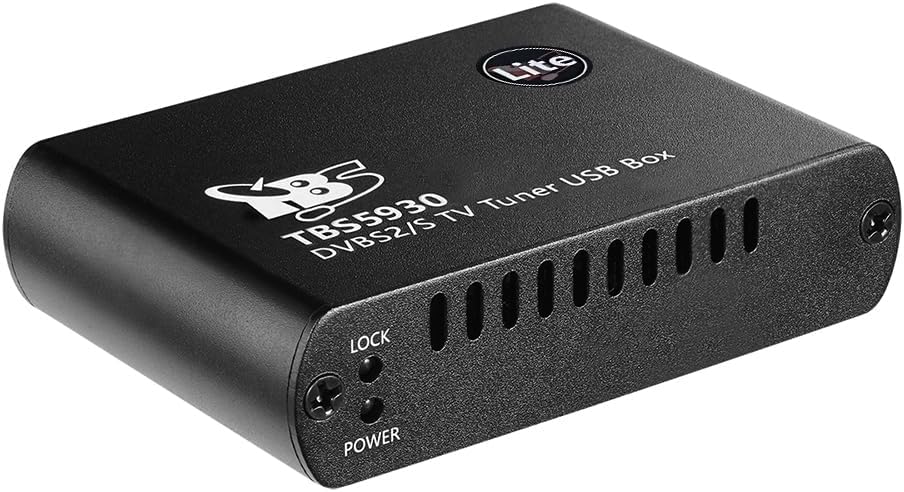
Figure 7.1: Side view of the TBS5930 lite, showing the ventilation slots and indicator lights (Lock and Power) which are important for monitoring device status.
8. Troubleshooting
If you encounter issues with your TBS5930 lite, refer to the following common problems and solutions:
- No Signal / Black Screen:
- Check all cable connections (satellite, USB, power) to ensure they are secure.
- Verify your satellite dish alignment.
- Ensure the LNB is correctly powered (check LNB settings in your TV software).
- Perform a new channel scan, especially a blind scan.
- Device Not Recognized by PC:
- Ensure the USB cable is properly connected to a working USB 2.0 port.
- Reinstall the device drivers. Check Device Manager (Windows) or `lsusb` (Linux) to see if the device is detected.
- Try a different USB port or USB cable.
- Poor Picture Quality / Freezing:
- Check signal strength and quality in your TV software. Adjust dish alignment if necessary.
- Ensure your computer meets the minimum system requirements, especially for CPU and RAM, for smooth video playback.
- Close other demanding applications running in the background.
- No Audio:
- Check audio settings in your TV software and ensure the correct audio output device is selected.
- Verify your system's audio drivers are up to date.
If the problem persists after trying these steps, please contact TBS customer support or consult their official website for further assistance.
9. Specifications

Figure 9.1: Front view of the TBS5930 lite DVB-S2 DVB-S Universal TV Tuner USB Card, showcasing its compact design and branding.
| Feature | Description |
|---|---|
| Model Number | TBS5930 lite |
| Connectivity Technology | Radio Frequency, USB 2.0 |
| Compatible Devices | Desktop, Laptop |
| DVB-S/S2 Support | Yes |
| QPSK Symbol Rates | 1/2, 3/5, 2/3, 3/4, 4/5, 5/6, 8/9, 9/10 |
| 8PSK Symbol Rates | 3/5, 2/3, 3/4, 5/6, 8/9, 9/10 |
| 16APSK Symbol Rates | 2/3, 3/4, 4/5, 5/6, 8/9, 9/10 |
| 32APSK Symbol Rates | 3/4, 4/5, 5/6, 8/9, 9/10 |
| VCM Support | Yes |
| Symbol Rate Range | 1 ~ 45 Msymb/s |
| Power Consumption | 1 ~ 6W |
| Operating Temperature | 0° ~ 78°C |
| Dimensions (L x W x H) | 3.9 x 2.5 x 1 inches |
| Item Weight | 1.1 pounds |
| Color | Black |
10. Warranty and Support
For warranty information, technical support, and driver updates, please visit the official TBS website. Keep your purchase receipt as proof of purchase for any warranty claims.
For additional assistance, you may also refer to online forums and communities dedicated to DVB hardware and software, where experienced users often share solutions and tips.
Related documentsTBS5930 lite


Ask a question about this manual
Ask about setup, troubleshooting, compatibility, parts, safety, or missing instructions. Manuals+ will review the question and use this page’s manual context to help answer it.