
Introduction
Thank you for choosing the EasyAcc Mini Portable Handheld Fan. This compact and powerful fan is designed to provide personal cooling wherever you go. With its 3 adjustable speeds, long-lasting rechargeable battery, and convenient USB-C charging, it's an ideal companion for various indoor and outdoor activities. This manual provides essential information for the safe and efficient use of your fan.

Image: The EasyAcc Mini Portable Handheld Fan in black, showcasing its compact design.
Package Contents
Please check the package for the following items:
- 1 x EasyAcc Mini Portable Fan
- 1 x USB Cable
- 1 x Handle Lanyard
- 1 x User Manual

Image: Contents of the EasyAcc Mini Portable Fan package, including the fan, USB cable, lanyard, and manual.
Product Features
- Powerful Airflow: Equipped with an upgraded copper motor and 7 fluid-mechanical fan blades, delivering strong wind up to 6379 RPM.
- Adjustable Speeds: Features 3 wind speeds (low, medium, high) for personalized comfort.
- Long-lasting Battery: Built-in 2600mAh rechargeable battery provides 3-12 hours of operation on a single charge, depending on speed setting.
- Fast Charging: USB Type-C port allows for full charge in 2-3 hours.
- Portable Design: Lightweight at 115g (3.2 ounces) and compact, making it easy to carry in a pocket or bag.
- Versatile Use: Can be used handheld or placed on a flat surface with its foldable design.
- Washable Fan Guard: The front fan guard is detachable for easy cleaning, extending product lifespan.
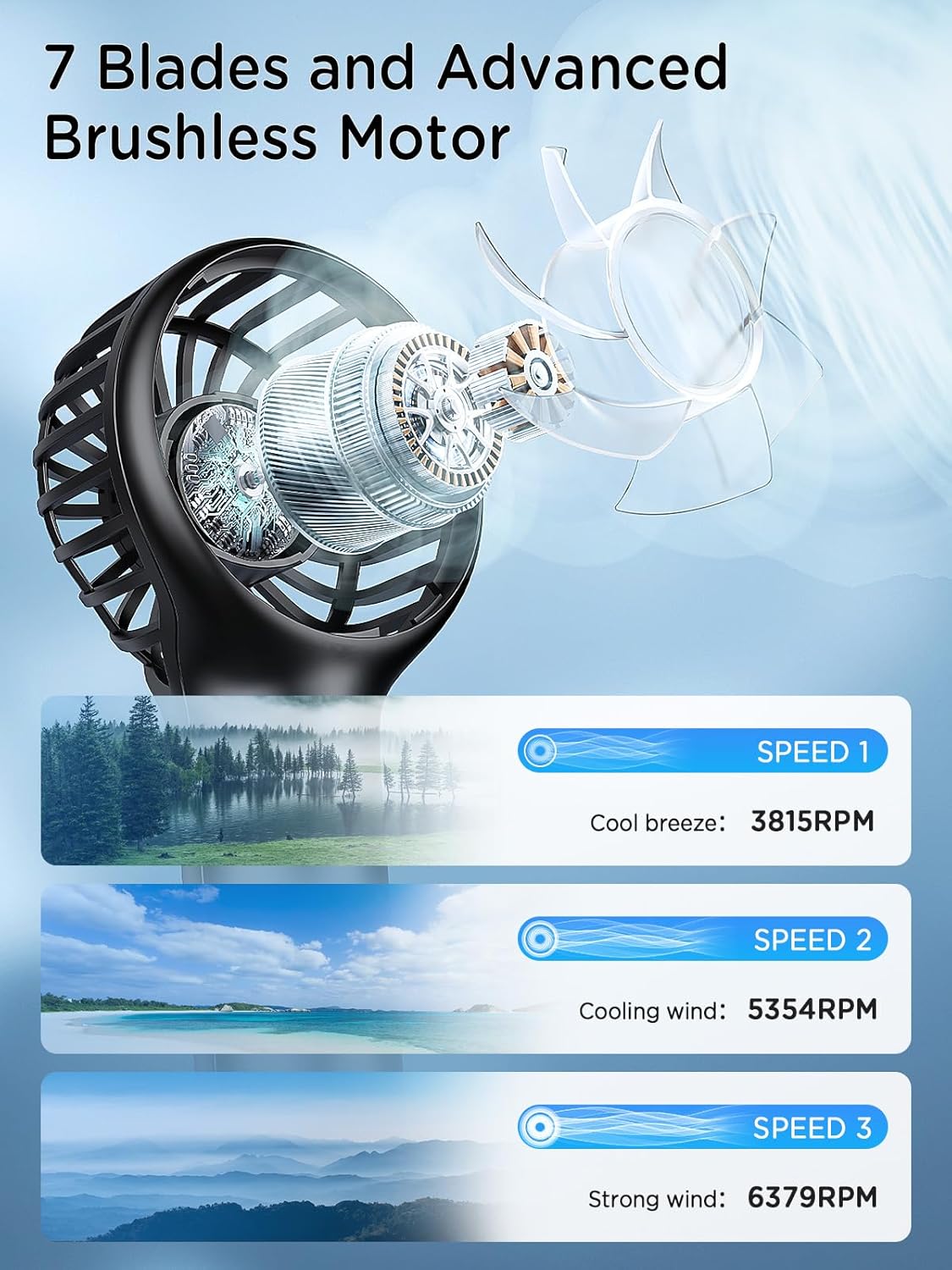
Image: Diagram illustrating the 7-blade design and advanced brushless motor for strong airflow.

Image: Visual representation of the 2600mAh rechargeable battery providing up to 12 hours of working time.
Setup
1. Charging the Fan
- Locate the USB Type-C charging port on the back of the fan.
- Connect the provided USB Type-C cable to the fan's charging port.
- Connect the other end of the USB cable to a compatible power source (e.g., USB adapter, power bank, laptop, car charger).
- The charging indicator light will illuminate during charging and turn off when fully charged. A full charge typically takes 2-3 hours.

Image: The fan's Type-C charging port connected to a power source.
2. Attaching the Lanyard
- Thread the thin loop of the lanyard through the small hole at the bottom of the fan handle.
- Pass the thicker part of the lanyard through the loop you just created and pull gently to secure it.
3. Using the Foldable Stand
The fan's handle is designed to fold, allowing it to stand upright on a flat surface for hands-free operation. Simply fold the handle at the hinge until the fan head is angled as desired.
Operating Instructions
1. Power On/Off
- To turn on the fan, press the power button located on the handle. It will start at Speed 1 (low).
- To turn off the fan, cycle through all speeds until the fan powers down, or press and hold the power button for a few seconds.
2. Adjusting Fan Speeds
- Press the power button repeatedly to cycle through the 3 available speeds:
- First press: Speed 1 (Low)
- Second press: Speed 2 (Medium)
- Third press: Speed 3 (High)
- Fourth press: Turns off the fan
Maintenance
Cleaning the Fan Guard
To ensure optimal performance and hygiene, regularly clean the fan guard.
- Ensure the fan is turned off and disconnected from any power source.
- Gently twist the front fan guard counter-clockwise to detach it from the main body.
- Wipe the fan blades and the inside of the guard with a soft, damp cloth. For stubborn dust, a small brush can be used.
- Ensure all parts are completely dry before reattaching the fan guard.
- Align the fan guard with the main body and twist clockwise until it clicks securely into place.

Image: Illustration of detaching the fan guard for easy cleaning.
Troubleshooting
| Problem | Possible Cause | Solution |
|---|---|---|
| Fan does not turn on. | Battery is depleted. | Charge the fan using the provided USB-C cable. |
| Weak airflow. | Fan guard is dirty or blocked. | Clean the fan guard and blades as per maintenance instructions. |
| Fan stops unexpectedly. | Battery is low. | Recharge the fan. |
| Charging not working. | Faulty cable or power source. | Try a different USB-C cable or power adapter. Ensure connections are secure. |
Specifications
| Brand | EasyAcc |
| Model Name | N605 |
| Color | Black |
| Power Source | Battery Powered |
| Battery Capacity | 2600mAh Lithium Polymer |
| Charging Time | 2-3 hours (Type-C) |
| Working Time | 3-12 hours (depending on speed) |
| Number of Speeds | 3 |
| Max Speed | 6379 RPM |
| Noise Level | 5 Decibels |
| Item Weight | 3.2 ounces (approx. 90g) |
| Product Dimensions | 3.15"D x 2"W x 4"H |
| Indoor/Outdoor Usage | Indoor, Outdoor |
Warranty and Support
EasyAcc products come with a standard manufacturer's warranty. For specific warranty details, product support, or any inquiries, please refer to the warranty card included in your package or visit the official EasyAcc website.
You can also contact EasyAcc customer service directly through their official channels for assistance.