
COOCHEER QAXC180822
Instruction Manual
For the COOCHEER 58CC 4-in-1 Gas Powered String Trimmer (Model: QAXC180822)
Introduction
This manual provides essential information for the safe and effective operation, assembly, and maintenance of your COOCHEER 58CC 4-in-1 Gas Powered String Trimmer. Please read this manual thoroughly before initial use and keep it for future reference.

Image: The COOCHEER 58CC 4-in-1 Gas Powered String Trimmer, showcasing the main unit, engine, and various interchangeable trimming heads including a 3-tooth blade, a circular saw blade, and dual line spools, all laid out on a white background with a patch of green grass.
Important Safety Information
WARNING: Always wear appropriate personal protective equipment (PPE) when operating this equipment. This includes, but is not limited to, eye protection (safety glasses or goggles) and ear protection (earmuffs or earplugs).
Ensure all bystanders, especially children and pets, are kept at a safe distance (at least 50 feet/15 meters) from the operating area. Never operate the string trimmer in enclosed spaces, as the exhaust fumes contain carbon monoxide, which can be fatal. Always operate in a well-ventilated outdoor area.
Carefully follow all assembly instructions provided in this manual to ensure proper and safe operation. Improper assembly can lead to serious injury or damage to the equipment.
Setup and Assembly
The COOCHEER 4-in-1 Gas Powered String Trimmer comes with multiple attachments for various tasks. Proper assembly of the desired trimming head is crucial for safe and effective use.
Attaching Trimmer Heads
This trimmer supports four different trimming heads: a 3T blade for tall and soft weeds, a dual line for small grass, a brush cutter blade, and another dual line for small grass. The following steps illustrate the general procedure for installing a blade-type trimmer head:

Image: A six-step visual guide demonstrating the installation of a trimmer head blade. Steps include disassembling the screw, fixing the shaft and aligning holes, installing the blade, putting on the washer, putting on the cover, and tightening the screw.
- Disassemble the screw: Use the provided tool to remove the retaining screw from the trimmer head shaft.
- Fix shaft and align holes: Ensure the shaft is stable and align the mounting holes for the blade.
- Install the blade: Carefully place the desired blade (e.g., 3T blade or circular saw blade) onto the shaft, ensuring it sits flush.
- Put on the washer: Place the washer over the blade and onto the shaft.
- Put on the cover: Position the protective cover over the washer and blade.
- Tighten the screw: Securely tighten the retaining screw to hold all components in place.
For dual line spool installation, refer to the specific instructions provided with the spool attachment, as the process may vary slightly.

Image: A visual representation of the 4-in-1 functionality, showing how different attachments like the brush cutter, blade for dense grass, and dual line spools are attached to the trimmer head.
Operating Instructions
Before starting, ensure the fuel tank is filled with the correct fuel mixture (gasoline and 2-stroke oil as per engine specifications) and the oil bubble is primed.
Starting Procedure

Image: A seven-step visual guide demonstrating the starting procedure for the gas-powered trimmer. Steps include turning on the ignition, adding fuel, squeezing the oil bubble, pushing the damper rod, pulling the starting cord, and repeating the pull if necessary.
- Turn on the ignition switch: Locate and switch the ignition to the "ON" position.
- Add gasoline and engine oil: Ensure the fuel tank contains the proper mixture.
- Squeeze the oil bubble: Press the primer bulb several times until the oil bubble is filled with fuel.
- Push the damper rod up: Engage the choke (damper rod) for cold starts.
- Pull the starting cord gently: Slowly pull the starter cord until resistance is felt, then give a firm, quick pull.
- Pull the cord twice quickly after feeling the force: If the engine does not start on the first pull, repeat the firm pull.
- Push the damper rod down when hearing the ignition sound, and then repeatedly operate step 5 three times: Once the engine attempts to start or "pops," disengage the choke and continue pulling the starter cord until the engine runs smoothly.
General Operation
The trimmer features a U-handle with anti-slip grips for easy operation and control. An adjustable shoulder strap is included to provide maximum comfort and reduce fatigue during extended use, allowing for proper weight distribution.
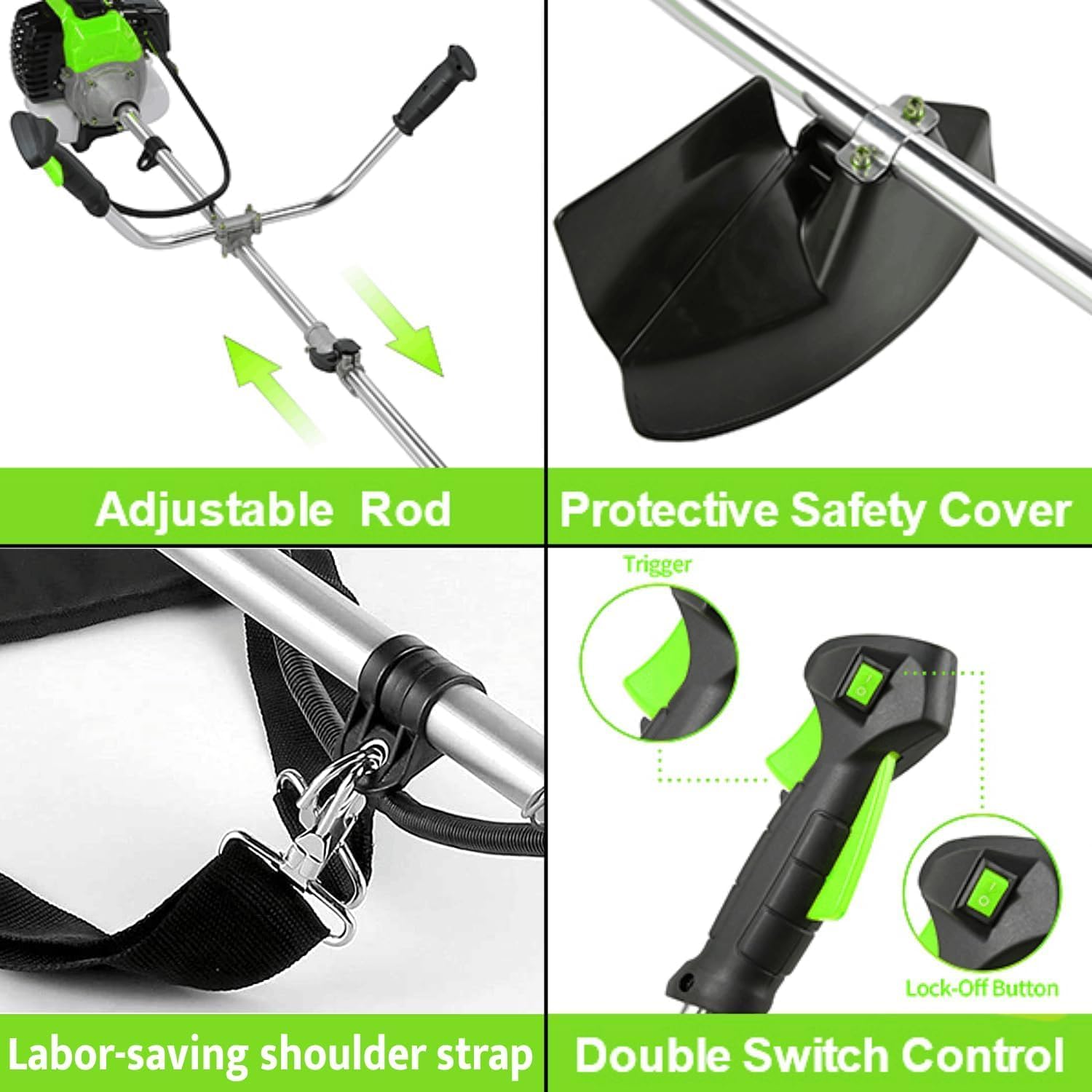
Image: Detailed views of key features: the adjustable rod for length customization, the protective safety cover for user safety, the labor-saving shoulder strap for comfortable operation, and the double switch control for enhanced safety and ease of use.
The 58CC powerful engine ensures efficient cutting for various types of vegetation, from lawn grass to heavy bush.

Image: A triptych showing the trimmer in action, effectively cutting through dense weeds, maintaining a neat lawn, and clearing tall, thick grass, illustrating its powerful performance across various vegetation types.
Watch this video for a visual guide on the product's features and operation:
Video: An official product video demonstrating the COOCHEER 58CC Gas Powered Weed Eater, highlighting its 4-in-1 trimming heads (3T blades for dense grass, round saw blades for heavy bush, and dual line for lawn grass), the 58CC powerful engine, U-handle with anti-slip for easy operation, and adjustable shoulder strap for maximum comfort. The video provides a comprehensive overview of the product's capabilities and ergonomic design.
Maintenance
Regular maintenance ensures the longevity and optimal performance of your string trimmer. Always disconnect the spark plug wire before performing any maintenance to prevent accidental starting.
- Clean after each use: Remove grass, dirt, and debris from the cutting head, engine, and air vents.
- Check cutting attachments: Inspect blades and lines for wear, damage, or dullness. Replace as needed.
- Inspect air filter: Clean or replace the air filter regularly to ensure proper engine performance.
- Check spark plug: Inspect the spark plug for wear and proper gap. Replace annually or as needed.
- Fuel system: Drain fuel from the tank if storing for extended periods to prevent fuel degradation.
- Lubrication: Refer to the full manual for specific lubrication points and schedules.
Troubleshooting
If you encounter issues with your trimmer, consult the following common troubleshooting tips. For more complex problems, contact customer support or a qualified service technician.
| Problem | Possible Cause | Solution |
|---|---|---|
| Engine won't start | No fuel, stale fuel, clogged fuel filter, fouled spark plug, incorrect starting procedure. | Check fuel level and freshness, clean/replace fuel filter, clean/replace spark plug, review starting steps. |
| Engine runs poorly/lacks power | Dirty air filter, incorrect fuel mixture, dull cutting attachment. | Clean air filter, ensure correct fuel/oil ratio, sharpen/replace cutting attachment. |
| Excessive vibration | Damaged or unbalanced blade, loose components. | Inspect blade for damage and replace if necessary, tighten all fasteners. |
Specifications
| Feature | Detail |
|---|---|
| Brand | COOCHEER |
| Power Source | Gas Powered |
| Color | green58CC |
| Item Weight | 14.7 Pounds |
| Cutting Width | 19 Inches |
| Product Dimensions | 73"L x 10"W |
| Speed | 9300 RPM |
| Assembly Required | Yes |
| Model Number | QAXC180822 |

Image: A detailed diagram illustrating the key dimensions of the trimmer, including the length of the shaft (62.2 inches / 158 cm) and the engine/handle assembly dimensions.
Warranty and Support
For detailed warranty information, product registration, or technical support, please refer to the full product manual included in your packaging or visit the official COOCHEER website. Keep your proof of purchase for warranty claims.
You can visit the COOCHEER Store on Amazon for more information and products.
Ask a question about this manual
Ask about setup, troubleshooting, compatibility, parts, safety, or missing instructions. Manuals+ will review the question and use this page’s manual context to help answer it.