
1. Product Overview
The treewell Motion Sensor Outdoor Wall Light (Model TOLM01A) is designed to provide efficient and secure outdoor lighting. It features a modern design, durable construction, and intelligent motion and dusk-to-dawn sensing capabilities with multiple operating modes.

Image 1.1: treewell Motion Sensor Outdoor Wall Light
Key Features:
- Integrated Sensors: Equipped with a PIR motion sensor and a dusk-to-dawn sensor for automatic operation.
- Multiple Lighting Modes: Offers PC Mode (Dusk to Dawn), Auto Mode, and Auto+ Mode for versatile lighting control.
- Adjustable Settings: Customize motion detection time delay (20s-180s), dim light brightness (20%-50% in Auto+ Mode), and sensing distance (10-40 feet).
- Wide Detection Angle: 140° detection angle for comprehensive coverage.
- Durable Construction: Made from heavy-duty aluminum and solid clear glass, designed to be waterproof, stormproof, snowproof, and sunproof.
- Included Bulb: Comes with an ST64 LED Dimmable Bulb (6W, 2700K warm white, 700 lumens) with a lifespan of over 20,000 hours.
2. Specifications
| Attribute | Detail |
|---|---|
| Brand | treewell |
| Model Number | TOLM01A |
| Dimensions | 20L x 19W x 34H Centimetres (approx. 7.9L x 7.5W x 13.4H inches) |
| Weight | 1.94 kg (approx. 4.28 lbs) |
| Material | Aluminum, Clear Tempered Glass |
| Color | Black |
| Power Source | Corded Electric |
| Bulb Type (Included) | ST64 LED Dimmable Bulb (6W, 2700K, 700 Lumens) |
| Motion Sensor Detection Angle | 140° |
| Motion Sensor Detection Range | 10-40 feet (adjustable) |
| Operating Modes | PC Mode (Dusk to Dawn), Auto Mode, Auto+ Mode |
| Weather Resistance | Waterproof, Stormproof, Snowproof, Sunproof |

Image 2.1: Product Dimensions and Components
3. Installation Instructions
Safety First: Before beginning installation, ensure the power supply to the installation area is turned OFF at the circuit breaker. If you are unsure about electrical wiring, consult a qualified electrician.
- Prepare the Mounting Surface: Ensure the wall surface is clean, dry, and structurally sound to support the fixture.
- Mount the Universal Plate: Attach the universal mounting plate to the electrical junction box on your wall using the provided screws. Ensure it is securely fastened.
- Connect Wiring:
- Connect the ground wire (usually green or bare copper) from the fixture to the ground wire from the junction box.
- Connect the white wire (neutral) from the fixture to the white wire from the junction box.
- Connect the black wire (live) from the fixture to the black wire from the junction box.
- Secure all connections with wire nuts and ensure no bare wires are exposed.
- Attach the Fixture: Carefully align the fixture with the mounting plate and secure it using the provided screws or nuts. Ensure the fixture is flush against the wall and stable.
- Install the Bulb: Screw the included ST64 LED bulb into the E26 socket. Do not overtighten.
- Restore Power: Once the fixture is securely installed and the bulb is in place, turn the power supply back ON at the circuit breaker.
For detailed visual instructions, refer to the diagrams provided in the product packaging.
4. Operating Modes and Adjustments
The treewell Motion Sensor Outdoor Wall Light features three distinct operating modes and adjustable settings for customization. The control panel for these adjustments is located on the fixture, typically near the motion sensor.

Image 4.1: Control Panel for Mode and Sensor Adjustments
4.1. Selecting Operating Modes
Use the slide switch on the control panel to select one of the three modes:
- PC Mode (Dusk to Dawn):
In this mode, the light automatically turns OFF during the daytime and turns ON at night. Motion detection is inactive. This mode provides continuous illumination throughout the night.

Image 4.2: PC Mode (Dusk to Dawn) Operation
- Auto Mode:
The light remains OFF during the daytime. At night, it will automatically turn ON to 100% brightness when motion is detected. After a set time (adjustable), if no further motion is detected, the light will turn OFF.
- Auto+ Mode:
The light remains OFF during the daytime. At night, it will automatically turn ON at a low, adjustable brightness (20%-50%). When motion is detected, the light will switch to 100% brightness. After a set time (adjustable) without motion, it will return to the dim light setting.
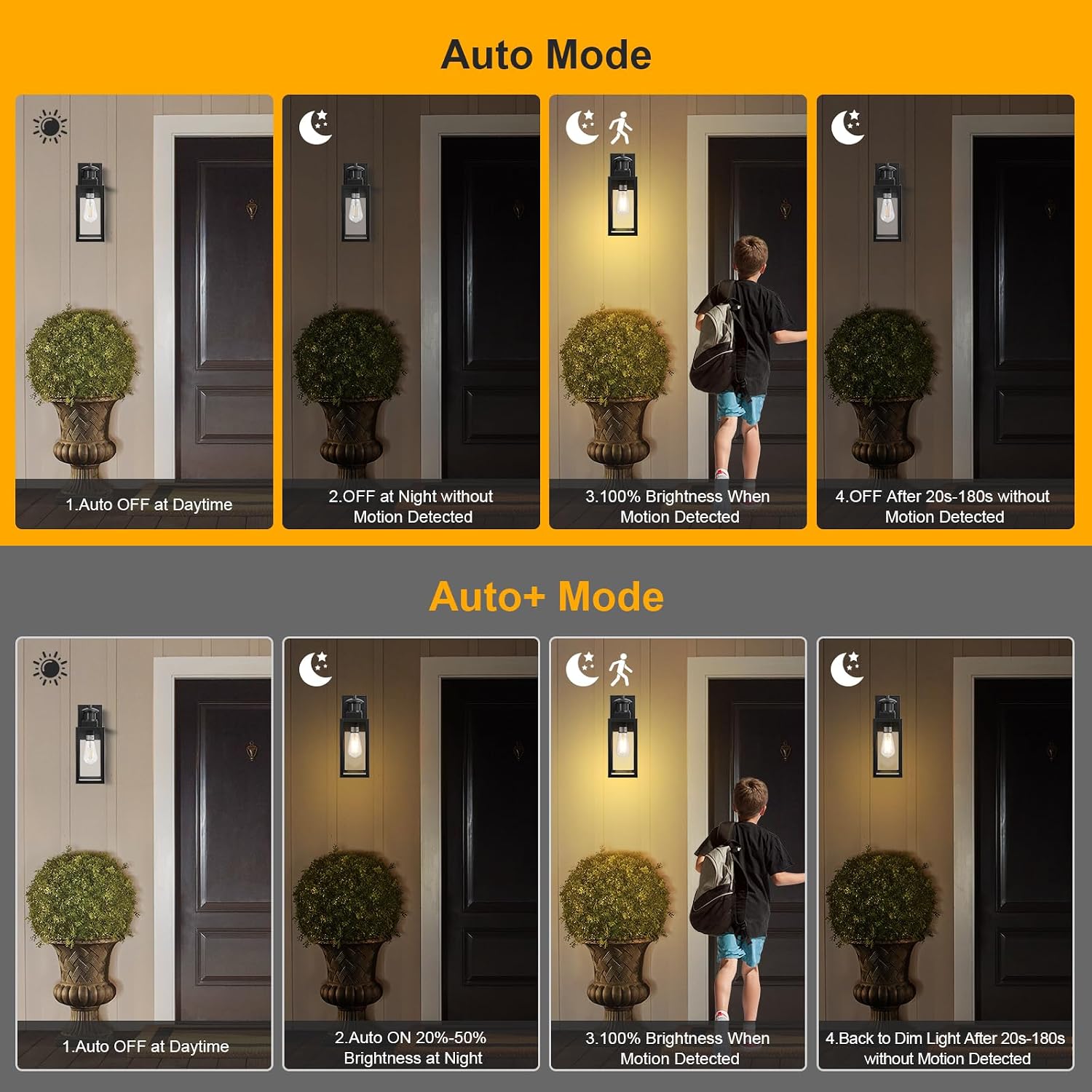
Image 4.3: Auto Mode and Auto+ Mode Operations
4.2. Adjusting Sensor Settings
The control panel includes three dials for fine-tuning the motion sensor's performance:
- Low Level (Only for Auto+ Mode): Adjusts the dim brightness level from 20% to 50% when in Auto+ Mode. Turn the dial to increase or decrease the dim light intensity.
- Time: Sets the duration the light stays at 100% brightness after motion is detected. This is adjustable from 20 seconds to 180 seconds. Turn the dial to select the desired time.
- Sens (Sensitivity): Controls the motion sensor's detection range. This is adjustable from 10 feet to 40 feet. Turn the dial to increase or decrease the sensing distance.

Image 4.4: Motion Sensor Detection Range and Angle
5. Maintenance
Regular maintenance ensures optimal performance and longevity of your treewell outdoor light.
- Cleaning: Periodically wipe the fixture with a soft, damp cloth to remove dust, dirt, and debris. Avoid using abrasive cleaners or solvents, as these can damage the finish or glass.
- Glass Care: Clean the clear tempered glass panels gently to maintain light output and clarity.
- Bulb Replacement: The included ST64 LED bulb has a long lifespan. If replacement is needed, ensure the power is OFF before unscrewing the old bulb and installing a new E26 base LED bulb. For optimal performance, use a dimmable LED bulb.
- Sensor Area: Keep the motion sensor lens clear of obstructions (e.g., spiderwebs, leaves) to ensure accurate detection.
- Weather Resistance: While designed for all-weather use, occasional inspection for any signs of wear or damage from extreme weather conditions is recommended.

Image 5.1: All-Weather Resistant Design
6. Troubleshooting
If you encounter issues with your treewell Motion Sensor Outdoor Wall Light, refer to the following common troubleshooting steps:
| Problem | Possible Cause | Solution |
|---|---|---|
| Light does not turn on at night (PC Mode) |
|
|
| Light stays on during the day (PC Mode) |
|
|
| Motion sensor not detecting movement |
|
|
| Light turns on/off too frequently or randomly |
|
|
| Dim light not working (Auto+ Mode) |
|
|
7. Warranty and Support
For warranty information or technical support, please refer to the documentation included with your purchase or contact treewell customer service directly. Keep your purchase receipt as proof of purchase.
Contact Information: Please visit the official treewell website or refer to your product packaging for the most up-to-date customer support contact details.