
Introduction
This manual provides comprehensive instructions for the ALLIMITY replacement remote control, specifically designed for various JTC Smart 4K LED TV models. Please read this manual carefully before using the remote control to ensure proper operation and to maximize its lifespan.
Product Overview
The ALLIMITY replacement remote control offers full functionality, replicating all features of your original remote. It requires no programming or complex setup, making it ready to use right out of the box. Its ergonomic design ensures comfortable handling and stable performance.
Compatible TV Models:
- DVX3
- LE-215M1
- G001-4032C
- DLE-315M1
- DLE-315M1D
- DLE-315MIS-D
- DLE-395M1
- DLE-500M1

Image 1: Front view of the ALLIMITY replacement remote control. This image displays the full layout of buttons, including power, number keys, navigation, volume, channel, and media controls.

Image 2: Angled view of the ALLIMITY replacement remote control. This perspective highlights the ergonomic shape and button placement from a side-front angle.
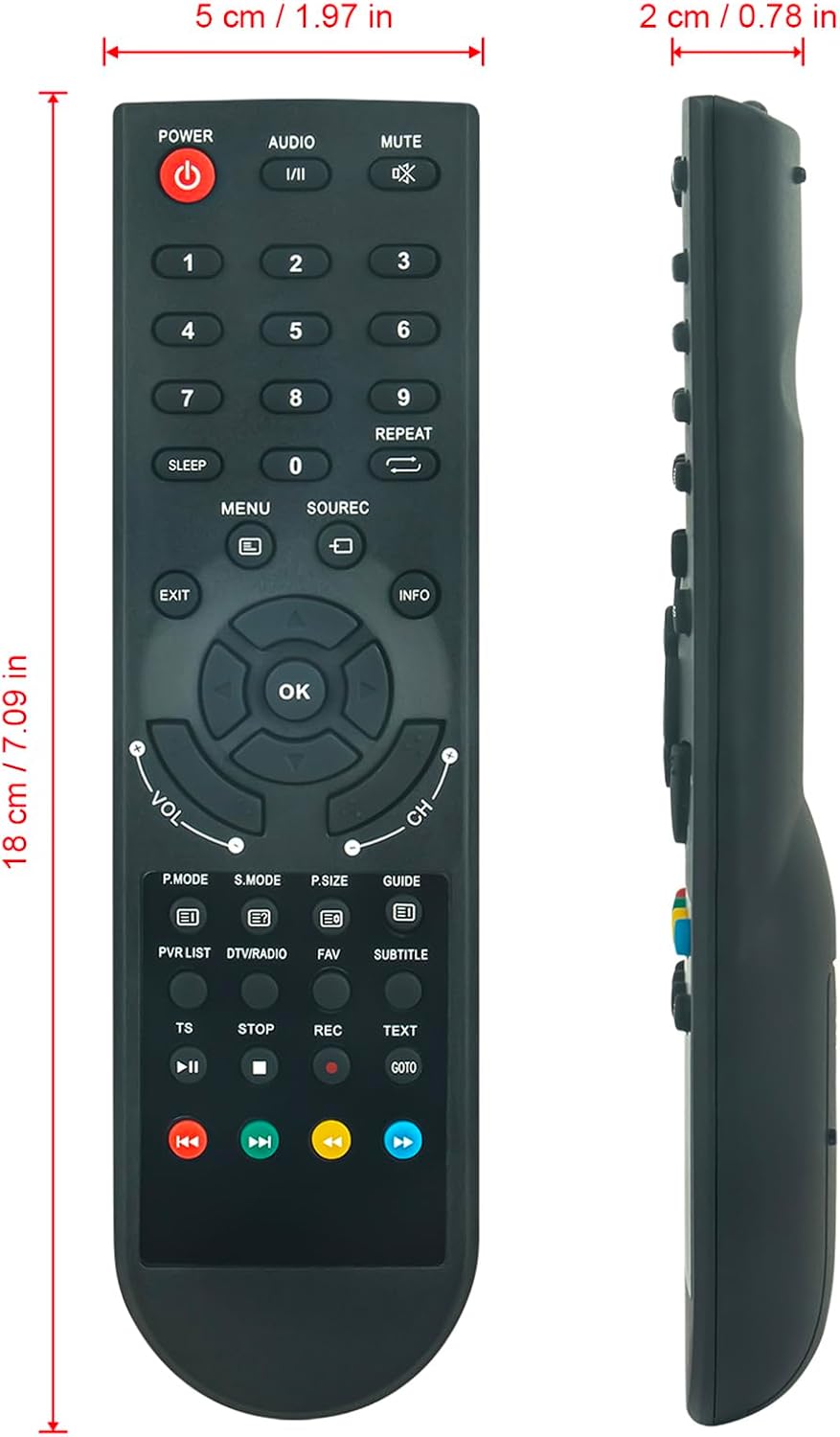
Image 3: Dimensions of the ALLIMITY replacement remote control. This image shows the remote's length (18 cm / 7.09 in), width (5 cm / 1.97 in), and thickness (2 cm / 0.78 in), providing a clear understanding of its physical size.
Setup
1. Battery Installation
The remote control requires two AAA batteries (not included).
- Open the battery compartment cover on the back of the remote control.
- Insert two AAA batteries, ensuring correct polarity (+ and -).
- Close the battery compartment cover securely.
Note: Ensure batteries are inserted correctly. Incorrect polarity can damage the remote control.
Operating Instructions
The ALLIMITY replacement remote control is designed to mimic the functions of your original JTC TV remote. Below are common button functions:
Key Functions:
- POWER (Red Button): Turns the TV on or off.
- AUDIO: Selects audio tracks or modes.
- MUTE: Mutes or unmutes the TV sound.
- Number Buttons (0-9): Directly selects channels or inputs numerical values.
- REPEAT: Repeats the current media playback.
- SLEEP: Sets the sleep timer.
- MENU: Accesses the TV's main menu.
- SOURCE/REC: Selects input sources (HDMI, AV, etc.) or initiates recording.
- EXIT: Exits the current menu or function.
- INFO: Displays information about the current program or input.
- Navigation Pad (Up, Down, Left, Right, OK): Navigates through menus and confirms selections.
- VOL +/-: Adjusts the volume level.
- CH +/-: Changes channels.
- P.MODE (Picture Mode): Selects picture presets.
- S.MODE (Sound Mode): Selects sound presets.
- P.SIZE (Picture Size): Adjusts the aspect ratio.
- GUIDE: Accesses the Electronic Program Guide (EPG).
- PVR LIST: Accesses the Personal Video Recorder list.
- DTV/RADIO: Switches between digital TV and radio modes.
- FAV (Favorites): Accesses favorite channel lists.
- SUBTITLE: Toggles subtitles on or off.
- TS (Time Shift): Activates time shift function.
- STOP: Stops media playback.
- REC (Record): Starts recording.
- TEXT: Accesses teletext.
- GOTO: Jumps to a specific time in media playback.
- Media Control Buttons (Rewind, Play/Pause, Fast Forward, Previous, Next): Controls media playback.
Maintenance
To ensure optimal performance and longevity of your remote control:
- Cleaning: Wipe the remote control with a soft, dry cloth. Do not use liquid cleaners or abrasive materials.
- Battery Replacement: Replace batteries when the remote's response becomes sluggish or stops working. Remove batteries if the remote will not be used for an extended period to prevent leakage.
- Storage: Store the remote control in a cool, dry place, away from direct sunlight and extreme temperatures.
- Avoid Drops: Protect the remote from physical impact.
Troubleshooting
If your remote control is not functioning correctly, try the following:
- No Response:
- Check if the batteries are inserted correctly with the correct polarity.
- Replace old batteries with new ones.
- Ensure there are no obstructions between the remote control and the TV's infrared sensor.
- Make sure you are within the effective operating range (up to 10 meters).
- Intermittent Response:
- This could indicate low battery power. Replace the batteries.
- Ensure the remote's infrared emitter is clean and unobstructed.
- Remote Controls Other Devices:
- This remote is specifically designed for the listed JTC TV models. If it affects other devices, ensure the TV is the only device in its line of sight or check for any universal remote settings on your TV (though this remote is not programmable).
Specifications
| Feature | Detail |
|---|---|
| Brand | ALLIMITY |
| Model Number | MM-DVX3-NP |
| Connectivity Technology | Infrared |
| Special Feature | Ergonomic Design |
| Maximum Range | 10 Meters |
| Item Weight | 59 Grams |
| Compatible TV Models | DVX3, LE-215M1, G001-4032C, DLE-315M1, DLE-315M1D, DLE-315MIS-D, DLE-395M1, DLE-500M1 |
Warranty and Support
Information regarding product warranty and dedicated support channels is not provided in the product details. Please refer to your purchase documentation or contact your retailer for details.