
SYNLETT QF29
SYNLETT QF29 Wireless Motion Sensor Instruction Manual
Model: QF29 | Brand: SYNLETT
Introduction
This instruction manual provides comprehensive guidance for the setup, operation, and maintenance of the SYNLETT QF29 Wireless Motion Sensor. This device is designed as an accessory for fall prevention and elderly monitoring, specifically intended to be paired with SYNLETT M091B or SP30 Pagers. It functions by detecting movement and sending a signal to the paired pager, alerting caregivers to activity.
Product Overview
The SYNLETT QF29 Wireless Motion Sensor is a compact and versatile device for remote monitoring. It is designed to enhance caregiver freedom by providing silent alerts when movement is detected in a monitored area, such as by a bed or doorway. The sensor features a rotatable bracket for flexible installation and operates wirelessly, transmitting signals to a compatible SYNLETT pager.
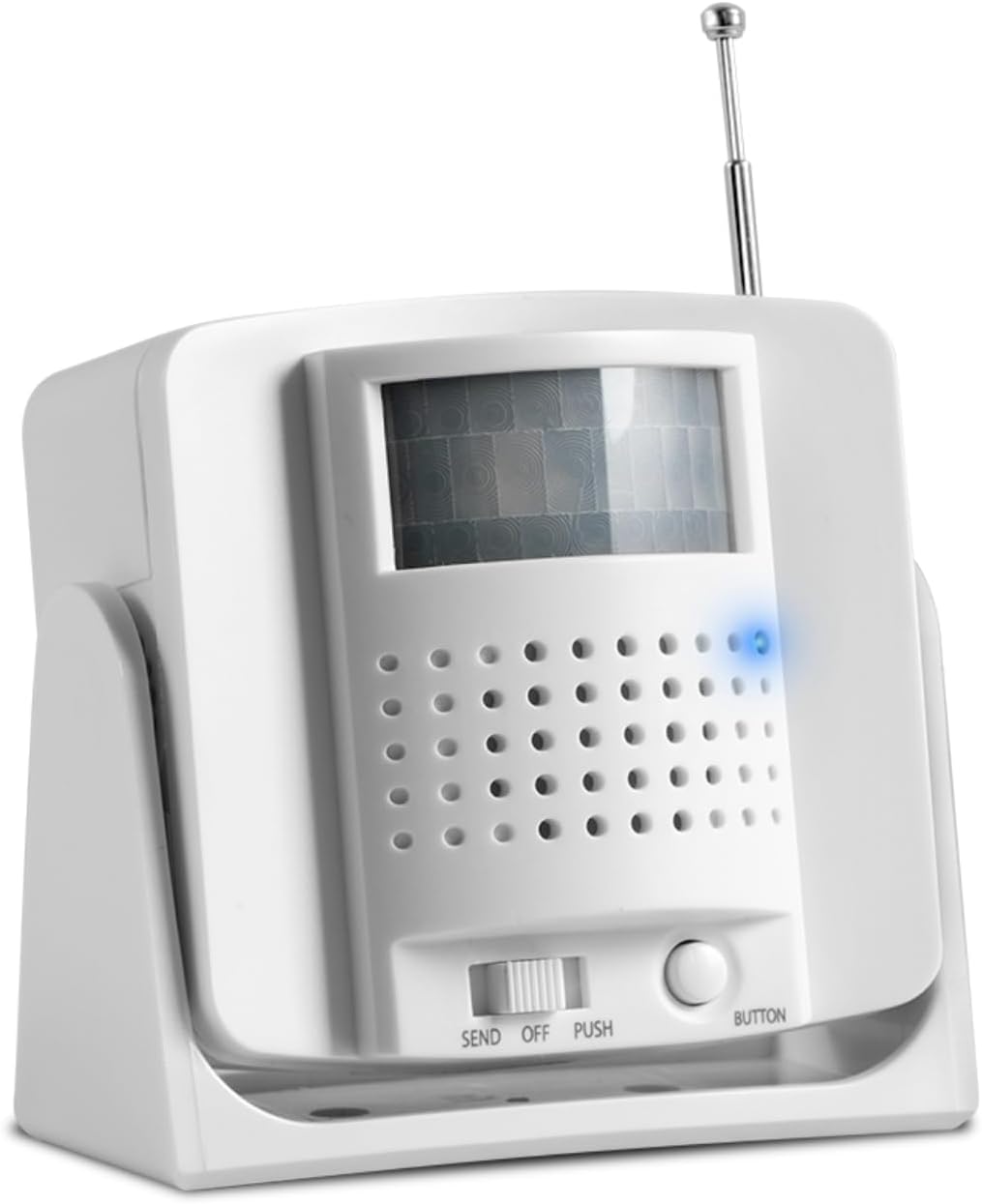
Figure 1: Front view of the SYNLETT QF29 Wireless Motion Sensor, showing the motion detection window and control buttons.
Key features include:
- Wireless Operation: Transmits signals to compatible SYNLETT pagers (M091B or SP30).
- Flexible Placement: Can be wall-mounted with screws, attached with adhesive tape, or placed on a flat surface.
- Adjustable Sensitivity: Allows for fine-tuning of motion detection.
- Long Range: Operates up to 300 feet in open areas, providing caregivers with freedom of movement.
- Battery Powered: Uses 3 AA batteries (included).
Safety Information
Please read and understand all safety instructions before using the SYNLETT QF29 Wireless Motion Sensor. Failure to follow these instructions may result in injury or damage to the device.
- Do not expose the device to water or excessive moisture.
- Do not attempt to open or repair the device. Refer all servicing to qualified personnel.
- Use only the specified battery type (3 AA Alkaline batteries).
- Dispose of used batteries according to local regulations.
- Keep the device out of reach of children and pets.
- Ensure the device is placed in a stable location to prevent accidental falls.
- Environmental factors such as concrete or brick walls and heavy electronic equipment may affect the signal range.
Package Contents
Verify that all items listed below are present in your package:
- 1 x SYNLETT QF29 Wireless Motion Sensor
- 3 x AA Alkaline Batteries (pre-installed or included separately)
- 2 x Screws for wall mounting
- 2 x Anchors for wall mounting
- 2 x Adhesive Tapes for surface attachment
- 1 x User Manual (this document)

Figure 2: Contents of the SYNLETT QF29 Wireless Motion Sensor package, including the sensor, batteries, screws, anchors, and adhesive tape.
Setup
Follow these steps to set up your SYNLETT QF29 Wireless Motion Sensor:
- Battery Installation:
Locate the battery compartment on the back of the motion sensor. Insert 3 AA Alkaline batteries, ensuring correct polarity (+/-). The batteries are typically included.
- Mounting Options:
The QF29 sensor offers flexible mounting options:
- Wall Mounting (Screws): Use the provided screws and anchors to securely mount the sensor to a wall. The rotatable bracket allows for optimal positioning.
- Adhesive Tape: For a less permanent solution, use the included adhesive tapes to attach the sensor to a clean, dry surface.
- Surface Placement: The sensor can also be placed directly on a flat surface, such as a bedside table or shelf.

Figure 3: Diagram illustrating the various mounting options (screw mounting, adhesive patch, surface placement) and key features like the antenna and sensitivity adjustment.
- Pairing with Pager:
The SYNLETT QF29 Motion Sensor MUST be paired with a compatible SYNLETT M091B or SP30 Pager to function. It is NOT compatible with the SYNLETT wireless call system - CMU.
Refer to your M091B or SP30 Pager's instruction manual for specific pairing procedures. Generally, this involves setting the pager to a pairing mode and then activating the sensor's "SEND" function or button to transmit a pairing signal.

Figure 4: Visual representation of the SYNLETT QF29 Motion Sensor's compatibility, showing it pairs with SYNLETT M091B and SP30 pagers, but not with the CMU system.

Figure 5: Detailed compatibility chart showing the SYNLETT Caregiver Pager M091B and Companion Pager SP30 are compatible with Motion Sensor QF029 and Call Button F100.
- Positioning for Optimal Detection:
Place the motion sensor in an area where it can effectively detect movement, such as beside a bed to monitor bed exits or near a doorway. Ensure the detection field is clear of obstructions. The rotatable bracket allows for precise aiming of the sensor's field of view.

Figure 6: Illustration demonstrating the wireless range of the motion sensor and its typical placement near a bed to detect movement and alert a caregiver.
Operating Instructions
Once the motion sensor is set up and paired with your pager, it operates automatically to detect movement.
- Motion Detection: The sensor continuously monitors its detection field. When movement is detected within this field, it sends a wireless signal to the paired SYNLETT M091B or SP30 Pager.
- Pager Alert: Upon receiving a signal, the pager will activate its alert (audible alarm, vibration, or visual indicator, depending on the pager model and settings), notifying the caregiver of activity. The motion sensor itself is silent to avoid disturbing the resident.
- "SEND" and "PUSH" Functions:
- SEND Mode: This mode is typically used for transmitting a signal upon movement detection.
- PUSH Button: The "BUTTON" or "PUSH" function allows for manual transmission of a signal to the pager by pressing the button on the sensor. This can be used for testing or manual alerts.
- Adjusting Sensitivity: The motion sensor may have an adjustment for sensitivity (refer to Figure 3). This allows you to fine-tune how easily the sensor triggers, reducing false alarms or ensuring detection of subtle movements.

Figure 7: The motion sensor positioned to detect a bed exit, sending a wireless signal to the caregiver's pager, enabling timely intervention.
Maintenance
Proper maintenance ensures the longevity and reliable operation of your motion sensor.
- Battery Replacement: When the batteries are low, the sensor's indicator light (if present) may signal this, or the pager may stop receiving signals. Replace all 3 AA batteries with new alkaline batteries simultaneously.
- Cleaning: Wipe the exterior of the sensor with a soft, dry cloth. Do not use abrasive cleaners, solvents, or immerse the device in water. Ensure the motion detection window is clean and free of dust or smudges for optimal performance.
- Storage: If storing the device for an extended period, remove the batteries to prevent leakage. Store in a cool, dry place.
Troubleshooting
If you experience issues with your SYNLETT QF29 Wireless Motion Sensor, refer to the following common problems and solutions:
| Problem | Possible Cause | Solution |
|---|---|---|
| Sensor not triggering pager. |
|
|
| False alarms. |
|
|
| Pager not receiving signal. |
|
|
If the problem persists after attempting these solutions, please contact SYNLETT customer support.
Specifications
| Brand | SYNLETT |
| Model Number | QF29 |
| Color | White or Gray |
| Power Source | Battery Powered |
| Battery Type | 3 AA Alkaline batteries (included) |
| Maximum Range | 300 Feet (in open areas) |
| Mounting Type | Wall Mount, Surface Placement |
| Compatible Devices | SYNLETT simple caregiver pager M091B, SP30 Pager |
| Item Weight | 6.7 ounces |
| Product Dimensions | 3.25 x 1.78 x 3 inches |
| Operating Temperature | 6E+1 Degrees Fahrenheit (approx. 61°F) |
| UPC | 768561405275 |
Warranty Information
Specific warranty terms and conditions for the SYNLETT QF29 Wireless Motion Sensor are provided by the manufacturer. Please refer to the warranty card included with your product or visit the official SYNLETT website for detailed information regarding warranty coverage, duration, and claims procedures.
Customer Support
For technical assistance, troubleshooting, or any inquiries regarding your SYNLETT QF29 Wireless Motion Sensor, please contact SYNLETT customer support. You can find contact information on the official SYNLETT website or through your purchase platform.
Visit the official SYNLETT Store for more products and information: SYNLETT Store on Amazon
Ask a question about this manual
Ask about setup, troubleshooting, compatibility, parts, safety, or missing instructions. Manuals+ will review the question and use this page’s manual context to help answer it.