
Introduction
Thank you for choosing the Lichico 2-in-1 Portable Folding Treadmill. This manual provides essential information for the safe and effective operation, maintenance, and troubleshooting of your new fitness equipment. Please read this manual thoroughly before initial use and keep it for future reference.
This versatile treadmill is designed to seamlessly integrate into your daily routine, offering both a walking mode for under-desk use and a running mode for more intense workouts. Its advanced brushless motor ensures quiet performance, while the dual shock absorption system provides a comfortable and safe experience.
Setup
Your Lichico treadmill is designed for minimal assembly. It arrives largely pre-assembled, requiring only a few simple steps to prepare for use.
Unpacking and Placement
Carefully remove all components from the packaging. Ensure all included components are present: Lichico Treadmill, Safety Key, Remote Control, Detachable Phone Holder, L-wrench, Knob Screw x 2, and User Manual.
Place the treadmill on a flat, stable surface. Ensure there is adequate clear space around the treadmill for safe operation, especially at the rear for emergency dismount.
Handlebar Installation (Optional for Running Mode)
While the treadmill can be used in walking mode with the handlebar folded down, for running mode, the handlebar must be raised and secured. Use the provided knob screws to firmly attach the handlebar in the upright position. Ensure it is stable before use.
Phone Holder Attachment
Attach the detachable phone holder to the handlebar for convenient access to your device during workouts.
Power Connection
Connect the power cord to a grounded electrical outlet. Insert the safety key into its designated slot on the handlebar. The treadmill will not operate without the safety key in place.

Figure 1: The Lichico treadmill in both upright (running) and folded (walking) configurations.
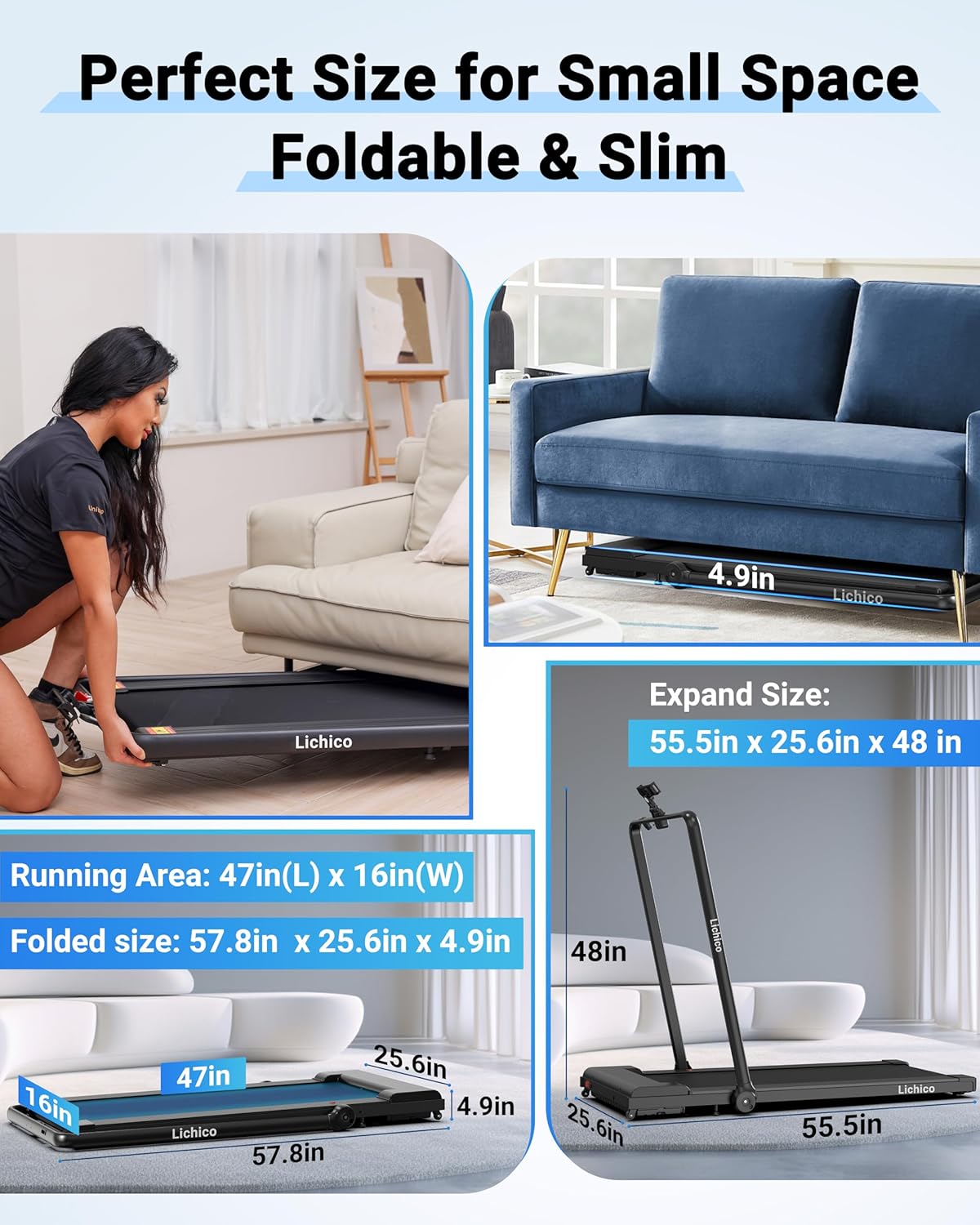
Figure 2: Included components of the Lichico treadmill package.
Operating Instructions
The Lichico treadmill offers two primary modes of operation: walking mode and running mode, controlled via a remote or a smart app.
Walking Mode (Handlebar Down)
In walking mode, the handlebar is folded down, allowing the treadmill to fit conveniently under a desk. Speeds range from 0.5 to 3.7 MPH. This mode is ideal for light activity while working or engaging in other sedentary tasks.
Running Mode (Handlebar Up)
For more intense workouts, raise and secure the handlebar. In running mode, the treadmill supports speeds from 0.5 to 8.7 MPH. This allows for jogging and running exercises.
Controlling Speed and Functions
Use the provided remote control to adjust the speed, start, and stop the treadmill. The remote features intuitive buttons for increasing/decreasing speed and mode selection. Alternatively, you can connect the treadmill to a smart app (if available) to control settings and track your workout data.

Figure 3: Demonstration of walking and running modes.

Figure 4: Remote and App control options.
Brushless Motor Technology
The treadmill is equipped with an advanced 3.0HP brushless motor, ensuring ultra-quiet operation (below 45 dB). This design prevents overheating, offers higher efficiency and precision, is maintenance-free, and boasts a longer lifespan compared to traditional brushed motors.

Figure 5: Benefits of the quiet brushless motor.
Shock Absorption System
The treadmill features a dual shock absorption system, including a suspension shock plate and a TRP cushioning pad. This system enhances comfort and safety, effectively protecting your knees from impact during workouts.

Figure 6: Dual Shock Absorption System.
Maintenance
Regular maintenance ensures the longevity and optimal performance of your Lichico treadmill.
Cleaning
Wipe down the treadmill surface with a damp cloth after each use to remove sweat and dust. Avoid using abrasive cleaners or solvents that could damage the finish.
Belt Lubrication
The running belt requires periodic lubrication to reduce friction and extend its lifespan. Use the provided lubricating oil as instructed in the detailed user manual. Typically, lubrication is needed after a certain number of hours of use or miles covered, depending on usage frequency.
Belt Adjustment
Over time, the running belt may shift or become loose. Refer to the detailed user manual for instructions on how to properly adjust the belt tension and alignment to ensure smooth operation.
Troubleshooting
While specific troubleshooting steps are not detailed in the provided product data, common issues with treadmills often relate to power, belt function, or unusual noises. If you encounter any problems, please check the following:
- Power: Ensure the power cord is securely plugged into a working outlet and the safety key is correctly inserted.
- Belt Issues: If the belt is slipping or not moving smoothly, it may require lubrication or adjustment (refer to the Maintenance section and the full user manual).
- Unusual Noises: Investigate any new or loud noises. This could indicate a need for lubrication, belt adjustment, or a more serious mechanical issue.
For persistent issues or concerns not covered here, please contact Lichico customer support for assistance.
Specifications
| Feature | Detail |
|---|---|
| Brand | Lichico |
| Model Name | AD-4000 Plus |
| Color | Glossy Black |
| Product Dimensions | 57.8"D x 25.6"W x 4.9"H |
| Item Weight | 57 Pounds |
| Material | Alloy Steel |
| Maximum Speed | 8.7 Miles per Hour |
| Minimum Speed | 0.5 Miles per Hour |
| Maximum Horsepower | 3 Horsepower |
| Maximum Weight Recommendation | 265 Pounds |
| Deck Length | 47 Inches |
| Deck Width | 16 Inches |
| Folded Size | 57.8in(L), 25.6in(W), 4.9in(H) |
| Special Feature | Shock Absorbent, Lightweight, Brushless Motor, Foldable, Wheeled |
| Display Type | LED |
| Connectivity Technology | Bluetooth |
| Included Components | Lichico Treadmill, Safety Key, Remote Control, Detachable Phone Holder, L-wrench, Knob Screw x 2, User Manual |
Warranty and Support
Lichico stands behind the quality of its products. Your treadmill comes with a comprehensive two-year quality protection warranty.
For any questions, concerns, or to utilize your warranty, please contact our 24/7 customer service. Our team is dedicated to ensuring your satisfaction and peace of mind.
For more details on warranty terms and conditions, please refer to the last page of your included User Manual or visit the official Lichico store online.
