
Eumspo JPD-HA200
Eumspo Automatic Blood Pressure Monitor User Manual
Model: JPD-HA200
1. Introduction
Thank you for choosing the Eumspo Automatic Blood Pressure Monitor. This device is designed for accurate and convenient measurement of blood pressure and pulse rate at home. It features a large LCD display, 2x99 memory storage for two users, and an arrhythmia detection function.
Please read this manual thoroughly before using the device to ensure correct operation and to obtain the most accurate results. Keep this manual for future reference.
2. Important Safety Information
- Consult your physician before using this device if you have any medical conditions.
- Do not use this device for diagnosis or treatment of any health problem or disease. Always consult a medical professional for diagnosis and treatment.
- Do not adjust medication based on measurement results from this blood pressure monitor. Always follow the advice of your physician.
- This device is intended for adult use only. Keep out of reach of children.
- Avoid strong electromagnetic fields (e.g., mobile phones) near the device during measurement.
- Do not use the device in a moving vehicle.
- Ensure the cuff size is appropriate for your arm circumference (22-42cm / 8.66-16.53 inches).
3. Package Contents
Upon opening the package, please verify that all items listed below are present and undamaged:
- 1x Eumspo Automatic Arm Blood Pressure Monitor
- 1x Upper Arm Cuff (22-42cm / 8.66-16.53 inches)
- 1x Storage Bag
- 1x Instruction Manual
- 1x Quick Guide
- 4x AAA Batteries (non-rechargeable)

4. Product Overview and Setup
4.1 Device Components

The blood pressure monitor consists of the main unit with an LCD display and control buttons, and an upper arm cuff connected via an air tube.
4.2 Power Supply
The monitor supports two power supply modes:
- Battery Power: Insert the included 4 AAA batteries into the battery compartment located on the back of the device. Ensure correct polarity (+/-).
- DC 5V Power: The device can also be powered using a Micro USB B cable (not included) plugged into the DC 5V charging port. This is an alternative to battery power.
Note: The included AAA batteries are not rechargeable. Do not attempt to charge them.

4.3 Initial Setup (Time and User Settings)
Before first use, or after replacing batteries, you may need to set the date and time. Refer to the quick guide or the detailed instruction manual for specific steps on setting the year, month, and time. This ensures accurate recording of measurement nodes.
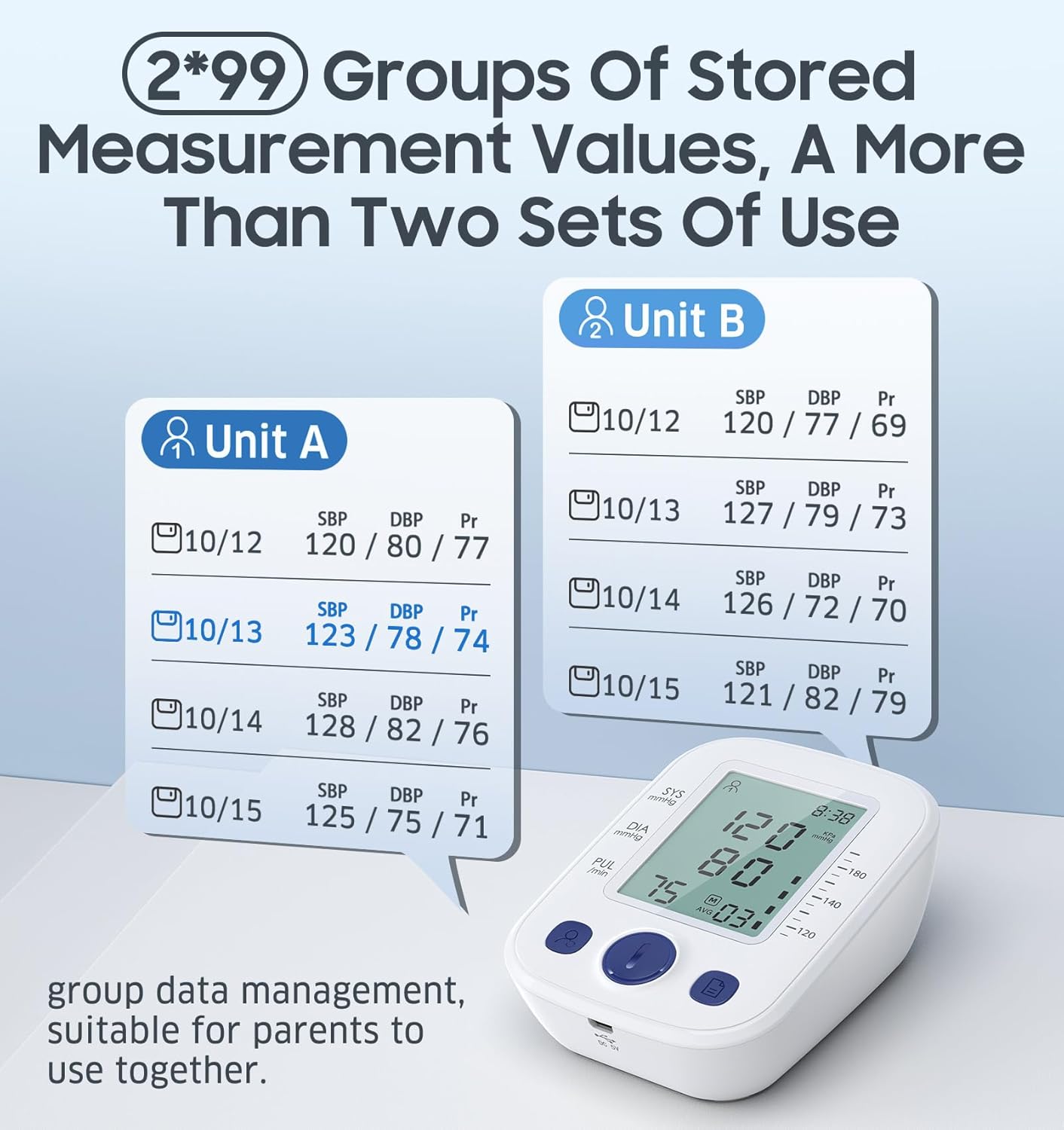
The device supports 2 users (User A and User B), each with 99 memory slots. This allows for individual tracking of readings. Instructions for selecting users and managing memory are detailed in the full manual.
5. Operating Instructions
5.1 Measurement Preparation
For accurate readings, follow these guidelines:
- Rest for at least 5 minutes before measurement.
- Avoid eating, drinking alcohol, smoking, or exercising for 30 minutes prior.
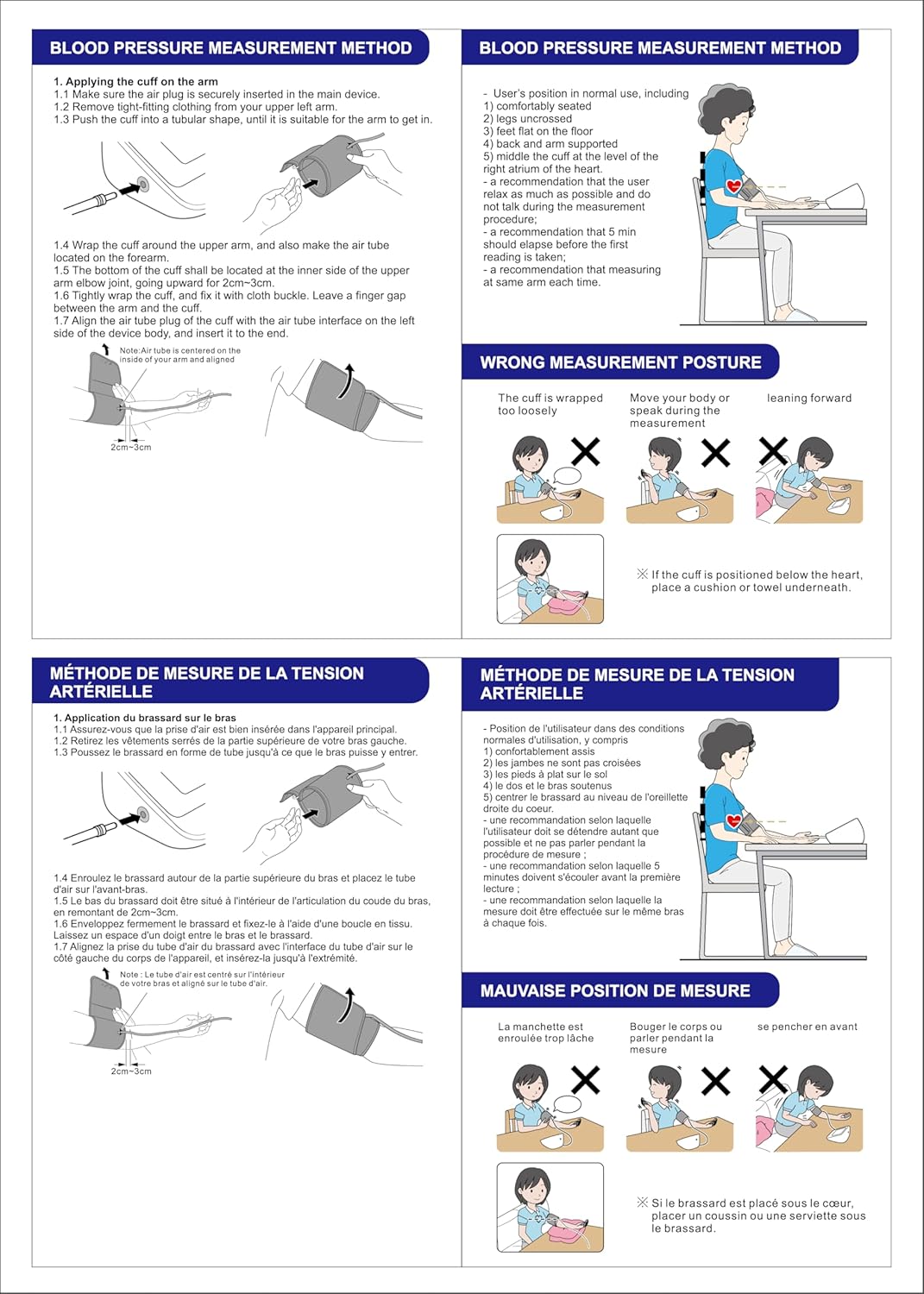
- Sit upright with your back supported, feet flat on the floor, and legs uncrossed.
- Place your arm on a flat surface so the cuff is at heart level.
- Ensure the room temperature is comfortable.
5.2 Applying the Cuff
- Take out the cuff and wear it on your left upper arm. Ensure the air tube is securely inserted into the main device.
- The cuff should wrap around your arm completely.
- Position the cuff 2-3 cm (approximately 1 inch) above your elbow joint.
- Ensure there is enough space for one or two fingers between the cuff and your arm. The cuff should be snug but not too tight.
- The air tube should run along the inside of your arm.
5.3 Taking a Measurement
- Ensure the cuff is correctly applied and you are in the proper measurement posture.
- Press the 'START/STOP' button (usually the large central button) to begin the measurement.
- The cuff will inflate, and the measurement will proceed automatically. Remain still and silent during this process.
- The results (Systolic, Diastolic, and Pulse Rate) will be displayed on the LCD screen within approximately 45 seconds.
- The device will automatically store the reading in the selected user's memory.
5.4 Understanding Your Readings
The display shows three main values:
- SYS (Systolic Pressure): The top number, indicating the pressure in your arteries when your heart beats.
- DIA (Diastolic Pressure): The bottom number, indicating the pressure in your arteries between beats.
- PUL (Pulse Rate): Your heart rate, measured in beats per minute.
The monitor also features an arrhythmia detection function, which will display a specific icon if an irregular heartbeat is detected during measurement. Consult your doctor if this icon appears frequently.
5.5 Memory Function
The device stores up to 99 readings for each of two users (User A and User B). To review past measurements:
- Press the 'Memory' button (often labeled 'M' or with a book icon) to cycle through stored readings.
- You can switch between User A and User B memory by pressing the user selection button (often with a person icon).
6. Maintenance and Storage
- Cleaning: Wipe the monitor and cuff with a soft, dry cloth. Do not use abrasive cleaners or immerse the device in water.
- Storage: Store the device in its storage bag in a cool, dry place, away from direct sunlight, extreme temperatures, and humidity.
- Batteries: Remove batteries if the device will not be used for an extended period to prevent leakage.
- Cuff Care: Do not fold the cuff too tightly or apply excessive force to the air tube.
7. Troubleshooting
| Problem | Possible Cause | Solution |
|---|---|---|
| No display/Device won't turn on | Batteries are dead or incorrectly inserted; Power adapter not connected (if using DC 5V). | Replace batteries, ensuring correct polarity. Check DC 5V connection. |
| Inaccurate readings | Incorrect cuff placement; Movement or talking during measurement; Insufficient rest before measurement; Cuff size incorrect. | Re-apply cuff correctly. Remain still and silent. Rest for 5 minutes. Ensure cuff fits arm circumference (22-42cm). |
| Cuff does not inflate or inflates too little | Air tube disconnected or kinked; Cuff not properly sealed; Air leakage. | Check air tube connection to monitor and cuff. Ensure cuff is wrapped snugly. Inspect cuff for damage. |
| Error message on display | Various internal errors or measurement issues. | Refer to the full instruction manual for specific error codes. Often, turning the device off and on, or re-taking the measurement after resting, resolves the issue. |
8. Specifications
| Feature | Detail |
|---|---|
| Model Number | JPD-HA200 |
| Measurement Method | Oscillometric |
| Cuff Size | 22-42 cm (8.66-16.53 inches) |
| Memory Storage | 2 users x 99 sets of readings |
| Power Supply | 4x AAA Batteries (included) or DC 5V Micro USB B (cable not included) |
| Arrhythmia Detection | Yes |
| Measurement Time | Approx. 45 seconds |
| Manufacturer | LIKELINKS TRADING LIMITED |
| Parcel Dimensions | 16.1 x 12.2 x 8.4 cm; 430 g |
9. Warranty and Support
Eumspo products are manufactured with care and attention to quality. For warranty information, technical support, or service inquiries, please refer to the contact details provided in the quick guide or on the product packaging. Keep your purchase receipt as proof of purchase for warranty claims.
Ask a question about this manual
Ask about setup, troubleshooting, compatibility, parts, safety, or missing instructions. Manuals+ will review the question and use this page’s manual context to help answer it.