
1. Introduction and Overview
This manual provides detailed instructions for the safe and efficient installation, operation, and maintenance of your CREATESTAR 100W LED Outdoor Flood Lights. Please read this manual thoroughly before installation and use, and retain it for future reference. These floodlights are designed for outdoor use, providing bright, warm white illumination for various applications.

Image 1.1: Overview of CREATESTAR 100W LED Flood Light highlighting key features such as 96 lamp beads, 10000 lumens output, 3000K warm white color temperature, IP65 waterproof rating, and a 120-degree beam angle.
Key Features:
- Super Bright Illumination: Each 100W floodlight features 96 LED beads, producing up to 10,000 lumens of 3000K warm white light.
- Wide Beam Angle: A 120° beam angle ensures effective lighting over a large area.
- Adjustable Bracket: The mounting bracket allows for 360° adjustment to direct light precisely where needed.
- Efficient Heat Dissipation: Designed with an ultra-thin aluminum body and PC panel for optimal heat management, extending product lifespan.
- Easy Installation: Includes a 2-meter power cable with a plug and an integrated push-button switch for convenient setup.
- IP65 Waterproof: The light fixture is rated IP65, making it suitable for use in various outdoor weather conditions (rain, sleet, snow).
2. Safety Instructions
To ensure safe operation and prevent damage, please observe the following safety precautions:
- Always disconnect the power supply before attempting any installation, maintenance, or cleaning.
- Ensure the power outlet used is properly grounded and matches the voltage requirements (220V).
- The light fixture itself is IP65 waterproof, but the integrated plug and switch are NOT waterproof. Ensure the plug and switch are protected from direct exposure to water or moisture.
- Do not look directly into the LED light when it is illuminated, as it may cause eye strain or damage.
- Do not attempt to disassemble or modify the floodlight. This will void the warranty and may lead to electrical hazards.
- Keep the floodlight away from flammable materials.
- If the power cable is damaged, it must be replaced by the manufacturer, its service agent, or similarly qualified persons to avoid a hazard.

Image 2.1: Illustration of the IP65 waterproof rating for the floodlight unit, emphasizing that the plug and switch require protection from water.
3. Package Contents
Please check the package for the following items:
- 2 x CREATESTAR 100W LED Flood Lights
- 2 x 2-meter power cables with integrated plug and push-button switch
- Mounting hardware (screws and wall anchors)
- Instruction Manual (this document)
4. Specifications
| Feature | Specification |
|---|---|
| Brand | CREATESTAR |
| Model Number | GQZ-TL100 |
| Power | 100 Watts |
| Luminous Flux | 10,000 lumens |
| Color Temperature | 3000 Kelvin (Warm White) |
| Voltage | 220 Volts |
| Material | Aluminum (body), Polycarbonate (lampshade) |
| Dimensions (L x W x H) | 25 x 13 x 2.5 cm |
| Weight | 800 grams |
| Beam Angle | 120° |
| Waterproof Rating | IP65 (light fixture only) |
| Cable Length | 2 meters |
| Switch Type | Push button |
| Installation Type | Wall mount |
| Special Features | Waterproof, dustproof, anti-glare, shadow-free, efficient heat dissipation |

Image 4.1: Detailed dimensions of the floodlight and a visual guide for the three-step installation process.
5. Setup and Installation
Follow these steps to install your CREATESTAR LED Flood Light:
- Choose Mounting Location: Select a suitable, stable surface for mounting, such as a wall or ceiling. Ensure the location allows for the desired light coverage and that the power cable can reach a protected outlet.
- Mark Drilling Points: Use the floodlight's mounting bracket as a template to mark the positions for drilling holes on the chosen surface.
- Drill Holes: Drill holes at the marked positions. Insert the provided wall anchors into the drilled holes if installing on masonry or drywall.
- Secure Bracket: Align the mounting bracket with the drilled holes and secure it firmly using the provided screws.
- Attach Floodlight: Attach the floodlight unit to the secured bracket. Ensure it is tightly fastened.
- Adjust Angle: Loosen the screws on the side of the bracket to adjust the floodlight's angle (up to 360 degrees) to achieve optimal illumination. Tighten the screws once the desired angle is set.
- Connect Power: Plug the 2-meter power cable into a standard 220V electrical outlet. Remember to protect the plug and switch from water exposure.
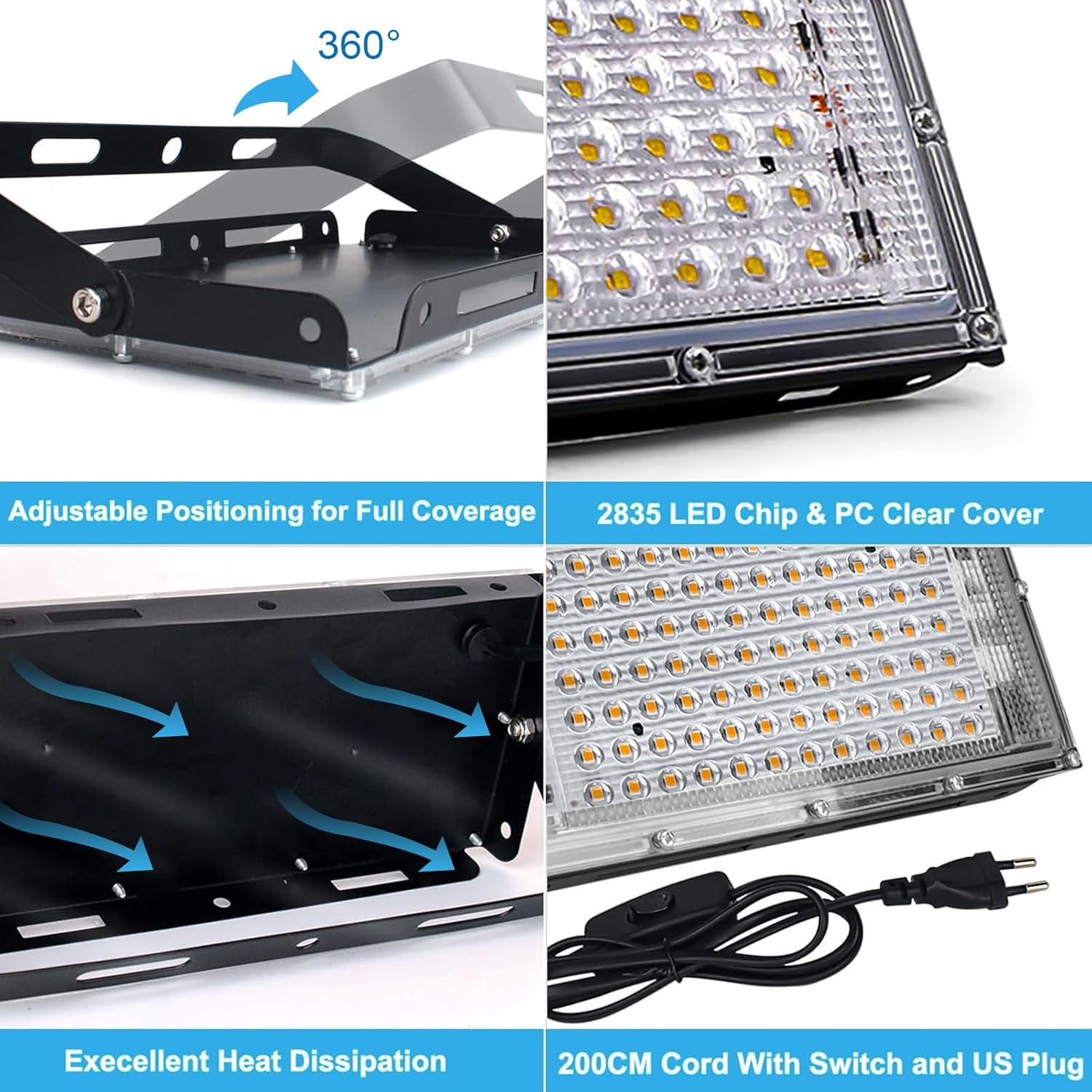
Image 5.1: Close-up view illustrating the 360-degree adjustable bracket, LED chip design, heat dissipation structure, and the power cord with an integrated switch.
6. Operating Instructions
Operating your CREATESTAR LED Flood Light is straightforward:
- Power On: Once the floodlight is securely installed and plugged into a power outlet, locate the push-button switch on the power cable. Press the switch to turn the light ON.
- Power Off: To turn off the floodlight, press the push-button switch again.

Image 6.1: Example of the floodlight providing large area illumination with its 120-degree beam angle, 10000 lumens, and 3000K warm white light.
7. Maintenance
Regular maintenance helps ensure the longevity and optimal performance of your floodlight:
- Cleaning: Periodically clean the surface of the floodlight and the PC panel with a soft, damp cloth to remove dust, dirt, or debris. Do not use abrasive cleaners or solvents.
- Inspection: Regularly inspect the power cable, plug, and switch for any signs of damage, fraying, or wear. Check the mounting screws to ensure they remain tight and secure.
- Environmental Protection: Ensure the non-waterproof plug and switch remain protected from rain and moisture.
8. Troubleshooting
If you encounter any issues with your floodlight, refer to the following troubleshooting guide:
| Problem | Possible Cause | Solution |
|---|---|---|
| Light does not turn ON | No power supply Switch is OFF Faulty outlet | Check if the floodlight is properly plugged in. Ensure the push-button switch is in the ON position. Test the outlet with another device or try a different outlet. |
| Light is dim or flickering | Unstable power supply Dirty lens Loose connection | Ensure the power supply is stable. Clean the PC panel with a soft cloth. Check all electrical connections. |
| Water inside the fixture | Improper installation Damage to the seal | Ensure all screws are tightened and the fixture is properly sealed. If damage is suspected, discontinue use and contact customer support. |
9. Warranty and Support
CREATESTAR products are manufactured to high-quality standards. For specific warranty information, including terms and conditions, please refer to the documentation provided with your purchase or visit the official CREATESTAR website. For technical support, replacement parts, or any inquiries not covered in this manual, please contact CREATESTAR customer service directly.
Manufacturer: CREATESTAR
Contact Information: Please refer to the packaging or CREATESTAR's official website for the most up-to-date contact details.