
1. Introduction
Thank you for purchasing the Rinnai RCK-30MA Gas High-Speed Oven. This large-capacity oven is designed for efficient and even cooking of various dishes using advanced hot air circulation technology. Please read this manual thoroughly before use to ensure safe and optimal operation.
Key Features:
- High-Speed Cooking: A sirocco fan circulates gas hot air throughout the oven cavity, enabling quick cooking of large quantities of food while minimizing uneven baking.
- Simultaneous Cooking: Dishes requiring lower cooking temperatures can be prepared simultaneously.
- Memory Function: Microcomputer control allows you to store up to 9 temperature and time settings for frequently used recipes.
- Soft Finish Function: This feature helps prevent food from drying out, ensuring moist and delicious results.
2. Safety Information
Your safety and the safety of others are very important. Always follow basic safety precautions when using this appliance to reduce the risk of fire, electric shock, or injury.
Important Safety Notes:
- This appliance is designed for city gas use. Ensure your gas supply matches the appliance specifications.
- Installation must be performed by a qualified professional in accordance with local regulations and the provided installation instructions.
- Ensure adequate ventilation in the installation area.
- Do not store or use flammable materials near the oven.
- The front door of the oven is not removable. Do not attempt to remove it.
- Be aware that when cooking items like cakes, the shape of the food may make it more susceptible to hot air, potentially causing uneven baking or deformation. Adjust cooking times and temperatures as needed.
- Temperature-sensitive dishes such as chawanmushi (savory egg custard) or pudding may develop 'su' (air bubbles) due to the hot air circulation.
- Always use oven mitts when handling hot trays or food.
- Keep children and pets away from the appliance during operation.
3. Setup
Proper setup is crucial for the safe and efficient operation of your Rinnai RCK-30MA oven.
3.1 Installation
This gas oven requires professional installation. Refer to the separate installation manual provided with the appliance for detailed instructions. Ensure the oven is installed on a stable, level surface and connected to the correct gas supply and electrical outlet.
3.2 Initial Checks
- After installation, verify that all gas connections are secure and leak-free.
- Ensure the power cord is properly plugged into a grounded outlet.
- Remove all packaging materials and accessories from inside the oven cavity before first use.
- For the first use, it is recommended to run the oven empty at a high temperature (e.g., 200°C for 30 minutes) to burn off any manufacturing residues. Ensure the area is well-ventilated during this process.
4. Operating Instructions
This section provides instructions for the basic operation of your Rinnai RCK-30MA oven.
4.1 Basic Operation
- Power On: Press the Power button to turn on the oven. The display will illuminate.
- Set Temperature: Use the Temperature adjustment buttons (e.g., Up/Down arrows) to select your desired cooking temperature. The temperature range is typically between 100°C and 300°C.
- Set Time: Use the Time adjustment buttons to set the cooking duration.
- Start Cooking: Press the Start button to begin the preheating and cooking process. The oven will preheat to the set temperature, then begin the cooking timer.
- End Cooking: Once the set time expires, the oven will beep and automatically turn off the heating elements. Open the door carefully to remove food.
4.2 Memory Function
The oven can store up to 9 customized temperature and time settings for quick recall.
- To Store a Setting:
- Set the desired temperature and cooking time using the respective adjustment buttons.
- Press and hold the 'Memory' button (or a designated 'Store' button) until a memory slot number flashes on the display.
- Use the adjustment buttons to select a memory slot (1-9).
- Press the 'Memory' button again to confirm and save the setting.
- To Recall a Setting:
- Press the 'Memory' button. A memory slot number will flash.
- Use the adjustment buttons to select the desired stored memory slot.
- Press the 'Start' button to begin cooking with the recalled settings.
4.3 Soft Finish Function
Activate the Soft Finish function to prevent food from drying out, especially useful for delicate items or when reheating.
- To activate, press the 'Soft Finish' button (or designated button) before or during the cooking cycle. An indicator light will confirm activation.
- This function subtly adjusts the heating process to retain moisture.
- To deactivate, press the 'Soft Finish' button again.
5. Maintenance
Regular cleaning and maintenance will ensure the longevity and optimal performance of your oven.
5.1 Cleaning the Oven Interior
- Always ensure the oven is cool and unplugged before cleaning.
- Wipe the interior surfaces with a damp cloth and mild detergent. Avoid abrasive cleaners or scouring pads that can damage the finish.
- For stubborn stains, use a specialized oven cleaner, following the product's instructions carefully. Ensure thorough rinsing to remove all chemical residues.
- Clean the oven trays, grilling racks, and oil drip pan after each use. These can typically be washed with warm soapy water.
5.2 Cleaning the Exterior
- Wipe the exterior surfaces with a soft, damp cloth. For stainless steel finishes, use a stainless steel cleaner to maintain its luster.
- Do not spray water directly onto the control panel or electrical components.
6. Troubleshooting
If you encounter any issues with your oven, refer to the following common problems and solutions. If the problem persists, contact customer support.
| Problem | Possible Cause | Solution |
|---|---|---|
| Oven does not turn on. | No power supply. | Check if the power cord is securely plugged in and if the circuit breaker has tripped. |
| Oven not heating. | Gas supply off or igniter issue. | Ensure the gas supply valve is open. If the issue persists, contact a qualified technician. |
| Uneven cooking/browning. | Improper food placement or oven overloaded. | Ensure food is placed centrally and not overcrowding the oven. Rotate trays if necessary. For cakes, be aware of potential unevenness due to hot air circulation. |
| Food is drying out. | Soft Finish function not activated. | Activate the Soft Finish function. Consider using a water bath for delicate items. |
| Display shows an error code. | Internal malfunction. | Note the error code and refer to the full service manual or contact customer support. |
7. Specifications
Detailed technical specifications for the Rinnai RCK-30MA Gas High-Speed Oven.
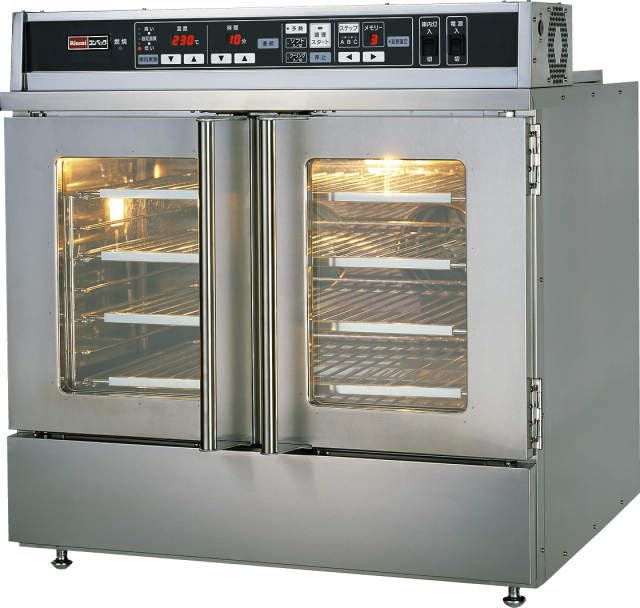
Figure 1: Front view of the Rinnai RCK-30MA Gas High-Speed Oven.
| Specification | Detail |
|---|---|
| Brand | Rinnai |
| Model Number | RCK-30MA |
| Product Type | Gas High-Speed Oven, Large Type |
| Color | Silver |
| Product Dimensions (D x W x H) | 36 cm x 54.5 cm x 51.8 cm |
| ASIN | B0CW35J9LC |
| Included Accessories |
|
| Oven Tray Dimensions (Outer) | 458 mm x 292 mm x 26 mm |
| Oven Tray Dimensions (Inner) | 410 mm x 262 mm x 14 mm |
8. Warranty and Support
Rinnai products are manufactured to high-quality standards and come with a manufacturer's warranty. Please refer to the warranty card included with your purchase for specific terms and conditions, including warranty period and coverage.
For technical assistance, service, or to inquire about replacement parts, please contact Rinnai customer support. Have your model number (RCK-30MA) and purchase date ready when contacting support.
You can find contact information for Rinnai customer service on the official Rinnai website or in the documentation provided with your appliance.