
1. Introduction
Thank you for choosing the LHKNL TG-T069 Rechargeable Headlamp. This manual provides detailed instructions for the safe and efficient use of your headlamp. The TG-T069 features a super bright LED, motion sensor functionality, multiple lighting modes, and a rechargeable battery, making it ideal for various outdoor and indoor activities.

Image 1.1: LHKNL TG-T069 Rechargeable Headlamps (Black and Orange)
This image displays both the black and orange versions of the LHKNL TG-T069 headlamp, showcasing their design and illuminated state.
2. Safety Instructions
- Do not look directly into the LED light. The high intensity light can cause temporary vision impairment or eye damage.
- Keep the headlamp out of reach of children.
- Do not attempt to disassemble, repair, or modify the headlamp. This will void the warranty and may cause damage or injury.
- Dispose of batteries according to local regulations. Do not expose batteries to fire or extreme temperatures.
- Avoid exposing the headlamp to extreme heat or cold.
- Ensure the charging port cover is securely closed when not charging to maintain water resistance.
3. Package Contents
Please check the package for the following items:
- 1 x LHKNL TG-T069 Rechargeable Headlamp (Black)
- 1 x LHKNL TG-T069 Rechargeable Headlamp (Orange)
- 2 x USB Charging Cables
- 1 x User Manual
4. Product Overview
Familiarize yourself with the components of your LHKNL TG-T069 Headlamp:
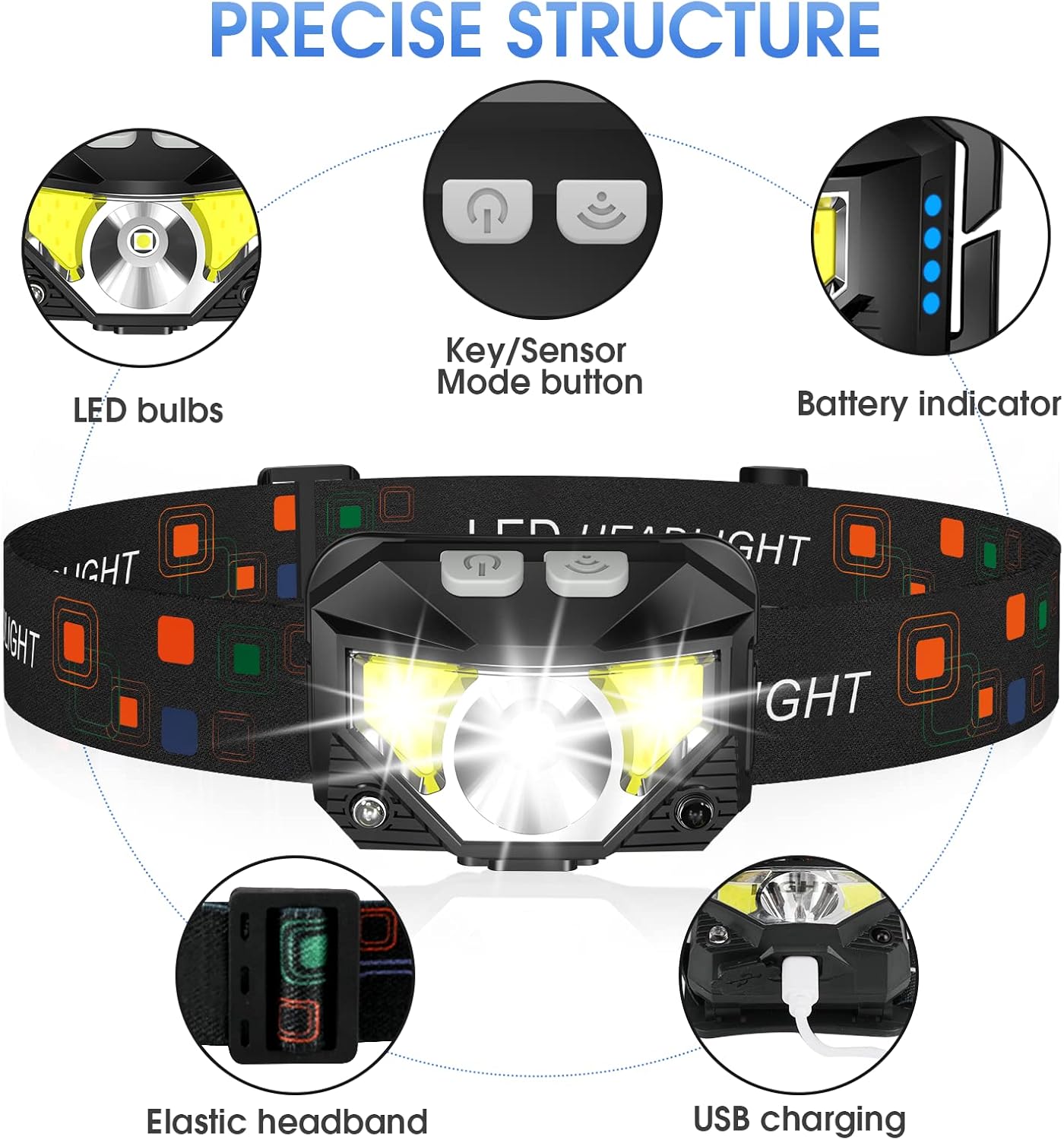
Image 4.1: LHKNL TG-T069 Headlamp Components
This diagram illustrates the key components of the headlamp, including the LED bulbs, the combined Key/Sensor Mode button, the battery indicator lights, the elastic headband, and the USB charging port.
- LED Bulbs: Main and side LED lights for various illumination needs.
- Key/Sensor Mode Button: Controls power, lighting modes, and activates motion sensor.
- Battery Indicator: Displays remaining battery charge.
- Elastic Headband: Adjustable for a comfortable and secure fit.
- USB Charging Port: For recharging the built-in battery.
5. Setup
5.1 Initial Charging
Before first use, it is recommended to fully charge your headlamp.
- Locate the USB charging port on the side of the headlamp.
- Open the protective cover of the USB port.
- Connect the provided USB charging cable to the headlamp and a suitable USB power source (e.g., wall adapter, computer USB port, power bank).
- The battery indicator lights will illuminate to show charging status. All lights will be solid when fully charged.
- Once fully charged, disconnect the cable and securely close the USB port cover to maintain water resistance.
5.2 Adjusting the Headband
The elastic headband is adjustable to fit various head sizes, for both adults and children.
- Place the headlamp on your head.
- Adjust the sliding buckle on the headband until it feels snug and comfortable, without being too tight.
- The lamp head can be rotated up to 60 degrees to direct the light where needed. Adjust the angle as desired.
6. Operating Instructions
6.1 Key Mode Operation
The main button controls the standard lighting modes.

Image 6.1: Key Mode and Motion Sensor Button Functions
This image highlights the two main control buttons: the Key Mode button for cycling through light modes and the Sensor Mode button for activating motion control.
- Power On/Mode Cycle: Press the Key Mode button once to turn on the headlamp. Subsequent presses will cycle through the following modes:
Main Strong Beam → Main Weak Beam → Side Strong Beam → Side Weak Beam → Red Beam → SOS Red Strobe. - Power Off (Long Press): To turn off the headlamp directly from any mode, press and hold the Key Mode button for approximately 3 seconds. This eliminates the need to cycle through all modes to turn off the device.
6.2 Motion Sensor Operation
The motion sensor allows for hands-free control of specific lighting modes.
- Activate Motion Sensor: Press the Sensor Mode button once. The indicator light for the motion sensor will illuminate.
- Cycle Sensor Modes: While in motion sensor mode, press the Key Mode button to cycle between:
Sensor Main Beam → Sensor Side Beam. - Hands-Free On/Off: Wave your hand in front of the headlamp's sensor to turn the light ON or OFF.
- Deactivate Motion Sensor: Press the Sensor Mode button again to exit motion sensor mode.

Image 6.2: All 8 Working Modes
This image visually represents all eight available lighting modes, including both manual and motion-sensor activated options, demonstrating the versatility of the headlamp.
7. Charging
The LHKNL TG-T069 Headlamp is equipped with a powerful 1500mAh built-in rechargeable battery. It can be charged and used simultaneously.
- Use the provided USB cable to connect the headlamp to a 5V USB power source.
- The battery indicator lights will show the charging progress.
- A full charge typically provides 4-10 hours of usage, depending on the selected mode.
- Always ensure the USB port cover is sealed after charging to maintain the IPX4 waterproof rating.
8. Maintenance
8.1 Cleaning
- Wipe the headlamp body with a soft, damp cloth. Do not use abrasive cleaners or solvents.
- Ensure the charging port is free of dust and debris.
8.2 Storage
- Store the headlamp in a cool, dry place away from direct sunlight.
- If storing for an extended period, charge the battery every 3-6 months to maintain battery health.
9. Troubleshooting
| Problem | Possible Cause | Solution |
|---|---|---|
| Headlamp does not turn on. | Battery is depleted. | Charge the headlamp fully. |
| Light flickers or is dim. | Low battery. | Recharge the headlamp. |
| Motion sensor not responding. | Motion sensor mode not activated or sensor obstructed. | Ensure the Sensor Mode button is pressed. Clear any obstructions in front of the sensor. |
| Headlamp not charging. | Faulty cable or power source. | Try a different USB cable or power adapter. Ensure the cable is securely connected. |
10. Specifications
| Feature | Specification |
|---|---|
| Model | TG-T069 |
| Light Source Type | LED |
| Brightness | Up to 1100 Lumens |
| Power Source | Battery Powered (Rechargeable) |
| Battery Type | Lithium Ion (1500mAh built-in) |
| Item Weight | 1.87 Ounces (approx. 53g) |
| Water Resistance Level | IPX4 (Waterproof) |
| Special Features | Long Press Function, Motion Sensor, 8 Lighting Modes |
| Material | Plastic or Rubber |
| Manufacturer | LHKNL |
11. Warranty and Support
LHKNL products are designed for reliability and performance. For any questions, technical support, or warranty claims, please contact LHKNL customer service through the retailer where the product was purchased or visit the official LHKNL website for contact information.
Please retain your proof of purchase for warranty purposes.
