
N newline NP2
N newline Bluetooth Speakerphone NP2 User Manual
Comprehensive instructions for setting up, operating, and maintaining your N newline Bluetooth Speakerphone NP2.
1. Product Overview
The N newline Bluetooth Speakerphone NP2 is designed for high-quality audio conferencing and media playback, offering 360° voice pickup and advanced AI noise reduction. Its compact and portable design makes it suitable for various environments, from professional meetings to personal leisure.
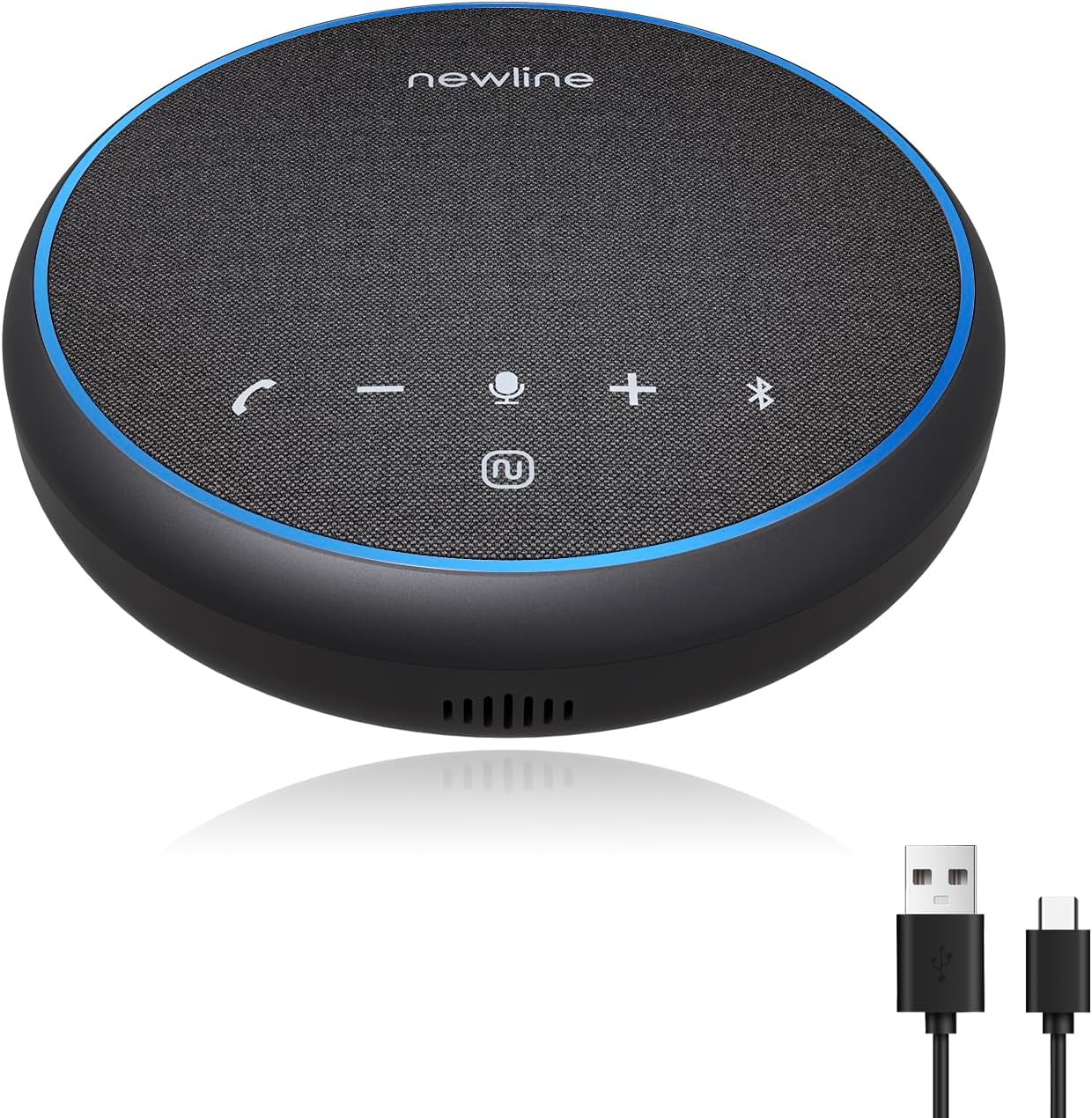
Figure 1: N newline Bluetooth Speakerphone NP2 and included USB-C cable.
- 360° Voice Pickup: Captures voices clearly from all directions within a 5-meter (16-foot) range.
- Pro AI Noise Reduction: Minimizes background noise for clear communication.
- High-Efficiency Full-Range Speaker: Delivers HiFi-level audio for calls and music.
- Dual Connectivity: Supports both Bluetooth 5.1 and USB-C connections.
- Extended Battery Life: Up to 12 hours of continuous use for calls or music playback.

Figure 2: Battery life indication for the NP2 speakerphone.
2. Setup
2.1 Initial Charging
Before first use, fully charge the speakerphone using the provided USB-C cable. Connect the USB-C end to the speakerphone and the USB-A end to a compatible power adapter (not included) or a computer USB port. The charging indicator light will show charging status.
2.2 Connecting via Bluetooth
- Press and hold the Power button (⏻) on the speakerphone until the Bluetooth indicator light begins to flash, indicating pairing mode.
- On your device (smartphone, tablet, laptop), navigate to the Bluetooth settings.
- Select "NP2" from the list of available devices.
- Once connected, the Bluetooth indicator light will become solid.
2.3 Connecting via USB-C
For a wired connection, simply connect the speakerphone to your computer using the provided USB-C cable. The device will be automatically recognized as an audio input and output device. No additional drivers are typically required.

Figure 3: Dual connectivity options for the NP2 speakerphone.
3. Operating Instructions
3.1 Controls and Functions
The NP2 speakerphone features intuitive buttons for easy control of calls and audio playback.

Figure 4: Multi-function buttons on the NP2 speakerphone.
| Button Icon | Function | Description |
|---|---|---|
| 📞 | Call Answer/Hang Up | Press to answer an incoming call; press again to end a call. |
| - | Volume Down | Decreases the speaker volume. |
| 🎤 | Microphone Mute | Toggles microphone mute on/off. |
| + | Volume Up | Increases the speaker volume. |
| ⏻ | Power Switch | Press and hold to power on/off; short press for battery status (if applicable). |
| Ⓑ | Bluetooth | Activates Bluetooth pairing mode. |
3.2 Voice Pickup and Noise Reduction
The NP2 features a 360° microphone array and Pro AI Noise Reduction technology to ensure clear voice capture and minimize background distractions during calls. For optimal performance, position the speakerphone centrally within the meeting area.

Figure 5: Illustration of Pro AI Noise Reduction in action.
3.3 Audio Output
Equipped with a 3W high-efficiency full-range speaker, the NP2 delivers clear and rich audio for both voice and music. This ensures that all participants can hear clearly during conferences and that music playback is enjoyable.

Figure 6: High-efficiency full-range speaker for superior audio.
4. Maintenance
- Cleaning: Use a soft, dry cloth to clean the surface of the speakerphone. Do not use liquid cleaners or aerosols.
- Storage: Store the device in a cool, dry place away from direct sunlight and extreme temperatures.
- Battery Care: To prolong battery life, avoid fully discharging the battery frequently. Charge the device regularly, even if not in use for extended periods.
- Avoid Water: The device is not waterproof. Keep it away from liquids to prevent damage.
5. Troubleshooting
| Problem | Possible Cause | Solution |
|---|---|---|
| Device does not power on. | Low battery or no charge. | Charge the speakerphone using the provided USB-C cable. Ensure the power source is active. |
| Cannot connect via Bluetooth. | Speakerphone not in pairing mode; device Bluetooth off; interference. | Ensure speakerphone is in pairing mode (flashing Bluetooth light). Turn Bluetooth off and on on your device. Move closer to the speakerphone. |
| Poor microphone quality (others cannot hear me well). | Incorrect microphone placement; software settings; environmental noise. | Ensure the speakerphone is placed centrally and not obstructed. Elevate the speakerphone to ear level if possible, as microphones may be angled. Check microphone input settings on your computer/device. Utilize the AI Noise Reduction feature. |
| Low speaker volume. | Volume set too low on speakerphone or connected device. | Increase volume using the '+' button on the speakerphone and on your connected device. |
| No audio when connected via USB. | Incorrect audio output device selected on computer. | Check your computer's sound settings and ensure the NP2 is selected as the default output device. Try a different USB port. |
6. Specifications
| Feature | Detail |
|---|---|
| Model Name | NP2 |
| Mounting Type | Tabletop Mount |
| Speaker Type | Multimedia |
| Compatible Devices | Desktop, Laptop, Smartphone, Tablet, Television |
| Controller Type | Button |
| Surround Sound Channel Configuration | 2.0 |
| Battery Life | 12 Hours |
| Included Components | USB-C cable |
| Item Weight | 10.4 ounces |
| Is Waterproof | FALSE |
| Maximum Voice Pickup Range | 16 Feet (5 meters) |
| Wireless Communication Technology | Bluetooth 5.1 |
| Power Source | Battery Powered |
| Speaker Maximum Output Power | 3 Watts |
| Frequency Response | 20 KHz |
| Audio Output Mode | Stereo |
7. Warranty and Support
The N newline Bluetooth Speakerphone NP2 comes with a Limited Warranty. Please refer to the warranty card included in your product packaging for specific terms and conditions, including coverage duration and limitations.
For technical support, troubleshooting assistance, or warranty claims, please contact N newline customer service through their official website or the contact information provided in your product documentation. When contacting support, please have your product model number (NP2) and purchase details ready.
For more information, visit the official N newline store: N newline Store on Amazon.
Ask a question about this manual
Ask about setup, troubleshooting, compatibility, parts, safety, or missing instructions. Manuals+ will review the question and use this page’s manual context to help answer it.