Introduction
This manual provides comprehensive instructions for the assembly, configuration, operation, and maintenance of your Bestier 95.2 Inch Reversible L-Shaped Desk. Designed for versatility and durability, this desk offers ample workspace and storage solutions for home offices, gaming setups, and creative environments. Please read these instructions carefully before beginning assembly or use to ensure proper setup and longevity of your product.
Product Features
- Versatile Configuration: Easily switch between a 59.5-inch L-shaped corner desk or a 95.5-inch double long desk to suit your space and needs.
- Ample Workspace: Accommodates multiple monitors, computers, printers, and other essentials, providing a spacious area for work or gaming.
- Integrated Storage: Features flexible storage shelves that can be installed on the right or left side, or in the middle, to organize your items efficiently.
- Cable Management: Equipped with 3 cable holes to help keep your wires organized and your desktop clutter-free.
- Sturdy Construction: Crafted from a durable metal frame and CARB-certified P2 Class Wood, ensuring stability and long-lasting use.
- Easy Assembly: Comes with a straightforward manual, labeled parts, and illustrated instructions for a simple and stress-free build.
Setup & Assembly
Your Bestier L-Shaped Desk is designed for straightforward assembly. All necessary tools are included, and parts are labeled for easy identification. It is recommended that two people assemble the desk for optimal ease and safety.
Assembly Overview
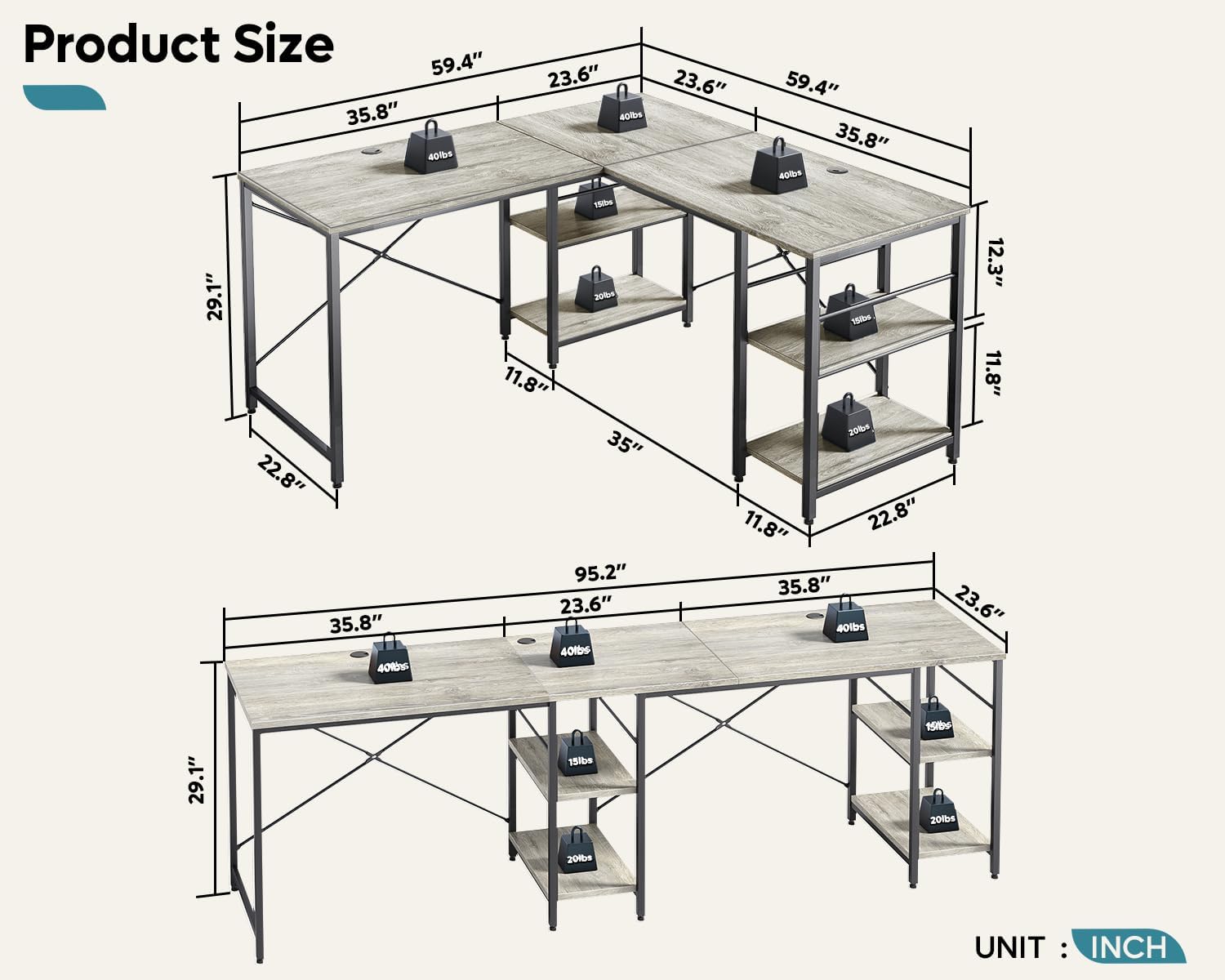
Figure 1: Product dimensions and weight distribution for both L-shaped and straight configurations.
Follow the detailed, illustrated instructions provided in the included manual. Ensure all components are present and undamaged before starting. The desk can be configured as an L-shape or a straight desk during assembly. The shelves are also flexible and can be positioned according to your preference.
Visual Assembly Guide
Video: A detailed guide demonstrating the assembly process and various configurations of the Bestier L-Shaped Desk.
Operating Instructions
Desk Configuration
The Bestier L-Shaped Desk offers two primary configurations: an L-shaped corner desk or a straight, long desk. This flexibility allows you to adapt the desk to different room layouts and user requirements. The change in configuration is performed during the initial assembly process.

Figure 2: Various configurations of the desk, including L-shape and straight options.
Adjustable Storage Shelves
The desk includes multiple shelves that can be adjusted in height or removed entirely to accommodate different items, such as a computer tower, books, or storage bins. For the L-shaped configuration, shelves can be placed on the right + middle or left + middle sections. In the straight desk configuration, shelves can be placed on the right + middle section.

Figure 3: Detail of the adjustable shelves, demonstrating how they can be configured to fit different items.
Cable Management
The desk features three integrated cable holes on the desktop. These grommets allow you to route power cords, display cables, and other wires neatly, reducing clutter and improving the aesthetic of your workspace.

Figure 4: Close-up of the wire management grommet and other key desk features.
Maintenance
To maintain the appearance and longevity of your Bestier L-Shaped Desk, follow these simple care instructions:
- Cleaning: Wipe surfaces with a damp cloth. Avoid harsh chemicals or abrasive cleaners, as these can damage the laminated finish.
- Spills: Promptly wipe up any spills to prevent moisture damage to the engineered wood.
- Heat Protection: While the desk is heat-resistant, it is advisable to use coasters or protective pads under hot items to prevent potential damage.
- Weight Distribution: Distribute weight evenly across the desktop and shelves to prevent stress on the frame and ensure stability.
- Fasteners: Periodically check and tighten all screws and fasteners to ensure the desk remains stable and secure.
Troubleshooting
- Desk Wobbles: Ensure all screws and bolts are securely tightened. Check that the adjustable feet are properly leveled on an even surface.
- Uneven Surface: Use the adjustable feet at the bottom of the desk legs to compensate for uneven flooring. Rotate the feet to raise or lower each leg until the desk is stable.
- Weight Capacity: The desk has a maximum weight recommendation of 40 pounds per section. Avoid placing excessive weight on any single area to prevent damage or instability.
- Assembly Difficulties: Refer to the illustrated instructions provided in the manual. If parts are missing or damaged, contact customer support.
Specifications
| Feature | Detail |
|---|---|
| Brand | Bestier |
| Model Number | BEST-15158-D31 |
| Shape | L-Shape (Reversible) |
| Product Dimensions (L-Shape) | 59.4"D x 59.4"W x 29.1"H |
| Product Dimensions (Straight) | 95.2"W x 22.8"D x 29.1"H (approx.) |
| Color | Gray Oak |
| Material Type | P2 Particleboard (CARB Certified), Metal Frame |
| Finish Type | Laminated |
| Number of Shelves | 4 (Adjustable) |
| Maximum Weight Recommendation | 40 Pounds (per section) |
| Item Weight | 68.3 Pounds |
| Assembly Required | Yes (2 people recommended) |
| Includes All Assembly Tools | Yes |
| Special Features | Reversible, Cable Management Tray, Adjustable Feet |
Warranty and Support
Your Bestier L-Shaped Desk comes with a Limited Warranty. For specific details regarding the warranty coverage and duration, please refer to the documentation included with your product or contact Bestier USA customer support.
Return Policy: This product is eligible for a 30-day refund/replacement return policy. Please check the retailer's specific return guidelines for more information.
Customer Support: For any questions, assistance with assembly, or to report missing/damaged parts, please contact Bestier USA customer support. Contact information can typically be found on the packaging or the Bestier official website.


