
DEERC DE84
DEERC DE84 RC Stunt Car User Manual
Model: DE84 | Brand: DEERC
1. Introduction
Thank you for purchasing the DEERC DE84 RC Stunt Car. This manual provides essential information for the safe and proper operation, maintenance, and troubleshooting of your new remote control car. Please read this manual thoroughly before use and retain it for future reference.
2. Safety Information
- Recommended age for this product is 6 years and above.
- The lithium-ion batteries included with this product have a volume energy density below 400Wh/L and are therefore exempt from PSE (Product Safety Electrical Appliance and Material) regulations.
- Always supervise children during operation.
- Do not operate the car near people, pets, or obstacles to prevent accidents.
- Avoid operating in wet conditions or near water unless specifically designed for it (this model is not amphibious).
- Do not modify or disassemble the product.
- Use only the provided charging cable and batteries.
3. Package Contents
The package includes the following items:
- DEERC DE84 RC Stunt Car
- Remote Controller
- Rechargeable Batteries (x2)
- USB Charging Cable
- Screwdriver
- User Manual (this document)

Image: DEERC DE84 RC Stunt Car, remote controller, two batteries, USB charging cable, and screwdriver.
4. Product Overview
The DEERC DE84 RC Stunt Car features a robust design for dynamic play. It includes a compact remote controller for easy handling.

Image: The DEERC DE84 RC Stunt Car performing a 360-degree rotation, with the remote and batteries shown separately.
Key Features:
- Double-Sided Driving: The car can be driven on both sides, allowing for continuous play even after flips.
- Durable ABS Material: Constructed from durable ABS material with anti-slip tires for stable driving on various terrains.
- Extended Playtime: Comes with two high-quality rechargeable batteries, providing over 30 minutes of continuous operation per charge.
- USB Charging: Convenient USB charging cable allows charging via computer, power bank, or 5V/2A smartphone charger.
- 360-Degree Rotation & LED Lights: Capable of 360-degree rotations and equipped with cool LED lights for an engaging experience day or night.
- 2.4GHz Anti-Interference Technology: Multiple cars can be operated simultaneously without interference, perfect for multi-player fun.
5. Setup
5.1 Battery Charging
- Connect the USB charging cable to the car's battery.
- Plug the USB end into a compatible USB power source (e.g., computer, power bank, 5V/2A USB adapter).
- The indicator light on the USB cable will show charging status (refer to the cable's specific instructions for light indications).
- Charging typically takes approximately 60-90 minutes. Do not overcharge.
The car comes with two batteries to extend playtime.

Image: The DEERC DE84 RC Stunt Car highlighting its 30+ minutes playtime with two included batteries and USB charging capability.
5.2 Battery Installation
Car Battery:
- Using the provided screwdriver, open the battery compartment on the car.
- Insert a fully charged battery into the compartment, ensuring correct polarity.
- Close the battery compartment and secure it with the screw.
Remote Controller Batteries:
- Open the battery compartment on the back of the remote controller.
- Insert 2x AA batteries (not included) into the compartment, observing correct polarity.
- Close the battery compartment.
5.3 Pairing the Remote Controller
- Ensure the car's battery is installed and the car is turned OFF.
- Turn ON the remote controller.
- Turn ON the car.
- The remote controller and car should automatically pair. If pairing fails, turn both devices OFF and repeat the steps.
6. Operating Instructions
6.1 Basic Controls
- Forward/Backward: Use the left joystick to move the car forward or backward.
- Turn Left/Right: Use the right joystick to steer the car left or right.
6.2 Special Features
- Double-Sided Driving: The car is designed to drive on both its top and bottom surfaces. If it flips over, simply continue driving.
- 360-Degree Rotation: Perform impressive 360-degree spins by manipulating the joysticks.
- LED Lights: The car is equipped with LED lights for enhanced visibility and an exciting visual effect, especially in low-light conditions.

Image: The DEERC DE84 RC Stunt Car driving on both its top and bottom sides.
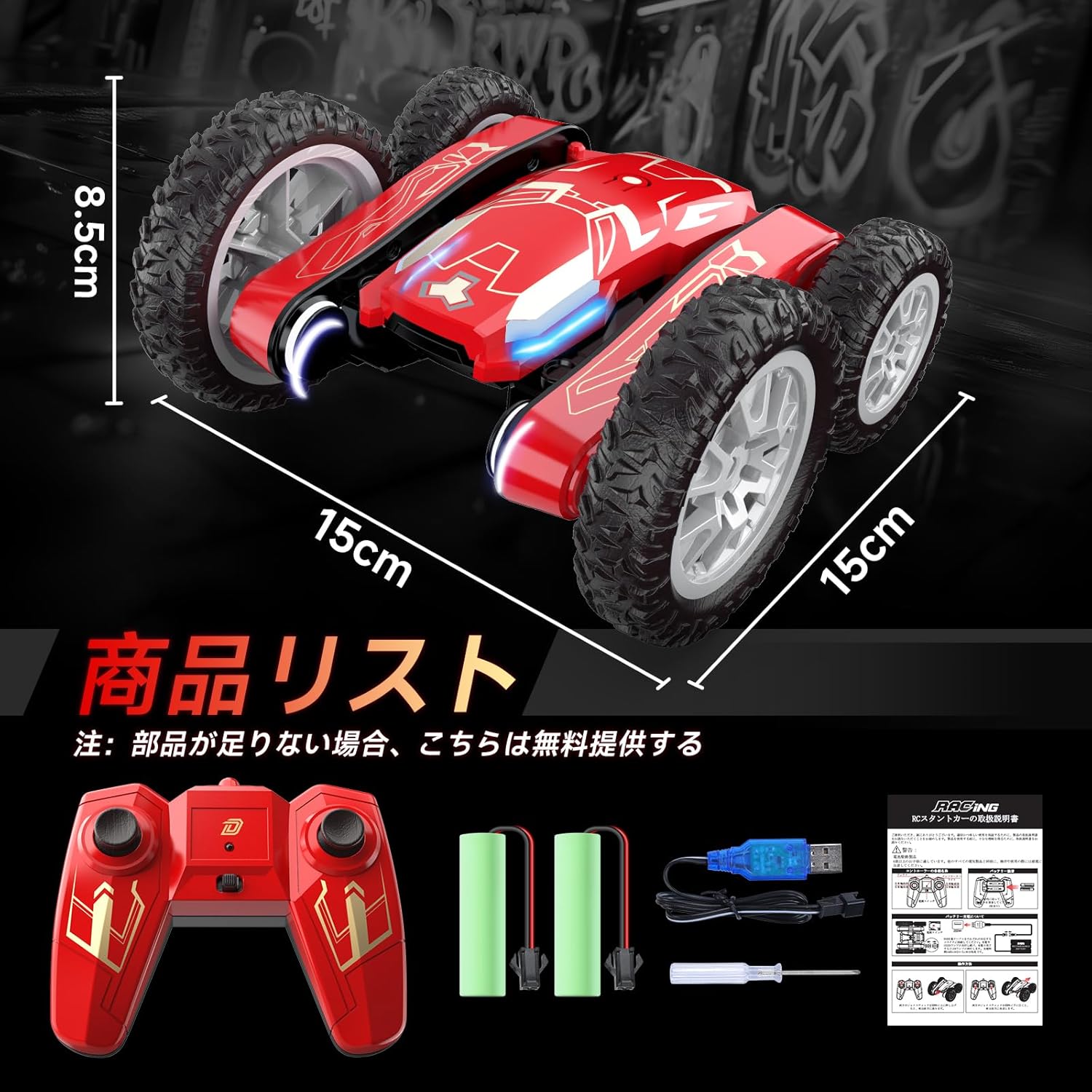
Image: The DEERC DE84 RC Stunt Car executing a 360-degree rotation, illuminated by its internal lights.
6.3 Driving on Various Terrains
The 4WD system and anti-slip tires allow the DEERC DE84 to operate on diverse surfaces such as:
- Flat ground
- Grass
- Small obstacles

Image: The DEERC DE84 RC Stunt Car navigating different environments, showcasing its versatility.
6.4 2.4GHz Anti-Interference Technology
The 2.4GHz remote control technology ensures stable signal transmission and allows multiple cars to be operated simultaneously without signal interference. This enables competitive or cooperative play with friends.

Image: Two DEERC DE84 RC Stunt Cars being controlled by children, illustrating the anti-interference feature.
6.5 Video Demonstration
Watch this video to see the DEERC RC Stunt Car's 360-degree rotation and double-sided driving capabilities in action.
Video: A demonstration of the RC Stunt Car's 360-degree rotation and double-sided driving features.
7. Maintenance
- Cleaning: After use, gently wipe the car with a dry cloth to remove dirt and debris. Do not use water or harsh chemicals.
- Storage: Store the car and remote in a cool, dry place away from direct sunlight. Remove batteries from both the car and remote if storing for extended periods.
- Battery Care: Always fully charge batteries before storage and recharge them periodically if not used for a long time to maintain battery health.
8. Troubleshooting
| Problem | Possible Cause | Solution |
|---|---|---|
| Car does not respond to remote. | Low battery in car or remote; Not paired; Out of range. | Charge car battery; Replace remote batteries; Re-pair car and remote; Operate within range. |
| Short play time. | Battery not fully charged; Old battery. | Ensure battery is fully charged; Consider replacing battery if it's old. |
| Car drives slowly. | Low car battery. | Charge car battery. |
9. Specifications
| Feature | Detail |
|---|---|
| Model Number | DE84 |
| Main Material | Acrylonitrile Butadiene Styrene (ABS) |
| Manufacturer Recommended Age | 6 years and above |
| Product Size | 15 x 15 x 8.5 cm |
| Product Weight | 520 g |
| Battery Use | Yes |
| Battery Included | Yes (2x rechargeable lithium-ion) |
| Remote Control Frequency | 2.4GHz |
10. Warranty and Support
For warranty information and customer support, please refer to the product packaging or contact DEERC customer service directly. Keep your purchase receipt as proof of purchase.
Related documentsDE84


Ask a question about this manual
Ask about setup, troubleshooting, compatibility, parts, safety, or missing instructions. Manuals+ will review the question and use this page’s manual context to help answer it.