
1. Introduction
This manual provides essential instructions for the safe operation, maintenance, and troubleshooting of your Yeedi Cube Robot Vacuum and Mop. Please read this manual thoroughly before using the product and retain it for future reference. The Yeedi Cube is designed to provide an automated cleaning experience, combining vacuuming and mopping with self-emptying, self-washing, and self-drying capabilities.
2. Safety Information
To reduce the risk of injury or damage, read and follow all safety precautions. This appliance is for household use only.
- Do not allow children to play with the robot.
- Ensure the power voltage matches the rating label on the charging station.
- Do not operate the robot in wet environments or near flammable materials.
- Keep hair, loose clothing, fingers, and all parts of the body away from openings and moving parts.
- Do not pick up large objects, sharp objects, or liquids with the robot.
- Always disconnect the robot from the charging station before cleaning or performing maintenance.
- Use only manufacturer-specified attachments and accessories.
3. Package Contents
Verify that all items are present in the package:
- Yeedi Cube Robotic Vacuum Cleaner x 1
- Cube Station x 1
- Edge Brushes x 2
- Mopping Pad x 1
- Water Tank Plug x 1
- User Manual (this document)
4. Product Overview
Familiarize yourself with the components of your Yeedi Cube system.

Figure 4.1: The Yeedi Cube Robot Vacuum and Mop docked in its charging station, with a smartphone displaying the companion app interface. This image illustrates the complete system, including the robot, the self-cleaning station, and the digital control interface.
4.1. Cube Station Features
The Cube Station is the central hub for your robot, providing self-emptying, self-washing, and hot air drying functionalities.

Figure 4.2: A detailed view of the Yeedi Cube Station, emphasizing its three core functions: self-emptying of the dustbin, self-washing of the mop pads, and hot air drying of the mop pads to prevent odors and humidity.
4.2. Robot Vacuum and Mop
The robot features powerful suction, sonic mopping, and intelligent navigation.

Figure 4.3: The underside of the Yeedi Cube Robot Vacuum, showing its dual edge brushes designed to sweep debris from corners and edges, along with its main brush for effective vacuuming.
5. Setup
5.1. Unpacking and Placement
- Remove all packaging materials and protective films from the robot and the Cube Station.
- Place the Cube Station on a hard, level surface against a wall. Ensure there is at least 0.5 meters (1.6 feet) of clear space on both sides and 1.5 meters (4.9 feet) in front of the station.
- Connect the power adapter to the Cube Station and plug it into a wall outlet.
5.2. Initial Charging
Place the robot onto the Cube Station. Ensure the charging contacts on the robot align with those on the station. The robot will begin charging automatically. For first-time use, fully charge the robot before operation (approximately 6 hours).
5.3. App Download and Connection
- Download the "yeedi" app from the App Store (iOS) or Google Play Store (Android).
- Open the app and follow the on-screen instructions to create an account and add your Yeedi Cube.
- Ensure your Wi-Fi network is 2.4GHz for successful connection.
5.4. Mapping Your Home
After connecting to the app, initiate a mapping run. The robot will navigate your home to create a detailed map, which is essential for efficient cleaning and setting up custom cleaning areas.

Figure 5.1: An illustration of the Yeedi app's multi-map saving feature, showing how the robot can store and manage maps for different floors or areas of a home.
6. Operating Instructions
6.1. Cleaning Modes
The Yeedi Cube offers various cleaning modes accessible via the app:
- Vacuum Only: For dry debris collection.
- Mop Only: For wet cleaning with the mop pads. Ensure the water tank is filled.
- Vacuum & Mop: Simultaneous vacuuming and mopping.
- Area Clean: Select specific rooms or zones on the map for cleaning.
- Spot Clean: Direct the robot to clean a small, concentrated area.
6.2. Sonic Mopping Technology
The robot utilizes sonic vibrations (up to 2,500 times per minute) to effectively scrub floors. Ensure the water tank is filled with clean water before mopping operations.

Figure 6.1: The Yeedi Cube Robot Vacuum in action, illustrating its sonic mopping capability with visible water trails, indicating the high-frequency vibration for effective floor scrubbing.
6.3. Automatic Mop Lifting
The Yeedi Cube can automatically lift its mop pads by 8mm when detecting carpets, preventing them from getting wet during combined vacuuming and mopping tasks.
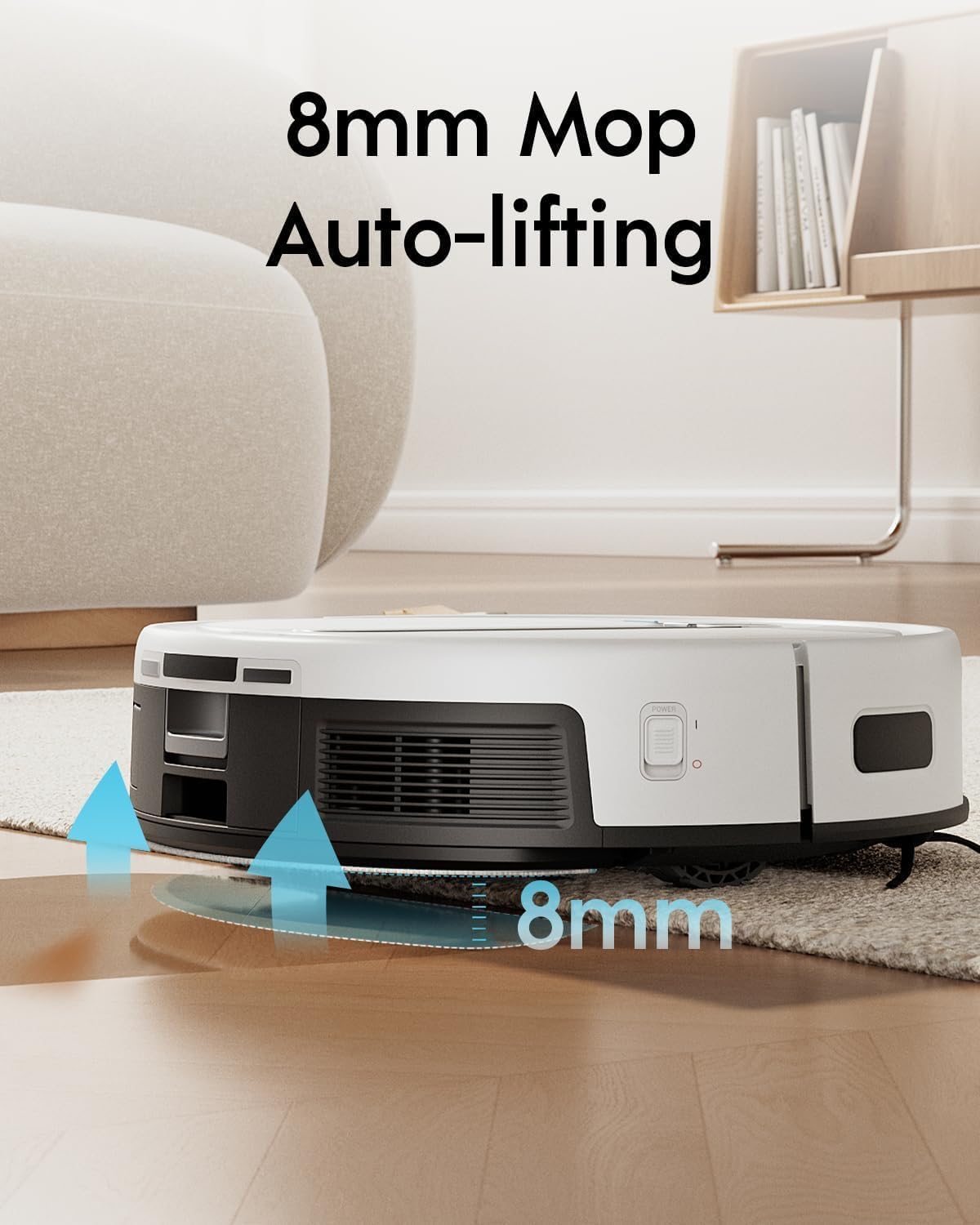
Figure 6.2: The Yeedi Cube Robot Vacuum positioned over a carpet, with arrows indicating the 8mm automatic mop lifting mechanism, designed to keep carpets dry during mopping operations.
6.4. Self-Emptying, Self-Washing, and Self-Drying
The Cube Station manages these functions automatically:
- Self-Emptying: After each cleaning cycle, the robot returns to the station to automatically empty its dustbin into a sealed bag within the station.
- Self-Washing: During and after mopping tasks, the station washes the robot's mop pads with clean water.
- Self-Drying: After washing, the station uses 104°F (40°C) hot air to dry the mop pads, preventing mildew and odors.
6.5. Scheduling and Virtual Boundaries
Use the yeedi app to set cleaning schedules, define no-go zones, and create virtual walls to restrict the robot from certain areas.
7. Maintenance
Regular maintenance ensures optimal performance and extends the lifespan of your Yeedi Cube.
7.1. Dustbin and Filter
- Emptying: The robot automatically empties its internal dustbin into the station's dust bag. Replace the station's dust bag when full (approximately every 60 days, depending on usage).
- Cleaning Filter: The robot's internal filter (sponge type) should be cleaned regularly (weekly) and replaced every 3-6 months.
7.2. Mop Pads and Water Tanks
- Mop Pads: The station self-washes the mop pads. Periodically remove and hand-wash or machine-wash the mop pads for a deeper clean. Replace worn mop pads as needed.
- Clean Water Tank: Refill the clean water tank in the Cube Station as needed.
- Dirty Water Tank: Empty the dirty water tank in the Cube Station after each mopping cycle or when prompted by the app. Clean the tank to prevent buildup.
7.3. Brushes
- Main Brush: Remove the main brush cover and main brush. Use the cleaning tool to remove hair and debris. Clean weekly.
- Edge Brushes: Check edge brushes for wear or entanglement. Remove and clean them, or replace if damaged. Clean monthly.
7.4. Sensors and Charging Contacts
- Wipe all sensors (cliff sensors, anti-collision sensors) and charging contacts on both the robot and the station with a clean, dry cloth monthly.
8. Troubleshooting
Refer to this section for common issues and their solutions. For more detailed troubleshooting, consult the yeedi app or customer support.
| Problem | Possible Cause | Solution |
|---|---|---|
| Robot does not charge. | Charging contacts are dirty or misaligned. Power cable is disconnected. | Clean charging contacts on both robot and station. Ensure power cable is securely plugged in. |
| Robot gets stuck frequently. | Obstacles in the cleaning path. Sensors are dirty. | Clear cables, rugs, and small objects. Clean all sensors. Update map if necessary. |
| Poor vacuuming performance. | Dustbin full. Main brush or edge brushes tangled. Filter clogged. | Empty dustbin/replace dust bag. Clean main and edge brushes. Clean or replace filter. |
| Poor mopping performance or water leakage. | Water tank empty or improperly installed. Mop pads dirty or worn. | Fill clean water tank. Ensure water tank plug is securely inserted. Clean or replace mop pads. |
| App connection issues. | Incorrect Wi-Fi password. Robot too far from router. 5GHz Wi-Fi network. | Verify Wi-Fi password. Move robot closer to router. Ensure 2.4GHz Wi-Fi is used. Reset Wi-Fi on robot if needed. |
9. Specifications
| Feature | Detail |
|---|---|
| Brand | yeedi |
| Model Name | yeedi cube |
| Product Dimensions | 50.8L x 45.6W x 43H Centimetres (Robot and Station) |
| Item Weight | 17.3 kg |
| Runtime | Up to 3 hours |
| Water Tank Capacity | 1 Liter (Robot), 3.5 Liters (Station) |
| Special Features | Auto-Docking, Self-Emptying, Self-Washing, Hot Air Drying, 8mm Auto Mop-Lifting, Sonic Mopping, Visual and Laser Fusion Navigation |
| Controller Type | App Control |
| Surface Recommendation | Hard Floor, Low-Pile Carpet |
| Filter Type | Sponge |
| Compatible Models | Amazon Echo (for voice control) |
10. Warranty and Support
Your Yeedi Cube Robot Vacuum and Mop comes with a limited warranty. For specific warranty terms and conditions, please refer to the warranty card included in your product packaging or visit the official yeedi website. For technical support, troubleshooting assistance, or to order replacement parts, please contact yeedi customer service through their official website or the yeedi app.
Online Support: www.yeedi.com


