
1. Important Safeguards
Please read all instructions carefully before operating your NutriBullet Triple Prep System. Failure to follow these instructions may result in injury or damage to the appliance.
- Always ensure the appliance is unplugged before assembly, disassembly, or cleaning.
- Do not immerse the motor base in water or any other liquid. Clean with a damp cloth only.
- Avoid contact with moving parts. Keep hands and utensils out of the container while blending to prevent severe personal injury and/or damage to the blender.
- Do not blend hot liquids in sealed cups. The vented lid on the 1.8L pitcher is designed for hot liquids.
- Never operate the appliance with damaged blades or if the appliance malfunctions or is dropped. Contact customer service for assistance.
- This appliance is not intended for use by persons with reduced physical, sensory, or mental capabilities, or lack of experience and knowledge, unless they have been given supervision or instruction concerning use of the appliance by a person responsible for their safety.
- Keep children away from the appliance during operation.
2. What's Included
Your NutriBullet Triple Prep System comes with the following components:
- 1500W Motor Base
- 1.8L Blending Pitcher with Vented Lid
- 1.6L Food Processor Work Bowl
- 2 x To-Go Cups (710ml and 946ml)
- 2 x To-Go Cup Lids
- Stainless Steel Extraction Blade
- Slicing/Grating Disc
- Kneading Hook
- Chopping Blade
- Pusher for Food Processor

Figure 2.1: Blender Components

Figure 2.2: Food Processor Components
3. Assembly & Setup
3.1 Assembling the Blender
- Place the motor base on a clean, dry, and level surface.
- Attach the 1.8L blending pitcher or a To-Go cup to the motor base. Ensure it is securely twisted into place.
- For the 1.8L pitcher, ensure the vented lid is properly sealed. For To-Go cups, securely twist the extraction blade onto the cup.
- Plug the power cord into a 220V electrical outlet.
3.2 Assembling the Food Processor
- Place the motor base on a clean, dry, and level surface.
- Place the 1.6L food processor work bowl onto the motor base and twist clockwise until it locks into place.
- Insert the desired blade (chopping blade, kneading hook, or slicing/grating disc) onto the central spindle inside the work bowl.
- Secure the food processor lid onto the work bowl, ensuring it clicks into place. Use the pusher for adding ingredients through the feed chute.
- Plug the power cord into a 220V electrical outlet.

Figure 3.1: Food Processor Assembly
4. Operating Instructions
The NutriBullet Triple Prep System features an intuitive touchscreen control panel that adapts to the attached accessory.

Figure 4.1: Control Panel and Accessories
4.1 Using the Touchscreen Control Panel
- The touchscreen activates when an accessory is properly attached to the motor base.
- Available functions (e.g., Low, Medium, High, Pulse) will illuminate based on the accessory.
- Press the desired program or speed setting to begin operation.
- Press the power button or the active program button again to stop.
4.2 Blending with the 1.8L Pitcher
- Add ingredients to the 1.8L pitcher. Do not exceed the MAX fill line.
- Secure the vented lid.
- Place the pitcher onto the motor base and twist to lock.
- Select a speed (Low, Medium, High) or a pre-programmed setting on the touchscreen.
- For hot liquids, ensure the vented lid is used to allow steam to escape.
- Once blending is complete, turn off the appliance, unplug, and carefully remove the pitcher. Use the pouring spout for easy serving.

Figure 4.2: Blending with the Pitcher
4.3 Making Smoothies with To-Go Cups
- Add ingredients to a To-Go cup. Do not exceed the MAX fill line.
- Twist the stainless steel extraction blade securely onto the cup.
- Invert the cup and place it onto the motor base, twisting to lock it into place.
- Select a speed or a pre-programmed setting. The system is designed for quick smoothie preparation.
- After blending, unlock the cup from the base, remove the blade, and attach a To-Go lid for convenience.

Figure 4.3: Preparing Smoothies
4.4 Using the Food Processor
- Assemble the food processor with the desired blade (chopping, kneading, slicing/grating).
- Add ingredients to the work bowl or through the feed chute using the pusher.
- Secure the lid.
- Place the assembled food processor onto the motor base and twist to lock.
- Select a speed (Low, Medium, High) or the Pulse function for controlled processing.
- After processing, turn off the appliance, unplug, and carefully remove the lid and work bowl.
5. Care & Maintenance
Proper cleaning and maintenance will ensure the longevity and optimal performance of your NutriBullet Triple Prep System.
5.1 Cleaning the Motor Base
- Always unplug the motor base before cleaning.
- Wipe the motor base with a clean, damp cloth. Do not immerse in water.
- Ensure the motor base is completely dry before storing or next use.
5.2 Cleaning Accessories
- All blending pitchers, To-Go cups, lids, and food processor components (work bowl, lid, blades, disc, hook, pusher) are top-rack dishwasher safe.
- Alternatively, wash with warm, soapy water, rinse thoroughly, and air dry.
- Handle blades with extreme care as they are sharp.

Figure 5.1: Easy Cleaning of Pitcher
6. Troubleshooting
If you encounter any issues with your NutriBullet Triple Prep System, refer to the following common problems and solutions:
- Appliance does not turn on: Ensure the power cord is securely plugged into a working outlet. Verify that the blending pitcher or food processor bowl is correctly assembled and locked onto the motor base.
- Motor stops during operation: The appliance may have overheated. Unplug the unit and allow it to cool down for at least 15 minutes before attempting to use it again. Reduce the load or liquid amount for future use.
- Leaking from the base: Check that the blade assembly is tightly screwed onto the To-Go cup or that the pitcher lid is properly sealed. Ensure the MAX fill line is not exceeded.
- Ingredients not blending smoothly: Add more liquid to the mixture. Use the Pulse function to break down larger pieces before continuous blending. Ensure blades are clean and free of debris.
- Food processor not processing: Ensure the lid is securely locked onto the work bowl. Check that the blade or disc is correctly seated on the central spindle. Do not overload the bowl.
If the problem persists, contact NutriBullet customer support.
7. Specifications
| Brand | NutriBullet |
| Model Number | NBF580B |
| Color | Black |
| Product Dimensions (L x W x H) | 37.6 x 20.5 x 44.2 cm |
| Capacity | 1.8 Liters (Blender Pitcher), 1.6 Liters (Food Processor Bowl) |
| Power | 1500 Watts |
| Voltage | 220 Volts |
| Material | Plastic |
| Number of Speeds | 3 |
| Special Features | 1500W motor, intelligent programs, food processor attachment, touchscreen, 3-in-1 appliance |
| Item Weight | 5.64 Kilograms |
| Power Source | Corded Electric |
| Country of Origin | China |
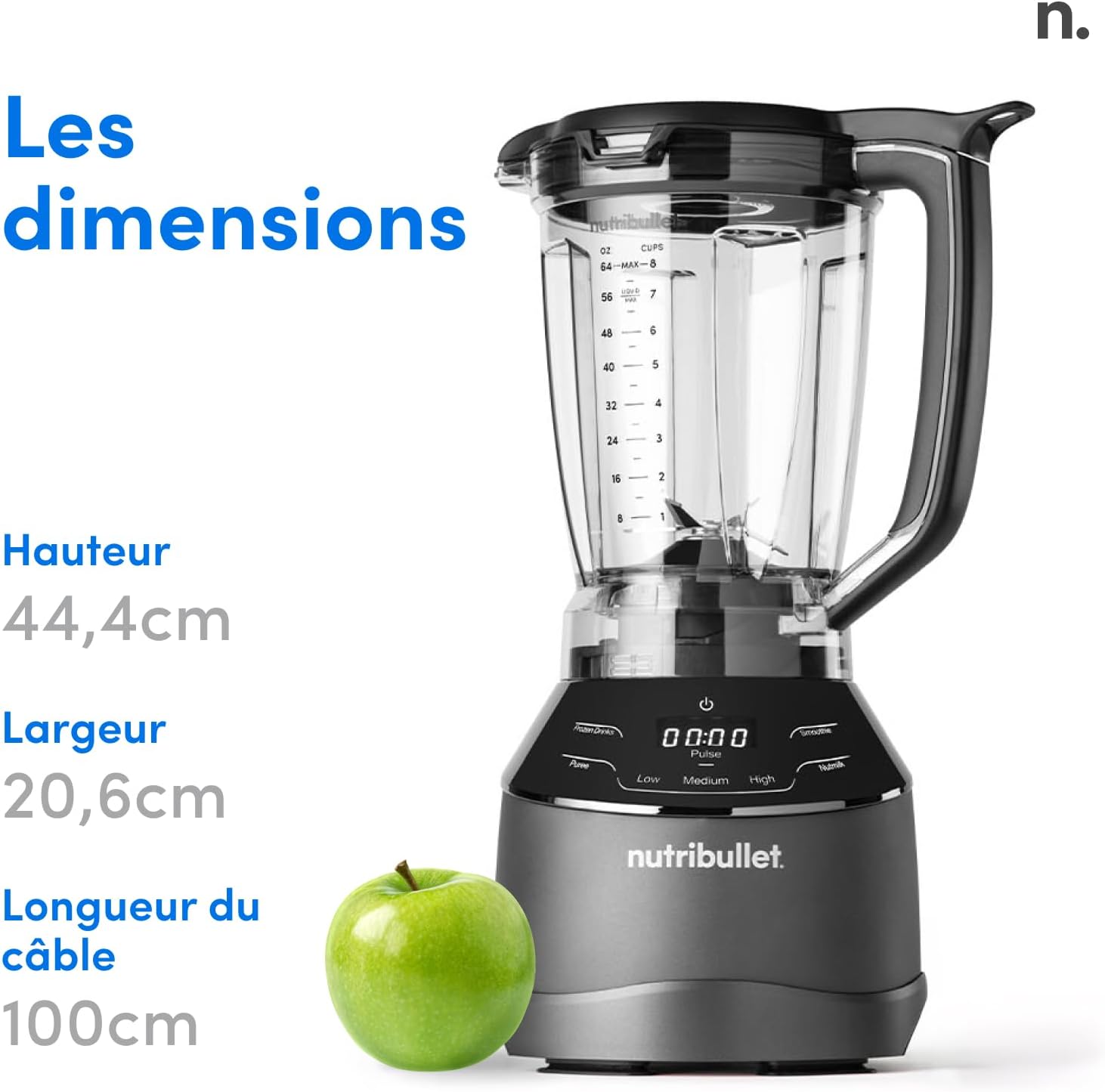
Figure 7.1: Product Dimensions
8. Warranty & Support
Your NutriBullet Triple Prep System is covered by a manufacturer's warranty. Please refer to the warranty card included in your product packaging for specific terms and conditions.
For technical support, replacement parts, or any inquiries regarding your appliance, please visit the official NutriBullet website or contact their customer service department. Contact information can typically be found on the product packaging or the brand's official website.
Keep your purchase receipt as proof of purchase for warranty claims.


