
1. Introduction
This manual provides detailed instructions for the assembly, operation, maintenance, and troubleshooting of your bigzzia Ergonomic Gaming Chair with Footrest. Please read this manual thoroughly before assembly and use to ensure proper function and safety.
2. Safety Information
Important Safety Precautions:
- Always follow the assembly instructions carefully.
- Ensure that the user's weight does not exceed the recommended maximum capacity of 130 kg (286 lbs) to maintain chair stability and safety.
- Keep all packaging materials away from children.
- Do not stand on the chair.
- Avoid using the chair on uneven surfaces.
- Regularly check all bolts and screws to ensure they are tightened.
3. Package Contents
Before beginning assembly, please verify that all components are present and undamaged. If any parts are missing or damaged, contact customer service immediately.
All necessary hardware and instructions are included in the package.

Figure 1: Overview of included components and features.
4. Setup and Assembly
Assembly is required for this gaming chair. Please follow the step-by-step instructions provided in the included manual. Typically, assembly can be completed within 20-40 minutes.
- Unpack all components and lay them out on a clean, flat surface.
- Attach the casters to the chair base.
- Insert the gas lift cylinder into the center of the base.
- Assemble the seat and backrest according to the diagrams.
- Attach the assembled seat and backrest to the gas lift cylinder.
- Install the lumbar support and headrest cushions.
- Ensure all screws are securely tightened before use.
If you encounter any issues during assembly, refer to the troubleshooting section or contact customer service.
5. Operating Instructions
Your bigzzia gaming chair offers several adjustable features for optimal comfort and support.
5.1 Height Adjustment
To adjust the chair's height, pull the lever located under the seat upwards while applying or releasing body weight. Release the lever at the desired height.
5.2 Backrest Recline
The backrest can be reclined from 90° to 155°. Use the recline lever on the side of the chair to adjust the angle. The chair offers multiple recline positions for various activities:
- 90°: Upright position for comfortable work.
- 120°: Relaxed position for film viewing or video games.
- 155°: Cozy rest mode for napping or deep relaxation.
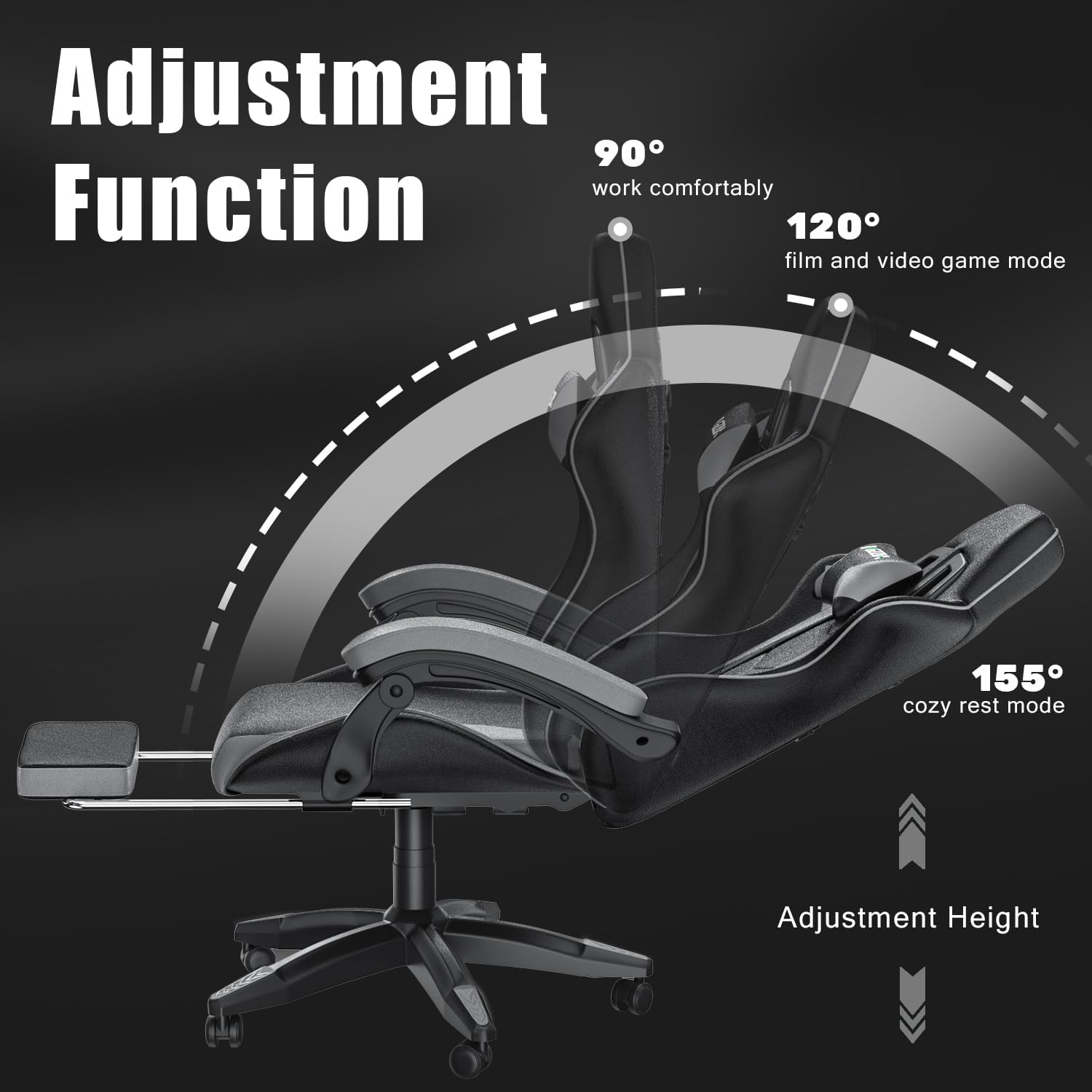
Figure 2: Backrest recline and height adjustment functions.
5.3 Footrest Operation
The retractable footrest can be pulled out from under the seat to provide leg support. Extend it when you wish to recline and relax, and push it back in when not in use.

Figure 3: Retractable footrest in extended position.
5.4 Lumbar and Headrest Cushions
The included lumbar and headrest cushions are removable and adjustable to provide personalized support. Position them to best fit the curve of your back and neck for enhanced comfort during long sessions.

Figure 4: New lumbar pillow design for improved back support.
6. Maintenance
Proper care will extend the life and appearance of your gaming chair.
- Cleaning: The high-quality eco-leather is easy to clean. Wipe with a damp cloth to remove dust and spills. Avoid harsh chemicals or abrasive cleaners.
- Inspection: Periodically check all screws and bolts for tightness. Re-tighten if necessary to ensure stability.
- Casters: Keep the nylon casters free of hair and debris to ensure smooth rolling and protect your floor.
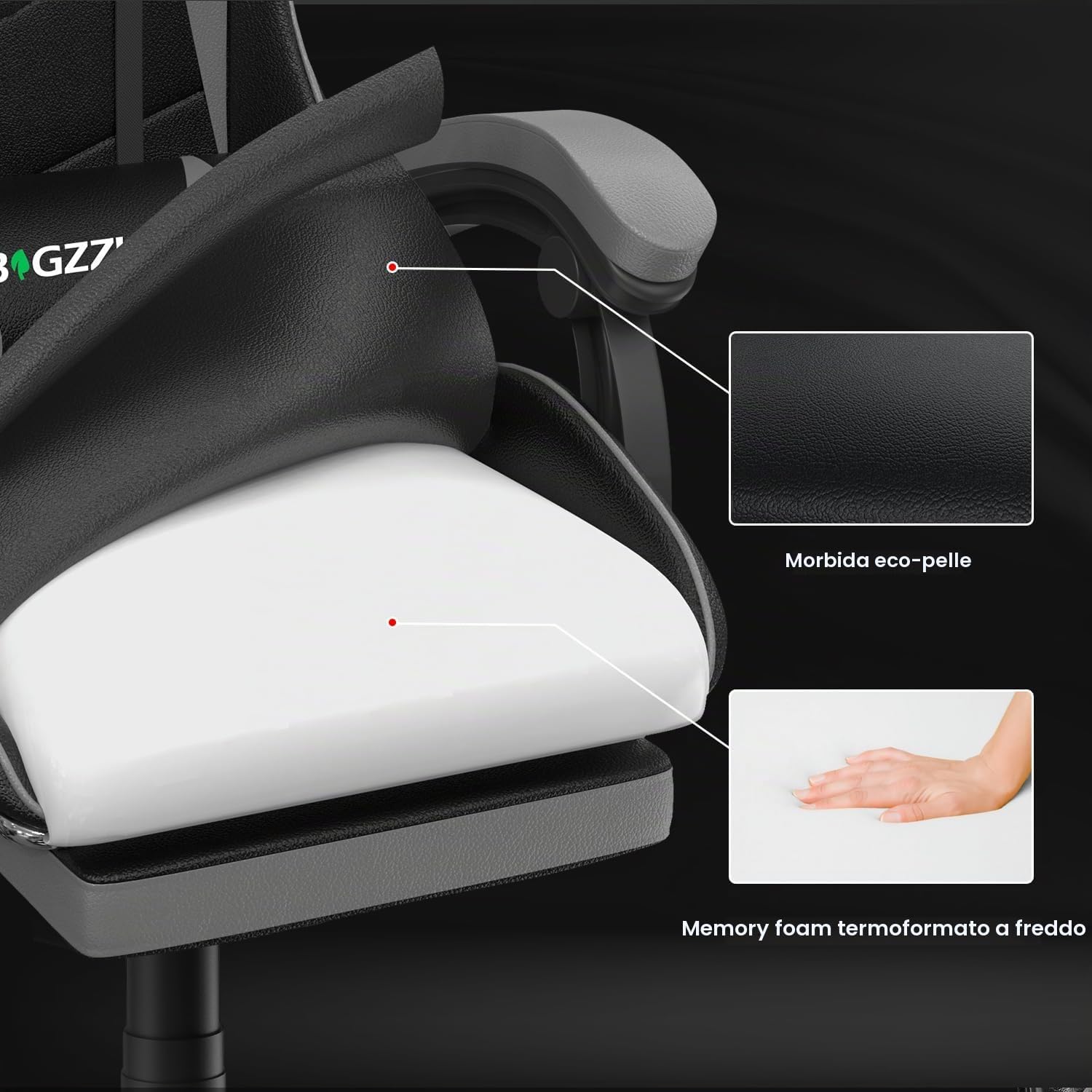
Figure 5: Illustration of chair material layers: soft eco-leather and cold-molded memory foam.
7. Troubleshooting
If you encounter any issues with your bigzzia gaming chair, refer to the common problems and solutions below.
| Problem | Possible Cause | Solution |
|---|---|---|
| Chair height lowers automatically. | Faulty gas lift cylinder. | Contact customer service for a replacement gas lift cylinder. |
| Chair is wobbly or unstable. | Loose screws or bolts. | Check and tighten all assembly screws and bolts. |
| Casters do not roll smoothly. | Debris (hair, dust) caught in casters. | Clean casters thoroughly to remove any obstructions. |
| Backrest does not recline or lock. | Recline mechanism obstruction or malfunction. | Ensure no obstructions are blocking the mechanism. If issue persists, contact customer service. |
If the problem persists after attempting these solutions, please contact bigzzia customer service for further assistance.
8. Specifications
| Feature | Detail |
|---|---|
| Brand | bigzzia |
| Model Number | Gaming Chair with footrest |
| Color | Grey |
| Material (Frame) | Nylon |
| Seat Material | High-quality eco-leather |
| Filling Material | Memory foam |
| Overall Product Dimensions (DxWxH) | 125P x 56l x 59H cm (approx. 49.2 x 22 x 23.2 inches) |
| Adjustable Height Range | 122.88 cm - 133.98 cm (48.38 in - 52.75 in) |
| Seat Width | 50 cm (19.68 in) |
| Seat Depth | 50 cm (19.68 in) |
| Base Width | 68 cm (26.77 in) |
| Item Weight | 20 Kilograms (approx. 44 lbs) |
| Recommended Maximum Weight | 130 Kilograms (approx. 286 lbs) |
| Special Features | Adjustable Height, Wheels, Cushions (Lumbar & Headrest), Ergonomic Design, Footrest |
| Recommended Uses | Gaming, Office |
| Back Style | Hard back |
| Number of Recline Positions | 3 (90°, 120°, 155°) |
| Assembly Required | Yes |
| Care Instructions | Wipe clean |

Figure 6: Detailed dimensions of the gaming chair.
9. Warranty and Support
bigzzia offers the following support for your gaming chair:
- Replacement Service: One month replacement service for assembly issues.
- Quality Warranty: 1-year quality warranty on parts.
For any questions, concerns, or to claim warranty service, please contact bigzzia customer support through your purchase platform or the official bigzzia website.


