
1. Introduction
This manual provides instructions for the ALLIMITY RG52A2-BGEF replacement remote control. This remote is designed to function as a direct replacement for various Direct and Midea AC Air Conditioner models, requiring no programming or setup beyond battery installation. Please read this manual carefully to ensure proper use and to understand all functions of your new remote control.
2. Product Overview
The ALLIMITY RG52A2-BGEF remote control is a compact, white unit featuring a clear LCD display and ergonomically arranged buttons for easy operation of your air conditioner.

Figure 2.1: Front view of the ALLIMITY RG52A2-BGEF remote control, showing the LCD screen and all control buttons.

Figure 2.2: Angled view of the remote control, highlighting its ergonomic design.
3. Setup
3.1 Battery Installation
To begin using your remote control, you must install batteries. No programming is required; simply insert the batteries, and the remote will be ready for use.
- Locate the battery compartment cover on the back of the remote control.
- Slide the cover downwards or press the latch and lift to open the compartment.
- Insert two (2) 1.5V AAA alkaline batteries, ensuring the positive (+) and negative (-) terminals match the diagrams inside the compartment.
- Replace the battery compartment cover by sliding it back into place until it clicks securely.
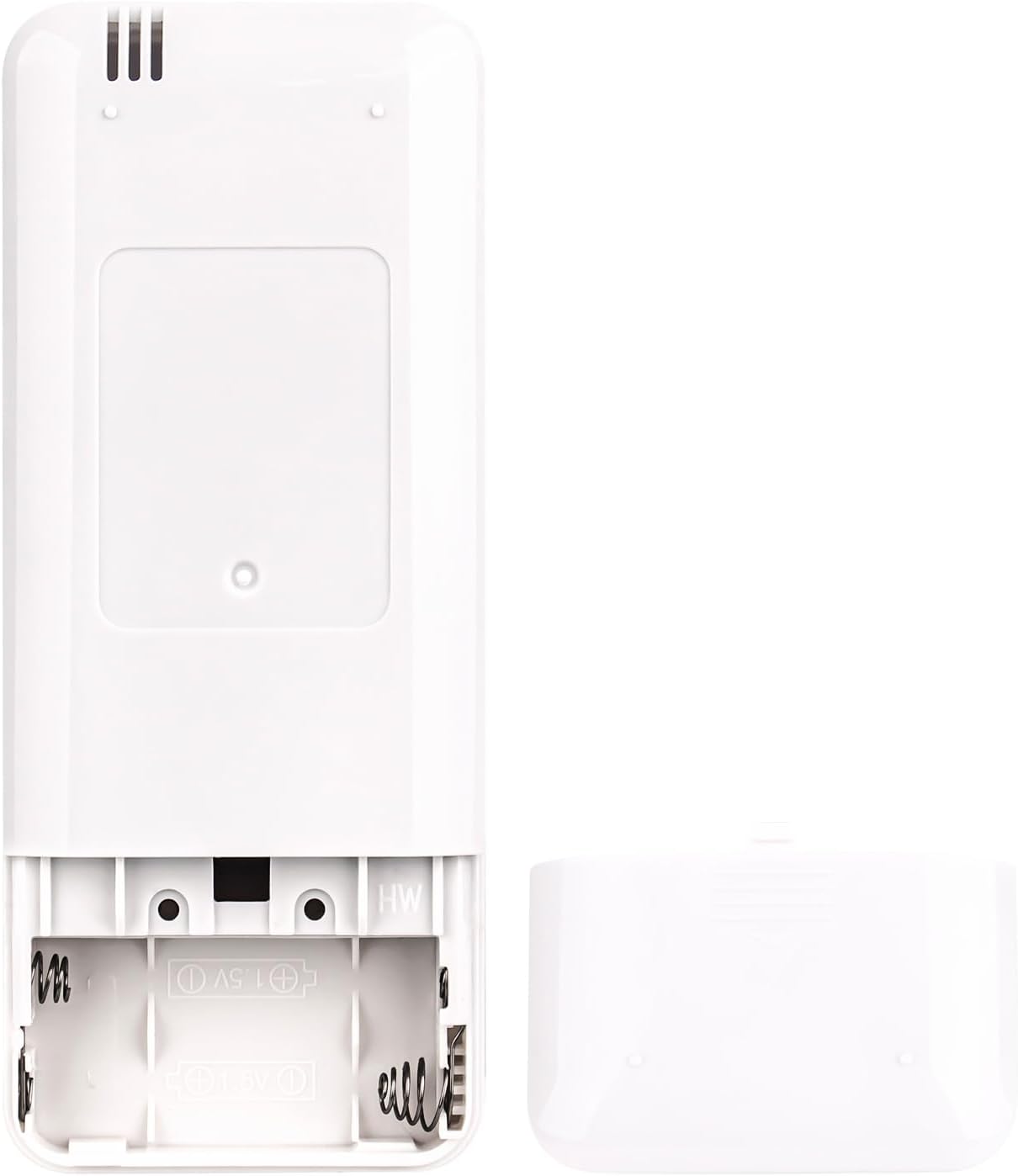
Figure 3.1: View of the open battery compartment, showing where to insert two AAA batteries.
Important: Always use new alkaline batteries. Do not mix old and new batteries, or different types of batteries. Remove batteries if the remote will not be used for an extended period.
4. Operating Instructions
Point the remote control directly at the air conditioner's receiver when operating. Ensure there are no obstructions between the remote and the unit.
4.1 Button Functions
- ON/OFF: Press to turn the air conditioner on or off.
- MODE: Cycles through available operating modes (e.g., Cool, Heat, Fan, Dry, Auto).
- FAN: Adjusts the fan speed (e.g., Low, Medium, High, Auto).
- TEMP ▲/▼: Increases or decreases the set temperature.
- TIMER ON: Sets a timer for the air conditioner to turn on automatically.
- TIMER OFF: Sets a timer for the air conditioner to turn off automatically.
- SLEEP: Activates or deactivates the sleep mode, which adjusts temperature for comfortable sleep and energy saving.
- SHORT CUT: Recalls your preferred settings with a single press.
- TURBO SELF CLEAN: Activates the turbo mode for rapid cooling/heating or initiates the self-clean function (if supported by your AC unit).
- LED FOLLOW ME: Controls the LED display on the AC unit or activates the 'Follow Me' function (if supported), which senses temperature at the remote's location.
- ◀/▶ (Swing/Direction): Adjusts the horizontal or vertical airflow direction (functionality may vary by AC model).
5. Compatible Models
This ALLIMITY RG52A2-BGEF replacement remote control is compatible with the following Direct/Midea AC Air Conditioner remote control models:
- RG52A8/BGEF
- RG52A9/BGEF
- RG52A2/BGEF
- RG52A2-BGEF
- RG52A2/BG(C)EF
Please verify your original remote control model number against this list to ensure compatibility.
6. Specifications
| Feature | Specification |
|---|---|
| Product Dimensions | 6.5 x 1.38 x 0.72 inches (16.5 x 3.5 x 1.8 cm) |
| Item Weight | 1.59 ounces (45 grams) |
| Power Supply | 2 x 1.5V AAA Batteries (not included) |
| Color | Black |
| Special Feature | Wireless Infrared (IR) |

Figure 6.1: Diagram showing the dimensions of the remote control in centimeters and inches.
7. Troubleshooting
7.1 Remote Not Responding
- Check Batteries: Ensure batteries are inserted correctly with the correct polarity (+/-). Replace with fresh AAA alkaline batteries if necessary.
- Line of Sight: Make sure there are no obstructions between the remote control and the air conditioner's infrared receiver.
- Distance: Operate the remote within the effective range of your air conditioner.
- AC Unit Power: Confirm that the air conditioner unit is powered on and receiving electricity.
7.2 Incorrect Functionality
- Compatibility: Double-check that your air conditioner's original remote model number is listed under the compatible models in Section 5.
- AC Unit Features: Some advanced functions on the remote (e.g., Self Clean, Follow Me) may only work if your specific air conditioner model supports them.
8. Maintenance
- Cleaning: Wipe the remote control with a soft, dry cloth. Do not use liquid cleaners or abrasive materials.
- Battery Care: Remove batteries if the remote will not be used for an extended period (e.g., one month or more) to prevent leakage and damage.
- Storage: Store the remote in a cool, dry place away from direct sunlight and extreme temperatures.
9. Warranty and Support
As a replacement remote control, specific warranty terms may vary. Please refer to the seller or retailer from whom you purchased this product for information regarding their return policy or any applicable warranty. For technical support or further inquiries, please contact the seller directly.
