
CO-Z WKC-0000-00
CO-Z Wireless Keypad User Manual
Model: WKC-0000-00
1. Introduction
Thank you for choosing the CO-Z Wireless Keypad. This manual provides essential information for the safe and efficient operation of your device. Please read it thoroughly before installation and use, and keep it for future reference.
1.1 Product Overview
The CO-Z Wireless Keypad is designed to enhance your home security system by providing convenient keyless entry to your property. It features a robust, waterproof design and advanced rolling code technology for superior security.
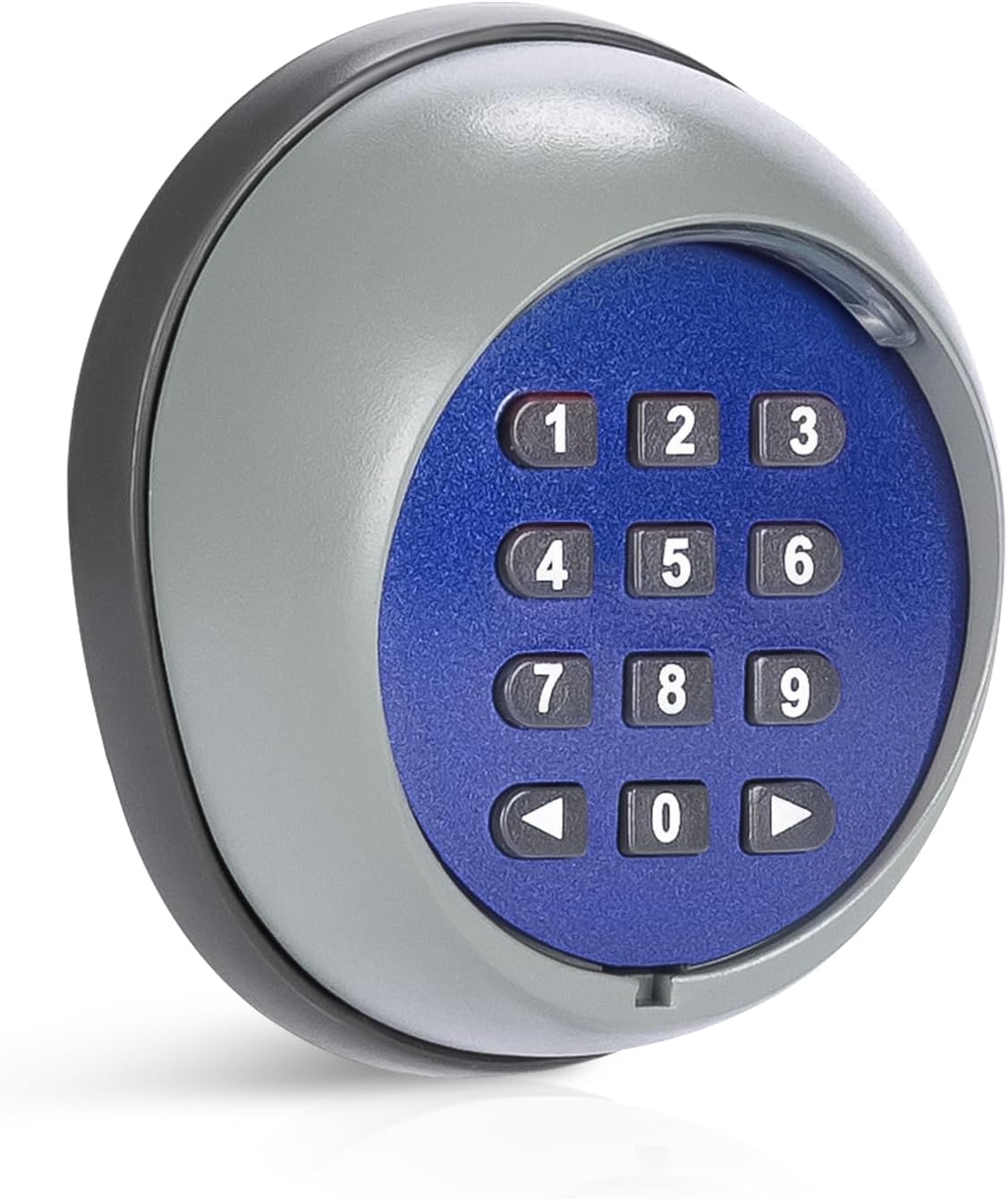
Figure 1.1: CO-Z Wireless Keypad, a grey and blue circular device with a numeric keypad (0-9) and arrow buttons.
1.2 Compatibility
This wireless keypad is exclusively compatible with CO-Z sliding and swing gate openers operating at 433.92 MHz. It is not designed to work with gate openers from other brands. Ensure your existing gate opener is a CO-Z model before attempting to pair this keypad.

Figure 1.2: Image illustrating the CO-Z Wireless Keypad's compatibility with various CO-Z gate opener types, including sliding and swing gate motors.
2. Safety Information
Always observe the following safety precautions to prevent injury or damage to the device and property:
- Ensure the keypad is installed in a location that does not obstruct pedestrian or vehicle traffic.
- Keep the keypad away from direct water jets or prolonged submersion, despite its waterproof rating.
- Do not attempt to disassemble or repair the keypad yourself. Refer to qualified personnel for service.
- Keep batteries out of reach of children. Dispose of used batteries responsibly.
- Only use the keypad with compatible CO-Z gate openers as specified.
3. Product Components and Features
3.1 Components
- CO-Z Wireless Keypad Unit
- Mounting Hardware (screws, anchors - typically included)
- Internal Battery (pre-installed, lasts up to 2 years)
3.2 Key Features
- Wireless Operation: Provides convenient keyless access to your gate.
- Superior Security: Features advanced rolling code technology for enhanced protection against unauthorized access.
- Wide Range: Offers a transmission range of up to 200 meters (656 feet) in open spaces and 35 meters (115 feet) indoors.
- Durable Design: Constructed with robust, waterproof (IP54 rated) thermoplastic for reliable outdoor use in various weather conditions (operating temperature: -20°C to 55°C).
- Long Battery Life: The included battery provides power for up to 2 years with typical usage (10 transmissions per day).
- Easy Installation: Designed for straightforward setup and pairing with compatible CO-Z gate openers.

Figure 3.1: The keypad is built for all-weather protection, showing its resistance to heat, cold, and water, with an IP54 rating and operating temperature range of -20°C to 55°C.

Figure 3.2: Illustration of the keypad's enhanced security, highlighting secure access and deterrence of unauthorized entries through advanced encryption.
4. Setup and Installation
4.1 Mounting the Keypad
Choose a suitable location for the keypad, ideally near your gate opener, ensuring it is easily accessible but protected from direct impact. The keypad can be installed indoors or outdoors.
- Mark the desired mounting position on the wall or post.
- Drill pilot holes using an appropriate drill bit for the provided mounting hardware.
- Secure the keypad's backplate to the surface using the screws.
- Attach the keypad unit to the secured backplate.

Figure 4.1: Depicts various installation locations for the keypad, including outdoor gate posts and indoor walls, along with its signal range capabilities (200m outdoor, 35m indoor, 433.92 MHz frequency).
4.2 Pairing the Keypad with Your Gate Opener
Follow these steps to pair your CO-Z Wireless Keypad with your CO-Z gate opener. This process involves programming a personal access code.
- Press the LEARN button on your gate motor's control panel. Refer to your gate opener's manual for the exact location of this button.
- Enter your desired password on the keypad and press the ◀ (left arrow) button.
- Re-enter the password and press the ◀ (left arrow) button again.
- If the indicator light on the control panel flashes, the pairing was successful.
- Confirm pairing by entering the password and pressing the ◀ (left arrow) button. If the gate opener responds, pairing is complete.
To pair for channel 2 (if applicable), follow the same steps but press the ▶ (right arrow) button instead of the left arrow button in steps 2, 3, and 5.

Figure 4.2: Visual guide for the easy installation and pairing process, showing the keypad and a gate opener control board with the LEARN button highlighted, along with the steps for programming.
5. Operation
Once the keypad is successfully paired, you can operate your gate opener using your programmed access code.
- To open or close the gate, simply enter your programmed access code on the keypad.
- After entering the code, press the ◀ (left arrow) button for channel 1 or ▶ (right arrow) button for channel 2.
- The gate opener will activate, opening or closing the gate.
The keypad's advanced rolling code technology ensures that the transmitted code changes with each use, providing enhanced security.

Figure 5.1: Demonstrates the CO-Z Wireless Keypad in various operational scenarios, including residential gates and indoor smart door applications, emphasizing keyless entry convenience.
6. Maintenance
6.1 Cleaning
Wipe the keypad surface with a soft, damp cloth. Do not use abrasive cleaners or solvents, as these can damage the finish or internal components.
6.2 Battery Replacement
The keypad is powered by an internal battery designed to last up to 2 years with typical use. When the battery is low, the keypad's performance may degrade, or the indicator light may behave differently. To replace the battery:
- Carefully detach the keypad unit from its mounting backplate.
- Locate the battery compartment.
- Replace the old battery with a new one of the same type (refer to specifications for battery type).
- Reattach the keypad unit to the backplate.
Dispose of old batteries according to local regulations.
7. Troubleshooting
| Problem | Possible Cause | Solution |
|---|---|---|
| Keypad does not respond. | Low or dead battery. Not powered on (if applicable). | Replace the battery. Ensure the keypad is correctly installed. |
| Gate opener does not respond to keypad. | Keypad not paired correctly. Keypad out of range. Interference. Incorrect code entered. | Re-pair the keypad following Section 4.2. Move closer to the gate opener. Check for sources of radio interference. Ensure the correct access code is entered. |
| Short transmission range. | Obstructions (walls, metal structures). Battery low. Interference. | Relocate the keypad or gate opener if possible. Replace the battery. Identify and remove sources of interference. |
8. Specifications
| Feature | Detail |
|---|---|
| Model | WKC-0000-00 |
| Dimensions (L x W x H) | 8.5 x 7.5 x 3.5 cm (3.35 x 2.95 x 1.38 inches) |
| Weight | 150 grams (0.33 lbs) |
| Color | Gray, Blue |
| Connectivity Technology | Radio Frequency (433.92 MHz) |
| Max Range (Outdoor) | 200 meters (656 feet) |
| Max Range (Indoor) | 35 meters (115 feet) |
| Number of Buttons | 20 |
| Compatible Devices | CO-Z Sliding and Swing Gate Openers |
| Power Source | Internal Battery (lasts up to 2 years) |
| Waterproof Rating | IP54 |
| Operating Temperature | -20°C to 55°C (-4°F to 131°F) |

Figure 8.1: Detailed dimensions of the CO-Z Wireless Keypad (8.5 cm height, 7.5 cm width, 3.5 cm depth) and information on its included battery, providing power for 2 years with 10 daily operations.
9. Warranty and Support
CO-Z products are designed for durability and reliability. For information regarding warranty coverage and customer support, please refer to the official CO-Z website or contact their customer service directly. Spare parts availability is listed as 2 years from the product's first availability date.
For any issues or inquiries, CO-Z offers 24/7 customer service.
Visit the CO-Z store: CO-Z Official Store
Related documentsWKC-0000-00


Ask a question about this manual
Ask about setup, troubleshooting, compatibility, parts, safety, or missing instructions. Manuals+ will review the question and use this page’s manual context to help answer it.