
1. Safety Information
For safe use, please observe the following guidelines:
- Keep the device away from high temperatures and humidity to prevent damage.
- Handle lithium-ion batteries with care. Do not disassemble, puncture, or expose to extreme heat.
- Be aware of potential interference with other wireless devices.
- Do not operate the device while driving if it distracts you from safe driving.
2. Product Overview
The SONRU Bluetooth 5.3 Aux Adapter is a versatile wireless audio receiver designed to upgrade your car, home stereo, wired headphones, or speakers with Bluetooth connectivity. Featuring advanced Bluetooth 5.3 technology, it ensures a faster, more stable, and smarter connection with minimal sound quality loss.
Key Features:
- Advanced Bluetooth 5.3 Technology: Provides improved transmission delay and connection stability compared to older versions.
- Clear Sounds: Equipped with high-quality microphones and upgraded CVC8.0 technology for echo and noise cancellation, ensuring clear conversations.
- Long Battery Life: Offers up to 16 hours of use on a single 1.5-hour charge, with support for charging while in use.
- Portable Design: Compact and lightweight, ideal for various audio setups.
- Dual Device Connection: Connects to two Bluetooth devices simultaneously, allowing for convenient switching between calls and music.
- Wide Compatibility: Supports AUX and RCA outputs, making it suitable for car stereos, home audio systems, wired headphones, and more.
Package Contents:
- 1 x SONRU Bluetooth Jack Adapter
- 1 x 3.5 mm Aux Plug to Plug Adapter
- 1 x 3.5 mm Audio Cable
- 1 x RCA Audio Cable
- 1 x Type-C Charging Cable
- 1 x User Manual

Figure 2.1: The SONRU Bluetooth Aux Adapter, showcasing its compact design and integrated 3.5mm audio jack.
3. Setup
3.1 Charging the Device
Before first use, fully charge the adapter using the provided Type-C charging cable. Connect the Type-C end to the adapter's charging port and the USB-A end to a compatible USB power source (e.g., car charger, wall adapter, computer USB port).
The device features a digital display that shows the battery percentage. A full charge takes approximately 1.5 hours.
3.2 Initial Pairing and Connection
- Turn On: Press and hold the multifunction button (usually the main central button) for approximately 3 seconds until the device powers on and the display lights up.
- Plug In: Connect the adapter to your audio system (car stereo, home stereo, wired headphones, or speaker) using the appropriate cable:
- For 3.5mm AUX input: Use the integrated 3.5mm jack or the provided 3.5mm Aux Plug to Plug adapter/Audio Cable.
- For RCA input: Use the provided RCA audio cable.
- Pairing Mode: The device will automatically enter pairing mode when powered on for the first time or if no previously paired device is found. The Bluetooth icon on the display will flash.
- Connect via Bluetooth: On your mobile device (smartphone, tablet, laptop), go to Bluetooth settings. Search for available devices and select "J48" or "SONRU" (device name may vary slightly).
- Confirmation: Once successfully paired, the Bluetooth icon on the adapter's display will stop flashing and remain solid. A voice prompt may also confirm the connection.

Figure 3.1: Visual guide for turning on, plugging in, pairing, and playing audio with the SONRU Bluetooth adapter.
3.3 Dual Device Connection
The adapter supports connecting to two Bluetooth devices simultaneously. After connecting the first device, enable Bluetooth on the second device and connect to the adapter. The adapter will manage connections, allowing you to switch between audio sources (e.g., music from one phone, calls from another).
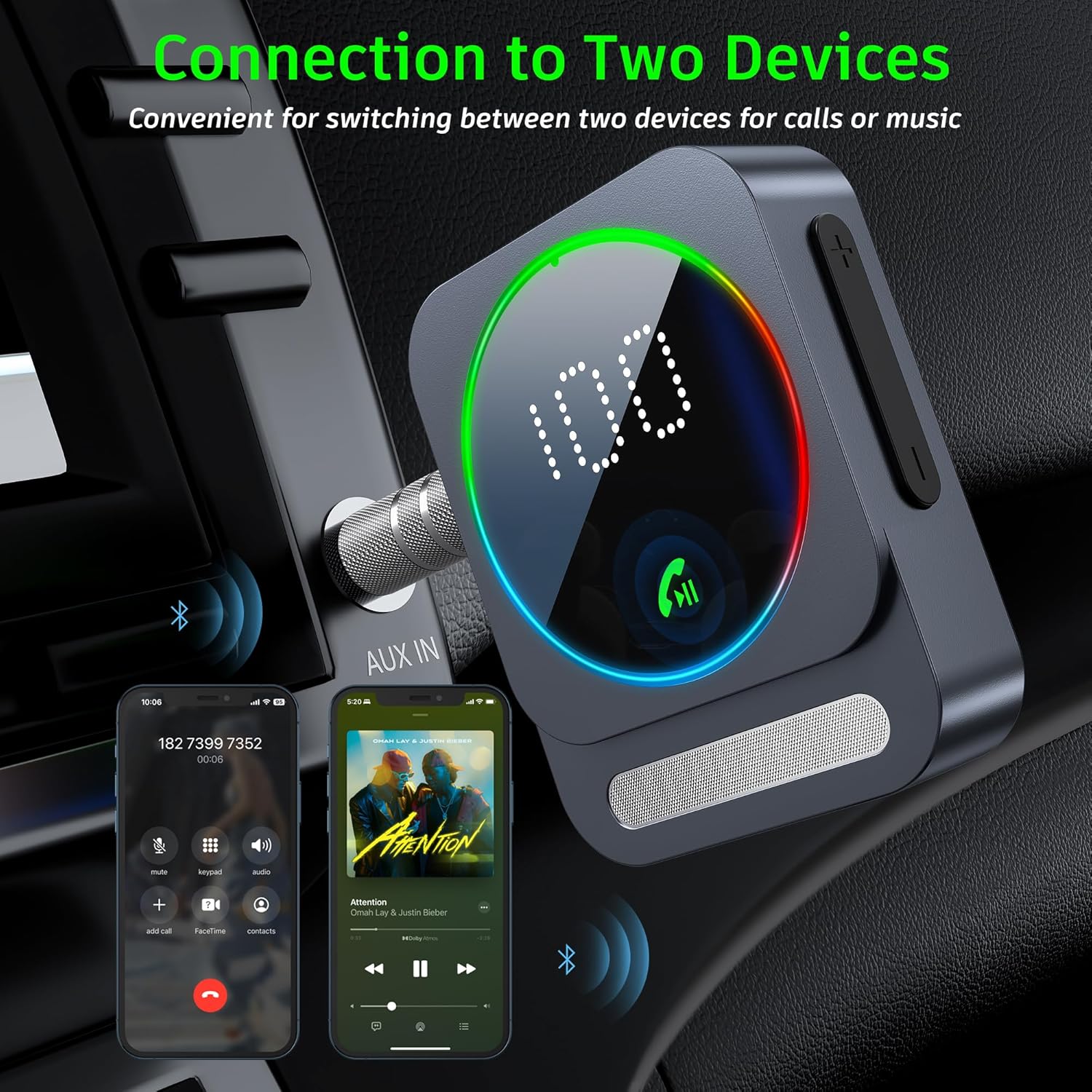
Figure 3.2: The adapter's ability to connect to two devices, enabling seamless switching between music and calls.
4. Operating Instructions
4.1 Button Functions
The SONRU Bluetooth adapter features a multifunction button and volume buttons for easy control:

Figure 4.1: Detailed button functions for the SONRU Bluetooth adapter.
| Button | Action | Function |
|---|---|---|
| Multifunction Button | Single Press | Answer calls / Play/Pause music |
| Multifunction Button | Double Press | Call back last number |
| Multifunction Button | Long Press (approx. 3s) | Reject call / Power On/Off |
| "+" Button | Single Press | Next song |
| "+" Button | Long Press | Volume up |
| "-" Button | Single Press | Previous song |
| "-" Button | Long Press | Volume down / Clear pairing (when not connected) |
4.2 Hands-Free Calling
The adapter supports hands-free calling with its built-in microphone and CVC8.0 noise cancellation technology.
- Answering Calls: Press the multifunction button once.
- Ending Calls: Press the multifunction button once during a call.
- Rejecting Calls: Long press the multifunction button when a call comes in.
- Voice Assistant: The device supports voice assistants (e.g., Siri). Consult your phone's manual for activating voice assistant features.

Figure 4.2: Hands-free calling functionality in a car environment.
4.3 Music Playback
- Play/Pause: Press the multifunction button once.
- Next Track: Press the "+" button once.
- Previous Track: Press the "-" button once.
- Volume Adjustment: Long press the "+" button to increase volume, and long press the "-" button to decrease volume.

Figure 4.3: Enjoying music wirelessly with the adapter connected to a speaker.
5. Maintenance
- Cleaning: Use a soft, dry cloth to clean the device. Do not use abrasive cleaners or solvents.
- Storage: Store the device in a cool, dry place when not in use. Avoid extreme temperatures.
- Battery Care: To prolong battery life, avoid fully discharging the battery frequently. Charge the device regularly, even if not in constant use.
- Cable Management: Ensure cables are not kinked or strained to prevent damage.
6. Troubleshooting
| Problem | Possible Cause | Solution |
|---|---|---|
| Device does not power on. | Low battery. | Charge the device fully. |
| Cannot pair with my device. | Bluetooth not enabled on source device; adapter not in pairing mode; too many paired devices. | Ensure Bluetooth is on. Long press the '-' button to clear previous pairings. Restart both devices. Move closer to the adapter. |
| No sound after connecting. | Volume too low; incorrect input selected on stereo; cable not fully inserted. | Increase volume on both adapter and audio system. Ensure correct AUX/RCA input is selected. Check cable connections. |
| Sound quality is poor/intermittent. | Interference; distance from source device; low battery. | Reduce distance between adapter and source. Avoid obstacles. Charge the device. Avoid strong electromagnetic interference. |
| Calls are not clear. | Microphone obstructed; background noise. | Ensure microphone is clear. CVC8.0 technology reduces noise, but extreme noise may still affect clarity. |
7. Specifications
| Feature | Detail |
|---|---|
| Bluetooth Version | 5.3 |
| Battery Life | Up to 16 hours (playback) |
| Charging Time | Approx. 1.5 hours |
| Charging Port | Type-C |
| Output Interfaces | 3.5mm AUX, RCA |
| Operating Range | Up to 33ft (10m) without obstacles |
| Dimensions | 6.38 x 2.78 x 0.83 inches (16.2 x 7.06 x 2.1 cm) |
| Item Weight | 2.89 ounces (81.9 g) |
| Material | Metal |
8. Product Videos
Watch these official videos for a visual guide on using your SONRU Bluetooth Aux Adapter.
SONRU Aux Bluetooth Adapter Overview
This video provides a comprehensive overview of the SONRU Aux Bluetooth adapter, demonstrating its features and functionality.
9. Warranty and Support
SONRU provides a warranty policy for this product. If you encounter any problems or are not satisfied with your purchase, please contact us at any time. We are committed to providing a satisfactory solution.
For support, please refer to the contact information provided in your product packaging or visit the official SONRU website.