
1. Introduction
Thank you for choosing the AODSK UP-701 88-Key Digital Piano. This instrument is designed to provide an authentic piano playing experience with its weighted hammer-action keyboard and rich, high-quality sound. This manual will guide you through the setup, operation, and maintenance of your new digital piano, ensuring you get the most out of its features.
2. Safety Instructions
- Read all instructions carefully before using the product.
- Keep the digital piano away from water, moisture, and direct sunlight.
- Do not attempt to disassemble or modify the instrument. Refer all servicing to qualified personnel.
- Use only the specified power adapter provided with the unit.
- Ensure proper ventilation around the instrument to prevent overheating.
- Keep out of reach of small children to prevent accidents.
3. Package Contents
Please check that all the following items are included in your package:
- AODSK UP-701 Digital Piano Unit
- 3-Pedal Unit
- Music Rest
- Power Adapter
- Headphones
- Online Lessons Access Card
- User Manual (this document)
4. Setup
4.1 Unpacking and Assembly
Carefully remove all components from the packaging. It is recommended to have two people for assembly due to the weight of the piano unit. Follow the assembly instructions provided in the separate assembly guide for the stand and pedal unit.

Image 1: Overall view of the AODSK UP-701 Digital Piano with dimensions (53.54 inches wide, 16.14 inches deep, 35.23 inches high).
4.2 Connecting Power and Peripherals
Once the piano is assembled, connect the power adapter to the DC 9-12V input jack (5) located at the rear of the piano. Plug the adapter into a standard wall outlet. The main control panel is located under the keyboard.
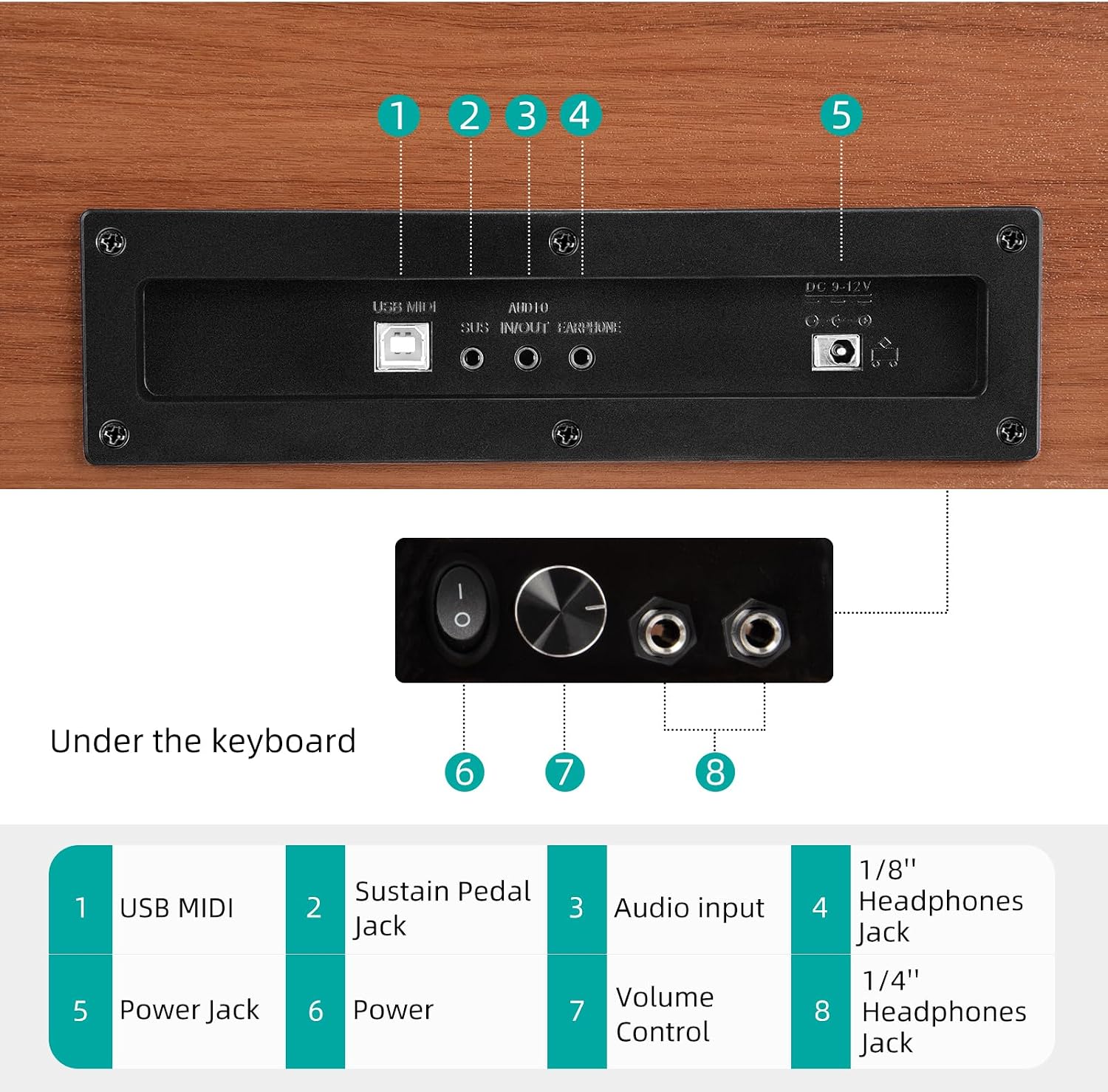
Image 2: Detailed view of the control panel and rear connections. 1: USB MIDI, 2: Sustain Pedal Jack, 3: Audio Input, 4: 1/8" Headphones Jack, 5: Power Jack (DC 9-12V), 6: Power Switch, 7: Volume Control, 8: 1/4" Headphones Jack.
- Headphones: Connect headphones to either the 1/8" (4) or 1/4" (8) headphone jacks for private practice.
- USB MIDI: Use the USB MIDI port (1) to connect the piano to a computer or other MIDI devices.
- Audio Input: Connect external audio sources to the Audio Input jack (3) to play along with your favorite music.
- Sustain Pedal: Ensure the 3-pedal unit is securely connected to the Sustain Pedal Jack (2).
5. Operating Instructions
5.1 Power On/Off
Press the Power Switch (6) located on the control panel under the keyboard to turn the digital piano on or off.
5.2 Volume Control
Adjust the overall volume using the Volume Control knob (7) on the control panel. Turn clockwise to increase volume and counter-clockwise to decrease it.
5.3 Using the Pedals
The AODSK UP-701 includes a 3-pedal unit for enhanced expression:
- Right Pedal (Sustain/Damper): Sustains the notes played, allowing them to ring out longer.
- Middle Pedal (Sostenuto): Sustains only the notes held down at the moment the pedal is pressed, while subsequent notes remain unaffected.
- Left Pedal (Soft/Una Corda): Softens the sound of the notes played.
6. Features
6.1 88-Key Hammer-Action Keyboard
The 88-key full-size heavy hammer keyboard provides an authentic touch and response, mimicking the feel of an acoustic grand piano. This allows for improved playing techniques and a realistic musical experience.

Image 3: Close-up view of the high-quality tactile keys, demonstrating the hammer-action design.
6.2 Premium Authentic Piano Sound
Powered by advanced piano sound sampling technology, the UP-701 produces full-bodied, layered tones with rich resonance. Every note is designed to reproduce the depth and nuance of an acoustic piano, offering an immersive practice and performance experience.

Image 4: Internal view of the built-in 15W stereo amplifier and speaker components, responsible for the excellent piano tone display.
6.3 Space-Saving Upright Construction
With compact dimensions of 53.54 x 16.14 x 35.23 inches, the UP-701 features an optimized playing height for comfortable long-term use. Its design is ideal for various home environments, including living rooms, bedrooms, and music classrooms.

Image 5: A user playing the AODSK UP-701 digital piano, highlighting its comfortable playing height and aesthetic integration into a home environment.
6.4 Online Lessons
The digital piano includes access to complimentary online lessons, making learning fun and helping beginners master skills faster. Details for accessing these lessons are provided with the included access card.

Image 6: Visual representation of the music app interface for online lessons, available on iOS and Android platforms.
7. Maintenance
- Cleaning: Use a soft, dry cloth to wipe the surface of the piano. For stubborn dirt, slightly dampen the cloth with water and then wipe dry immediately. Avoid using abrasive cleaners, waxes, or solvents.
- Storage: Store the digital piano in a dry, temperate environment, away from extreme temperatures, humidity, and direct sunlight.
- Handling: When moving the piano, ensure it is lifted by at least two people to prevent damage to the unit or personal injury.
8. Troubleshooting
If you encounter any issues, please refer to the following common problems and solutions before contacting support.
| Problem | Possible Cause | Solution |
|---|---|---|
| No sound | Power off, volume too low, headphones connected, faulty connection. | Ensure power is on. Increase volume. Disconnect headphones if using speakers. Check all cable connections. |
| Distorted sound | Volume too high, faulty audio cable, external interference. | Lower the volume. Try a different audio cable. Move away from other electronic devices. |
| Keys not responding | Power issue, internal fault. | Ensure the piano is powered on correctly. If the problem persists, contact customer support. |
| Pedals not working | Pedal unit not connected properly. | Check the connection of the 3-pedal unit to the Sustain Pedal Jack (2). |
9. Specifications
- Brand: AODSK
- Model Name: UP-701
- Number of Keys: 88
- Keyboard Type: Hammer Action
- Dimensions (W x D x H): 53.54 x 16.14 x 35.23 inches
- Connectivity: USB MIDI, 3.5mm Jack (Headphones, Audio Input)
- Power Source: Corded Electric
- Special Features: Built-In Speaker, Hammer Action, Headphone Jack
- Included Components: Headphones, Online Lessons
10. Warranty and Support
10.1 Warranty Information
From the date of purchase, within six months, if product quality problems arise, the package will be eligible for return.
10.2 Customer Support
For any questions, technical assistance, or warranty claims, please contact the seller, HK DEFU, through the platform where the purchase was made. Please have your purchase details and model number (UP-701) ready when contacting support.

