1. Introduction
Thank you for choosing the Timex Expedition Field Chronograph Watch. This analog timepiece is designed for rugged outdoor use, featuring a durable construction and a comfortable adjustable strap. It includes an INDIGLO backlight for low-light visibility and a chronograph function for precise time measurement. This manual provides detailed instructions for setting up, operating, and maintaining your watch to ensure its longevity and optimal performance.

Figure 1.1: Front view of the Timex Expedition Field Chronograph Watch, showcasing the black dial, gunmetal case, and brown strap.
2. Initial Setup
2.1 Unpacking and Inspection
Carefully remove the watch from its packaging. Inspect the watch for any visible damage. Ensure all protective films are removed from the crystal and case back.
2.2 Setting the Time
- Pull the Crown: Gently pull the crown (the knob on the side of the watch) out to the Time Setting Position. The second hand may stop moving.
- Adjust the Time: Turn the crown clockwise or counter-clockwise to move the hour and minute hands to the correct time.
- Push the Crown In: Once the time is set, push the crown back into its original position. The second hand will resume movement.
2.3 Setting the Date (if applicable)
If your watch model includes a date display, pull the crown out to the Date Setting Position (usually one click out). Turn the crown to adjust the date. Once the date is set, push the crown back in.

Figure 2.1: Side view of the watch, highlighting the crown for time and date adjustments.
3. Operation
3.1 Using the Chronograph Function
The chronograph allows for precise measurement of elapsed time. Your watch features sub-dials for seconds, minutes, and potentially 1/20th of a second, depending on the specific movement.
- Start/Stop: Press the top pusher button (usually at 2 o'clock) to start the chronograph. Press it again to stop.
- Reset: While the chronograph is stopped, press the bottom pusher button (usually at 4 o'clock) to reset all chronograph hands to zero.
- Split Time (if applicable): Some models may offer a split time function. Consult the full Timex manual for advanced chronograph features.
3.2 INDIGLO Night-Light
Your Timex Expedition watch is equipped with the INDIGLO night-light feature, which illuminates the entire dial for easy reading in low-light conditions.
- Activate: Press and hold the crown (or the main pusher button, depending on the model) to activate the INDIGLO night-light.
- Duration: The light will remain on as long as the button is pressed.

Figure 3.1: The Timex Expedition watch is designed for outdoor adventures, where features like the chronograph and INDIGLO backlight are highly useful.
4. Care and Maintenance
4.1 Cleaning Your Watch
To maintain the appearance of your watch, regularly wipe the case and crystal with a soft, damp cloth. For the strap, follow these guidelines:
- Leather/Fabric Straps: Avoid prolonged exposure to water, direct sunlight, and harsh chemicals. Clean with a dry, soft cloth.
- Metal Bracelets: Can be cleaned with a soft brush and mild soapy water, then rinsed thoroughly and dried. Ensure the crown is pushed in before cleaning.
4.2 Water Resistance
Your watch is water resistant up to 50 meters (164 feet). This means it is suitable for short periods of recreational swimming, but not for diving or snorkeling. Do not operate the crown or pusher buttons when the watch is wet or submerged.
| Rating | Activity |
|---|---|
| 30M (3 ATM) | Splash resistant, rain. Not suitable for showering or swimming. |
| 50M (5 ATM) | Short periods of recreational swimming. Not suitable for diving. |
| 100M (10 ATM) | Swimming, snorkeling. Not suitable for diving. |
| 200M (20 ATM) | Scuba diving (non-saturation). |
4.3 Battery Replacement
The watch is powered by a standard watch battery (CR2016 CELL, as indicated on the case back). When the watch stops or the INDIGLO light dims significantly, the battery may need replacement. It is recommended to have the battery replaced by a qualified watch technician to ensure proper sealing and maintain water resistance.
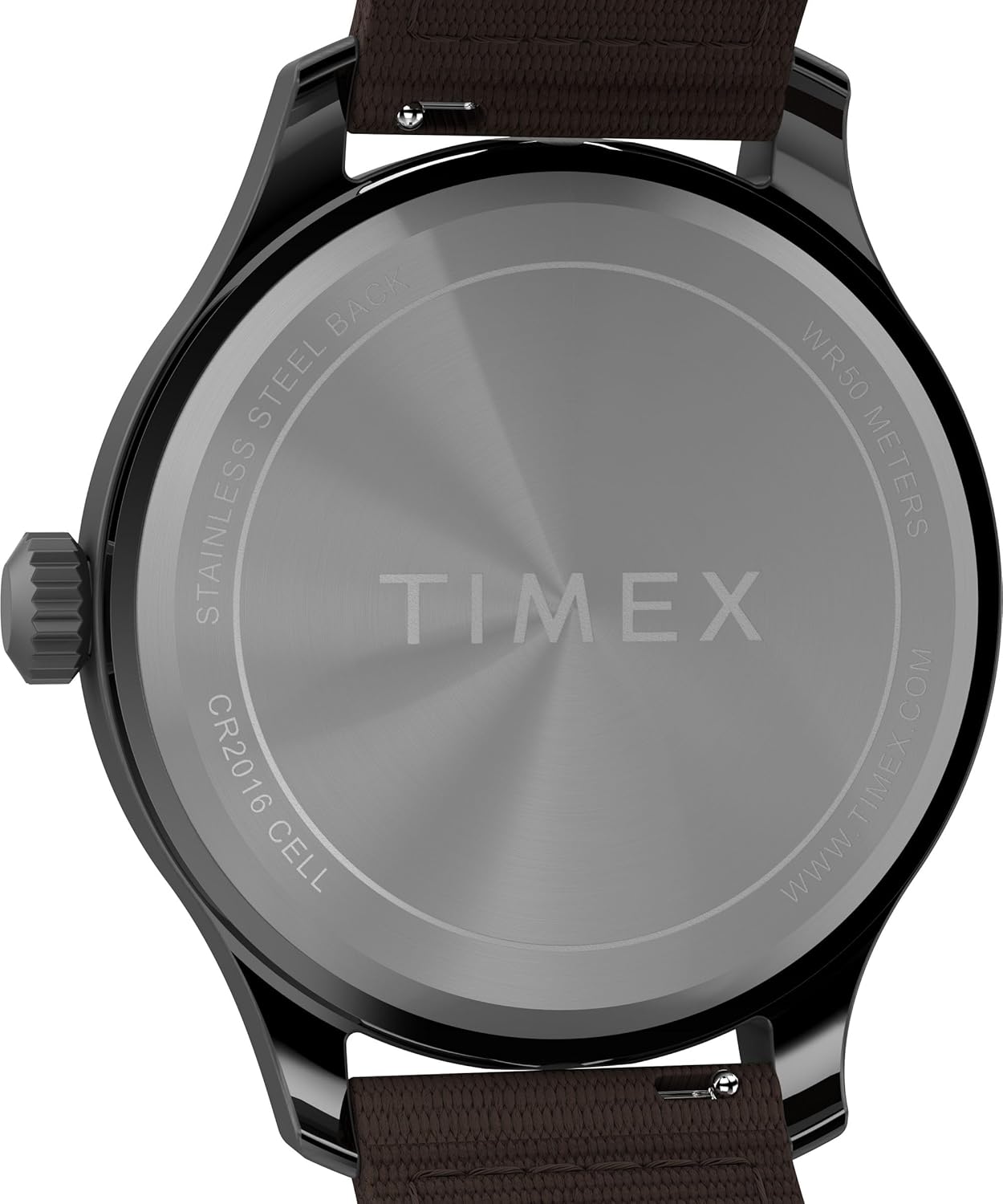
Figure 4.1: The watch case back indicates water resistance and battery type (CR2016 CELL).
5. Troubleshooting
| Problem | Possible Cause | Solution |
|---|---|---|
| Watch not running | Battery depleted; Crown pulled out. | Replace battery; Push crown fully in. |
| INDIGLO light not working or dim | Low battery; Button not pressed firmly. | Replace battery; Press the crown/button firmly. |
| Chronograph hands not resetting to zero | Misalignment; Not reset properly. | Consult Timex official manual for chronograph hand calibration instructions. This usually involves pulling the crown to a specific position and using the pusher buttons to adjust the sub-dials. |
| Condensation under crystal | Water ingress; Extreme temperature change. | Seek professional service immediately to prevent damage. |
For issues not listed here or if solutions do not resolve the problem, please contact Timex customer support or visit an authorized service center.
6. Specifications
- Model Number: TW4B309009J
- Case Diameter: 43mm
- Case Material: Gunmetal finish
- Strap Material: Brown fabric/leather (8 inch length)
- Dial Color: Black
- Lens Material: Mineral Glass
- Water Resistance: 50 meters (164 feet)
- Movement: Quartz Analog
- Features: Chronograph, INDIGLO Night-Light
- Battery Type: CR2016 CELL
- Package Dimensions: 6.69 x 4.61 x 2.44 inches
- Item Weight: 4.06 ounces

Figure 6.1: Rear view of the watch, showing the durable case back and strap attachment.
7. Warranty and Support
7.1 Warranty Information
Timex watches are manufactured to high standards and come with a limited warranty. Specific warranty terms and conditions, including duration and coverage, are provided with your purchase documentation or can be found on the official Timex website. Please retain your proof of purchase for warranty claims.
7.2 Customer Support
For further assistance, technical support, or service inquiries, please visit the official Timex website or contact their customer service department. Contact information can typically be found on the Timex website or in the documentation included with your watch.
Official Timex Website: www.timex.com


