
1. Product Overview
The YiKaiEn 50 Ohm BNC D-Type Panel Mount Connector is a versatile and robust adapter designed for integrating BNC connections into custom communication and surveillance systems. This female-to-female coaxial adapter features a gold-plated SDI video connection, ensuring stable and reliable signal transmission. Its D-shaped panel aperture allows for secure and stable mounting on various surfaces, including walls, desktops, equipment panels, and racks. The connector is built with a durable zinc alloy die-cast casing, providing excellent protection and longevity.


2. Key Features
- Customizable I/O Configuration: Ideal for creating bespoke input/output setups in communication systems, surveillance camera installations, and digital communication networks.
- Secure Panel Mounting: Features a D-shaped panel aperture for secure fixation with nuts, allowing extension of BNC video connection ports on various surfaces.
- Robust Construction: Main body crafted from zinc alloy die-cast casing for sturdy chassis protection, ensuring durability and resistance to damage.
- Stable Signal Transmission: Expertly designed for connecting BNC coaxial cables, ensuring safe and stable signal integrity for audiovisual and digital communications.
- Versatile Applications: Suitable for extension cables, coaxial cables in monitoring projects, audiovisual imaging, laboratories, LMR, wireless LANs, and other RF electronic devices in diverse environments.
3. Setup and Installation
This BNC panel mount connector is designed for straightforward installation into a D-shaped cutout. Ensure the mounting surface is clean and free of debris before installation.
3.1. Required Tools
- Drill (if creating a new panel cutout)
- Appropriate drill bit for D-shaped cutout (refer to specifications for dimensions)
- Screwdriver (for mounting screws)
- Wrench (for securing nuts)
3.2. Installation Steps
- Prepare the Mounting Surface: If not already present, create a D-shaped cutout on your panel, wall, or equipment rack according to the dimensions provided in the Specifications section (Figure 6.1).
- Insert the Connector: Insert the BNC D-Type Panel Mount Connector into the prepared cutout from the front side of the panel.
- Secure with Nuts: From the rear side of the panel, thread the included nuts onto the connector's threaded body and tighten them securely with a wrench.
- Attach Mounting Screws: Use the provided screws to further secure the connector to the panel through the four corner holes.
- Optional Waterproof Cover: If environmental protection is required, attach the waterproof cover to the front of the connector.
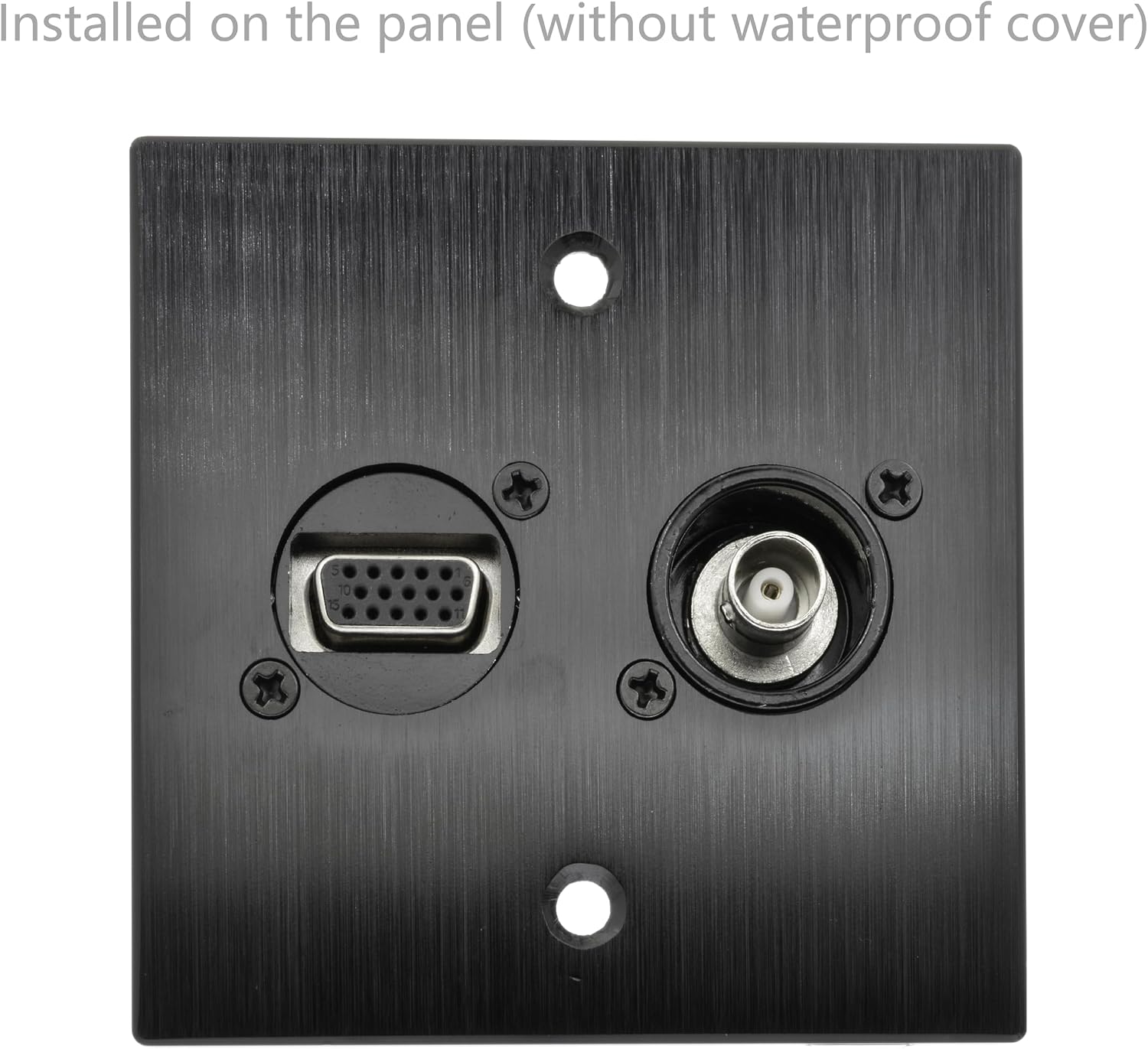

4. Operation
Once installed, the BNC D-Type Panel Mount Connector functions as a pass-through for BNC coaxial cables. Its operation is simple and direct.
4.1. Connecting BNC Cables
- Align the BNC male connector of your coaxial cable with the BNC female port on the panel mount connector.
- Push the BNC male connector onto the female port and twist clockwise until it locks into place. A click sound indicates a secure connection.
- To disconnect, twist the BNC male connector counter-clockwise and pull it away from the panel mount connector.

5. Maintenance
The YiKaiEn BNC D-Type Panel Mount Connector requires minimal maintenance due to its robust construction. Regular inspection can help ensure optimal performance and longevity.
- Cleaning: Periodically wipe the connector's exterior with a soft, dry cloth to remove dust and dirt. Avoid using abrasive cleaners or solvents.
- Waterproof Cover: Ensure the waterproof cover is properly seated when the connector is not in use, especially in environments where moisture or dust is present. Inspect the cover for any signs of wear or damage and replace if necessary.
- Connection Integrity: Occasionally check the tightness of the mounting nuts and screws to ensure the connector remains securely fixed to the panel.
- Contact Points: While the gold-plated contacts are designed for durability, avoid excessive force when connecting or disconnecting cables to prevent damage to the internal pins.
6. Troubleshooting
If you encounter issues with your BNC D-Type Panel Mount Connector, consider the following common troubleshooting steps:
- No Signal or Intermittent Signal:
- Ensure both ends of the BNC coaxial cable are securely connected to the panel mount connector and the respective devices.
- Inspect the BNC cables for any visible damage (kinks, cuts, frayed shielding). Try a different cable if possible.
- Verify that the connected devices (e.g., camera, monitor) are powered on and functioning correctly.
- Check for proper impedance matching (this connector is 50 Ohm; ensure it matches your system's requirements).
- Loose Connector in Panel:
- Tighten the mounting nuts and screws on the rear of the panel.
- Ensure the panel cutout dimensions are accurate and provide a snug fit for the D-type connector.
- Waterproof Cover Does Not Stay On:
- Ensure the cover is correctly aligned and pushed firmly onto the connector.
- If the cover is damaged or stretched, it may need replacement.
If issues persist after attempting these steps, contact customer support for further assistance.
7. Specifications
Detailed technical specifications for the YiKaiEn 50 Ohm BNC D-Type Panel Mount Connector:
| Attribute | Value |
|---|---|
| Product Dimensions (L x W x H) | 1.26 x 1.18 x 1.02 inches |
| Item Weight | 0.634 ounces |
| Model Number | socket-BNC50-D-FTF |
| Connector Type | BNC Female-to-Female |
| Impedance | 50 Ohm |
| Color | Black |
| Manufacturer | YiKaiEn |
| Compatible Devices | Video Surveillance Systems, Television, Digital Video Equipment, Video Equipment, CCTV Cameras |
| Specific Uses For Product | Camera, Communication Systems, Surveillance Systems |

8. Warranty and Support
Specific warranty information for the YiKaiEn 50 Ohm BNC D-Type Panel Mount Connector is not provided in this manual. For details regarding product warranty, returns, or technical support, please refer to the product listing on the retailer's website or contact YiKaiEn customer service directly through their official channels.
For the most up-to-date information, please visit the official YiKaiEn store or product page where you purchased this item.