
Introduction
Thank you for purchasing the PUREMIC S3 Portable Bluetooth Karaoke Machine. This manual provides detailed instructions for setting up, operating, and maintaining your device. Please read this manual thoroughly before use to ensure proper function and to maximize your enjoyment of the product.
What's in the Box
Verify that all items are present in the package:
- Bluetooth Speaker x 1
- UHF Wireless Microphone x 2
- Leather Bag x 1
- Speaker Charger x 1
- Microphone Charger x 1
- User Manual x 1

Image: All components included in the PUREMIC S3 package.
Product Overview and Features
The PUREMIC S3 is a portable karaoke system designed for high-quality audio and versatile use. Key features include:
- Immersive Sound: Equipped with a 5.25-inch woofer and two 1-inch tweeters for clear, powerful sound.
- Wireless Microphones: Two UHF wireless microphones for singing.
- Voice Elimination: One-touch vocal elimination feature on microphones.
- Sound Effects: Eight entertainment sound effects (Children, Monster, K.T.V., etc.).
- Long-lasting Battery: Built-in 10,000 mAh rechargeable battery providing up to 8 hours of playtime for the speaker and 10 hours for microphones.
- Energy Saving: Automatic power-down after 15 minutes of inactivity.
- Versatile Connectivity: Bluetooth 5.0, AUX input, USB port for playback and recording.
- Dynamic Lighting: Six adjustable lighting modes with 128 LED colors that synchronize with music.
- Portability: Lightweight, compact design with a swivel handle and included leather carrying bag.
- Water Resistance: IPX4 rated for splash resistance.
- NFC Connectivity: Quick pairing with Android devices via NFC.
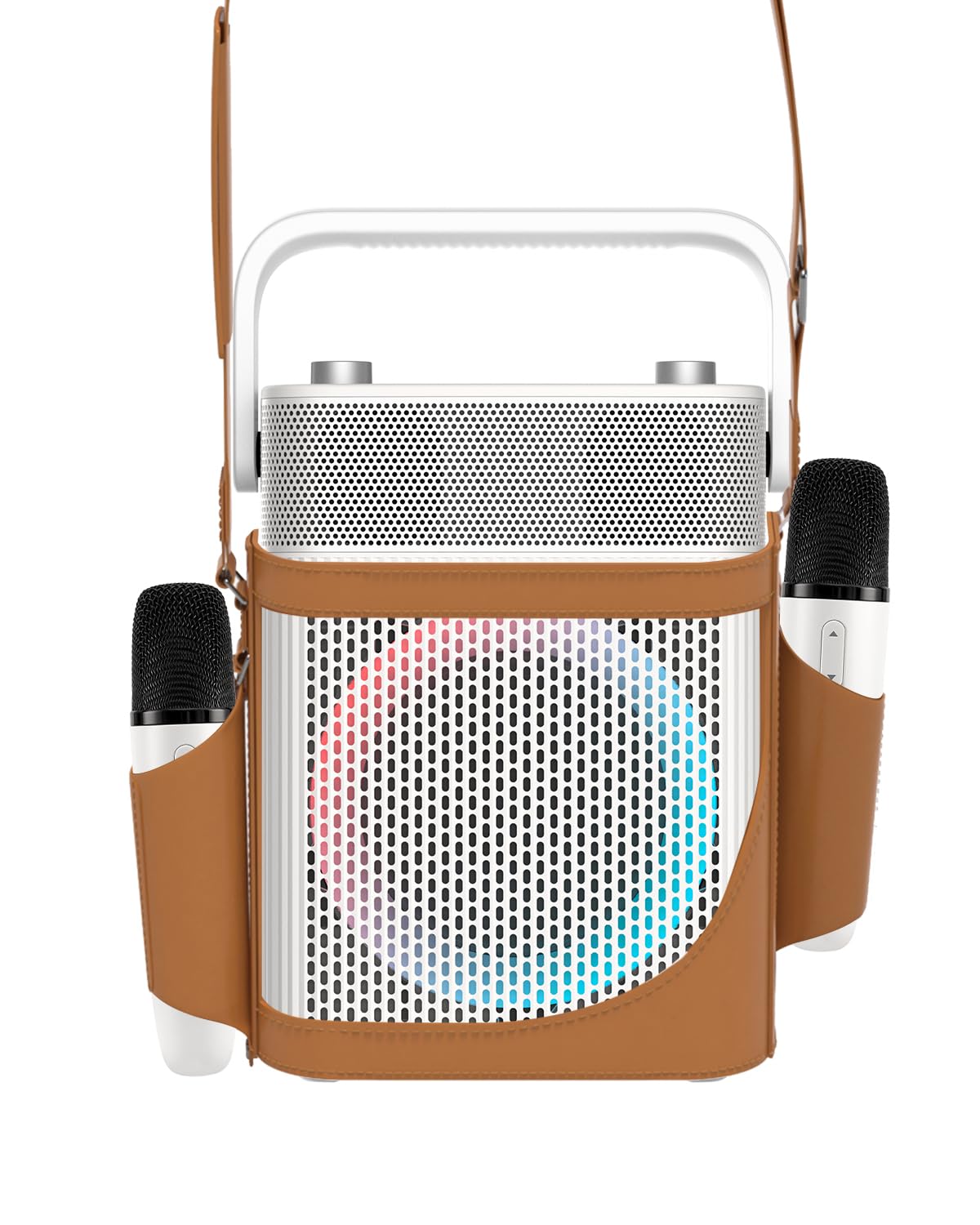
Image: Front view of the PUREMIC S3 Karaoke Machine, highlighting its design and LED lights.
Setup Guide
1. Charging the Device
Before first use, fully charge the speaker and microphones.
- Speaker: Connect the speaker charger to the "Charge Port" on the back of the speaker. The charging indicator will show progress.
- Microphones: Place the UHF wireless microphones into their dedicated charging holders on top of the speaker. The microphones will begin charging automatically.

Image: Close-up of the speaker's rear panel, indicating the Charge Port, Aux-in Port, and USB Port.
2. Powering On/Off
- Speaker: Press and hold the Power On/Off button on the control panel until the device powers on or off.
- Microphones: Press and hold the power button on each microphone to turn them on or off. They will automatically pair with the speaker when both are powered on.
Operating Instructions
1. Bluetooth Connection
- Turn on the PUREMIC S3 speaker.
- Press the BT button on the speaker's control panel to enter Bluetooth pairing mode. The Bluetooth indicator will flash.
- On your device (smartphone, tablet, TV, computer), enable Bluetooth and search for "PUREMIC S3".
- Select "PUREMIC S3" from the list of available devices to pair. A confirmation sound will indicate a successful connection.
NFC Pairing (Android devices only): For quick pairing, ensure NFC is enabled on your Android smartphone. Tap your phone gently against the NFC area on the speaker's control panel. Your phone will prompt you to connect to the PUREMIC S3.

Image: Demonstrates NFC pairing with an Android phone on the PUREMIC S3 speaker.
2. AUX Input
To connect devices via AUX cable:
- Connect one end of a 3.5mm AUX cable (not included) to the AUX-in port on the back of the PUREMIC S3.
- Connect the other end to the audio output jack of your device (e.g., TV, MP3 player).
- The speaker will automatically switch to AUX mode.

Image: PUREMIC S3 connected to a TV via AUX, showing karaoke lyrics on screen.
3. USB Playback and Recording
Insert a USB drive into the USB port on the back of the speaker for music playback or to record your performance.
- Playback: The speaker will automatically detect and play audio files from the USB drive.
- Recording: Press the REC button on the control panel to start recording. Press it again to stop recording. Recordings will be saved to the USB drive.
4. Microphone Functions
The wireless microphones offer several features:
- Volume/Echo: Use the dedicated knob on the speaker to adjust microphone volume and echo effect.
- Vocal Elimination: Press the designated button on the microphone for one-touch vocal elimination from music tracks.
- Sound Effects: The microphones feature 8 different sound effects (Children, Monster, Male, Female, Original, Concert, Live, K.T.V.). Cycle through these effects using the microphone's controls.

Image: Visual representation of the 8 sound effects available on the PUREMIC S3 microphones.
5. Speaker Controls
The speaker's control panel includes:
- Power On/Off: Press and hold to power on/off.
- Volume/Echo Knob: Rotate to adjust overall volume and microphone echo.
- BT Button: Activates Bluetooth pairing mode.
- BASS Button: Toggles bass sound enhancement.
- Pause Button: Pauses/resumes playback.
- REC Button: Initiates/stops recording to USB.
- Light Effect Button: Cycles through 6 different lighting modes.
- Pre/Next Song Knob: Rotate to skip tracks.

Image: Detailed view of the speaker's control panel, showing all buttons and their functions.
6. TWS Pairing (True Wireless Stereo)
If you have two PUREMIC S3 speakers, you can pair them for a true wireless stereo experience:
- Ensure both speakers are powered on and not connected to any Bluetooth device.
- On one speaker, press and hold the Bluetooth button until you hear a pairing tone.
- Repeat this step on the second speaker.
- The speakers will automatically connect to each other. Once paired, connect your device to one of the speakers via Bluetooth.

Image: Two PUREMIC S3 speakers set up for TWS, providing double stereo sound in a room.
Maintenance
- Cleaning: Wipe the speaker and microphones with a soft, dry cloth. Do not use abrasive cleaners or solvents.
- Storage: Store the device in a cool, dry place away from direct sunlight and extreme temperatures.
- Battery Care: To prolong battery life, fully charge the device before long periods of storage and recharge it every 3 months.
- Water Resistance: The speaker is IPX4 rated, meaning it is resistant to splashes. Do not submerge the device in water. Ensure all ports are securely covered when exposed to moisture.
Troubleshooting
| Problem | Possible Cause | Solution |
|---|---|---|
| No power | Battery is depleted. | Charge the speaker and microphones using the provided chargers. |
| Cannot connect via Bluetooth | Bluetooth is not enabled on your device or speaker is not in pairing mode. Device is too far. | Ensure Bluetooth is active on your device. Press the BT button on the speaker. Move device closer to the speaker. |
| No sound from microphones | Microphones are off or not paired. Microphone volume is too low. | Turn on microphones. Ensure they are charged. Adjust microphone volume knob on the speaker. |
| Sound distortion | Volume is too high. Microphone is too close to the speaker. | Reduce the volume. Increase distance between microphone and speaker. |
| USB playback not working | USB drive not formatted correctly or unsupported file types. | Ensure USB drive is formatted to FAT32. Use supported audio formats (e.g., MP3). |
Specifications
| Feature | Detail |
|---|---|
| Model Number | S3 |
| Item Weight | 8.82 pounds |
| Product Dimensions | 5.91 x 7.72 x 10.2 inches |
| Battery Type | 1 Lithium Ion battery (required) |
| Battery Capacity | 10,000 mAh (Speaker) |
| Playtime | Up to 8 hours (Speaker), Up to 10 hours (Microphones) |
| Compatible Devices | Smartphones, Televisions, iPads, Tablets, Computers |
| Connector Type | 3.5 mm Jack (AUX), USB |
| Speaker Count | 3 (1x 5.25-inch woofer, 2x 1-inch tweeters) |
| Output Wattage | 300 Watts |
| Power Source | Battery Powered |
| Voltage | 5 Volts (DC) |
| Water Resistance | IPX4 |
| Special Feature | Light Up Speaker, NFC |
Warranty and Support
For warranty information and technical support, please refer to the warranty card included in your package or contact PUREMIC customer service through their official website or the retailer where the product was purchased.
Online Support: Visit the PUREMIC Store on Amazon for additional product information and support resources: PUREMIC Store