Introduction
Thank you for choosing the TIDRADIO TD-M8s Walkie Talkies. This manual provides essential information for the safe and efficient operation of your two-way radios. Please read it thoroughly before use and keep it for future reference.
What's in the Box

Image: Package contents of the TIDRADIO TD-M8s Walkie Talkies.
- 8 x TIDRADIO TD-M8s Walkie Talkies
- 1 x Six-Way Multi-Gang Charger and Adapter
- 8 x Acoustic Walkie Talkie Earpieces
- 8 x Battery (pre-installed or separate)
- 8 x Unique Belt Clips
- 4 x USB Charging Cables
- 2 x USB Wall Chargers (dual line)
- 1 x User Manual
Product Overview
The TIDRADIO TD-M8s walkie talkies are designed for reliable communication across various environments. Key features include:
- 22 Preset Channels: Ideal for group management, supporting up to 22 distinct groups.
- Enhanced Privacy: Each channel supports 50 CTCSS tones and 105 CDCSS codes for secure and private communication.
- Hands-Free Operation (VOX): Voice-Activated Transmission eliminates the need for manual PTT button pressing.
- Scanning Feature: Automatically detects nearby active frequencies for monitoring.
- Noise Reduction: Squelch function minimizes background interference for clearer audio.
- Long Range Communication: Up to 3 miles (5 km) in open terrain with minimal obstructions; 0.6–1.8 miles (1–3 km) in urban environments. Actual range may vary based on environmental conditions and obstacles.
- High Capacity Battery: 1500mAh battery provides 8-12 hours of continuous use or 72-120 hours of standby time on a full charge.
- Clear Sound Quality: Equipped with a high-performance built-in speaker for loud, crystal-clear audio in noisy environments.
- Compact and Lightweight Design: Ultra-compact (5.3"x2.9"x0.6") and lightweight (0.2lb), fitting easily in a shirt pocket. Ergonomic curved design for comfortable grip.
- Durable Construction: Military-grade ABS + TPU material, 1.5m drop-resistant certified. IP52 water and dust resistant for harsh environments.
- Integrated Antenna: Compact yet powerful integrated antenna for crystal-clear long-range communication without snagging.
- Multi-Gang Charger: Professional 6-slot charging station for simultaneous charging of multiple radios.
- Acoustic Earpiece: Hands-free earpiece with integrated microphone for private and clear communication in high-noise environments.
- Versatile Applications: Suitable for hospitality, outdoor adventures, industrial sites, large venues, retail, and security teams.

Image: Overview of TD-M8s features.

Image: Long range and gain antenna for enhanced signal.

Image: Crystal clear sound quality.

Image: Enhanced privacy with CTCSS/DCS codes.
Getting Started
Component Identification

Image: Labeled components of the TD-M8s Walkie Talkie.
- Antenna: For signal transmission and reception.
- Power/Volume Knob: Rotate to turn the radio on/off and adjust volume.
- PTT (Push-to-Talk) Button: Press and hold to transmit your voice.
- Channel Buttons (+/-): Press to change the operating channel.
- Speaker: For receiving audio.
- Microphone (MIC): For transmitting your voice.
- Accessory Port: For connecting earpieces or programming cables.
- USB-C Charging Port: For direct charging.
- Indicator Light: Shows power and charging status.
Charging the Radios
Ensure radios are turned off before charging. The TD-M8s offers two charging methods:
- Multi-Gang Charger: Place up to 6 walkie talkies into the dedicated slots on the multi-gang charger. Connect the charger to a power outlet using the provided adapter. The indicator light on each slot will show charging status (e.g., red for charging, green for fully charged).
- USB-C Direct Charging: For individual radios, connect a USB-C charging cable to the port on the side of the walkie talkie. You can use the provided USB wall chargers, a car charger, power bank, or laptop for charging.
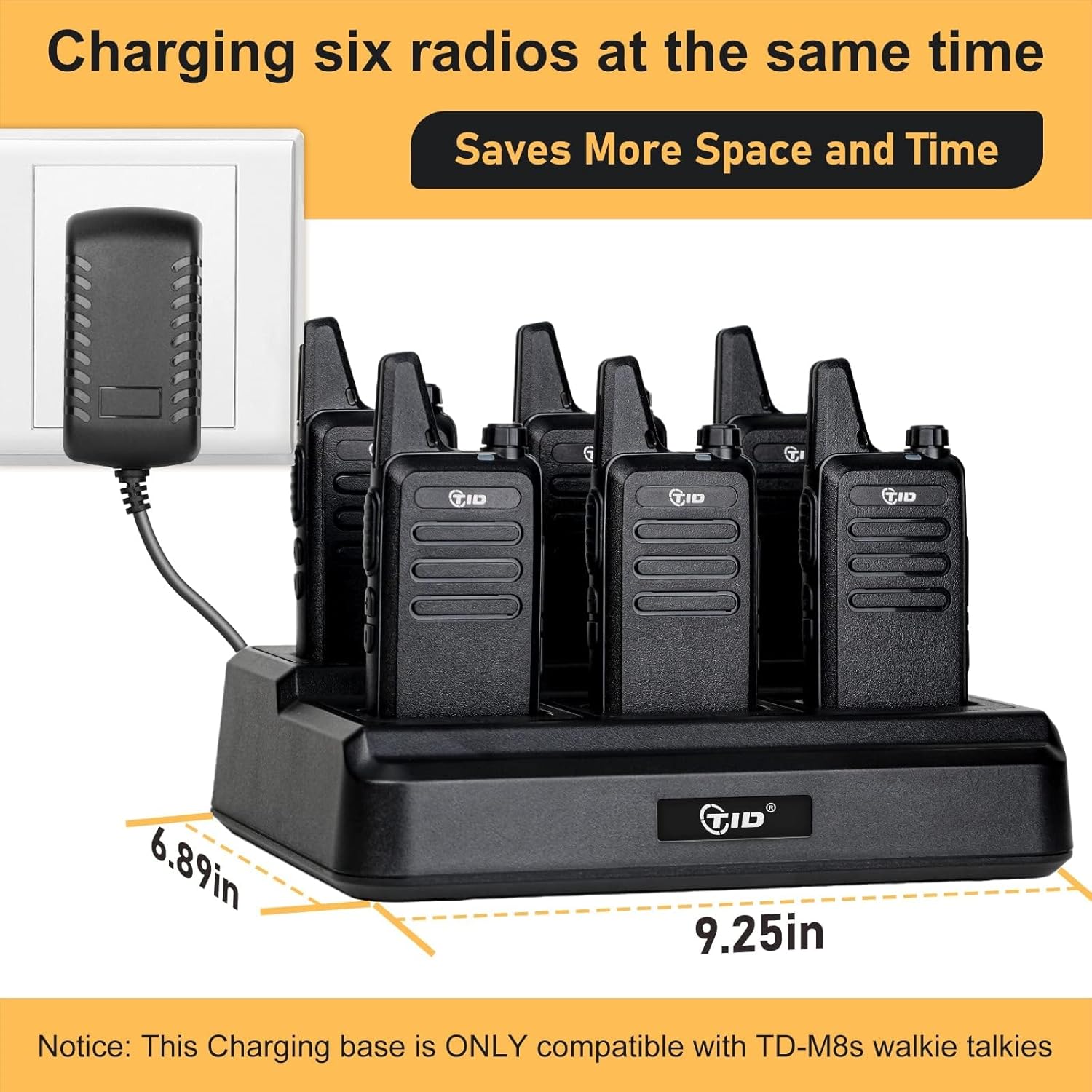
Image: 6-Way Multi-Gang Charger in use.

Image: Battery capacity and charging details.

Image: Various USB direct charging options.
Attaching the Belt Clip
Align the belt clip with the designated grooves on the back of the walkie talkie and slide it down until it clicks securely into place. To remove, push the release tab and slide the clip upwards.

Image: Walkie Talkie with detachable belt clip.
Attaching the Lanyard
Thread the lanyard loop through the small hole located near the top of the walkie talkie. Secure the lanyard by passing the larger end through the loop and pulling it tight.
Basic Operation
Power On/Off and Volume Adjustment
Rotate the Power/Volume knob clockwise to turn the radio on. Continue rotating clockwise to increase the volume. Rotate counter-clockwise to decrease the volume and turn the radio off.
Channel Selection
Use the Channel (+) and (-) buttons on the side of the radio to select your desired channel. Ensure all radios intended for communication are set to the same channel.
Transmitting (PTT)
To transmit your voice, press and hold the PTT button. Speak clearly into the microphone. Release the PTT button to stop transmitting and listen for a response.
VOX Function (Voice-Activated Transmission)
The VOX feature allows for hands-free conversations without pressing the PTT button. To activate/deactivate VOX:
- Turn off the radio.
- Press and hold the PTT and Channel (-) buttons simultaneously.
- While holding, turn on the radio. You will hear a voice prompt indicating "VOX ON" or "VOX OFF".

Image: Instructions for activating VOX function.
Earpiece Use
Connect the acoustic earpiece to the accessory port on the side of the walkie talkie. The earpiece features an integrated microphone and a finger PTT button for private and clear communication, especially in noisy environments.

Image: Acoustic Earpiece features.
Specifications
| Item Weight | 5.17 pounds |
| Package Dimensions | 13.15 x 12.24 x 4.45 inches |
| Item Model Number | TD-M8s Walkie Talkies |
| Batteries | 1 Lithium Polymer batteries required (included) |
| Number of Channels | 22 |
| Frequency Range | FRS Frequency |
| Talking Range Maximum | 3 Mile (5 km) |
| Voltage | 3.7 Volts |
| Water Resistance Level | Water Resistant (IP52) |
Troubleshooting
If you encounter issues with your TD-M8s walkie talkies, consider the following common solutions:
- No Power: Ensure the battery is fully charged and properly inserted. Rotate the Power/Volume knob to turn on the device.
- Cannot Transmit/Receive: Verify that all radios are on the same channel and that the PTT button is being pressed correctly. Check for obstructions or excessive distance between radios.
- Poor Audio Quality: Adjust the volume. Ensure the microphone and speaker are not obstructed. Check for strong interference sources.
- VOX Not Working: Ensure VOX is activated as per the instructions in the Basic Operation section. Adjust VOX sensitivity if available (refer to full product manual for advanced settings).
- Charging Issues: Ensure the charger is properly connected to a power source and the radio is correctly seated in the charging slot or the USB-C cable is firmly connected.
For further assistance, please contact TID customer support.
Maintenance
To ensure the longevity and optimal performance of your walkie talkies:
- Keep the radios clean and dry. Wipe with a soft, damp cloth.
- Avoid exposing the radios to extreme temperatures, direct sunlight, or harsh chemicals.
- Store radios and accessories in a cool, dry place when not in use.
- Do not attempt to disassemble or modify the radios, as this will void the warranty.
Warranty & Support
The TIDRADIO TD-M8s Walkie Talkies come with a 1-year warranty. For warranty claims, technical support, or any product-related concerns, please contact TID customer service. We are committed to product quality and customer satisfaction.
Product Video
Video: Overview of TIDRADIO TD-M8s walkie talkies features and design.


