
1. Introduction and Overview
The POXURIO 900W Macerator Pump is a powerful and efficient solution designed for handling wastewater in areas where traditional gravity drainage is not feasible. This pump is ideal for creating new bathrooms, laundry rooms, or utility sinks in basements, extensions, or any location below the main sewer line. With its robust 900W motor, it can effectively discharge sewage vertically up to 32.8 feet and horizontally up to 328 feet, offering significant flexibility in plumbing installations. Its design incorporates multiple inlets and outlets to accommodate various fixtures, ensuring a comprehensive wastewater management system.
2. Safety Instructions
Please read all safety instructions carefully before installation, operation, or maintenance of the POXURIO Macerator Pump. Failure to follow these instructions may result in electric shock, fire, serious injury, or property damage.
- Electrical Safety: Ensure the pump is connected to a properly grounded 110V, 60Hz power supply. Do not operate the pump with a damaged power cord or plug. All electrical connections should be performed by a qualified electrician and comply with local electrical codes. Disconnect power before performing any maintenance or service.
- Water and Plumbing: This pump is designed for domestic wastewater only. Do not use it for flammable liquids, corrosive chemicals, or solid objects that are not human waste or toilet paper. Ensure all plumbing connections are secure and watertight to prevent leaks.
- Installation Environment: Install the pump in a dry, well-ventilated area, protected from freezing temperatures. Ensure adequate space around the unit for ventilation and future maintenance.
- Children and Pets: Keep children and pets away from the pump during operation and maintenance.
- Maintenance: Always wear appropriate personal protective equipment (PPE) such as gloves and eye protection when performing maintenance. Do not attempt to repair the internal components unless you are a qualified technician.
3. Package Contents
Carefully unpack the box and ensure all items listed below are present and undamaged. If any parts are missing or damaged, contact customer support immediately.

Image: The POXURIO Macerator Pump with its various components and accessories, including hose clamps, inlet hoses, and plugs. Dimensions of the pump (15.75 inches length, 7.5 inches width, 11 inches height) are also indicated.
| Item No. | Description | Quantity |
|---|---|---|
| 1 | Toilet Connection Rubber Ring | 1 |
| 2 | Check Valve With Plastic Elbow | 1 |
| 3 | Hose Clamp (110-120mm) | 1 |
| 4 | Hose Clamp (90-110mm) | 1 |
| 5 | Front Lid | 1 |
| 6 | Plastic Inlet Hose | 3 |
| 7 | Hose Clamp (32-50mm) | 4 |
| 8 | Plug | 1 |
| 9 | Plug Mounted On The Pump | 1 |
4. Specifications
Detailed technical specifications for the POXURIO 900W Macerator Pump:

Image: This diagram illustrates the pump's impressive performance metrics, including a maximum vertical lift of 10 meters (32.8 ft) and horizontal discharge up to 100 meters (328 ft), a flow rate of 2750 GPH, 1.2 HP input power, and a low noise level of 45 dB.
| Specification | Value |
|---|---|
| Power | 900W (1.2 HP) |
| Voltage | 110V, 60Hz |
| Max Vertical Lift | 32.8 ft (10m) |
| Max Horizontal Lift | 328 ft (100m) |
| Max Rated Flow Rate | 2750 GPH |
| Noise Level | 45 dB |
| Protection Class | IPX4 |
| Max Temperature | 90°C |
| Material | Acrylonitrile Butadiene Styrene (ABS) |
| Blade Material | Stainless Steel |
| Dimensions (L x W x H) | 15.75 x 7.5 x 11 inches |
| Item Weight | 18.56 pounds |
5. Installation
Proper installation is crucial for the optimal performance and longevity of your macerator pump. It is recommended that installation be performed by a qualified plumber.
5.1. Placement
Position the macerator pump on a stable, level surface near the fixtures it will serve. Ensure there is sufficient access for future maintenance. The pump should be installed in a location where it is protected from direct water spray and freezing temperatures.
5.2. Connecting Inlets
The POXURIO Macerator Pump features 4 water inlets (Ø40mm Ext) allowing connection of up to four bathroom sewage discharge devices. These can include a toilet, wash basin, washing machine, or bathtub. Use appropriate plumbing fittings and ensure all connections are sealed securely to prevent leaks.
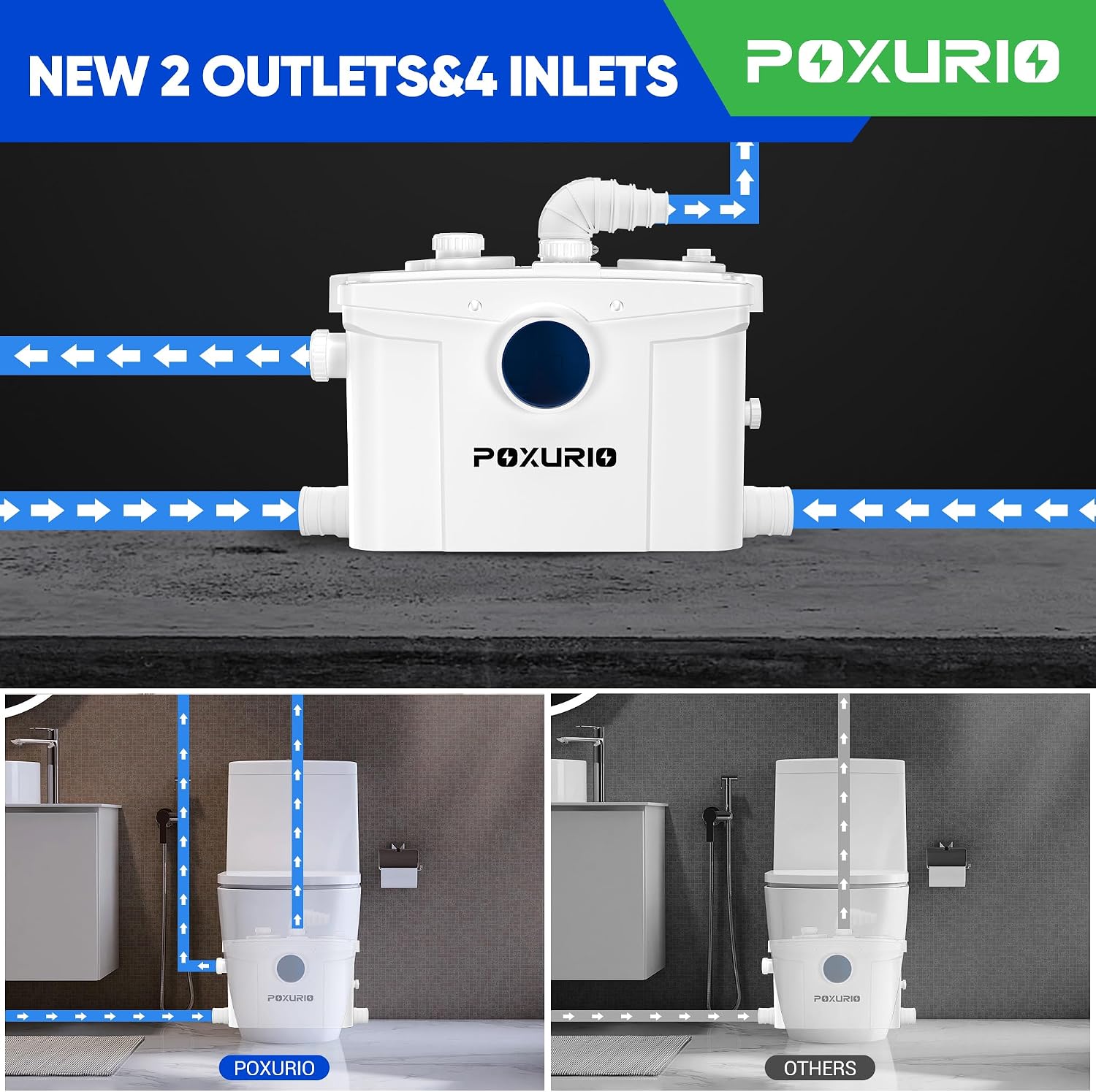
Image: This visual demonstrates the pump's versatile connectivity with two water outlets and four water inlets, designed to accommodate various plumbing configurations.

Image: A detailed view of the pump's pipe connection points, specifying the external diameters for the four Ø40mm inlets and the two Ø25/32/40/48mm extendable outlets.

Image: This graphic demonstrates the broad utility of the macerator pump, capable of connecting to and managing wastewater from multiple household appliances and fixtures such as washing machines, toilets, sinks, and bathtubs.
5.3. Connecting Outlets
The pump is equipped with 2 outlets (Ø25/32/40/48mm Ext) to provide flexibility for various discharge pipe sizes. Connect the discharge pipe to the pump's outlet, ensuring a proper slope for horizontal runs (minimum 1% or 1/8 inch per foot) to facilitate flow. The discharge pipe should lead to the main sewer line or an approved drainage system.
5.4. Electrical Connection
Connect the pump to a dedicated 110V, 60Hz grounded electrical outlet. Ensure the circuit is protected by a Ground Fault Circuit Interrupter (GFCI) for added safety, especially in damp environments like basements.
6. Operation
The POXURIO Macerator Pump operates automatically. Once properly installed and connected to power, it will activate when wastewater enters the unit, macerating solids and pumping the liquid to the discharge point. The pump is designed for low noise operation, with a typical noise level of only 45 dB, minimizing disturbance during use.
- Ensure all connected fixtures (toilet, sink, etc.) are functioning correctly and draining into the pump.
- Avoid flushing non-biodegradable items such as wet wipes, feminine hygiene products, paper towels, or excessive amounts of toilet paper, as these can clog the macerating blades and damage the pump.
7. Maintenance
Regular maintenance helps ensure the long-term performance and efficiency of your macerator pump.
7.1. General Cleaning
Periodically clean the exterior of the pump with a damp cloth. Do not use abrasive cleaners or solvents. For internal cleaning, specialized macerator pump cleaning solutions can be used following the product's instructions. Always disconnect power before cleaning.
7.2. Ventilation System
The pump includes a ventilation port. This vent can be used with the included activated carbon filter to effectively remove odors, or it can be connected to your home's ventilation duct system for improved air quality in the bathroom or utility area.

Image: This image highlights the pump's ventilation feature, which can be equipped with activated carbon to neutralize odors, contributing to a cleaner and more comfortable environment.
7.3. Inspection
Regularly inspect the pump and all connections for any signs of leaks, damage, or unusual noises. Address any issues promptly to prevent further complications.
8. Troubleshooting
This section provides solutions to common issues you might encounter with your POXURIO Macerator Pump. For problems not listed here or if solutions do not resolve the issue, please contact customer support.
| Problem | Possible Cause | Solution |
|---|---|---|
| Pump does not start or run. | No power, tripped circuit breaker, clogged sensor, motor issue. | Check power connection and circuit breaker. Ensure the pump is plugged into a live outlet. Inspect for blockages around the sensor. If issues persist, contact support. |
| Pump runs continuously or frequently. | Leak in plumbing, faulty check valve, sensor malfunction. | Inspect all plumbing connections for leaks. Check the check valve for proper operation. Contact support if the issue continues. |
| Poor discharge or slow drainage. | Partial blockage in inlet/outlet, insufficient power, excessive vertical/horizontal lift. | Check for blockages in pipes and pump inlets. Verify power supply. Ensure installation parameters are within specified limits. Avoid flushing non-maceratable items. |
| Unpleasant odors. | Lack of ventilation, buildup of waste, issues with P-traps. | Ensure the ventilation system is properly connected and the activated carbon filter (if used) is functional. Clean the pump and connected fixtures. Verify P-traps are filled with water. |
| Loud or unusual noises. | Foreign object in macerator, worn bearings, pump not level. | Immediately disconnect power. Do not attempt to clear internal blockages without proper tools and safety precautions. Ensure the pump is on a stable, level surface. Contact support. |
9. Warranty and Support
For specific warranty information regarding your POXURIO 900W Macerator Pump, please refer to the warranty card included with your purchase or visit the official POXURIO website. Keep your proof of purchase for warranty claims.
If you require technical assistance, have questions about installation, operation, or maintenance, or need to report a defect, please contact POXURIO customer support. Provide your product model and purchase date when contacting support to ensure efficient service.
POXURIO Customer Support:
- Please refer to your product packaging or the official POXURIO website for the most current contact information.