1. Introduction
This manual provides comprehensive instructions for the VINABTY HSG1074 replacement remote control. This remote is designed to function as a direct replacement for various original HANNspree TV remote controls, offering seamless compatibility without the need for complex programming.
Simply insert the required batteries, and the remote control will be ready for immediate use with your compatible HANNspree television.
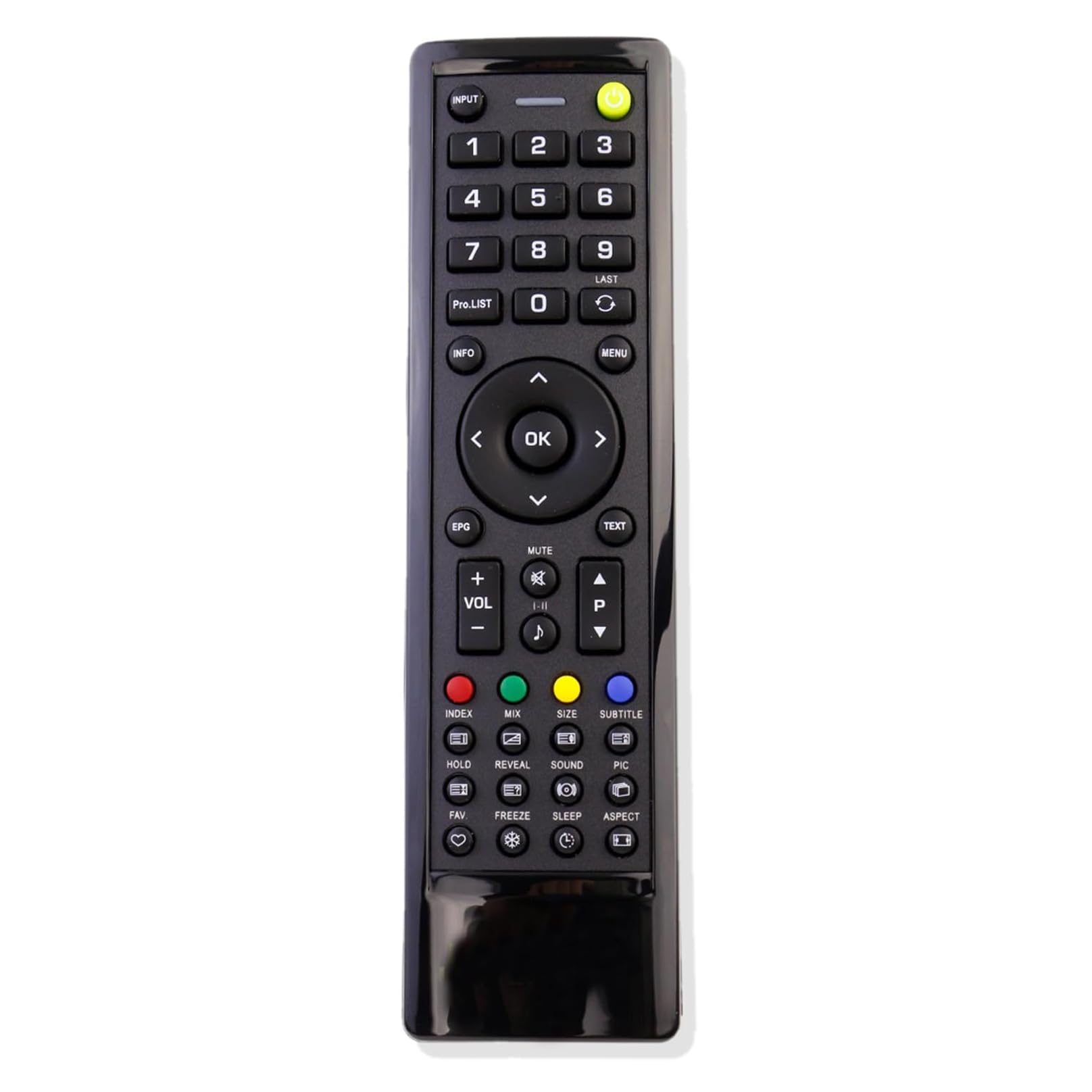
Figure 1: Front view of the VINABTY HSG1074 Replacement Remote Control. This image displays the full layout of buttons, including power, number keys, navigation, volume, and channel controls.
2. Setup and Battery Installation
The VINABTY HSG1074 remote control requires two AAA 1.5V batteries for operation. Batteries are not included with the remote control.
2.1 Battery Requirements
- Battery Type: AAA
- Quantity: 2
- Voltage: 1.5V per battery
2.2 Installation Steps
- Locate the battery compartment on the back of the remote control.
- Slide the battery compartment cover downwards or press the latch to open it.
- Insert two AAA batteries, ensuring that the positive (+) and negative (-) terminals align correctly with the markings inside the compartment. Incorrect polarity can prevent the remote from functioning.
- Slide the battery compartment cover back into place until it clicks securely.
Once batteries are installed, the remote control is ready for use. No additional programming or pairing is required for compatible HANNspree TV models.

Figure 2: Rear view of the remote control with the battery compartment open, showing the correct orientation for inserting two AAA batteries.
3. Operating the Remote Control
The VINABTY HSG1074 remote control provides full functionality for your HANNspree TV. Ensure a clear line of sight between the remote control and the TV's infrared (IR) receiver for optimal performance.

Figure 3: Detailed view of the VINABTY HSG1074 remote control, highlighting the various buttons and their positions.
3.1 Button Functions Overview
| Button | Function |
|---|---|
| Power (Green) | Turns the TV on or off. |
| INPUT | Selects the input source (e.g., HDMI, AV, Component). |
| Number Buttons (0-9) | Direct channel selection. |
| LAST | Switches to the previously viewed channel. |
| Pro.LIST | Accesses the program list. |
| INFO | Displays current program information. |
| MENU | Opens the TV's main menu. |
| Navigation (Up, Down, Left, Right) | Navigates through menus and options. |
| OK | Confirms selections in menus. |
| EXIT | Exits current menu or function. |
| TEXT | Activates or deactivates Teletext. |
| MUTE | Mutes or unmutes the TV sound. |
| VOL +/- | Adjusts the volume level. |
| CH +/- (P +/-) | Changes the TV channel. |
| EPG | Accesses the Electronic Program Guide. |
| SUBTITLE | Toggles subtitles on or off. |
| MIX | (Function may vary by TV model) |
| SOUND | Accesses sound settings. |
| PIC | Accesses picture settings. |
| ASPECT | Changes the screen aspect ratio. |
| SLEEP | Sets the sleep timer. |
| FREEZE | Freezes the current image on screen. |
| HOLD | (Function may vary by TV model) |
| REVEAL | (Function may vary by TV model) |
| INDEX | (Function may vary by TV model) |
| FAV | Accesses favorite channels. |
| Colored Buttons (Red, Green, Yellow, Blue) | Functions vary depending on the TV menu or Teletext page. |
4. Maintenance
Proper maintenance ensures the longevity and reliable performance of your remote control.
- Cleaning: Use a soft, dry cloth to clean the remote control. Avoid using liquid cleaners, aerosols, or abrasive materials, as these can damage the surface or internal components.
- Battery Replacement: Replace batteries promptly when the remote's responsiveness decreases or it stops functioning. Old batteries left in the compartment can leak and cause damage.
- Storage: Store the remote control in a dry environment, away from direct sunlight, high temperatures, and excessive humidity.
- Avoid Drops: Protect the remote from physical impact, as drops can damage internal circuitry.
5. Troubleshooting
If you encounter issues with your VINABTY HSG1074 remote control, refer to the following common troubleshooting steps:
5.1 Remote Not Responding
- Check Batteries: Ensure that the batteries are inserted correctly with the positive (+) and negative (-) terminals aligned as indicated in the battery compartment.
- Replace Batteries: If the batteries are old or depleted, replace them with two new AAA 1.5V batteries.
- Line of Sight: Verify that there is a clear path between the remote control's IR emitter and the TV's IR receiver. Obstructions can block the signal.
- Remote Distance: Ensure you are within the effective operating range (up to 10 meters) of the TV.
5.2 Intermittent Functionality
- Battery Connection: Open the battery compartment and gently adjust the batteries to ensure a secure connection.
- Interference: Strong light sources (e.g., direct sunlight, fluorescent lights) or other electronic devices can sometimes interfere with IR signals. Try operating the remote in a different environment.
5.3 Specific Button Not Working
- Inspect Button: Check if the button is physically stuck or damaged.
- Clean Remote: Dust or debris under the button may affect its function. Gently clean around the button with a dry, soft cloth.
If these steps do not resolve the issue, consider contacting the seller or manufacturer for further assistance.
6. Compatible HANNspree TV Models
This VINABTY HSG1074 replacement remote control is compatible with a wide range of HANNspree TV models, including but not limited to:
- HSG1074
- HSG1051
- HSG1066
- HSG-1114
- HSG-1116
- HSG-1117
- HSG1067
- HSG1075
- HSG1076
- HSG1101
- HSG1113
- HSG1114
- HSG1117
- HSG1139
- HSG1141
- HSG1142
- SJ28DMBB
- HSG-1051
- HSG-1066
- HSG-1067
- HSG-1074
- HSG1116
- HSG-1075
- HSG-1076
- HSG-1101
- HSG-1113
- HSG-1139
- HSG-1141
- HSG-1142
- HSG1248
- HSG1138
- HSG1112
- HSG1241
- HSG1231
- Sj22dmab
- Sj25dmab
- St32amsb
- 52-4r280002g040
- Sj32dmbb
If your HANNspree TV model is not listed but uses a remote similar to the HSG1074, it may still be compatible. Please refer to your TV's original manual or contact the seller for confirmation.
7. Specifications
| Feature | Detail |
|---|---|
| Model | VINABTY HSG1074 (SYJ-HSG1074-SYJ) |
| Brand | VINABTY |
| Power Source | 2 x AAA 1.5V Batteries (not included) |
| Connectivity Technology | Infrared (IR) |
| Compatible Devices | HANNspree Televisions |
| Dimensions (L x W x H) | Approx. 10 x 5 x 2 cm (3.9 x 2.0 x 0.8 inches) |
| Weight | Approx. 80 g (2.8 oz) |
| Color | Black |
| Operating Range | Up to 10 meters (33 feet) |
| Special Feature | No programming required |
8. Warranty and Support
Specific warranty information for the VINABTY HSG1074 replacement remote control is not provided in this manual. For details regarding warranty coverage, returns, or technical support, please contact the retailer or the VINABTY manufacturer directly.
When contacting support, please have your product model number (SYJ-HSG1074-SYJ) and purchase information readily available.


