
1. Safety Information
Please read this manual carefully before using the LEVENHUK Atom DNB200 Digital Night Vision Binoculars to ensure proper operation and to prevent damage. Keep this manual for future reference.
- Do not attempt to disassemble or repair the device yourself. Refer all servicing to qualified specialists.
- Avoid direct exposure to strong light sources, especially sunlight, as this can damage the internal components.
- Keep the device away from high temperatures, direct sunlight, and high humidity.
- Use only the specified battery type (18650 Li-ion) and charger. Improper use can lead to fire or explosion.
- Keep out of reach of children.
2. Package Contents
Verify that all items listed below are present in your package:
- LEVENHUK Atom DNB200 Digital Night Vision Binoculars
- Carrying Case
- Neck Strap
- USB Cable
- Cleaning Cloth
- MicroSD Card (pre-installed or separate)
- User Manual

Image 2.1: All items included in the LEVENHUK Atom DNB200 package, including the binoculars, carrying case, neck strap, USB cable, cleaning cloth, and a microSD card.
3. Product Components
Familiarize yourself with the main parts and controls of your digital night vision binoculars.

Image 3.1: Top view of the binoculars, highlighting the control panel with various buttons.
- Power Button: Turns the device on/off.
- Mode (M) Button: Switches between Photo, Video, and Playback modes.
- IR Illuminator Button (Sun/Light icon): Adjusts the infrared illumination level.
- OK Button: Confirms selections in the menu or takes a photo/starts video recording.
- Zoom In/Up Button (Magnifying glass with +): Increases digital zoom or navigates up in menus.
- Zoom Out/Down Button (Magnifying glass with -): Decreases digital zoom or navigates down in menus.
- Focus Wheel: Located on the side, adjusts optical focus for clear viewing.
- Eyepiece/Display: Viewfinder for observing images.
- Objective Lens: Front lens for capturing light.
- IR LED: Infrared light emitter for night vision.
- Battery Compartment: Located at the rear.
- USB-C Port: For charging and data transfer.
- MicroSD Card Slot: For memory card insertion.

Image 3.2: Front view of the binoculars, showcasing the display screen and objective lens.
4. Getting Started
4.1. Battery Installation
The device uses one 18650 Li-ion rechargeable battery.
- Locate the battery compartment cover on the rear of the binoculars.
- Open the cover.
- Insert the 18650 battery according to the polarity markings (+/-) inside the compartment.
- Close the battery compartment cover securely.
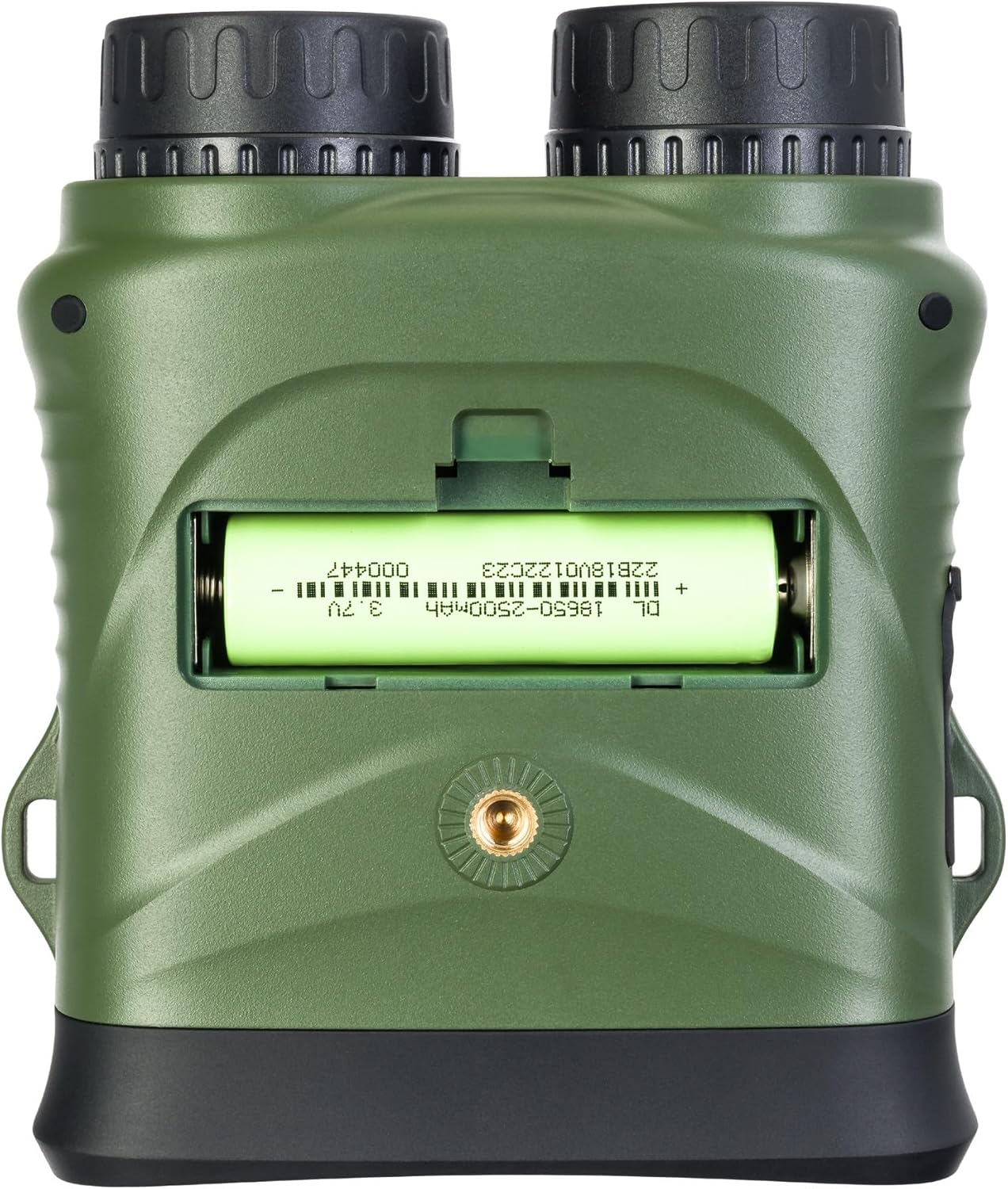
Image 4.1: Rear view of the binoculars with the battery compartment open, illustrating correct battery insertion.
4.2. Memory Card Installation
A microSD card (up to 32GB, Class 10 recommended) is required to save photos and videos.
- Locate the microSD card slot on the side of the binoculars, usually protected by a rubber flap.
- Gently open the rubber flap.
- Insert the microSD card with the gold contacts facing down until it clicks into place.
- Close the rubber flap to protect the port from dust and moisture.

Image 4.2: Side view of the binoculars, showing the USB-C port and the microSD card slot under a protective cover.
4.3. Powering On/Off
- To Power On: Press and hold the Power button (⑁) for a few seconds until the display illuminates.
- To Power Off: Press and hold the Power button (⑁) again until the display turns off.
5. Operating Instructions
5.1. Focus Adjustment
To achieve a clear image, adjust the focus:
- Look through the eyepiece.
- Rotate the focus wheel (located on the side of the binoculars) until the image appears sharp.
5.2. Mode Selection
Press the Mode (M) button to cycle through the available modes:
- Photo Mode: For capturing still images.
- Video Mode: For recording video footage.
- Playback Mode: For reviewing captured photos and videos.
5.3. Night Vision and IR Illumination
The device automatically switches to night vision mode in low light conditions. To enhance visibility in complete darkness:
- In Photo or Video mode, press the IR Illuminator button (Sun/Light icon).
- Each press will cycle through different IR illumination levels (e.g., Off, Level 1, Level 2, Level 3). Higher levels provide more illumination but consume more battery.
5.4. Digital Zoom
Use the Zoom In (+) and Zoom Out (-) buttons to adjust the digital magnification of the image on the display.
5.5. Capturing Photos and Videos
- To take a photo: In Photo Mode, frame your subject and press the OK button.
- To record a video: In Video Mode, press the OK button once to start recording. Press it again to stop recording. A recording indicator will appear on the screen.
5.6. Menu Settings
To access and adjust device settings:
- Press and hold the Mode (M) button to enter the menu.
- Use the Zoom In (+) and Zoom Out (-) buttons to navigate through menu options.
- Press the OK button to select an option or enter a sub-menu.
- Press the Mode (M) button again to exit the menu.
Common settings include: Video Resolution, Photo Resolution, Date Stamp, Language, Auto Power Off, Format SD Card.
6. Maintenance
6.1. Cleaning
- Lenses: Use the included cleaning cloth or a soft, lint-free cloth specifically designed for optical surfaces. Breathe lightly on the lens or use a small amount of lens cleaning fluid if necessary.
- Body: Wipe the body of the device with a soft, dry cloth. Do not use abrasive cleaners or solvents.
6.2. Storage
- When not in use, store the binoculars in their carrying case in a cool, dry place.
- Remove the battery if the device will not be used for an extended period to prevent leakage.
7. Troubleshooting
| Problem | Possible Cause | Solution |
|---|---|---|
| Device does not power on. | Battery is dead or incorrectly inserted. | Charge the battery or re-insert it with correct polarity. |
| Image is blurry. | Focus is not adjusted. | Rotate the focus wheel until the image is sharp. |
| Cannot save photos/videos. | No microSD card or card is full/corrupted. | Insert a microSD card, delete old files, or format the card (this will erase all data). |
| Poor night vision performance. | IR illuminator is off or set too low. | Increase the IR illumination level using the IR button. |
| Device freezes. | Software glitch. | Press and hold the Power button for 10 seconds to force a shutdown, then restart. |
8. Technical Specifications
| Feature | Specification |
|---|---|
| Model Number | 81702 |
| Product Dimensions | 3.94 x 1.97 x 0.5 inches |
| Item Weight | 3.53 ounces |
| Brand | Levenhuk |
| Special Feature | Night Vision |
| Color | Black |
| Eye Relief | 5 Millimeters |
| Binocular Prism Description | Roof Prism |
| Power Source | 18650 Li-ion Rechargeable Battery (included) |
| Storage | MicroSD card (up to 32GB, Class 10 recommended) |
9. Warranty and Customer Support
LEVENHUK products are covered by a manufacturer's warranty. For detailed warranty terms and conditions, please refer to the warranty card included with your product or visit the official Levenhuk website.
If you encounter any issues or have questions regarding your LEVENHUK Atom DNB200 Digital Night Vision Binoculars, please contact our customer support team:
- Website: www.levenhuk.com
- Email: Refer to website for support contact.
- Phone: Refer to website for support contact.
Please have your product model (DNB200) and serial number ready when contacting support.


