
ELECTROPRIME CACAZI A06-DC
ELECTROPRIME Wireless Waterproof Doorbell User Manual
Model: CACAZI A06-DC / TBD0603681701B
1. Introduction
This manual provides comprehensive instructions for the ELECTROPRIME Wireless Waterproof Doorbell, model CACAZI A06-DC. This smart home doorbell system features a long transmission distance, multiple music ringtones, adjustable volume, and LED light reminders, designed for ease of use and durability in various home environments.
2. Package Contents
Please verify that all items listed below are included in your package:
- Two (2) Wireless Doorbell Receivers
- One (1) Wireless Doorbell Transmitter
- Mounting accessories (double-sided tape, screws)
Note: Batteries are not included. The receiver requires 3 x No. 5 batteries, and the transmitter requires 1 x 12V 23A battery.
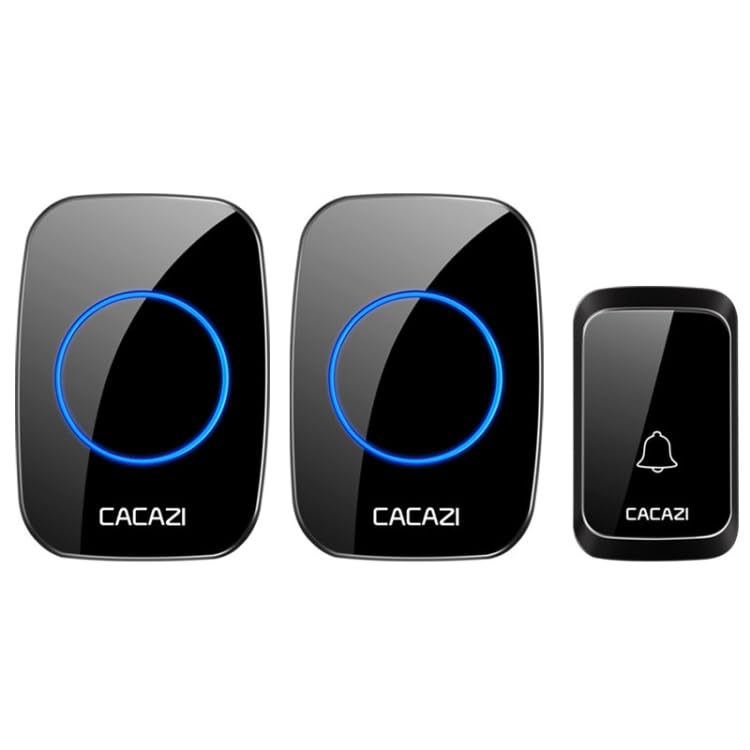
Image: The complete ELECTROPRIME Wireless Doorbell system, featuring two indoor receivers and one outdoor transmitter.
3. Setup and Installation
- Insert Batteries:
- For each receiver, open the battery compartment and insert three (3) No. 5 batteries (not included), ensuring correct polarity.
- For the transmitter, open the battery compartment and insert one (1) 12V 23A battery (not included), ensuring correct polarity.
- Pairing (if necessary): The units are typically pre-paired from the factory. If they do not connect automatically, consult the manufacturer's website for specific pairing instructions. A common method involves pressing and holding a volume or pairing button on the receiver until an indicator light flashes, then pressing the transmitter button.
- Mount the Transmitter: Choose a suitable outdoor location near your door. Ensure the surface is clean and dry. You can either:
- Use the provided double-sided tape to firmly attach the transmitter to the desired surface.
- Use screws to securely mount the transmitter. Ensure it is positioned to prevent direct water accumulation, despite its waterproof rating.
- Place the Receivers: Position the receivers in desired indoor locations within your home. Ensure they are within the effective 300-meter transmission range from the transmitter.
4. Operating Instructions
- Pressing the Doorbell: When a visitor presses the button on the outdoor transmitter, the indoor receivers will chime and their LED lights will flash simultaneously.
- Changing Ringtones: Locate the 'Music Selection' button on the receiver. Press this button repeatedly to cycle through the 36 available melodies until you find your preferred chime.
- Adjusting Volume: Locate the 'Volume Control' button on the receiver. Press this button to adjust the volume level. There are 4 distinct volume levels to choose from.
5. Maintenance
- Battery Replacement: Replace batteries in both the transmitter and receivers when the chime becomes weak, intermittent, or stops working entirely. Always use fresh batteries of the specified type.
- Cleaning: Wipe the doorbell units with a soft, dry cloth to remove dust or smudges. Do not use abrasive cleaners, solvents, or harsh chemicals, as these can damage the finish or internal components.
- Transmitter Protection: Although the transmitter has an IP44 waterproof rating, it is designed to withstand splashes and light rain. Avoid prolonged exposure to extreme weather conditions, direct submersion in water, or high-pressure water jets.
6. Troubleshooting
If you encounter issues with your doorbell, please refer to the following common solutions:
- Doorbell Not Chiming:
- Check if batteries are correctly inserted and not depleted in both the transmitter and receivers. Replace if necessary.
- Ensure the receivers are within the effective range of the transmitter (up to 300 meters barrier-free).
- Re-pair the transmitter and receivers if they have lost connection (refer to pairing instructions in Section 3).
- Weak Chime/Intermittent Operation:
- Replace old batteries with new ones.
- Reduce the distance between the transmitter and receivers.
- Remove any large metal objects or thick walls that might be obstructing the wireless signal.
- Unwanted Chimes:
- Check for potential interference from other wireless devices operating on similar frequencies.
- Ensure the doorbell button on the transmitter is not stuck in a pressed position.
7. Specifications
| Feature | Description |
|---|---|
| Material | ABS, Electronic Components |
| Transmission Distance | Up to 300 meters (barrier-free) |
| Music Ringtones | 36 selectable melodies |
| Volume Levels | 4 adjustable levels |
| Receiver Power Supply | 3 x No. 5 batteries (not included) |
| Transmitter Power Supply | 1 x 12V 23A battery (not included) |
| Waterproof Grade (Transmitter) | IP44 |
| Receiver Indicator | LED flashing light |
| Transmitter Dimensions (L x W x H) | 7.7 x 4.6 x 2 cm |
| Receiver Dimensions (L x W x H) | 9.5 x 6.5 x 2.4 cm |
| Model Number | TBD0603681701B |
8. Warranty and Support
For warranty information, product registration, or technical support, please refer to the manufacturer's official website or contact your retailer. It is recommended to keep your purchase receipt as proof of purchase for any warranty claims.
Ask a question about this manual
Ask about setup, troubleshooting, compatibility, parts, safety, or missing instructions. Manuals+ will review the question and use this page’s manual context to help answer it.