
1. Introduction
The DEENO S1500 Portable Power Station is a versatile and high-capacity power solution designed to provide reliable electricity for various applications, including emergency backup, home use, camping, RVs, and off-grid scenarios. Featuring a 1036Wh LiFePO4 battery and 1500W continuous power output, it supports charging up to 12 devices simultaneously. This manual provides essential information for safe and efficient operation of your DEENO S1500.
2. Safety Instructions
Please read and understand all safety instructions before operating the DEENO S1500 Portable Power Station. Failure to follow these instructions may result in electric shock, fire, or serious injury.
- Do not disassemble, repair, or modify the unit. Incorrect reassembly may cause fire or electric shock.
- Do not expose the unit to fire or extreme temperatures (above 60°C/140°F).
- Do not use or store the unit in a bathroom or in areas exposed to water or moisture.
- Do not use the unit if it is damaged or has been dropped.
- Keep the unit away from children and pets.
- Ensure proper ventilation during use and charging to prevent overheating.
- Use only approved accessories and charging cables.
- Avoid short-circuiting the output ports.
- Dispose of the unit according to local regulations for LiFePO4 batteries.
3. Package Contents
Verify that all items are included in your package. If any items are missing or damaged, please contact DEENO support.
- DEENO S1500 Portable Power Station
- AC Charging Cable
- Car Charging Cable
- MC4 Connection Cable (for solar charging)
- User Manual
4. Product Overview
Familiarize yourself with the components and ports of your DEENO S1500 Portable Power Station.

Image: Front view of the DEENO S1500 Portable Power Station, highlighting its various output ports, input ports, and the central LCD display.
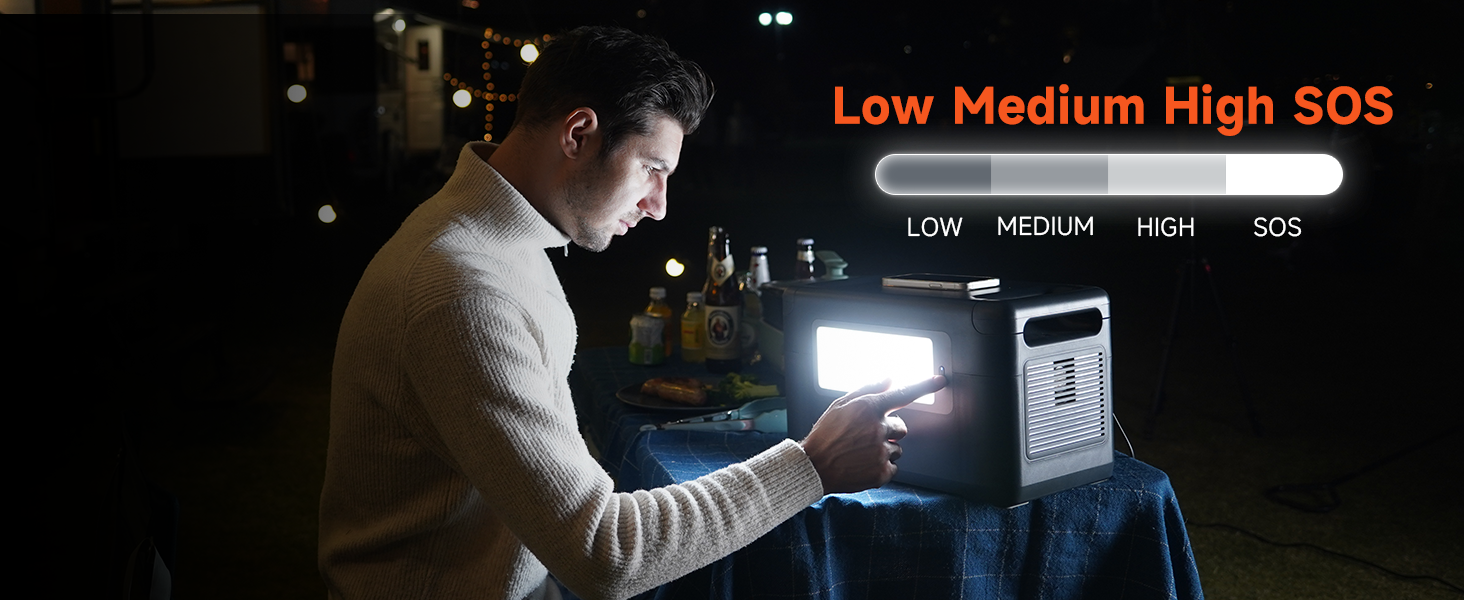
Image: A person carrying the DEENO S1500 using its integrated hidden handle, demonstrating its portability.
Ports and Controls:
- AC Outlets (x3): 1500W Pure Sine Wave output for standard household appliances.
- USB-A Ports (x3): Standard USB ports for charging smaller devices.
- USB-C Ports (x2): 100W Power Delivery (PD) for fast charging compatible devices.
- DC Outputs: Includes 24V/5A and 12V/5A ports.
- Car Outlet: Constant 12V 10A output.
- Wireless Charging Pad: Located on top of the unit for compatible devices.
- Input Port: For AC, solar, and car charging.
- LCD Display: Shows battery capacity, current input/output, and estimated recharge time.
- Floodlight: Integrated 12W emergency lighting.
5. Setup
Before initial use, it is recommended to fully charge your DEENO S1500 Portable Power Station.
- Unpacking: Carefully remove the power station and all accessories from the packaging.
- Initial Charge: Connect the AC charging cable to the power station's input port and then to a wall outlet. The LCD display will indicate charging status.
- Full Charge: Allow the unit to charge until the display shows 100%. This typically takes approximately 2 hours via AC wall outlet.
6. Operating Instructions
6.1 Charging the Power Station
The DEENO S1500 offers multiple charging methods:
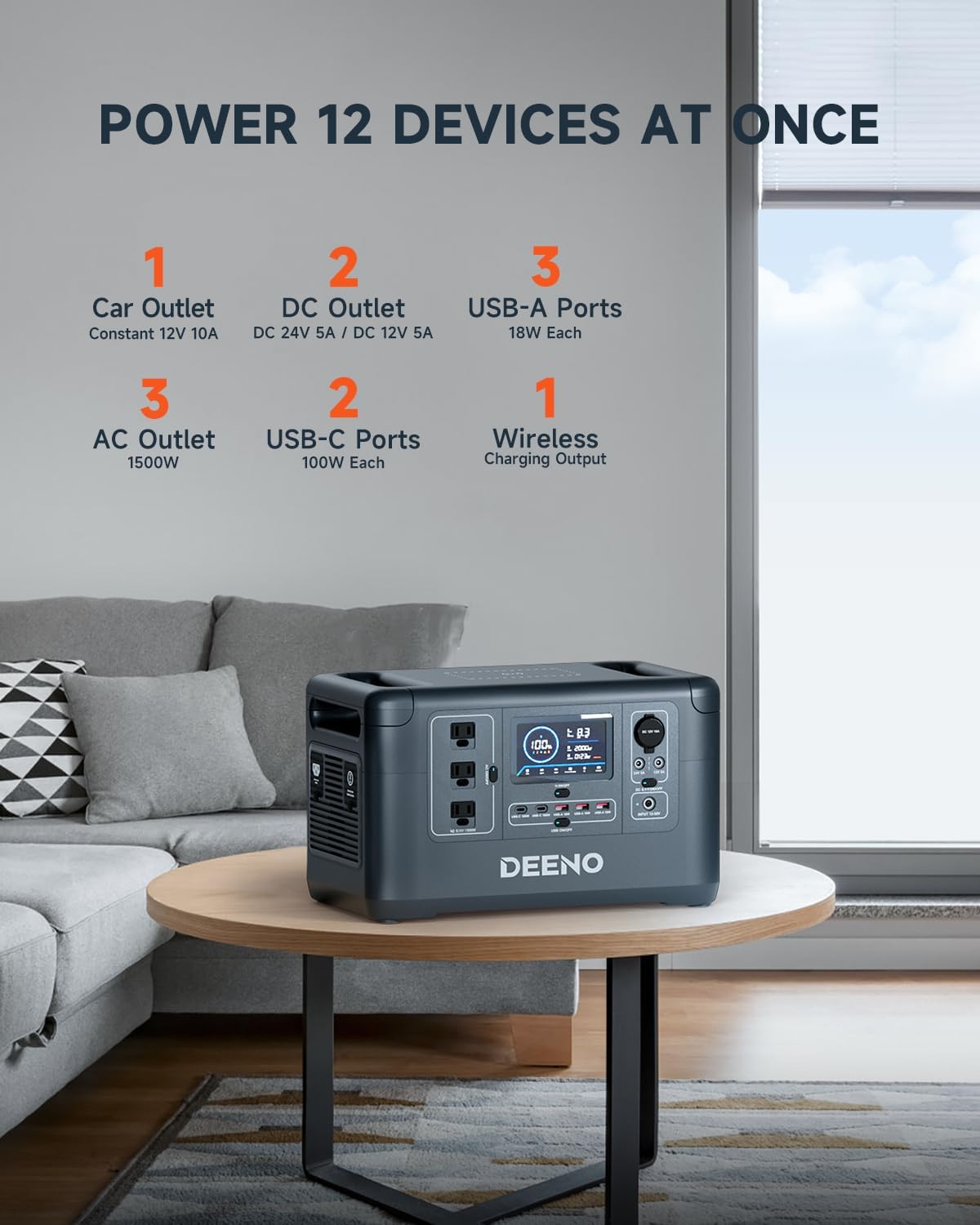
Image: The DEENO S1500 Portable Power Station connected to a standard wall outlet for AC fast charging.
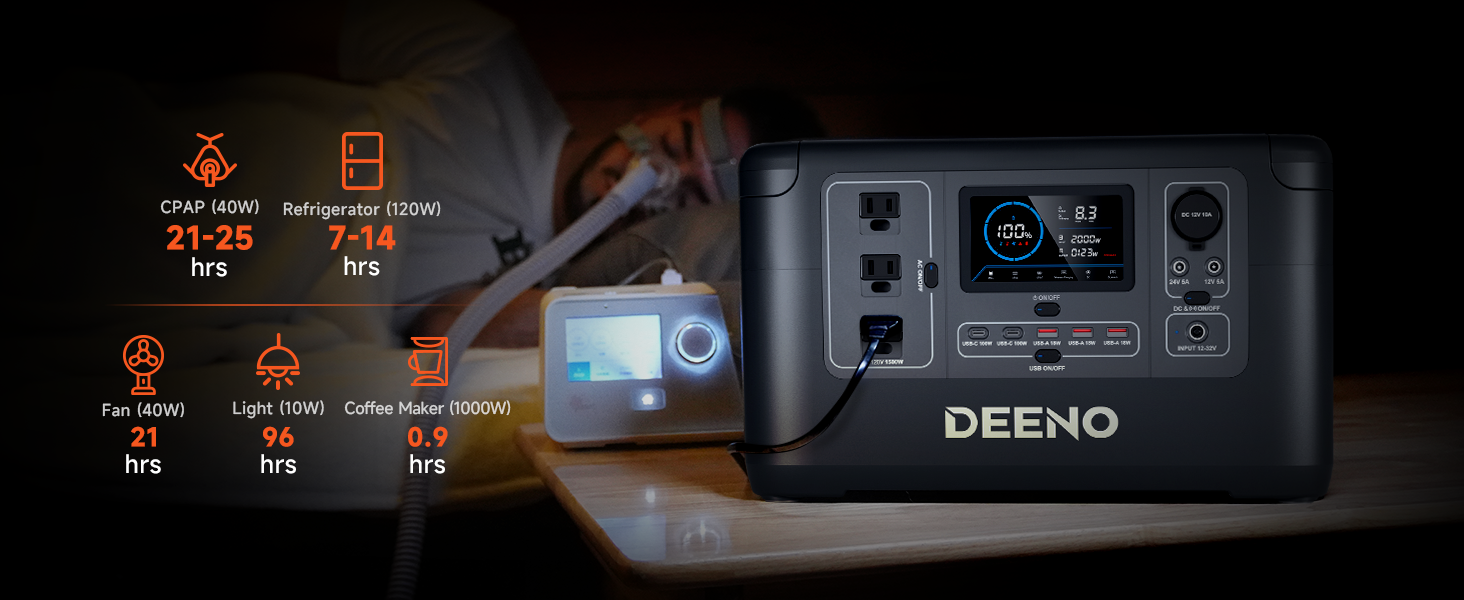
Image: The DEENO S1500 charging from a wall outlet, illustrating its fast AC charging capability from 0-100% in 2 hours.
- AC Wall Outlet: Connect the provided AC charging cable to the input port and a standard wall outlet. Full charge in approximately 2 hours.
- Solar Panel (Optional): Connect compatible solar panels (sold separately) using the MC4 connection cable to the input port. Charging time is typically 6-10 hours depending on solar intensity and panel wattage.
- Car Outlet: Use the provided car charging cable to connect to your vehicle's 12V car outlet. Charging time is approximately 5.5-6.5 hours.
- External Generator: The unit can also be charged via an external generator, with a charging time of approximately 5.5-6.5 hours.

Image: A visual representation of the four charging methods for the DEENO S1500: AC wall outlet, solar panels, car charger, and external generator, with estimated charging times.
6.2 Using the Power Station (Discharging)
The DEENO S1500 can power up to 12 devices simultaneously through its various output ports.

Image: The DEENO S1500 Portable Power Station on a table, illustrating its capability to power up to 12 devices at once through its various ports.

Image: A man working on a laptop outdoors, powered by the DEENO S1500, with icons showing estimated charge cycles for various devices like laptops, drones, and phones.

Image: The DEENO S1500 powering a refrigerator, microwave, coffee maker, and CPAP machine, with estimated operating times for each appliance.
- AC Output: Press the 'AC ON/OFF' button to activate the AC outlets. Connect your devices. Ensure the total wattage does not exceed 1500W.
- USB Output: Press the 'USB ON/OFF' button to activate the USB-A and USB-C ports. Connect your USB-powered devices.
- DC Output: Press the 'DC ON/OFF' button to activate the DC and car outlets. Connect your 12V/24V devices.
- Wireless Charging: Place your Qi-compatible device on the wireless charging pad on top of the unit.
6.3 Uninterruptible Power Supply (UPS) Function
The DEENO S1500 features a seamless UPS function, providing continuous power during outages.

Image: The DEENO S1500 connected to a computer setup, demonstrating its seamless UPS backup capability for essential electronics.

Image: The DEENO S1500 providing UPS power to a refrigerator in a living room setting, highlighting its less than 10ms switchover time.
When connected to a wall outlet and powering devices, the S1500 acts as a pass-through power source. If the wall outlet power is interrupted, the UPS function automatically switches to battery power in less than 10 milliseconds, protecting sensitive devices like desktop PCs and servers from data loss or damage.
6.4 LCD Display
The 4.3-inch large LCD provides real-time information about the power station's status.

Image: A close-up view of the DEENO S1500's LCD display, clearly showing battery capacity, current input and output wattage, and estimated time to recharge or discharge.
It displays:
- Battery capacity percentage
- Current input wattage
- Current output wattage
- Estimated time to full charge or empty
- Self-check indicators
6.5 Floodlight Function
The integrated 12W floodlight provides emergency illumination.
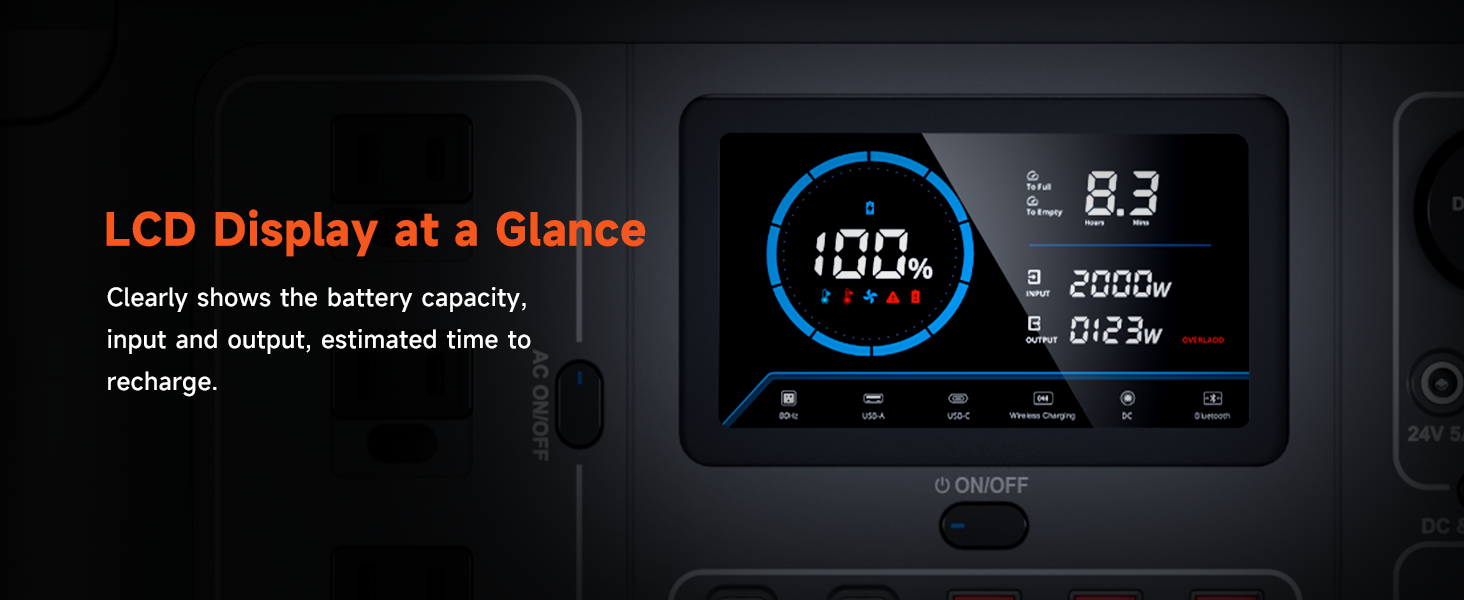
Image: A man operating the DEENO S1500's floodlight function in a dimly lit outdoor setting, demonstrating its emergency lighting capabilities with adjustable brightness levels (Low, Medium, High, SOS).
Press the floodlight button to cycle through different brightness modes (Low, Medium, High) and an SOS flashing mode for emergencies.
7. Maintenance
Proper maintenance ensures the longevity and optimal performance of your DEENO S1500.

Image: An internal view of LiFePO4 battery cells, emphasizing their durability with over 3500 cycles and a 10-year lifespan.
- Battery Life: The LiFePO4 battery is designed for over 3500 charge cycles to 80% capacity, providing a lifespan of approximately 10 years with everyday use.
- Storage: Store the power station in a cool, dry place away from direct sunlight and extreme temperatures. For long-term storage, charge the unit to 50-80% every 3-6 months.
- Cleaning: Use a dry, soft cloth to clean the exterior of the unit. Do not use harsh chemicals or abrasive materials.
- Ventilation: Ensure the ventilation vents are clear of obstructions during use to prevent overheating.
8. Troubleshooting
If you encounter issues with your DEENO S1500, refer to the following common troubleshooting steps:
| Problem | Possible Cause | Solution |
|---|---|---|
| Unit not turning on | Battery is depleted; Power button not pressed correctly | Charge the unit; Press and hold the main power button for 3 seconds. |
| No output from AC/DC/USB ports | Output port not activated; Overload protection triggered; Cable issue | Ensure respective ON/OFF button is pressed; Reduce connected load; Check cables for damage. |
| Unit not charging | Charging cable not connected properly; Charger malfunction; Extreme temperature | Reconnect charging cable; Try a different charging method/cable; Move unit to a suitable temperature range (0-40°C / 32-104°F). |
| LCD display not working | Unit off; Display malfunction | Turn on the unit; Contact customer support if issue persists. |
| Overload warning on display | Connected devices exceed 1500W output | Disconnect some devices to reduce the load. |
If the problem persists after trying these steps, please contact DEENO customer support.
9. Specifications
Detailed technical specifications for the DEENO S1500 Portable Power Station.
| Feature | Specification |
|---|---|
| Brand | DEENO |
| Model Name | S1500 |
| Item Model Number | PS151032S |
| Battery Type | LiFePO4 |
| Capacity | 1036Wh |
| Continuous Output Power | 1500W |
| Peak Output Power | 3000W |
| AC Output Voltage | 120 Volts (AC) |
| Total Power Outlets | 12 |
| AC Charging Time | Approx. 2 hours (0-100%) |
| Solar Charging Time | Approx. 6-10 hours (with 200W solar panel) |
| UPS Switchover Time | Less than 10ms |
| Item Weight | 32 Pounds |
| Product Dimensions | 15.5"L x 8.9"W x 9.4"H |
| Special Feature | USB Port, Floodlight, UPS Function |
| Included Components | Power Station, AC Charging Cable, Car Charging Cable, MC4 Connection Cable, User Manual |
10. Warranty and Support
The DEENO S1500 Portable Power Station comes with a 2-year guarantee for a worry-free experience. This warranty covers defects in materials and workmanship under normal use.
For technical support, warranty claims, or any questions regarding your product, please contact DEENO customer service through the official DEENO website or your purchase platform.


