1. Introduction
This manual provides instructions for the ALLIMITY replacement remote control. This remote is designed to function with various Nordmende TV models, offering a direct replacement experience without the need for complex setup. Please refer to the compatible models listed on the product packaging or in the specifications section to ensure compatibility with your television.
2. Product Overview
The ALLIMITY replacement remote control is engineered for ease of use and reliability. It is lightweight, features an ergonomic design for comfortable handling, and provides stable remote control performance with a long transmission distance.
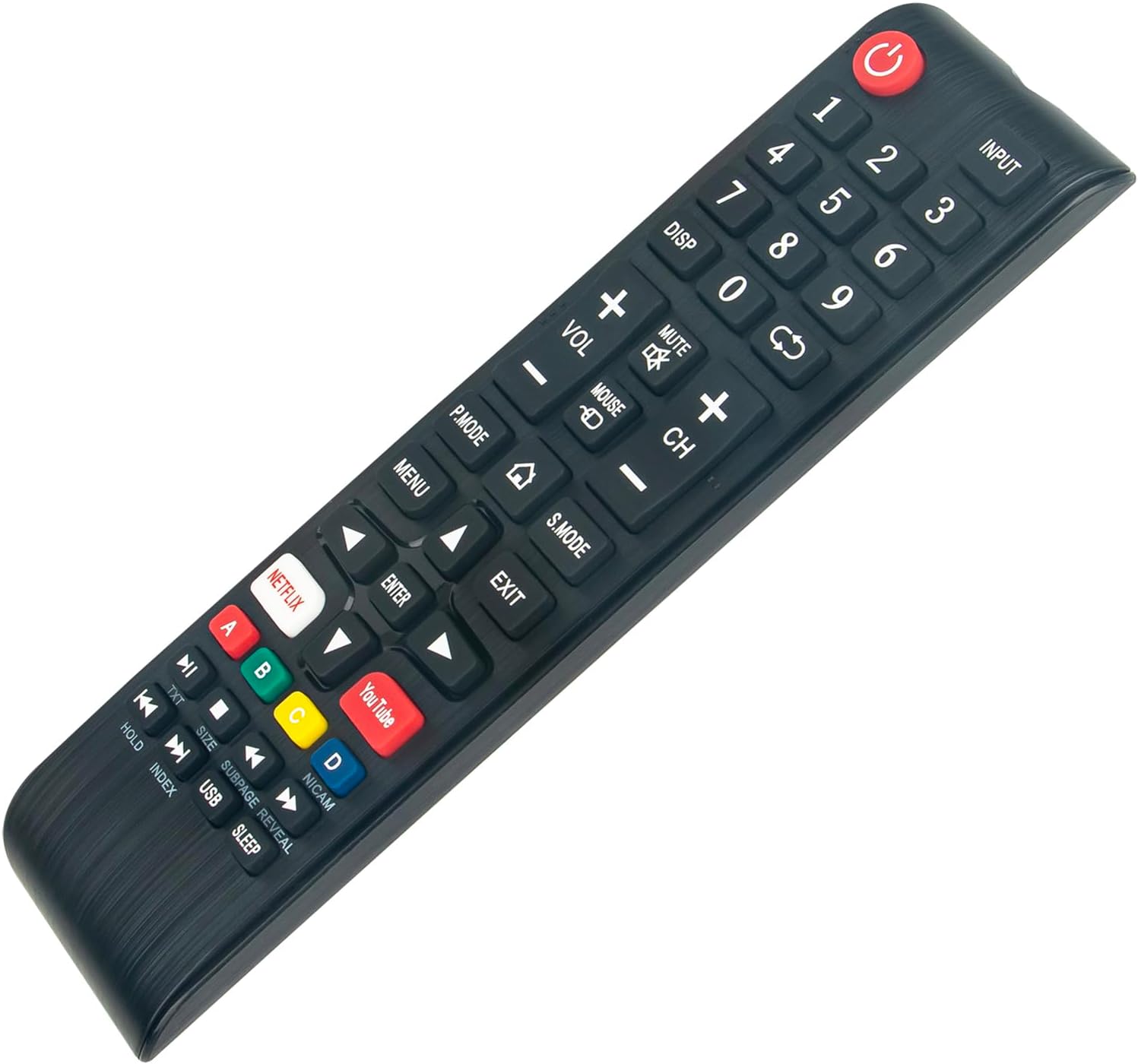
Figure 2.1: Top-down view of the ALLIMITY replacement remote control, highlighting the button layout and design.
Key Features:
- No Programming Required: Ready to use directly out of the box.
- Full Functionality: Designed to replicate all functions of your original remote control.
- Ergonomic Design: Lightweight and comfortable to hold for extended periods.
- Stable Performance: Offers reliable signal transmission over a practical distance.
3. Setup
This ALLIMITY replacement remote control requires no programming or complex installation. Simply insert the batteries, and it will be ready for use with your compatible Nordmende TV.
3.1 Battery Installation
- Locate the battery compartment on the back of the remote control.
- Slide open the battery compartment cover.
- Insert two AAA batteries (not included), ensuring the positive (+) and negative (-) terminals align correctly with the markings inside the compartment.
- Close the battery compartment cover securely.
Note: Always use new batteries and replace both batteries at the same time. Do not mix old and new batteries or different types of batteries.
4. Operating Instructions
The remote control operates using infrared (IR) technology. Ensure there is a clear line of sight between the remote control and the TV's IR receiver for optimal performance. The maximum effective range is approximately 10 meters (33 feet).

Figure 4.1: Angled view of the remote control, illustrating its ergonomic design and button placement for operation.
4.1 Button Functions
The remote control features standard TV functions and dedicated buttons for popular streaming services:
- Power (⏻): Turns the TV on or off.
- Input: Selects the input source (HDMI, AV, etc.).
- Number Buttons (0-9): Direct channel selection.
- DISP: Displays on-screen information.
- VOL (+/-): Adjusts volume up or down.
- MUTE: Mutes or unmutes the TV sound.
- CH (+/-): Changes channels up or down.
- P.MODE: Picture Mode selection.
- S.MODE: Sound Mode selection.
- MENU: Accesses the TV's main menu.
- EXIT: Exits the current menu or function.
- Navigation Buttons (Up, Down, Left, Right, ENTER): Navigates through menus and confirms selections.
- NETFLIX: Direct access to the Netflix application.
- YouTube: Direct access to the YouTube application.
- Colored Buttons (A, B, C, D): Functionality varies by TV model and context (e.g., teletext, interactive features).
- TXT: Teletext function.
- HOLD, INDEX, SIZE, SUBPAGE, REVEAL, USB, SLEEP: Additional functions, refer to your TV's manual for specific usage.
5. Maintenance
5.1 Cleaning the Remote Control
To clean the remote control, gently wipe its surface with a soft, dry cloth. For stubborn dirt, slightly dampen the cloth with water or a mild, non-abrasive cleaner. Avoid using harsh chemicals or abrasive materials, as these can damage the remote's finish or internal components.
5.2 Battery Replacement
Replace batteries when the remote's response becomes sluggish or stops working. Follow the battery installation steps outlined in Section 3.1. Dispose of used batteries responsibly according to local regulations.
5.3 Storage
When not in use for extended periods, it is recommended to remove the batteries from the remote control to prevent leakage and potential damage. Store the remote in a cool, dry place away from direct sunlight and extreme temperatures.
6. Troubleshooting
If you encounter issues with your ALLIMITY replacement remote control, please refer to the following common troubleshooting steps:
- Remote not responding:
- Ensure batteries are inserted correctly with the correct polarity.
- Replace old batteries with new ones.
- Check for any obstructions between the remote and the TV's IR receiver.
- Point the remote directly at the TV's IR receiver.
- Short transmission range:
- Replace batteries with new ones.
- Ensure there are no strong light sources (like direct sunlight or bright fluorescent lights) interfering with the IR signal.
- Specific buttons not working:
- This remote is designed to be fully functional. If a specific button does not work, ensure your TV model supports that function.
- Clean the remote control, especially around the non-functional button, to remove any debris.
If the issue persists after trying these steps, please verify the compatibility of the remote with your specific TV model.
7. Specifications
| Brand | ALLIMITY |
| Model Number (Remote) | MM-ND39S3400T-NP |
| Color | Black |
| Connectivity Technology | Infrared (IR) |
| Special Feature | Lightweight |
| Maximum Range | 10 Meters (approx. 33 feet) |
| Number of Buttons | 3 (This seems incorrect based on image, likely refers to main control types. The remote has many more physical buttons.) |
| Controller Type | Button Control |
| Compatible Devices | Nordmende TV models: ND39S3400T, ND24S3400T, ND32S4100M, ND32S400T-SMART-SAT, D55KFS5700TUHD-SMART, ND32S4000T-SMART |
8. Warranty and Support
Specific warranty information for this ALLIMITY replacement remote control is not provided in the product details. For any support inquiries or further assistance, please refer to the seller or the platform where the product was purchased. Information regarding spare parts availability and software updates is also not available.


