
Introduction
Welcome to the world of Carrera DIGITAL 132! This instruction manual provides essential information for setting up, operating, and maintaining your Carrera DIGITAL 132 Pole to Podium slot car race track set. Please read this manual carefully before assembly and use to ensure safe and optimal performance.
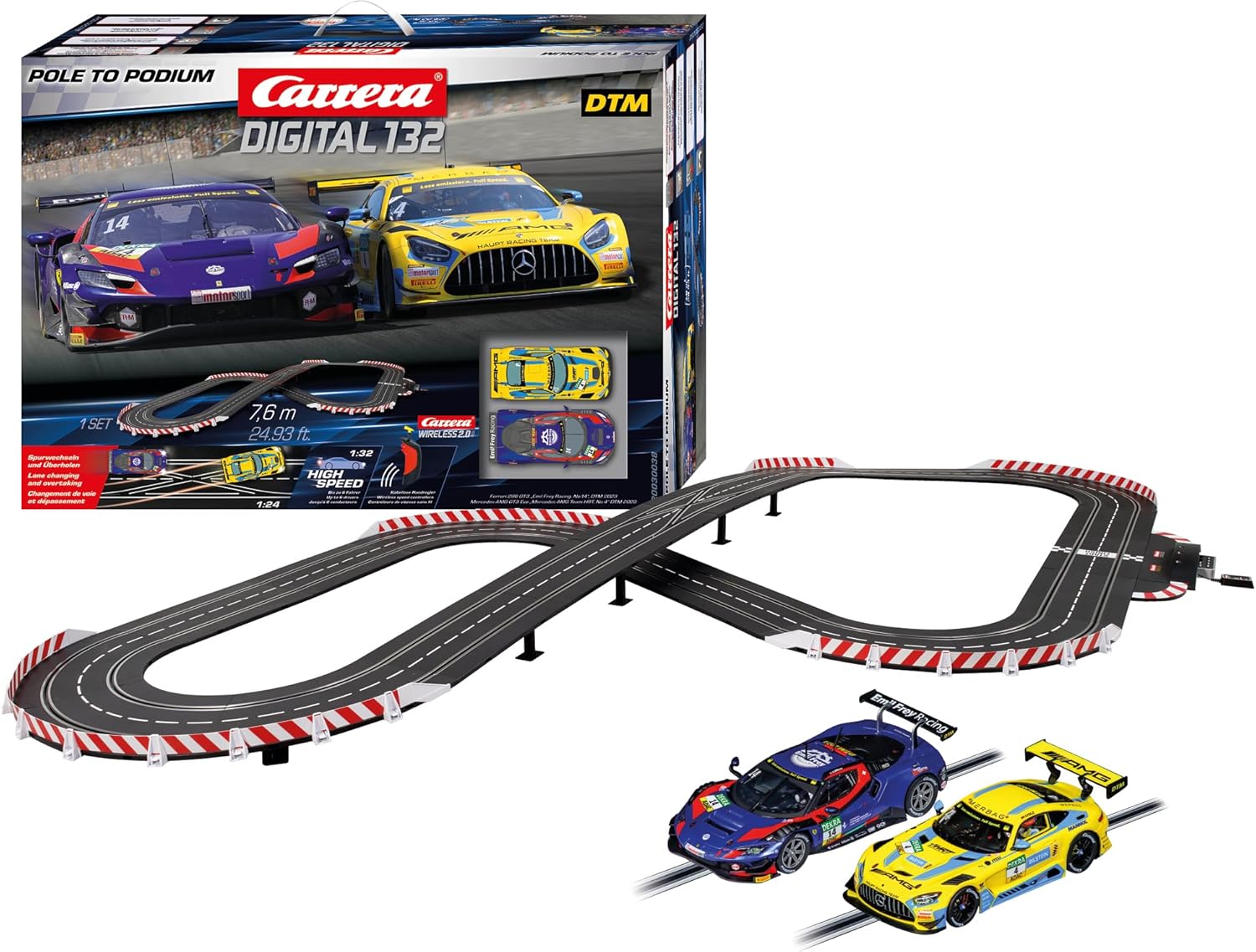
Image: The Carrera DIGITAL 132 Pole to Podium set, showing the complete race track layout and the two included DTM cars (Mercedes-AMG GT3 Evo and BMW M4 GT3) alongside the product packaging.
Safety Information
This product is recommended for ages 8 years and up. Adult supervision is advised, especially during assembly and initial operation. Please observe the following safety guidelines:
- Keep small parts away from young children to prevent choking hazards.
- Do not operate the race track near water or in damp conditions.
- Ensure all electrical connections are secure before powering on the system.
- Only use the power supply unit provided with the set.
- Avoid touching moving parts of the cars or track during operation.
Package Contents
Verify that all components listed below are present in your package:
- 1x Carrera DIGITAL 132 Race Track Set (7.6 meters / 24.93 feet track length)
- 1x Mercedes-AMG GT3 Evo Slot Car (DTM, Car No. 4)
- 1x BMW M4 GT3 Slot Car (DTM, Car No. 14)
- 1x Control Unit
- 2x Speed Controllers
- Track sections (straights, curves, lane change sections)
- Guardrails and supports
- Power Supply Unit
- Instruction Manual (this document)

Image: Front view of the Carrera DIGITAL 132 Pole to Podium product box, illustrating the two DTM cars and a section of the track.
Setup Instructions
1. Track Assembly
- Choose a suitable location: Select a flat, stable surface large enough for the 7.6-meter track layout.
- Connect track sections: Carefully interlock the track sections. Ensure a firm connection for optimal electrical contact. Refer to the included layout diagram for suggested track configurations.
- Install guardrails and supports: Attach guardrails to the outer edges of curves and bridge sections. Use the provided supports for elevated track sections to ensure stability.
- Connect the Control Unit: Integrate the Control Unit into the track layout as indicated in the diagram. This unit manages power and digital functions.
- Connect power supply: Plug the power supply unit into the Control Unit, then into a standard electrical outlet.

Image: Side view of the Carrera DIGITAL 132 Pole to Podium product box, showing a detailed diagram of the track layout and components.
2. Car Preparation
- Check guide keels: Ensure the guide keels on the underside of the cars are clean and properly seated.
- Inspect braids: Verify that the contact braids are clean and positioned correctly to make good contact with the track rails.
- Place cars on track: Position the cars correctly in their respective lanes on the track.

Image: Close-up view of the blue and red Mercedes-AMG GT3 Evo slot car, one of the two cars included in the set.
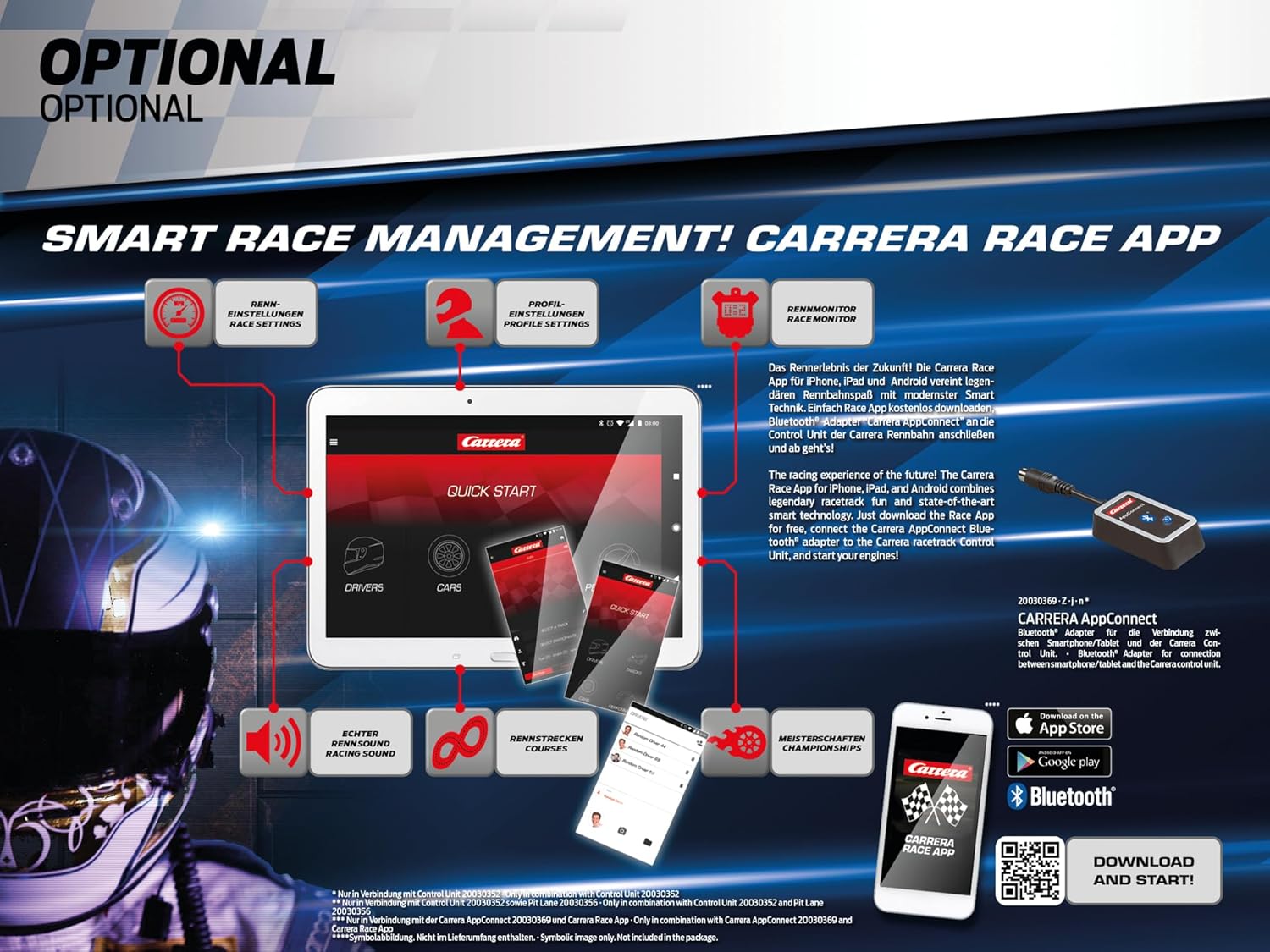
Image: Close-up view of the yellow and blue BMW M4 GT3 slot car, the second car included in the set.
Operating Instructions
1. Basic Operation
- Power On: Switch on the power at the Control Unit. The cars should be recognized.
- Speed Control: Use the speed controllers to accelerate and brake your car. The trigger controls speed, and the button on the controller is typically used for lane changes.
- Digital Features: The DIGITAL 132 system allows for up to 6 cars to race simultaneously (with additional cars and controllers, sold separately).
2. Advanced Features (DIGITAL 132)
- Lane Changing: Press the lane change button on your controller when approaching a lane change section to switch lanes and overtake opponents.
- Ghost Car Function: Program a car to run autonomously as a "ghost car" for practice or to fill the track.
- Safety Car Function: Activate a safety car feature for controlled restarts or during incidents.
- Individual Car Settings: Adjust speed, braking power, and fuel level for each car via the Control Unit or Carrera Race App (if connected).

Image: An illustration of the Carrera DIGITAL 132 track showcasing various features like lane changing, ghost car, and multiple cars racing simultaneously.
3. Carrera Race App (Optional)
Enhance your racing experience with the Carrera Race App. Connect a Carrera AppConnect Bluetooth unit (sold separately) to your Control Unit to access features like race settings, driver profiles, race monitor, and real racing sounds.
Download the app from the App Store or Google Play. More information can be found at Carrera-toys.com.

Image: Diagram illustrating the features of the Carrera Race App, including race settings, driver profiles, race monitor, and connectivity options via Bluetooth.
Maintenance
- Track Cleaning: Regularly wipe track rails with a clean, dry cloth to remove dust and ensure good electrical conductivity.
- Car Maintenance:
- Clean guide keels and braids periodically. Replace worn braids for optimal performance.
- Check tires for wear and replace if necessary to maintain grip.
- Ensure axles and gears are free of debris.
- Storage: When not in use, store the track and cars in a clean, dry place away from direct sunlight and extreme temperatures.
Troubleshooting
| Problem | Possible Cause | Solution |
|---|---|---|
| Car does not move or moves intermittently. | Poor electrical contact; dirty braids/track; loose track connection; power supply issue. | Clean braids and track rails. Ensure track sections are firmly connected. Check power supply connection. |
| Car deslots frequently. | Excessive speed in curves; worn tires; incorrect guide keel. | Reduce speed in curves. Replace worn tires. Ensure guide keel is properly seated. |
| Lane change not working. | Car not positioned correctly over lane change section; button not pressed firmly; digital chip issue. | Ensure car is centered over the lane change section. Press the button fully. Consult Carrera support if issue persists. |
Specifications
- Model: Carrera DIGITAL 132 Pole to Podium (20030038)
- Track Length: 7.6 meters (24.93 feet)
- Scale: 1:32 (cars), 1:24 (track)
- Recommended Age: 8 years and up
- Product Dimensions: 30.87 x 7.72 x 22.68 inches (packaged)
- Item Weight: 11.88 pounds (packaged)
- Cars Included: Mercedes-AMG GT3 Evo (DTM), BMW M4 GT3 (DTM)
- Digital Features: Lane changing, ghost car, safety car, individual car settings (speed, braking, fuel)
Warranty and Support
Carrera products are manufactured to high-quality standards. For warranty information, technical support, or to purchase spare parts and accessories, please visit the official Carrera website or contact their customer service department.
Official Website: www.carrera-toys.com
Please retain your proof of purchase for warranty claims.


