
1. Introduction
This instruction manual provides detailed guidance for the Carrera RC 2.4 GHz Buggy Advent Calendar 2.0. This product offers a unique experience of assembling a remote-controlled buggy over 24 days, revealing different components daily. Please read this manual thoroughly before beginning assembly and operation to ensure correct usage and to maximize the product's lifespan.
2. Safety Information
Please observe the following safety guidelines to prevent injury or damage to the product:
- Age Recommendation: This product is recommended for users aged 12 years and up.
- Choking Hazard: Not suitable for children under 3 years due to small parts that may present a choking hazard.
- Adult Supervision: Adult supervision is recommended during assembly and operation, especially for younger users.
- Battery Safety: Always follow battery installation and usage instructions carefully. Do not mix old and new batteries, or different types of batteries. Remove batteries from the vehicle and controller when not in use for extended periods.
- Operating Environment: Operate the RC buggy in open, clear areas, away from obstacles, people, and pets. Avoid operating near water or in wet conditions.
- Packaging: Retain the packaging as it contains important information.
3. Package Contents
The Carrera RC Advent Calendar contains 24 individual components, revealed daily, which collectively form a complete 1:18 scale remote-controlled buggy. The package also includes:
- All necessary components for the 1:18 scale RC Buggy.
- One 2.4 GHz one-handed controller.
- Batteries (4x AAA for vehicle, 2x AAA for controller).
- Instruction Manual (this document).

Image 3.1: The Carrera RC Buggy Advent Calendar 2.0 packaging box, showing the assembled buggy and controller.
4. Assembly Instructions
The Carrera RC Buggy Advent Calendar 2.0 is designed for assembly over 24 days. Each day, a new component is revealed, contributing to the construction of the 1:18 scale buggy. Follow the daily instructions provided within each calendar window to correctly assemble your vehicle.
4.1 General Assembly Process
- Unpack Daily Component: Each day, open the corresponding window on the Advent Calendar to retrieve the component for that day.
- Follow Daily Instructions: Refer to the specific assembly instructions or diagrams provided with each daily component. These will guide you on how to integrate the new part into the growing structure of your buggy.
- Careful Handling: Handle all components with care. Ensure parts are correctly aligned and securely fastened as per the instructions.
- Completion: After 24 days, all components will be assembled, resulting in a fully functional Carrera RC Buggy.
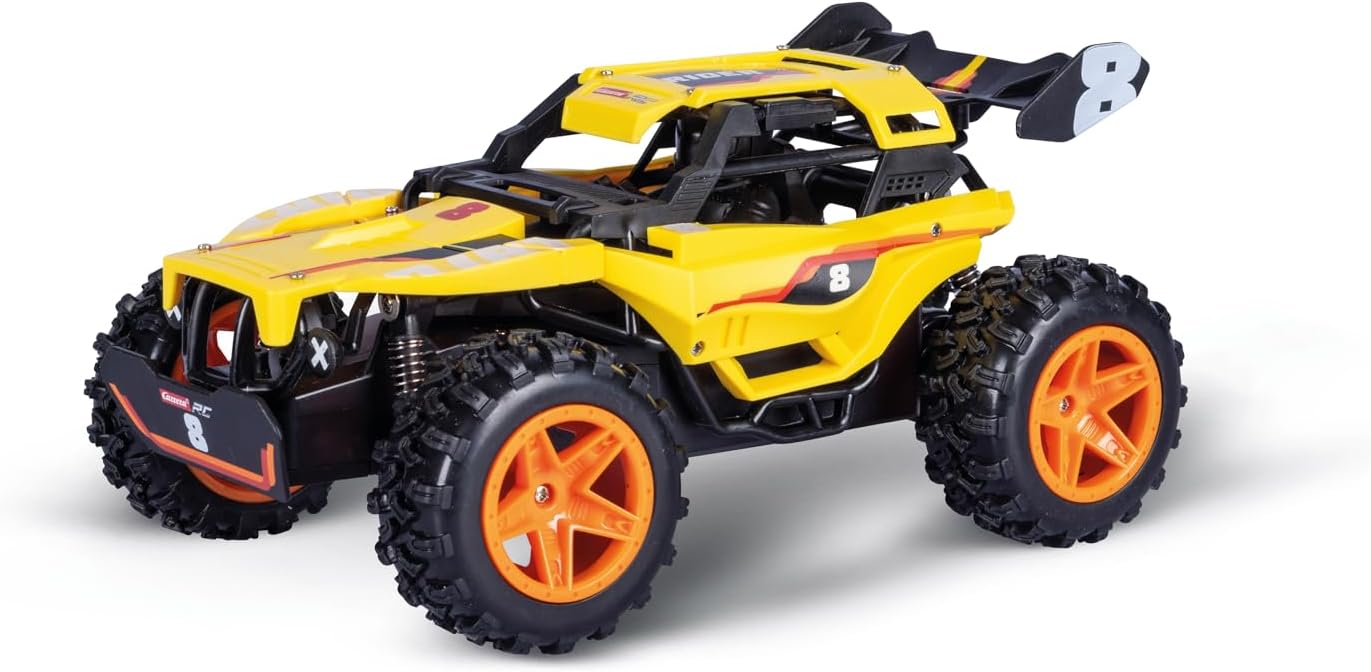
Image 4.1: An assembled Carrera RC Buggy, showing its front and side profile.

Image 4.2: The assembled Carrera RC Buggy, showcasing its design from a different front-side perspective.
5. Operating Instructions
Once fully assembled, your Carrera RC Buggy is ready for operation. This section details how to prepare and control your vehicle.
5.1 Battery Installation
- Vehicle Batteries: Locate the battery compartment on the underside of the buggy. Open it and insert 4 AAA batteries, ensuring correct polarity (+/-). Close the compartment securely.
- Controller Batteries: Locate the battery compartment on the back of the one-handed controller. Open it and insert 2 AAA batteries, ensuring correct polarity (+/-). Close the compartment securely.
5.2 Pairing the Controller and Vehicle
The 2.4 GHz system automatically pairs the controller with the vehicle. Ensure both the vehicle and controller are switched ON. The indicator light on the controller should become solid, indicating a successful connection.
5.3 Basic Controls

Image 5.1: The Carrera RC one-handed controller, featuring a steering wheel and trigger.
- Power Switch: Located on both the vehicle and the controller. Switch both to the 'ON' position to begin.
- Throttle Trigger: Pull the trigger to move the buggy forward. Push the trigger forward to brake or reverse.
- Steering Wheel: Rotate the steering wheel left or right to control the direction of the buggy.
The buggy features full steering and driving functions, allowing for precise control. It can reach speeds of up to 12 km/h. The 2.4 GHz technology allows up to 16 players to operate their vehicles simultaneously without interference.
6. Maintenance
Proper maintenance ensures the longevity and performance of your Carrera RC Buggy.
- Cleaning: After use, especially in dusty or dirty conditions, gently wipe the buggy with a soft, dry cloth to remove dirt and debris. Avoid using water or chemical cleaners.
- Battery Care: Always remove batteries from the vehicle and controller if they will not be used for an extended period. Store batteries in a cool, dry place. Dispose of used batteries responsibly according to local regulations.
- Storage: Store the buggy and controller in a cool, dry place, away from direct sunlight and extreme temperatures.
- Inspection: Periodically inspect the vehicle for any loose parts, damaged wires, or worn tires. Address any issues promptly.
7. Troubleshooting
If you encounter issues with your Carrera RC Buggy, refer to the following common problems and solutions:
| Problem | Possible Cause | Solution |
|---|---|---|
| Vehicle does not respond to controller. | Batteries are low or incorrectly installed. Vehicle/controller not switched ON. Not paired. | Check and replace batteries. Ensure both power switches are ON. Turn both OFF, then ON again to re-establish connection. |
| Vehicle moves slowly or erratically. | Low batteries. Obstruction in wheels/gears. | Replace batteries in both vehicle and controller. Check for and remove any debris from moving parts. |
| Short operating range or interference. | Environmental interference. Low batteries. | Move to an open area away from other electronic devices. Replace batteries. |
8. Specifications
| Model Number | 370160150 |
| Brand | Carrera |
| Scale | 1:18 |
| Frequency | 2.4 GHz |
| Max Speed | Up to 12 km/h |
| Multiplayer Capability | Up to 16 players simultaneously |
| Vehicle Dimensions (approx.) | 23.5 cm (length) |
| Calendar Dimensions (W/D/H) | 56.5 cm x 7.5 cm x 37 cm |
| Batteries Included | 4x AAA (vehicle), 2x AAA (controller) |
| Recommended Age | 12 years and up |
| Material | Plastic |
9. Warranty and Support
Specific warranty information for the Carrera RC 2.4 GHz Buggy Advent Calendar 2.0 is not provided in this document. For warranty details, please refer to the product packaging or contact Carrera customer support directly. For technical support or inquiries, please visit the official Carrera website or consult your retailer.


