
Roku 65R8B5
Roku Smart TV – 65-Inch Pro Series
Instruction Manual
Model: 65R8B5
Introduction
The Roku 65-Inch Pro Series 4K QLED RokuTV is designed to elevate your entertainment experience. It offers a powerfully simple streaming interface combined with brilliant 4K picture quality, immersive audio, and an elegant design. Key features include a bright, colorful QLED display with Dolby Vision IQ, razor-sharp details thanks to thousands of mini-LEDs, and a blazing-fast 120Hz refresh rate ideal for sports and gaming. Powered by AI, Roku Smart Picture Max optimizes visual content for superior clarity and color.
What's in the Box
Carefully unpack all components and ensure you have the following items:
- Roku 65" Pro Series TV
- Stands and screws
- Roku voice remote (2nd Edition)
- Quick Start Guide
- USB-A to USB-C charging cable

Image: Contents of the Roku 65-Inch Pro Series TV box.
Setup
Physical Connection
Place the TV on a stable surface or mount it securely to a wall. Connect the power cable to the TV and a power outlet. For external devices like gaming consoles or media players, use the HDMI ports. The Roku Pro Series TV features HDMI 2.1 ports (HDMI 1 and HDMI 2) that support 120Hz refresh rates, ideal for high-performance gaming. HDMI 4 also supports eARC for enhanced audio return channel functionality.

Image: Side view of the TV's input ports.
Initial Power On and Network Setup
After connecting the TV to power, press the power button on the remote. Follow the on-screen instructions to connect your TV to your home Wi-Fi network. This step is crucial for accessing streaming content and smart features.
Operating Your Roku TV
Roku Voice Remote Pro
The included Roku Voice Remote Pro features backlit buttons for easy use in low light, a hands-free voice on/off switch, and dedicated app shortcuts for popular streaming services like Netflix, Disney+, Apple TV+, and Prime Video. It is rechargeable via USB-C.
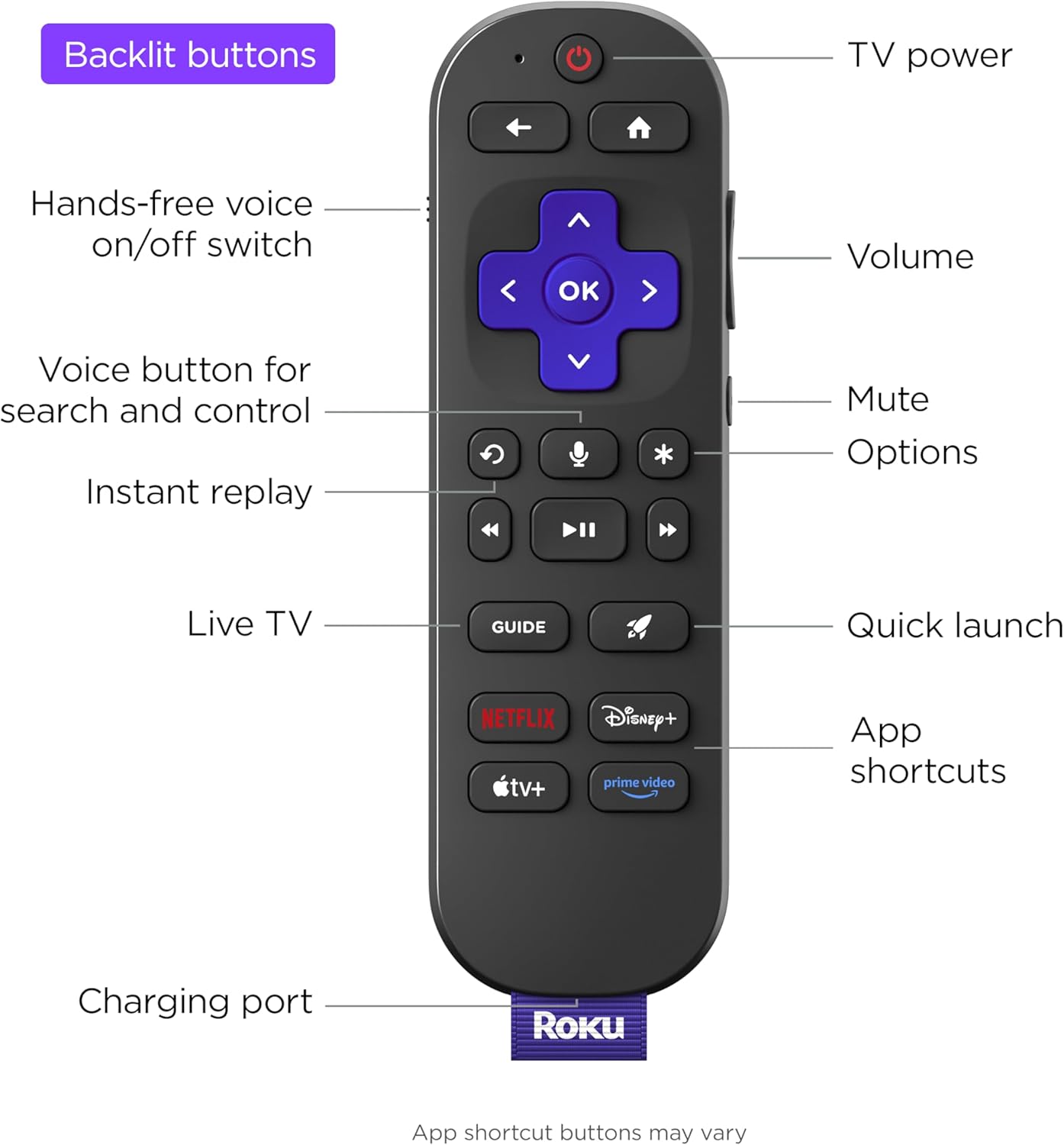
Image: Roku Voice Remote Pro features.
Roku OS Navigation
The Roku OS provides a user-friendly interface for accessing all your entertainment. Navigate through the Home screen to find Live TV, search for content, explore featured free options, browse sports, and visit the Streaming Store to download new apps.

Image: Roku TV Home Screen.
Picture and Audio Features
Experience stunning visuals with 4K QLED technology, Dolby Vision IQ for exceptional clarity, and thousands of mini-LEDs for precise local dimming. The TV's Smart Picture Max, powered by AI, automatically refines color and sharpness for all content. Enjoy immersive audio with the TV's built-in sound system.

Image: Bright and clear picture quality.

Image: Immersive sound experience.
Smart Features and Gaming
The Roku TV adapts to your viewing with settings that set themselves, automatically adjusting to enhance your entertainment. Transform your TV into a digital gallery with Backdrops. For gamers, the 120Hz refresh rate ensures blistering speed and smooth action. The TV also integrates seamlessly with Roku Smart Home, Apple AirPlay, Apple Home, Alexa, and Google Home devices.

Image: Automatic picture settings adjustment.

Image: Roku TV Backdrops feature.

Image: Smart home integration.
Roku TV OS Overview
Video: An overview of the Roku TV operating system, demonstrating its user interface and various features.
Maintenance
- Cleaning the Screen: Gently wipe the screen with a soft, lint-free cloth. For stubborn marks, slightly dampen the cloth with water or a screen-specific cleaner. Avoid harsh chemicals.
- Cleaning the Cabinet: Use a soft, dry cloth to wipe dust from the TV's cabinet.
- Software Updates: The TV will automatically check for and install software updates when connected to the internet. Ensure your TV remains connected to receive the latest features and improvements.
Troubleshooting
- No Power: Ensure the power cable is securely connected to both the TV and a working power outlet. Try a different outlet.
- No Picture/Sound: Verify that the correct input source is selected. Check all cable connections (HDMI, etc.) for looseness or damage.
- Remote Not Responding: Ensure the remote is charged. If issues persist, try re-pairing the remote with the TV (refer to the Quick Start Guide for specific steps).
- Network Connection Issues: Restart your Wi-Fi router and the TV. Check your network settings on the TV to ensure the correct network is selected and the password is entered correctly.
- Picture Quality Issues: Adjust picture settings (brightness, contrast, color) in the TV menu. Ensure your content source is high quality (e.g., 4K content for 4K display).
Specifications
| Brand | Roku |
| Model Number | 65R8B5 |
| Screen Size | 65 Inches |
| Display Technology | QLED |
| Resolution | 4K |
| Refresh Rate | 120 Hz |
| Product Dimensions | 1.91"D x 57.21"W x 36"H |
| Item Weight | 85.1 Pounds |
| Connectivity Technology | Bluetooth, Wi-Fi, USB-C, Ethernet, HDMI |
| Special Features | Game Mode, Bezel-Less Design, Local Dimming, Ambient Light Sensor, Dolby Vision |
Warranty and Support
This product comes with a standard manufacturer's warranty. For detailed warranty information, product support, or to contact customer service, please visit the official Roku support website or refer to the warranty card included in your product packaging.
For additional assistance, you may also refer to the Roku Store on Amazon.
Related documents65R8B5


Ask a question about this manual
Ask about setup, troubleshooting, compatibility, parts, safety, or missing instructions. Manuals+ will review the question and use this page’s manual context to help answer it.