
Introduction to Your Roku Pro Series TV
The Roku Pro Series TV is designed to be the centerpiece of your entertainment. It offers a powerfully simple streaming experience combined with brilliant 4K picture quality, immersive audio, and an elegant design. This 55-inch smart TV is built to elevate your viewing experience.
Key features include:
- Bright, colorful picture: Rich, accurate hues on a QLED screen with Dolby Vision IQ.
- Razor-sharp details: Thousands of mini-LEDs for vivid highlights and deep blacks.
- Blistering speed: A 120Hz refresh rate ideal for sports and gaming.
- Picture, perfected: AI-powered Roku Smart Picture Max optimizes color and sharpness.

What's in the Box
Your Roku Pro Series TV package includes the following components:
- Roku 55" Pro Series TV
- Stands and screws
- Roku voice remote (2nd Edition)
- Quick Start Guide
- USB-A to USB-C charging cable

Setup
Follow these steps to set up your Roku Pro Series TV:
- Attach the Stands: Carefully attach the included stands to the bottom of your TV using the provided screws. Ensure they are securely fastened.
- Power Connection: Connect the power cable to the TV and plug it into a wall outlet.
- Initial Setup: Power on the TV. Follow the on-screen instructions to connect to your Wi-Fi network, sign in to your Roku account, and complete the initial software setup.
- Connect Devices: Use the HDMI ports to connect your external devices such as gaming consoles, cable boxes, or Blu-ray players.
Operating the TV
The Roku OS provides a user-friendly interface for seamless navigation and content discovery. Your Roku Voice Remote Pro offers advanced control features.
Roku OS Navigation
The home screen provides quick access to your installed apps, inputs, and recommended content. You can easily browse through categories like Live TV, What to Watch, and the Streaming Store.

Roku Voice Remote Pro
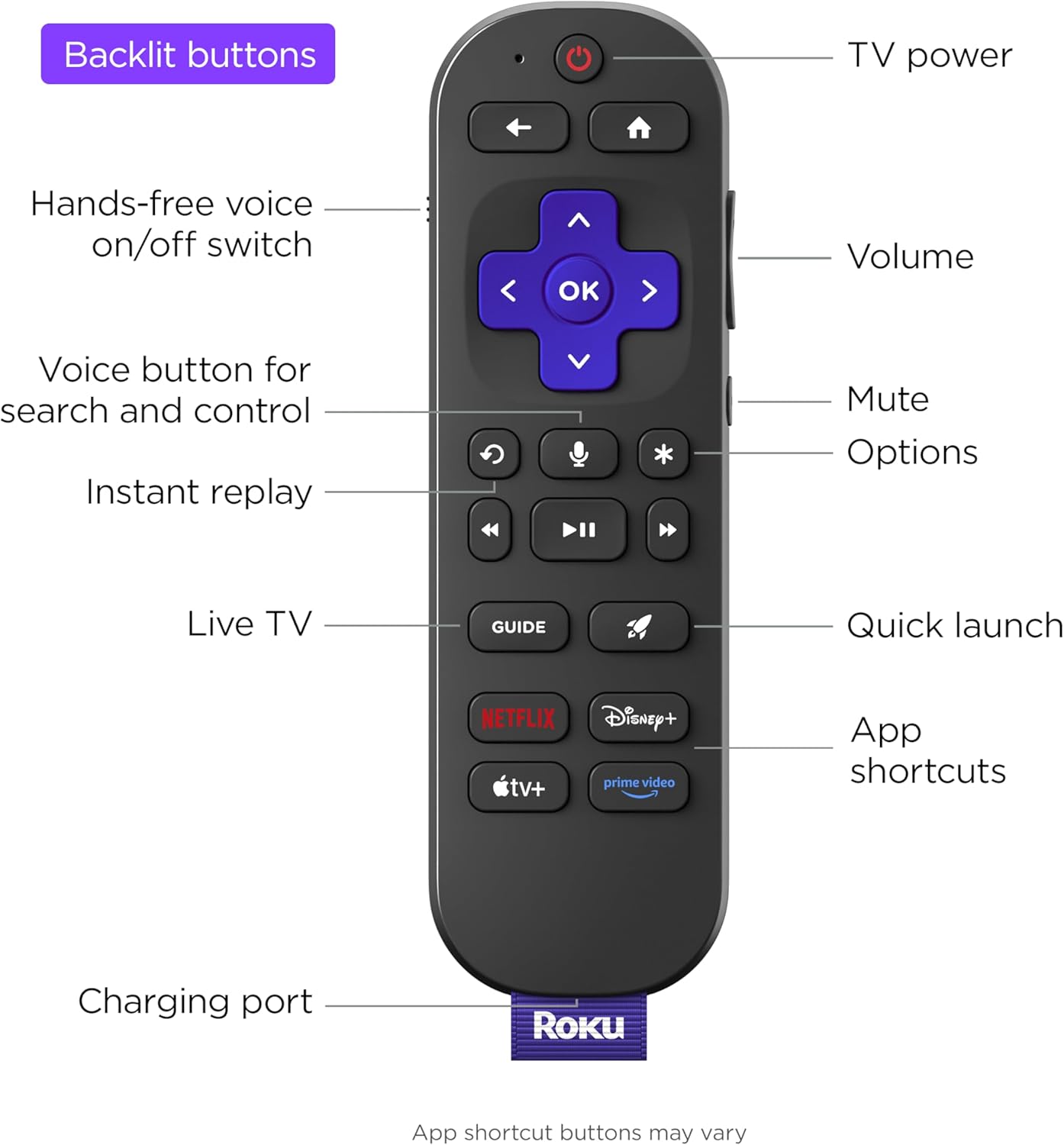
The included remote is backlit for easy use in low light and features voice control for searching and commands. It also includes a remote finder speaker to help locate it if misplaced.
- Voice Control: Press the voice button to search for content or control your TV with spoken commands.
- Backlit Buttons: Buttons illuminate in low light conditions for enhanced visibility.
- Side Buttons: Conveniently located volume and mute buttons.
- Quick Launch Buttons: Dedicated buttons for popular streaming services and a customizable quick launch button.

Roku OS Smart TV Details
The Roku OS is loaded with useful features, including accessibility options like a screen reader mode for the visually impaired, with customizable speech rate, volume, and pitch. It also offers easy-to-use parental controls and a guest mode for temporary user access.
Picture Quality
Experience stunning visuals with the Roku Pro Series TV's advanced display technologies.
- QLED Display: Enjoy rich, accurate colors and exceptional clarity.
- Dolby Vision IQ: Movies, TV, and games come to life with enhanced brightness, contrast, and color that adapt to your room's lighting.
- Mini-LED Backlight: Thousands of mini-LEDs provide precise local dimming, delivering vivid highlights and deeper blacks for realistic depth.
- 120Hz Refresh Rate: Follow fast-paced action with blistering speed, perfect for live sports and gaming, minimizing motion blur.
- Roku Smart Picture Max: This AI-powered feature cleans up incoming TV signals, optimizes them for your TV, and automatically refines color and sharpness for every show and scene.

Audio Quality
The Roku Pro Series TV delivers immersive audio directly from its built-in speakers.
- Side-Firing Speakers: Experience room-filling sound that enhances your entertainment.
- Clear Dialogue: Voices are always clear, ensuring you don't miss any important details.
- Expandable Audio: You can wirelessly add Roku speakers and a Roku subwoofer to this TV for a more robust home theater experience, without needing additional equipment. The TV will control and send signals to these speakers.

Gaming Features
The Roku Pro Series TV is optimized for gaming, providing a smooth and responsive experience.
- 120Hz Refresh Rate: Enjoy ultra-smooth gameplay with reduced motion blur.
- Variable Refresh Rate (VRR): Synchronizes the TV's refresh rate with your console's frame rate to eliminate screen tearing and stuttering.
- Auto Low Latency Mode (ALLM): Automatically switches the TV to a low-latency mode when a gaming console is detected, reducing input lag.
- FreeSync Premium Pro Certification: Ensures a fluid, tear-free gaming experience with high dynamic range (HDR) support.
Connectivity
Your Roku Pro Series TV offers a variety of ports and wireless options for all your devices.
- HDMI Ports: Features four HDMI ports, including two HDMI 2.1 ports for next-gen gaming and one eARC port for enhanced audio return.
- USB Ports: Includes both USB-A and USB-C ports for connecting external storage or other peripherals.
- Wireless Connectivity: Built-in Wi-Fi and Bluetooth for seamless wireless connections.
- Ethernet: A dedicated LAN port for a stable wired internet connection.
Smart Home Integration
The Roku Pro Series TV seamlessly integrates with popular smart home ecosystems.
- Roku Smart Home: Connect and control your Roku smart home devices directly from your TV.
- Apple AirPlay & HomeKit: Stream content from your Apple devices and integrate your TV into your Apple Home setup.
- Works with Alexa & Google Home: Control your TV using voice commands through your Amazon Alexa or Google Home devices.

Maintenance
To ensure the longevity and optimal performance of your Roku Pro Series TV, follow these maintenance tips:
- Cleaning the Screen: Use a soft, lint-free cloth specifically designed for electronics. Gently wipe the screen to remove dust and smudges. Avoid using harsh chemicals or abrasive materials.
- Cleaning the Frame and Vents: Dust the TV frame and ventilation openings regularly with a soft, dry cloth to prevent dust buildup, which can affect performance.
- Avoid Direct Sunlight: Do not expose the TV to direct sunlight for extended periods, as this can cause damage to the screen and internal components.
- Proper Ventilation: Ensure adequate space around the TV for proper airflow to prevent overheating.
Troubleshooting
If you encounter issues with your Roku Pro Series TV, try these common troubleshooting steps:
- No Power: Check if the power cable is securely connected to both the TV and the wall outlet. Try plugging into a different outlet.
- No Picture/Sound: Verify that the correct input source is selected. Check all HDMI and audio cable connections.
- Network Connection Issues: Restart your router and modem. Go to Settings > Network > Check connection on your TV to diagnose the issue.
- Remote Not Responding: Ensure the remote is charged (if rechargeable) or replace batteries. Try re-pairing the remote if it's a voice remote.
- Software Updates: Ensure your TV's software is up to date by going to Settings > System > Software update.
For more detailed troubleshooting or persistent issues, please refer to the official Roku support website.
Specifications
| Feature | Specification |
|---|---|
| Brand Name | Roku |
| Item Weight | 59.9 pounds |
| Product Dimensions | 1.91 x 48.6 x 31.14 inches |
| Country of Origin | Mexico |
| Item model number | 55R8B5 |
| Batteries | 1 Lithium Ion batteries required. (included) |
| Color Name | Black |
| Special Features | Game Mode, Bezel-Less Design, Local Dimming, Ambient Light Sensor, Dolby Vision |
| Standing screen display size | 55 Inches |
| Aspect Ratio | 16:9 |
| Voltage | 120 Volts (AC) |
| Wattage | 235 watts |
| Screen Size | 55 Inches |
| Display Technology | QLED |
| Resolution | 4K |
| Refresh Rate | 120 Hz |
| Connectivity Technology | Bluetooth, Wi-Fi, Usb C, Ethernet, HDMI |
Important Information
- Energy Consumption: 162 Kilowatt Hours Per Year, based on the power consumption of the television operating 4 hours per day for 365 days. Actual energy consumption will depend on usage.
- Visible Screen Diagonal: 55" / 140 cm.
Warranty and Support
For detailed warranty information and customer support, please visit the official Roku website or contact their customer service directly. Keep your purchase receipt for warranty claims.


