
Legrand 752190A
Legrand Valena Life with Netatmo 752190A Wireless Roller Shutter Switch User Manual
Model: 752190A
1. Introduction
This manual provides comprehensive instructions for the installation, operation, and maintenance of your Legrand Valena Life with Netatmo 752190A Wireless Roller Shutter Switch. This device is designed to control 230V roller shutters, offering both local and smart control options. Please read this manual thoroughly before installation and use to ensure safe and correct operation.
2. Package Contents
Verify that all components are present in the package:
- Legrand Valena Life with Netatmo 752190A Wireless Roller Shutter Switch (includes rocker and cover frame)
- Instruction Manual (this document)

Image 1: Front view of the Legrand Valena Life with Netatmo 752190A Wireless Roller Shutter Switch, showing the up, stop, and down buttons.
3. Key Features
- Wireless Control: Operates 230V roller shutters wirelessly.
- Multiple Control Options:
- Manual control via integrated buttons.
- Voice control via Amazon Alexa, Apple Siri, and Google Assistant.
- Remote control via the "Home + Control" smartphone application.
- Compatibility: Designed for roller shutters with electronic or mechanical limit switches.
- Design: Ultra white finish with included rocker and cover frame, part of the Valena Life with Netatmo series.
- System Integration: Requires prior installation of a Legrand Netatmo starter pack for smart functionalities.
4. Safety Information
WARNING: Electrical installation should only be performed by a qualified electrician. Disconnect power at the main circuit breaker before performing any work on electrical circuits. Failure to follow these instructions may result in electric shock, fire, or serious injury.
- Ensure the power supply is disconnected before installation or maintenance.
- Do not expose the device to moisture or extreme temperatures.
- This device is designed for indoor use only.
- Do not attempt to repair or modify the device. Contact qualified personnel for service.
- Ensure wiring complies with local electrical codes and regulations.
5. Setup and Installation
This wireless roller shutter switch requires a Legrand Netatmo starter pack to be installed first for full smart functionality. This product is an expansion unit.
5.1 Pre-installation Checks
- Confirm you have a Legrand Netatmo starter pack already installed and configured.
- Ensure the power supply to the installation area is turned off at the main circuit breaker.
- Verify the existing wiring for your 230V roller shutter motor.
5.2 Wiring Diagram (General)
Connect the wireless roller shutter switch according to the following general guidelines. Refer to the specific wiring diagram provided with your Legrand Netatmo starter pack or consult a qualified electrician.
- Disconnect power at the main circuit breaker.
- Remove the existing switch or cover plate from the wall box.
- Connect the Live (L) wire to the corresponding terminal on the switch.
- Connect the Neutral (N) wire to the corresponding terminal.
- Connect the Up (↑) motor wire to the designated terminal.
- Connect the Down (↓) motor wire to the designated terminal.
- Secure the switch into the wall box.
- Attach the cover frame and rocker.
- Restore power at the main circuit breaker.
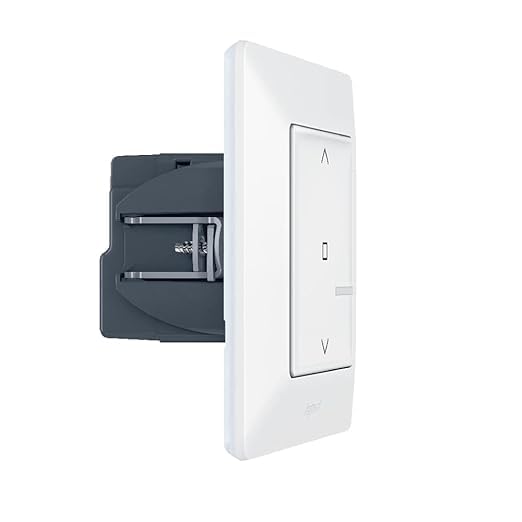
Image 2: Rear view of the switch, illustrating the terminal block for electrical connections.
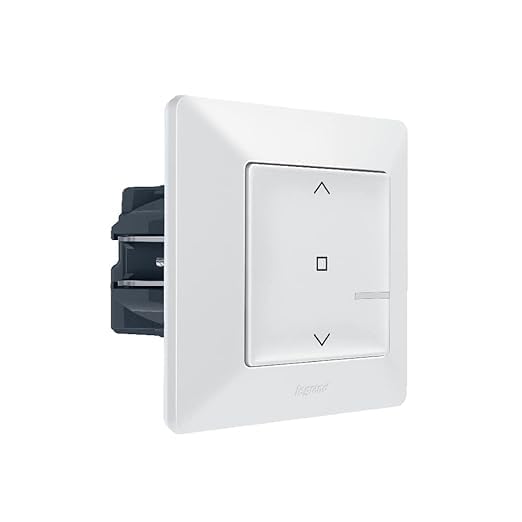
Image 3: Side view of the switch, highlighting the mounting mechanism for installation into a wall box.
6. Operation
6.1 Manual Control
The switch features three buttons for direct control of your roller shutters:
- Up (↑) Button: Press to raise the roller shutter. Press again to stop.
- Down (↓) Button: Press to lower the roller shutter. Press again to stop.
- Stop (□) Button: Press to immediately stop the roller shutter at its current position.
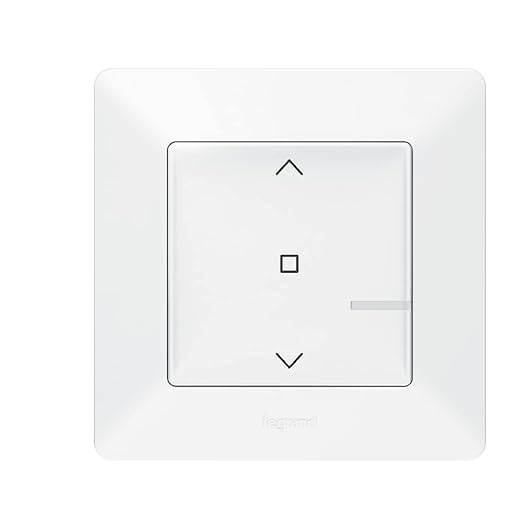
Image 4: Close-up of the switch face, detailing the control buttons.
6.2 Smart Control (via Home + Control App)
Once integrated with your Legrand Netatmo starter pack, you can control your roller shutters remotely using the "Home + Control" application on your smartphone or tablet.
- Ensure your Legrand Netatmo gateway is connected to your home Wi-Fi network.
- Open the "Home + Control" app.
- Follow the in-app instructions to add the new wireless roller shutter switch to your system.
- Once added, you can control the shutter's position, set schedules, and create scenes.
6.3 Voice Control
The Legrand Valena Life with Netatmo system supports voice control through popular assistants:
- Amazon Alexa: "Alexa, open the living room blinds."
- Apple Siri: "Hey Siri, close the kitchen shutter."
- Google Assistant: "Ok Google, set the bedroom roller shutter to 50%."
Ensure your Legrand Netatmo system is linked to your preferred voice assistant account via the "Home + Control" app settings.
7. Maintenance
- Cleaning: Clean the surface of the switch with a soft, dry cloth. Do not use abrasive cleaners or solvents.
- Firmware Updates: Ensure your Legrand Netatmo gateway and connected devices receive regular firmware updates via the "Home + Control" app to benefit from the latest features and security enhancements.
- Inspection: Periodically inspect the switch for any signs of damage or loose connections. If any issues are found, disconnect power and consult a qualified electrician.
8. Troubleshooting
| Problem | Possible Cause | Solution |
|---|---|---|
| Switch does not respond. | No power supply. | Check circuit breaker. Ensure proper wiring. |
| Roller shutter does not move. | Motor issue or limit switch problem. | Consult roller shutter motor manual. Check motor connections. |
| Cannot control via app/voice assistant. | Not paired with Netatmo gateway; Wi-Fi issue; app not linked to voice assistant. | Ensure Netatmo starter pack is online. Re-pair switch via app. Check Wi-Fi connection. Link app to voice assistant. |
| Switch LED indicator is off or blinking abnormally. | Power issue or pairing mode. | Check power. Refer to Netatmo system documentation for LED status meanings. |
If the problem persists after attempting these solutions, please contact Legrand customer support or a qualified electrician.
9. Specifications
| Attribute | Detail |
|---|---|
| Model Number | 752190A |
| Brand | Legrand |
| Product Dimensions (L x W x H) | 3.35 x 3.35 x 1.97 inches |
| Item Weight | 5.29 ounces |
| Operating Voltage | 240 Volts (for 230V roller shutters) |
| Current Rating | 2.5 Amps |
| Operation Mode | ON-OFF |
| Contact Type | Normally Closed |
| Connector Type | Rear Mounting |
| Circuit Type | 1-way |
| Actuator Type | Push Button |
| Compatibility | Legrand Valena Life with Netatmo system (requires starter pack) |
10. Warranty and Support
Legrand products are manufactured to high standards and are backed by a manufacturer's warranty. For specific warranty terms and conditions, please refer to the documentation included with your Legrand Netatmo starter pack or visit the official Legrand website.
For technical support, troubleshooting assistance, or to inquire about replacement parts, please contact Legrand customer service:
- Website: www.legrand.us/support (or your regional Legrand website)
- Phone: Refer to your regional Legrand website for contact numbers.
Please have your product model number (752190A) and purchase date available when contacting support.
Related documents752190A


Ask a question about this manual
Ask about setup, troubleshooting, compatibility, parts, safety, or missing instructions. Manuals+ will review the question and use this page’s manual context to help answer it.