
1. Introduction
Thank you for choosing the SKYWATCH Pro Anemometer. This device is designed for precise measurement of wind speed, temperature, and altitude, making it an essential tool for various outdoor activities, professional applications, and environmental monitoring. This manual provides detailed instructions for the proper setup, operation, and maintenance of your SKYWATCH Pro Anemometer to ensure optimal performance and longevity.
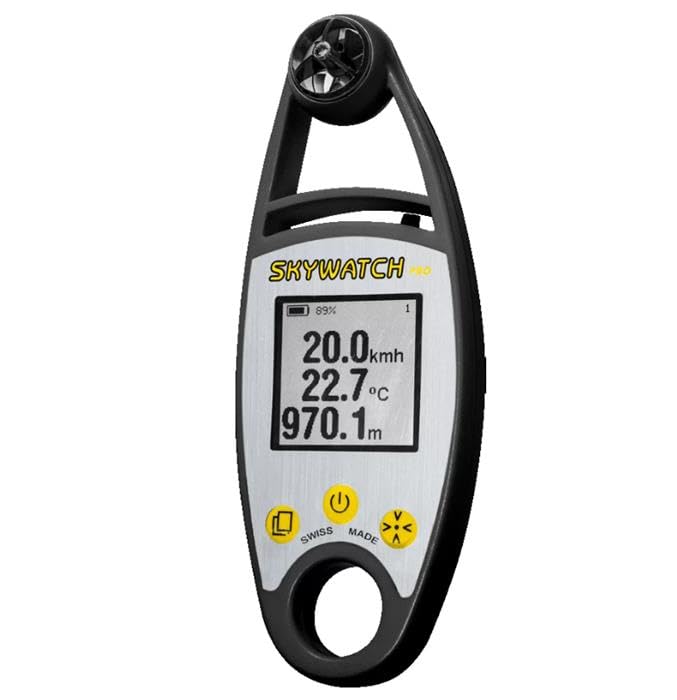
Figure 1: The SKYWATCH Pro Anemometer with its digital display showing measurements. The device features a black casing with a silver-colored display area and a rotating impeller at the top.
2. Setup
2.1. Unboxing and Components
Carefully remove all components from the packaging. Ensure the following items are present:
- SKYWATCH Pro Anemometer unit
- Protective case (if included)
- Lanyard (if included)
- User Manual (this document)
2.2. Battery Installation
The SKYWATCH Pro Anemometer requires 2x AAA batteries (not included). To install the batteries:
- Locate the battery compartment cover on the back of the device.
- Gently slide or unscrew the cover to open it.
- Insert the 2x AAA batteries, ensuring the correct polarity (+/-) as indicated inside the compartment.
- Replace the battery compartment cover securely.
2.3. Initial Power-On
After battery installation, press and hold the power button (usually marked with a circle and a vertical line) for approximately 2 seconds until the display illuminates. The device will perform a brief self-test before showing the main measurement screen.
3. Operating Instructions
3.1. Power On/Off
- To Power On: Press and hold the ⏻ button for 2 seconds.
- To Power Off: Press and hold the ⏻ button for 2 seconds. The device will automatically power off after 10 minutes of inactivity to conserve battery life.
3.2. Reading Measurements
The display shows real-time measurements. The primary readings typically include:
- Wind Speed: Indicated by the largest number, usually in km/h, m/s, or knots.
- Temperature: Displayed in degrees Celsius (°C) or Fahrenheit (°F).
- Altitude: Shown in meters (m) or feet (ft).
3.3. Unit Selection
To change measurement units (e.g., km/h to m/s, °C to °F):
- With the device powered on, press the "Mode" button (often labeled with an 'M' or an arrow icon) repeatedly to cycle through available measurement modes or units.
- Stop pressing when your desired unit is displayed. The device will save your selection.
3.4. Holding a Reading
Some models feature a data hold function. Press the "Hold" button (often labeled with a 'H' or a square icon) to freeze the current reading on the display. Press it again to release and resume live readings.
4. Maintenance
4.1. Cleaning
To ensure accurate readings and extend the life of your anemometer:
- Wipe the device with a soft, dry cloth.
- For stubborn dirt, use a slightly damp cloth with mild soap, then dry thoroughly.
- Do not use abrasive cleaners or solvents, as these can damage the casing or display.
- Keep the impeller (fan) free from dust, dirt, and debris. Use a soft brush or compressed air if necessary, but avoid excessive force.
4.2. Storage
When not in use for extended periods, store the anemometer in its protective case in a cool, dry place, away from direct sunlight and extreme temperatures. Remove batteries if storing for more than a month to prevent leakage.
4.3. Battery Replacement
When the low battery indicator appears on the display, replace the batteries as described in Section 2.2. Always use fresh, high-quality AAA batteries.
5. Troubleshooting
| Problem | Possible Cause | Solution |
|---|---|---|
| Device does not power on. | Dead or incorrectly installed batteries. | Check battery polarity; replace with new batteries. |
| Inaccurate wind speed readings. | Impeller obstructed or damaged. | Clean the impeller; ensure it spins freely. Avoid using in dusty or sandy environments. |
| Display is dim or flickering. | Low battery. | Replace batteries. |
| Temperature reading seems off. | Sensor exposed to direct sunlight or body heat. | Allow the device to acclimate to ambient temperature away from heat sources. |
6. Specifications
| Feature | Detail |
|---|---|
| Model Number | O38593 |
| Brand | SKYWATCH |
| Measurement Functions | Wind Speed, Temperature, Altitude |
| Wind Speed Units | km/h, m/s, knots, mph, Beaufort |
| Temperature Units | °C, °F |
| Altitude Units | m, ft |
| Power Source | 2 x AAA Batteries |
| Automatic Shut-off | Yes (after 10 minutes of inactivity) |
| Dimensions (Approx.) | 150 x 60 x 25 mm (H x W x D) |
| Weight (Approx.) | 120 g (without batteries) |
| Country of Origin | China |
7. Warranty and Support
7.1. Warranty Information
The SKYWATCH Pro Anemometer is covered by a manufacturer's warranty against defects in materials and workmanship. The specific duration and terms of the warranty may vary by region. Please refer to the warranty card included with your product or visit the official SKYWATCH website for detailed warranty information.
7.2. Customer Support
If you encounter any issues or have questions regarding your SKYWATCH Pro Anemometer that are not addressed in this manual, please contact SKYWATCH customer support. You can typically find contact information on the official SKYWATCH website or on the product packaging.
When contacting support, please have your product model number (O38593) and a detailed description of the issue ready.


