
1. Introduction
This manual provides instructions for the Besia RC902V replacement infrared (IR) remote control, designed for use with various TCL Android TV models. This remote offers direct control over your television's functions and includes dedicated shortcut buttons for popular streaming services. Please note that this remote control operates via infrared technology and does not support voice control functions.
For a comprehensive list of compatible TCL Android TV models, please refer to Section 4: Compatibility List.
2. Package Contents
- 1 x Besia RC902V IR Remote Control
- Batteries are NOT included.
3. Setup
3.1 Battery Installation
- Locate the battery compartment cover on the back of the remote control.
- Slide the cover downwards or press the latch (if present) to open the compartment.
- Insert two AAA batteries (not included), ensuring the positive (+) and negative (-) terminals align correctly with the markings inside the compartment.
- Replace the battery compartment cover by sliding it back into place until it clicks securely.
Note: This remote control is an infrared (IR) device and typically does not require pairing. It should function immediately after battery installation, provided there is a clear line of sight to your TCL Android TV's IR receiver.

Image 1: Front and back view of the Besia RC902V remote control, showing button layout and battery compartment area.
4. Operating Instructions
The RC902V remote control provides intuitive access to your TCL Android TV's features. Below is a general overview of the main buttons and their functions:
- Power Button: Turns the TV on or off.
- Navigation Pad (Up/Down/Left/Right) & OK Button: Used to navigate menus and confirm selections.
- Back Button: Returns to the previous screen or menu.
- Home Button: Accesses the TV's home screen.
- TV Button: Switches to live TV input.
- Volume Up/Down: Adjusts the TV's volume.
- Channel Up/Down (P+/P-): Changes TV channels.
- Menu Button: Opens the TV's settings or options menu.
- Input/Source Button: Selects different input sources (HDMI, AV, etc.).
- Mute Button: Mutes or unmutes the TV's audio.
- Shortcut Buttons: Dedicated buttons for quick access to streaming services: Netflix, Prime Video, YouTube, Guard, Media, and TCL Channel.
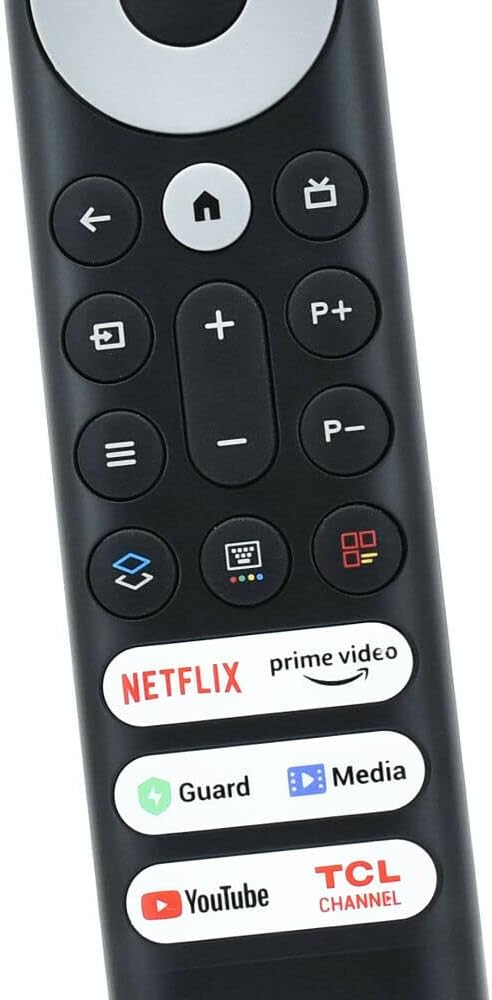
Image 2: Close-up view of the lower section of the RC902V remote, highlighting the dedicated shortcut buttons for streaming services.
5. Compatibility List
The Besia RC902V remote control is compatible with a wide range of TCL Android TV models. Please verify your TV model number against the list below:
- 40S330, 32S330, 43S434, 50S434, 55S434, 65S434, 70S430, 75S434, 43S446, 50S446, 50S546, 55S446, 55R646, 55S546, 65S446, 65R646, 65R648, 65S546, 75S446, 50P725G, 55C728, 75C728, 65X925, 55R635, 65R635, 75R635, 75R646, 75R648, 75S546, 85X925 PRO, 85S446, 32S5200, 32S615, 32S60A, 32S334, 32P30S, 42S6500
- 43S65A/F8F, 50C717, 50C715, 50C716, 50P715, 50P717, 50T8S, 50P8S, 55P8, 50P8M, 50P65US, 55Q637, 55S430, 55C715, 55C716, 55C717, 55C8, 55C815, 55P715, 55P717, 55P8M, 55P8S, 55T8, 65C715, 65C716, 65C717, 65C815, 65C8, 65P8S, 65P8M, 65P8, 65P717, 65P715, 65Q637, 65T8S, 65T8, 75C815, 75P8MR, 75P8M, 75P715, 85P715, 85P8M
- 49P30FS, 65P8S, 65P8, 55P8S, 55P8, 55EP680, 50P8S, 50P8, 49S6800FS, 49S6800, 49S6510FS, 32S6500, 32S6800S, 32S6510S, 32S65A, 32S6500S, 32A325, 32A323, 32S6800, 40S615, 40S6500, 40S6800, 40S6500FS, 40A325, 40S334, 40A323, 43S6510FS, 49S6500, 49S6500FS, 40S6800FS, 40S65A, 43S6500, 43S6800FS, 43S6500FSFS, 55R646, 43S430, 43P8M, 43P30FS, 43P8, 43P717, 43P715, 43P65US
Important Note: This remote control is specifically designed for TCL Android TVs and does NOT support voice functions. It is also NOT compatible with TCL Roku TVs or TCL Fire TVs.

Image 3: Visual clarification that the RC902V remote does not have voice functionality and is not compatible with TCL Roku or Fire TVs.
6. Troubleshooting
Remote Not Responding:
- Check Batteries: Ensure batteries are inserted correctly with the correct polarity (+/-). Replace old or depleted batteries with new ones.
- Line of Sight: Make sure there is a clear path between the remote control and the IR receiver on your TCL Android TV. Obstructions can block the signal.
- Distance: Ensure you are within the effective operating range of the remote control (typically up to 20 feet).
- Interference: Strong light sources (like direct sunlight or certain fluorescent lights) can interfere with IR signals. Try operating the remote in a different lighting condition.
Specific Buttons Not Working:
- If only certain buttons are unresponsive, it might indicate a physical issue with the remote. Try the general troubleshooting steps first.
7. Specifications
| Feature | Detail |
|---|---|
| Model Number | RC902V |
| Compatibility | TCL Android TVs (refer to compatibility list) |
| Communication | Infrared (IR) |
| Voice Function | Not supported |
| Power Source | 2 x AAA Batteries (not included) |
| Package Dimensions | 8.11 x 1.85 x 0.55 inches |
| Item Weight | 2.08 ounces |
8. Support
If you encounter any issues or have questions regarding your Besia RC902V replacement remote control that are not addressed in this manual, please contact the seller or manufacturer for assistance. Provide your product model number (RC902V) and a detailed description of the issue to facilitate support.
